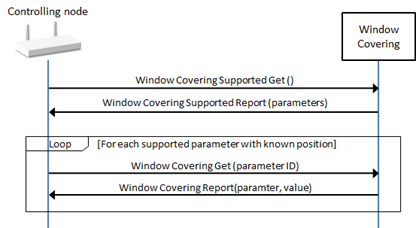
6.2. Application Command Class Control Definitions

6.2.1. Active Schedule Command Class, version 1

6.2.1.1. Mandatory node interview

\requirement{CL:00A4.01.11.01.1}{0}

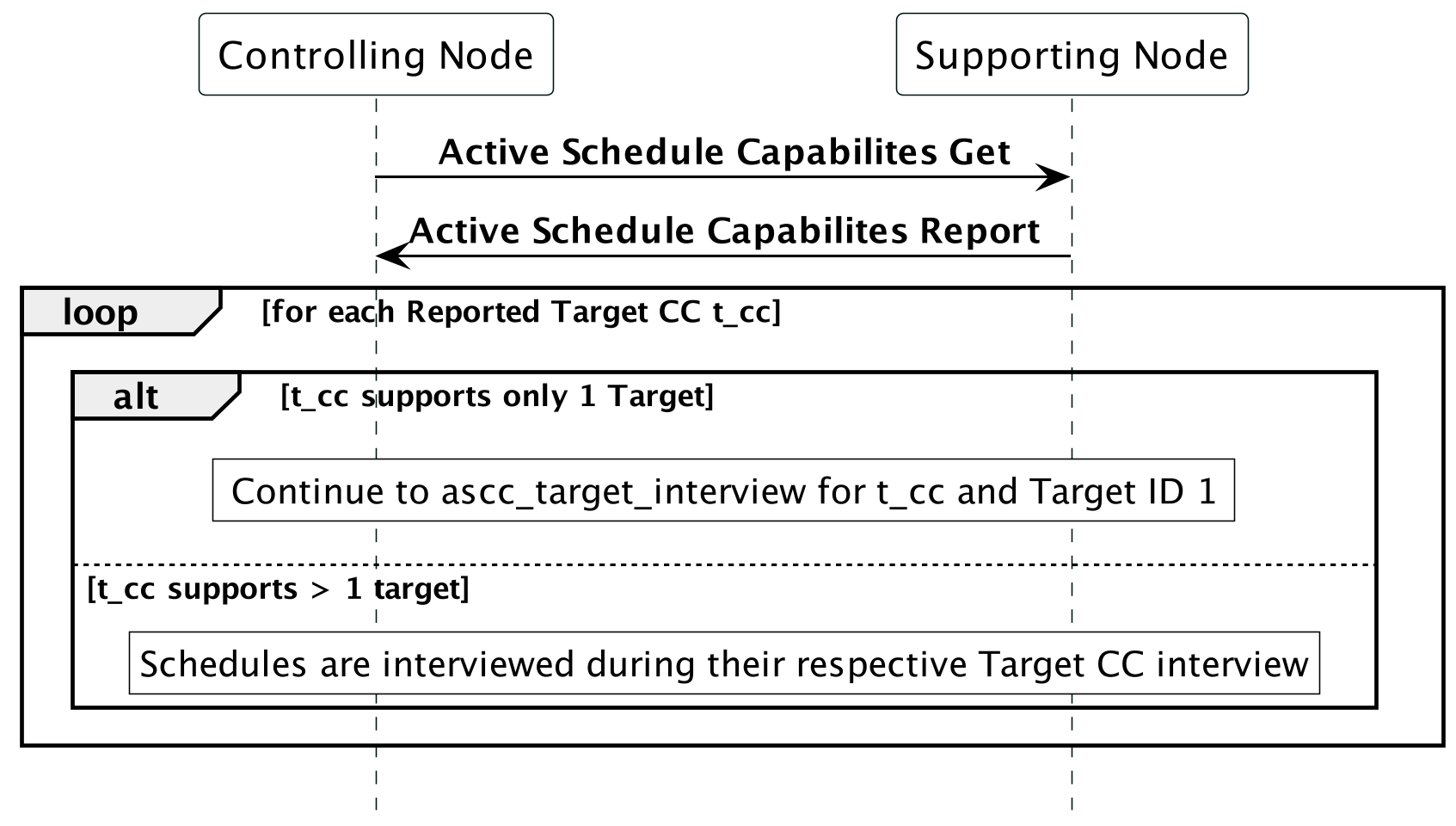
A node controlling this Command Class MUST perform a supporting node interview according to Figure 6.1.

Active Schedule Command Class Interview

Figure 6.1 Active Schedule Command Class Interview

6.2.1.2. Target Schedule Data Interview

\requirement{CL:00A4.01.11.02.1}{0}

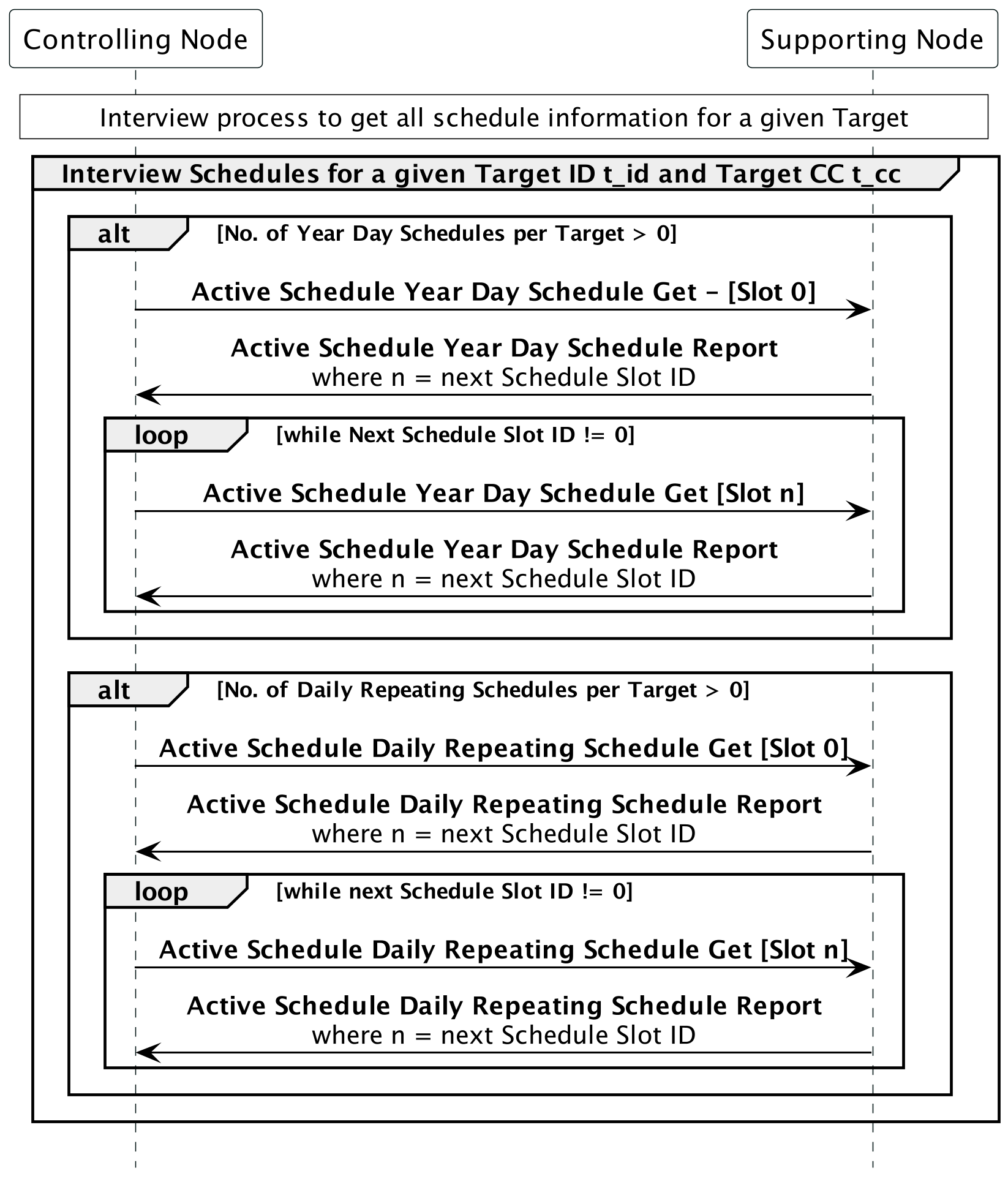
Any time schedule data for a Target (distinct combination of Target CC and Target ID) is queried by a controlling node, it MUST follow the process defined in Figure 6.2:

Active Schedule Target Interview

Figure 6.2 Active Schedule Target Interview

6.2.1.3. Minimum end user functionalities

6.2.1.3.1. Attach, Modify or Delete a Schedule

\requirement{CL:00A4.01.21.01.1}{0}

If the supporting node supports both the Active Schedule Command Class, version 1 [NEVER CERTIFIED] and a compatible command class in in Table 6.1, and the respective Target CC enables scheduling, the device MUST allow adding, modifying and deleting schedules for a target by the controller using the Active Schedule Year Day Schedule Set Command or the Active Schedule Daily Repeating Schedule Set Command.

6.2.1.3.2. Query the State of a Schedule

\requirement{CL:00A4.01.31.01.1}{0}

If the supporting node supports both the Active Schedule Command Class, version 1 [NEVER CERTIFIED] and a compatible command class in in Table 6.1, and the respective Target CC enables scheduling, the device MUST allow the controller to query a Target’s scheduling enabled/disabled state using the Active Schedule Enable Get Command.

6.2.1.3.3. Enable or Disable Schedules for a Target

\requirement{CL:00A4.01.51.01.1}{0}

If the supporting node supports both the Active Schedule Command Class, version 1 [NEVER CERTIFIED] and a compatible command class in in Table 6.1, and the respective Target CC enables scheduling, the device MUST allow the controller to enable and disable all schedules attached to a target using the Active Schedule Enable Set Command.

6.2.1.4. Node properties

\requirement{CL:00A4.01.61.01.1}{0}

A controlling node MUST display a UI showing the following:

  • Which Targets on the node have (a) schedule(s) attached

  • If that Target’s schedules(s) is/are enabled

6.2.1.5. Supported Target Command Classes

\requirement{CL:00A4.01.71.01.1}{0}

Nodes controlling this command class MUST also control at least one (1) of the supported Target Command Classes, at the listed version or higher, that are listed in Table 6.1:

Table 6.1 Active Schedule Command Class::Supported Target CCs

CC ID

Name

Min. Version

0x83

User Credential Command Class, version 2 [NEVER CERTIFIED]

2

6.2.2. Anti-theft Unlock Command Class, version 1

6.2.2.1. Mandatory node interview

\requirement{CL:007E.01.21.01.1}{0}

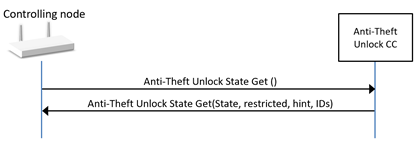
A node controlling this Command Class MUST perform a supporting node interview according to Figure 6.3.

Anti-Theft Unlock Command Class interview

Figure 6.3 Anti-Theft Unlock Command Class interview

6.2.2.2. Minimum end user functionalities

6.2.2.2.1. Unlock the node

\requirement{CL:007E.01.31.01.1}{0} \requirement{CL:007E.01.31.01.1}{4}

If the supporting node is in the locked state and runs in restricted mode, the end user MUST be able send an unlock command. When the end user performs this action, the issued command MUST comply with Table 6.2.

\requirement{CL:007E.01.32.01.1}{24}

Table 6.2 Anti-Theft Unlock::Unlock the node

Field

Value

Command

COMMAND_ANTITHEFT_UNLOCK_SET

Magic Code length

Controlling node defined in 0x01..0xA, based on user input.

Magic Code

User defined

The Magic Code SHOULD be shown as a hexadecimal value to the end users.

6.2.2.3. Node properties

\requirement{CL:007E.01.41.01.1}{0}

If the supporting node is in the locked state and runs in restricted mode, the controlling node MUST have a UI allowing the end user to see that the supporting node is restricted and that the supporting node requires unlocking to use the full functionality.
\requirement{CL:007E.01.43.01.1}{0}

A controlling node MAY display the information provided in [26] for the reported Z-Wave Alliance locking entity ID.

6.2.3. Barrier Operator Command Class, version 1

6.2.3.1. Mandatory node interview

\requirement{CL:0066.01.21.01.1}{0}

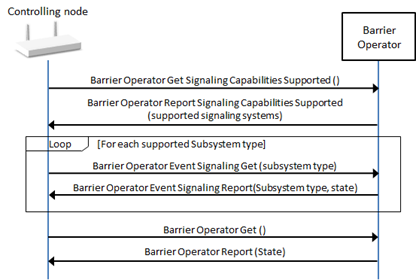
A node controlling this Command Class MUST perform a supporting node interview according to Figure 6.4.

Barrier Operator Command Class interview

Figure 6.4 Barrier Operator Command Class interview

6.2.3.2. Minimum end user functionalities

\requirement{CL:0066.01.31.01.1}{0}

A node controlling this command class MUST allow the end user to perform the actions described below.

6.2.3.2.1. Initiate opening (or stop closing)

\requirement{CL:0066.01.31.03.1}{0}

When the end user performs this action, the issued command MUST comply with Table 6.3.

Table 6.3 Barrier Operator::Initiate opening (or stop closing)

Field

Value

Command

BARRIER_OPERATOR_SET

Target Value

0xFF

6.2.3.2.2. Initiate closing

\requirement{CL:0066.01.31.04.1}{0}

When the end user performs this action, the issued command MUST comply with Table 6.4.

Table 6.4 Barrier Operator::Initiate closing

Field

Value

Command

BARRIER_OPERATOR_SET

Target Value

0x00

6.2.3.3. Node properties

\requirement{CL:0066.01.42.01.1}{0}

The controlling node SHOULD have a UI allowing the end user to see/access the following properties:

  • Last known Barrier State (Open, Closed, stopped at a % position or unknown)

  • Last known Subsystems’ state (ON/OFF), if any

6.2.3.4. Additional control requirements

\requirement{CL:0066.01.52.01.2}{0}

A node controlling this command class SHOULD also control the Notification Command Class. A node controlling this command class SHOULD activate all supported subsystems by default.

6.2.4. Basic Command Class, version 1-2

6.2.4.1. Mandatory node interview

\requirement{CL:0020.01.21.01.1}{0}

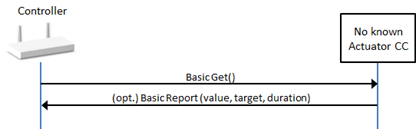
A node controlling this Command Class MUST perform a supporting node interview according to Figure 6.5.

Basic Command Class interview

Figure 6.5 Basic Command Class interview

\requirement{CL:0020.01.21.02.2}{0}

A controlling node MUST conclude that the Basic Command Class is not supported by a node (or endpoint) if no Basic Report is returned.

6.2.4.2. Minimum end user functionalities

\requirement{CL:0020.01.31.01.1}{0}

A node controlling this command class MUST allow the end user to perform the actions described below.

6.2.4.2.1. Set the node On/Off state

\requirement{CL:0020.01.31.02.1}{0}

When the end user performs this action, the issued command MUST comply with Table 6.5

Table 6.5 Basic::Set the node state

Field

Value

Command

BASIC_SET

Value

User defined among 0x00 and 0xFF.

More values MAY be available to the end user.

6.2.4.3. Node properties

\requirement{CL:0020.01.43.01.1}{0}

A controlling node MAY have a UI allowing the end user to see the following properties:

  • Last known state (On or Off)

\requirement{CL:0020.01.42.01.1}{0}

A controlling node SHOULD NOT assume that the last state is as defined in the last Set Command and SHOULD issue a subsequent Basic Get Command even if receiving a Supervision SUCCESS status after issuing a Basic Set Command.

6.2.4.4. Additional control requirements

\requirement{CL:0020.01.51.01.3}{0}

A controlling node MUST NOT use the Basic Command Class for controlling nor showing status (receiving report) of a node (or endpoint) if the controlling node controls at least one actuator command class supported by a node (or endpoint). The actuator command classes are defined in Application Command Classes.

6.2.5. Binary Switch Command Class, version 1-2

6.2.5.1. Mandatory node interview

\requirement{CL:0025.01.21.01.1}{0}

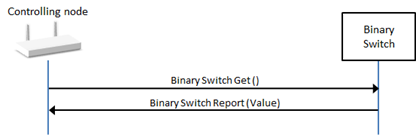
A node controlling this Command Class MUST perform a supporting node interview according to Figure 6.6.

Binary Switch Command Class interview

Figure 6.6 Binary Switch Command Class Interview

6.2.5.2. Minimum end user functionalities

\requirement{CL:0025.01.31.01.1}{0}

A node controlling this command class MUST allow the end user to perform the actions described below.

6.2.5.2.1. Set the node On/Off state

\requirement{CL:0025.01.31.02.1}{0}

When the end user performs this action, the issued command MUST comply with Table 6.6.

Table 6.6 Binary Switch::Set the node state

Field

Value

Command

SWITCH_BINARY_SET

Value

User defined among 0x00 and 0xFF.

Duration (v2)

User defined or 0xFF

6.2.5.3. Node properties

\requirement{CL:0025.01.51.01.1}{0}

A node controlling this Command Class SHOULD have a UI allowing the end user to see the following properties:

  • Last known state (On or Off)

6.2.6. Central Scene Command Class, version 1-3

6.2.6.1. Mandatory node interview

\requirement{CL:005B.01.21.01.1}{0}

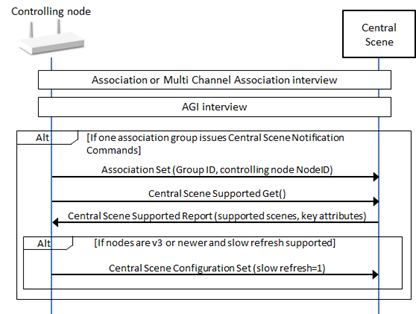
A node controlling this Command Class MUST perform a supporting node interview according to Figure 6.7.

Central Scene Command Class interview

Figure 6.7 Central Scene Command Class interview

\requirement{CL:005B.01.23.01.1}{0}

A node controlling this command class MAY skip the AGI Interview (refer to Section 6.3.2) if the supporting node is a Z-Wave Plus node and the controlling node has estalished a Lifeline Association.

6.2.6.2. Minimum end user functionalities

There is no minimum end user functionalities associated with the control of this Command Class.

\requirement{CL:005B.01.32.01.1}{0}

A controlling node SHOULD allow the user to define which other nodes to actuate when receiving a Central Scene Notification from a given node with a given key attribute and SceneID.

6.2.6.3. Node properties

\requirement{CL:005B.01.41.01.1}{0}

The controlling node MUST have a UI allowing the end user to see how many Scenes ID (or buttons) and key attributes are supported by a node.

\requirement{CL:005B.01.41.02.1}{0}

The controlling node MUST make received Central Scene Notifications available to the end user.

6.2.6.4. Additional control requirements

\requirement{CL:005B.01.51.01.1}{0}

A node controlling this command class MUST also control:

  • Association Command Class, version 2

  • Association Group Information, version 3

\requirement{CL:005B.01.51.02.1}{0}

A controlling node MUST associate itself to a group issuing Central Scene Notification Commands in order to provide end user functionalities.

\requirement{CL:005B.01.51.03.1}{0}

A controlling node MUST NOT remove associations in order to associate itself to an association group issuing Central Scene Notification Commands.

\requirement{CL:005B.01.53.01.1}{0}

It is OPTIONAL for a controlling node to provide end user functionalities and node properties if it cannot associate itself to an association group sending Central Scene Notification Commands. (e.g. all Association Groups sending the relevant command are full)

6.2.7. Color Switch Command Class, version 1-3

6.2.7.1. Mandatory node interview

\requirement{CL:0033.01.21.01.1}{0}

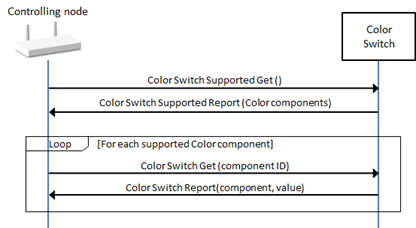
A node controlling this Command Class MUST perform a supporting node interview according to Figure 6.8.

Color Switch Command Class interview

Figure 6.8 Color Switch Command Class interview

6.2.7.2. Minimum end user functionalities

\requirement{CL:0033.01.31.01.1}{0}

A node controlling this command class MUST allow the end user to perform the actions described below.

6.2.7.2.1. Set the color

\requirement{CL:0033.01.31.02.1}{0}

When the end user performs this action, the issued command MUST comply with Table 6.7.

Table 6.7 Color Switch::Set the color

Field

Value

Command

SWITCH_COLOR_SET

Color component count

Determined by the controlling node based on user input

Color Component ID x

User defined among supported

Value x

User defined

Duration (v2)

User defined or 0xFF

\requirement{CL:0033.01.31.03.1}{0}

For this functionality, the color selected by the end user MUST be set using a single command.

6.2.7.2.2. Fade/enhance a color component

\requirement{CL:0033.01.31.04.1}{0}

When the end user performs this action, the issued command MUST comply with Table 6.8.

Table 6.8 Color Switch::Fade/enhance a color component

Field

Value

Command

SWITCH_COLOR_START_LEVEL_CHANGE

Up/down

User defined

Color component ID

User defined among supported

Duration (v3)

User defined or 0xFF

6.2.7.2.3. Stop fading/enhancing a color component

\requirement{CL:0033.01.31.05.1}{0}

When the end user performs this action, the issued command MUST comply with Table 6.9.

Table 6.9 Color Switch::Stop fading/enhancing a color component

Field

Value

Command

SWITCH_COLOR_STOP_LEVEL_CHANGE

Color component ID

User defined among supported

6.2.7.3. Node properties

\requirement{CL:0033.01.42.01.1}{0}

A controlling node SHOULD have a UI allowing the end user to see the following properties:

  • Last known configured color or color components values

6.2.7.4. Additional control requirements

\requirement{CL:0033.01.51.01.1}{0}

A node controlling this Command Class MUST also control:

  • Binary Switch Command Class, version 2

  • Multilevel Switch, version 4

6.2.8. Configuration Command Class, version 1-4

6.2.8.1. Mandatory node interview

\requirement{CL:0070.03.21.01.1}{0}

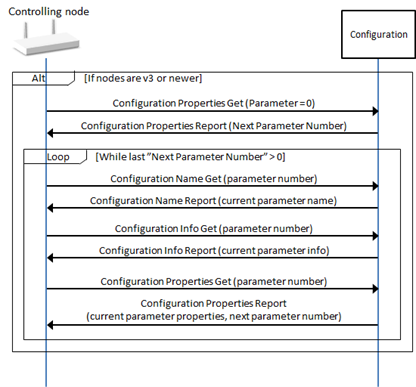
A node controlling this Command Class MUST perform a supporting node interview according to Figure 6.9.

Configuration Command Class interview

Figure 6.9 Configuration Command Class interview

6.2.8.2. Minimum end user functionalities

\requirement{CL:0070.01.31.01.1}{0}

A node controlling this command class MUST allow the end user to perform the actions described below.

6.2.8.2.1. Set a configuration parameter Value

\requirement{CL:0070.01.31.02.1}{0}

When the end user performs this action, the issued command MUST comply with Table 6.10 for parameters numbers smaller than 256 and Table 6.11 for parameter numbers greater or equal to 256.

Table 6.10 Configuration::Set a (normal) configuration parameter value

Field

Value

Command

CONFIGURATION_SET

Parameter number

For version 2 or older: User defined

For version 3 or newer: User defined among supported parameter numbers.

Size

For version 2 or older: User defined among 1, 2 and 4.

For version 3 or newer: Automatically determined from configuration parameter number properties

Default

User defined or 0x00

For version 3 or older: this field SHOULD NOT be set to 1.

Command

For version 2 or older: User defined.

For version 3 or newer: User defined among supported values

Table 6.11 Configuration::Set an extended range configuration parameter value

Field

Value

Command (v2)

CONFIGURATION_BULK_SET

Parameter offset (v2)

For version 2: User defined among any value (256..65535).

For version 3 or newer: User defined among supported parameter numbers.

Number of Parameters (v2)

User defined or 0x01.

Size (v2)

For version 2: User defined among 1, 2 and 4.

For version 3 or newer: Automatically determined from configuration parameter number properties

Default (v2)

User defined or 0x00

For version 3 or older: this field SHOULD NOT be set to 1.

Handshake (v2)

0x00

Configuration Value (v2)

For version 2: User defined.

For version 3 or newer: User defined among supported values

6.2.8.2.2. Reset all configuration parameter values to default

\requirement{CL:0070.04.31.01.1}{0}

When the end user performs this action, the issued command MUST comply with Table 6.12.

Table 6.12 Configuration::Reset all configuration parameter values to default

Field

Value

Command (v4)

CONFIGURATION_DEFAULT_RESET

6.2.8.3. Node properties

\requirement{CL:0070.03.41.01.1}{0}

If nodes are version 3, the controlling node MUST have a UI allowing the end user to see supported parameter numbers, their current value, their allowed value range and their default value.

Values MUST be presented according to the Format advertised in the Configuration Properties Report Command.

\requirement{CL:0070.01.41.01.1}{0}

If nodes are version 1 or 2, the controlling node MUST have a UI showing the known parameters that have been set by the end user and their current value.

6.2.8.4. Additional control requirements

\requirement{CL:0070.04.51.01.1}{0}

If nodes are version 4, a node controlling this command class MUST NOT issue a Bulk Set Command supporting nodes advertising “No Bulk support” in the Configuration Properties Report Commands.

\requirement{CL:0070.04.51.02.1}{0}

If nodes are version 4, a node controlling this command class MUST NOT allow an end user to issue a Configuration Set or a Bulk Set Command for parameters advertised as “read-only” in the Configuration Properties Report Command.

6.2.9. Door Lock Command Class, version 1-4

6.2.9.1. Mandatory node interview

\requirement{CL:0062.01.21.01.1}{0}

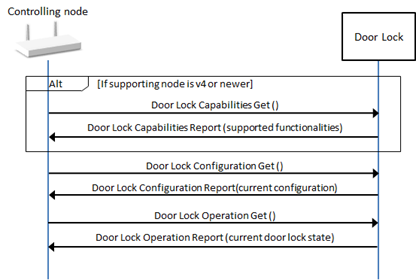
A node controlling this Command Class MUST perform a supporting node interview according to Figure 6.10.

Door Lock Command Class interview

Figure 6.10 Door Lock Command Class interview

6.2.9.2. Minimum end user functionalities

\requirement{CL:0062.01.31.01.1}{0}

A node controlling this command class MUST allow the end user to perform the actions described below.

6.2.9.2.1. Configure the door lock

\requirement{CL:0062.01.31.02.1}{0}

When the end user performs this action, the issued command MUST comply with Table 6.13.

Table 6.13 Door Lock::Configure the door lock

Field

Value

Command

DOOR_LOCK_CONFIGURATION_SET

Operation type

For version 4 or newer: User defined among supported operation types.

For version 3 or older: User defined among 0x01..0x02

Outside Door Handles Mode

Free (0xF recommended)

Inside Door Handles Mode

Free (0xF recommended)

Lock Timeout Minutes

User defined (0x00..0xFD) if Operation Type is set to 0x02, else 0xFE

Lock Timeout seconds

User defined (0x00..0x3B) if Operation Type is set to 0x02, else 0xFE

Auto-relock time (v4)

User defined if supported, else 0

Hold and release time (v4)

User defined if supported, else 0

BTB (v4)

User defined if supported, else 0

TA (v4)

User defined if supported, else 0

6.2.9.2.2. Set the door mode

\requirement{CL:0062.01.31.03.1}{0}

When the end user performs this action, the issued command MUST comply with Table 6.14.

Table 6.14 Door Lock::Set the door mode

Field

Value

Command

DOOR_LOCK_CONFIGURATION_SET

Door Lock Mode

For version 4 or newer: User defined among supported modes.

For version 3 or older: User defined among 0x00 and 0xFF.

Timed Operation modes MUST NOT be selectable by the end user if the door lock is not configured in Timed Operation

6.2.9.3. Node properties

\requirement{CL:0062.01.41.01.1}{0}

Controller SHOULD have a UI allowing the end user to see the following properties:

  • Last known Door Lock mode (Secure, Unsecured, etc.)

  • Current door lock configuration

6.2.10. Entry Control Command Class, version 1

6.2.10.1. Mandatory node interview

\requirement{CL:006F.01.21.01.1}{0}

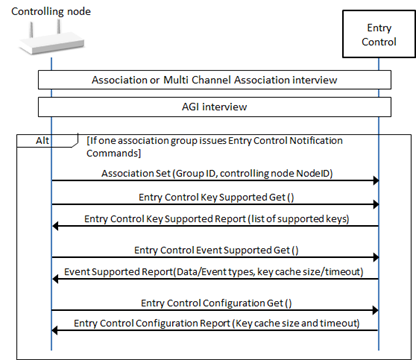
A node controlling this Command Class MUST perform a supporting node interview according to Figure 6.11.

Entry Control Command Class interview

Figure 6.11 Entry Control Command Class interview

\requirement{CL:006F.01.23.01.1}{0}

A node controlling this command class MAY skip the AGI Interview (refer to Section 6.3.2) if the supporting node is a Z-Wave Plus node and the controlling node has estalished a Lifeline Association.

6.2.10.2. Minimum end user functionalities

\requirement{CL:006F.01.31.01.1}{0}

A node controlling this command class MUST allow the end user to perform the actions described below.

6.2.10.2.1. Configure the keypad

\requirement{CL:006F.01.31.02.1}{0}

When the end user performs this action, the issued command MUST comply with Table 6.15.

Table 6.15 Entry Control Keypad::Configure the keypad

Field

Value

Command

ENTRY_CONTROL_CONFIGURATION_SET

Key Cache Size

User defined among supported values

Key Cache Timeout

User defined among supported values

6.2.10.3. Node properties

\requirement{CL:006F.01.41.01.1}{0}

A controlling node MUST have a UI allowing the end user to see the received Entry Control Notifications (Event type and data)

6.2.10.4. Additional control requirements

\requirement{CL:006F.01.51.01.1}{0}

A node controlling this command class MUST also control:

  • Association Command Class, version 2

  • Association Group Information, version 3

\requirement{CL:006F.01.51.02.1}{0}

A controlling node MUST associate itself to a group issuing Entry Control Notification Commands before performing a supporting node interview and providing end user functionalities.

\requirement{CL:006F.01.51.03.1}{0}

A controlling node MUST NOT remove associations in order to associate itself to an association group issuing Entry Control Notification Commands.

\requirement{CL:006F.01.52.01.1}{0}

A controlling node SHOULD NOT provide end user functionalities if it cannot associate itself to an association group sending Entry Control Notification Commands. (e.g. all Association Groups sending the relevant command are full)

\requirement{CL:006F.01.52.02.1}{0}

A controlling node SHOULD have a UI allowing the end user to define what actions to take based on received Entry Control Notifications.

\requirement{CL:006F.01.52.03.1}{0}

A controlling node SHOULD also control Door Lock Command Class and Barrier Operator Command Class. It SHOULD also allow the user to set the door mode or initiate opening/closing of a given node based on received Entry Control Notifications.

6.2.11. IR Repeater Command Class, version 1

6.2.11.1. Mandatory node interview

\requirement{CL:00A0.01.21.01.1}{0}

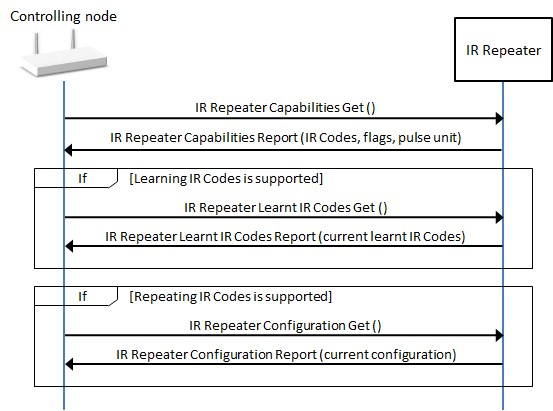
A node controlling this Command Class MUST perform a supporting node interview according to Figure 6.12.

IR Repeater Command Class interview

Figure 6.12 IR Repeater Command Class interview

6.2.11.2. Minimum end user functionalities

\requirement{CL:00A0.01.31.01.1}{0}

A node controlling this command class MUST allow the end user to perform the actions described below.

6.2.11.2.1. Repeat an IR code

\requirement{CL:00A0.01.31.02.1}{0}

This action MUST be available to the end user if the supporting node supports repeating IR Codes.

\requirement{CL:00A0.01.31.03.1}{0}

When the end user performs this action, the issued commands MUST comply with Table 6.16.

Table 6.16 IR Repeater::Repeat an IR Code

Field

Value

Command

IR_REPEATER_REPEAT

Sequence number

Controlling node defined. It MUST be incremented at each new repeat action

Sub carrier

Controlling node defined within the capabilities of the supporting node

Duty Cycle

Controlling node defined within the capabilities of the supporting node

Pulse time unit

Controlling node defined within the range advertised by the supporting node in the IR Repeater Capabilities Report Command

Report Number

Controlling node defined.

Last

1 for the last command, 0 else.

Data

Controlling node defined.

The end user MUST be able to select an IR Code that will be transferred.

6.2.11.2.2. Learn an IR code

\requirement{CL:00A0.01.31.04.1}{0}

This action MUST be available to the end user if the supporting node supports Learning IR Codes.

\requirement{CL:00A0.01.31.04.1}{0}

When the end user performs this action, the issued command MUST comply with Table 6.17.

Table 6.17 IR Repeater::Learn an IR Code

Field

Value

Command

IR_REPEATER_IR_CODE_LEARNING_START

IR Code identifier

User defined among available IR Codes slots

Timeout

Controlling node or User defined.

Pulse time unit

Controlling node defined within the range advertised by the supporting node in the IR Repeater Capabilities Report Command

The Controlling node MUST inform the user about the status of the IR Code learning when the IR Code Learning Status Command is received.

The controlling node MAY allow the end user to interrupt the learning process, if it does, the issued command MUST comply with Table 6.18.

Table 6.18 IR Repeater::Stop learning an IR code

Field

Value

Command

IR_REPEATER_IR_CODE_LEARNING_STOP

6.2.11.2.3. Erase a learnt IR code

\requirement{CL:00A0.01.31.05.1}{0}

This action MUST be available to the end user if the supporting node supports Learning IR Codes.

\requirement{CL:00A0.01.31.06.1}{0}

When the end user performs this action, the issued command MUST comply with Table 6.19.

Table 6.19 IR Repeater::Erase an IR Code from memory

Field

Value

Command

IR_REPEATER_LEARNT_IR_CODE_REMOVE

IR Code identifier

User defined among available IR Codes slots that have a defined IR Code

6.2.11.2.4. Repeat a learnt IR code

\requirement{CL:00A0.01.31.07.1}{0}

This action MUST be available to the end user if the supporting node supports Repeating IR Codes.

\requirement{CL:00A0.01.31.08.1}{0}

When the end user performs this action, the issued command MUST comply with Table 6.20.

Table 6.20 IR Repeater::Repeat a learnt IR code

Field

Value

Command

IR_REPEATER_REPEAT_LEARNT_CODE

IR Code identifier

User defined among available Learnt IR Codes slots

6.2.11.3. Node properties

If the supporting node supports IR Code learning:

\requirement{CL:00A0.01.41.01.1}{0}

  • A controlling node MUST have a UI allowing the end user to see the which IR Code Identifiers contain a valid learnt code.

6.2.12. Meter Command Class, version 1-5

6.2.12.1. Mandatory node interview

\requirement{CL:0032.01.21.01.2}{0}

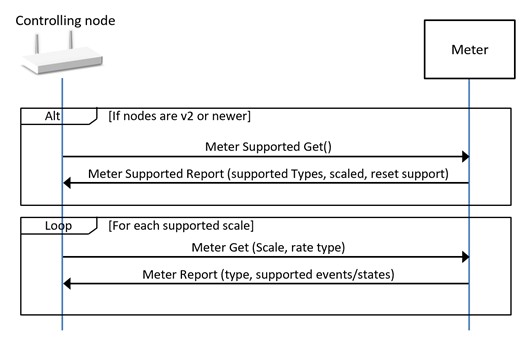
A node controlling this Command Class MUST perform a supporting node interview according to Figure 6.13.

Meter Command Class interview

Figure 6.13 Meter Command Class interview

6.2.12.2. Minimum end user functionalities

\requirement{CL:0032.02.31.01.1}{0}

A node controlling this command class MUST allow the end user to perform the actions described below.

6.2.12.2.1. Reset cumulated data

\requirement{CL:0032.02.31.02.1}{0}

This action MUST be available to the end user if both nodes implement version 2 or newer and the supporting node indicates that meter reset is supported.

\requirement{CL:0032.02.31.03.1}{0}

When the end user performs this action, the issued command MUST comply with Table 6.21.

Table 6.21 Meter::Reset cumulated data

Field

Value

Command (v2)

METER_RESET

6.2.12.3. Node properties

\requirement{CL:0032.01.41.01.2}{0}

A controlling node MUST have a UI allowing the end user to see the last readings for each supported scale and all cumulated values. For version 1 supporting nodes, the scale reported in the Meter Report MUST be accessible to the end user.

\requirement{CL:0032.01.41.02.1}{0}

A controlling node MUST always show the value even if the Type and/or Scale are unknown.

\requirement{CL:0032.01.42.01.1}{0}

A controlling node SHOULD implement the capability to update its list of Meter Type and Scales, so that new Meter Types and scales added in more recent versions are not presented as unknown.

\requirement{CL:0032.01.41.03.1}{0}

If a controlling node receives an unknown Meter Type or Scale, it MUST allow the end user to identify the Meter reading and MAY allow the user to assign a free-text description to that Meter reading

6.2.12.4. Additional control requirements

\requirement{CL:0032.01.51.01.1}{0}

Unless unsolicited Meter Report Commands are received, a controlling node MUST:

  • Probe the current meter readings for each supported scale (and rate type if v4 nodes) at least every 6 hours for listening nodes.

  • Probe the current meter readings for each supported scale (and rate type if v4 nodes) when the supporting node issues a Wake Up Notification Command for sleeping nodes.

6.2.13. Multilevel Sensor Command Class, version 1-11

6.2.13.1. Mandatory node interview

\requirement{CL:0031.01.21.01.1}{0}

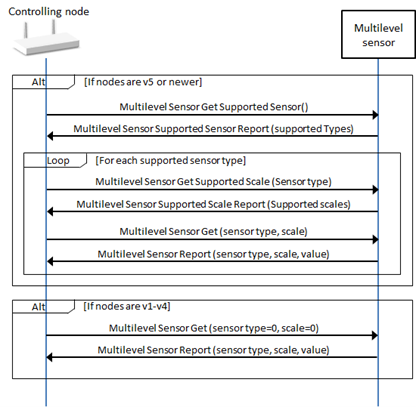
A node controlling this Command Class MUST perform a supporting node interview according to Figure 6.14.

Multilevel Sensor Command Class interview

Figure 6.14 Multilevel Sensor Command Class interview

6.2.13.2. Minimum end user functionalities

No minimum end user functionality is required for this Command Class.

6.2.13.3. Node properties

\requirement{CL:0031.01.41.01.1}{0}

A controlling node MUST allow the end user to see the received readings for every Sensor types

\requirement{CL:0031.01.41.02.1}{0}

A controlling node MUST always show the sensor reading values even if the Sensor Type and/or Scale are unknown.

\requirement{CL:0031.01.42.01.1}{0}

A controlling node SHOULD implement the capability to update its list of Sensor Type and Scales, so that new Sensor Types and Scales added in [28] are not presented as unknown.

\requirement{CL:0031.01.41.03.2}{0}

If a controlling node receives an unknown Sensor Type or Scale, it MUST allow the end user to identify the Sensor reading and MAY allow the end user to assign a free-text description to the sensor reading.

6.2.13.4. Additional control requirements

\requirement{CL:0031.01.51.01.1}{0}

Unless unsolicited Multilevel Sensor Report Commands are received, a controlling node MUST:

  • Probe the current reading for each supported sensor type at least every 6 hours for listening nodes.

  • Probe the current reading for each supported sensor type when the supporting node issues a Wake Up Notification Command for sleeping nodes.

\requirement{CL:0031.01.52.01.1}{0}

A node controlling this command class SHOULD also control:

  • Association Command Class, version 2

  • Association Group Information, version 3

\requirement{CL:0031.01.52.02.1}{0}

A controlling node SHOULD associate itself to an association group issuing Multilevel Report Commands after performing a supporting node interview and providing end user functionalities.

\requirement{CL:0031.01.51.02.1}{0}

A controlling node MUST NOT remove associations in order to associate itself to an association group issuing Multilevel Report Commands.

\requirement{CL:0031.01.52.03.1}{0}

Controller SHOULD have a UI allowing the end user to define rules or commands based on received readings.

6.2.14. Multilevel Switch Command Class, version 1-4

6.2.14.1. Mandatory node interview

\requirement{CL:0026.01.21.01.2}{0}

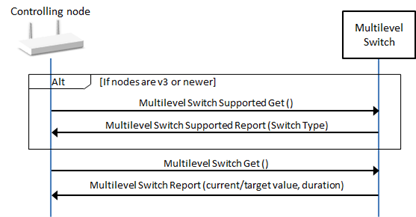
A node controlling this Command Class MUST perform a supporting node interview according to Figure 6.15. It is OPTIONAL to issue the Multilevel Switch Supported Get Command if a controlling node does not use this information for its UI.

Multilevel Switch Command Class interview

Figure 6.15 Multilevel Switch Command Class interview

6.2.14.2. Mimimum End User Functionalities

\requirement{CL:0026.01.31.01.1}{0}

A node controlling this command class MUST allow the end user to perform the actions described below.

6.2.14.2.1. Set the Level

\requirement{CL:0026.01.31.02.2}{0}

When the end user performs this action, the issued command MUST comply with Table 6.22.

Table 6.22 Multilevel Switch::Set the level

Field

Value

Command

SWITCH_MULTILEVEL_SET

Value

User defined among 0x00..0x63. Using 0xFF is optional.

Duration (v2)

User defined or 0xFF

6.2.14.3. Node Properties

\requirement{CL:0026.01.42.01.1}{0}

Controller SHOULD have a UI allowing the end user to see the following properties:

  • Last known state (xx%)

6.2.15. Notification Command Class, version 1-8

6.2.15.1. Mandatory Node Interview

\requirement{CL:0071.02.21.01.2}{0}

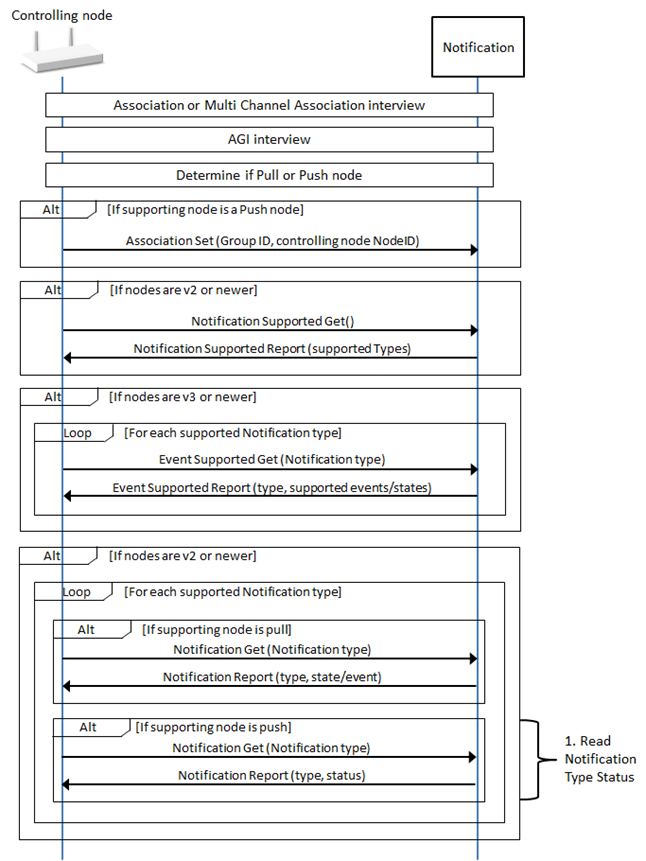
A node controlling this command class MUST perform a supporting node interview according to Figure 6.16.

Notification Command Class interview

Figure 6.16 Notification Command Class interview

\requirement{CL:0071.02.23.01.1}{0}

The step denoted as “1. Read Notification Type Status” in Figure 6.16 MAY be replaced by Notification Set commands for each Notification Type, with the Status field set to 0x00 or 0xFF.

\requirement{CL:0071.02.23.02.1}{0}

A node controlling this command class MAY skip the AGI Interview (refer to Section 6.3.2) if the supporting node is a Z-Wave Plus node and the controlling node has estalished a Lifeline Association.

6.2.15.2. Minimum End User Functionalities

No minimum end user functionality is required for this Command Class.

6.2.15.3. Node Properties

\requirement{CL:0071.01.41.01.1}{0}

A controlling node MUST have a UI allowing the end user to see the received Notification Reports (Notification type and event/state).

6.2.15.4. Additional Control Requirements

\requirement{CL:0071.01.51.01.1}{0}

A controlling node MUST probe state/event notifications from pull nodes

  • at least every 6 hours for listenting nodes.

  • when the supporting node issues a Wake up Notification Command for sleeping nodes.

\requirement{CL:0071.01.51.02.1}{0}

A node controlling this command class MUST also control:

  • Association Command Class, version 2

  • Association Group Information, version 3

\requirement{CL:0071.01.51.03.1}{0}

For Push supporting nodes, a controlling node MUST associate itself to a group issuing Notification Report Commands before performing a supporting node interview and providing end user functionalities.

\requirement{CL:0071.01.53.01.1}{0}

For Push supporting nodes, it is OPTIONAL for a controlling node to provide end user functionalities and node properties if it cannot associate itself to an association group sending Notification Report Commands. (e.g. all Association Groups sending the relevant command are full)

\requirement{CL:0071.01.51.04.1}{0}

A controlling node MUST NOT remove associations in order to associate itself to an association group issuing Notification Report Commands.

\requirement{CL:0071.01.52.01.1}{0}

Controller SHOULD have a UI allowing the end user to define rules or commands based on received notifications events/states.

\requirement{CL:0071.01.52.02.1}{0}

A controlling node SHOULD implement the capability to update its Notifications list, so that new Notifications added in [37] are not presented as unknown.

\requirement{CL:0071.01.51.05.2}{0}

If a controlling node receives an unknown Notification (a Notification advertised by the supporting node, but that has no description in the controlling node software), it MUST allow the end user to identify this notification and MAY allow the end user to assign a free-text description to that Notification.

6.2.15.4.1. Detailed Controller Guidelines

This section presents guidelines for controlling legacy sensors nodes supporting the Notification Command Class, version 3-8.

Alarm Command Class version 2 supporting nodes operate in Push mode only. The guidelines presented in Section 6.2.15.4.1.6 Controlling Pull Mode Sensors can also be used for controlling Alarm CC version 2 supporting nodes.

6.2.15.4.1.1. Sensor database

The following sections present discovery methods for sensor properties, such as Push/Pull mode or the use of state idle notifications. Some sensor properties (e.g. configuration parameters, Association group properties, state variables dependencies) cannot always be discovered.

\requirement{CL:0071.01.52.03.1}{0}

If a controlling node has a database of known certified Notification sensors, it SHOULD be consulted first before attempting to interview the Notification Command Class of a supporting node. If the supporting node is present in the database, a controlling node SHOULD read the sensor properties from the database and skip any discovery.

6.2.15.4.1.2. Push/Pull mode discovery

\requirement{CL:0071.01.51.06.1}{4}

A supporting node does not advertise whether it operates in Push or Pull mode. Therefore a controlling node MUST discover what mode a supporting node implements.

\requirement{CL:0071.01.52.04.1}{0}

The RECOMMENDED discovery steps for a controlling node are the following:

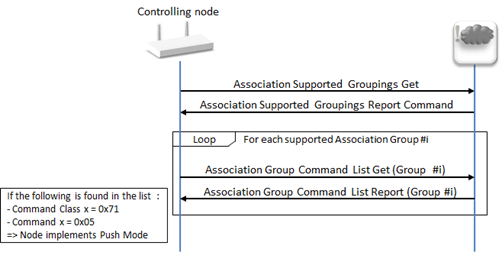
If the supporting node does not support the Association Command Class, it may be concluded that the supporting node implements Pull Mode and discovery may be aborted.

If the supporting node supports the AGI Command Class, probe the AGI table in the following way or read the already probed AGI table:

  1. Discover how many Association groups the supporting node (and its eventual End Points) implements by issuing an Association Supported Groupings Get Command.

  2. For each association group, issue an Association Group Command List Get for the grouping identifier. Inspect the returned Association Group Command List Report and look for the following pair: {Command Class x = COMMAND_CLASS_NOTIFICATION, Command x = NOTIFICATION_REPORT}. If a match is found, conclude that the supporting node implements Push Mode and stop the discovery process.

If no match is found at the end of the AGI test, conclude that the supporting node implements Pull Mode. The AGI test is illustrated in Figure 6.17.

Push/Pull Node Discovery, AGI table probing

Figure 6.17 Push/Pull Node Discovery, AGI table probing

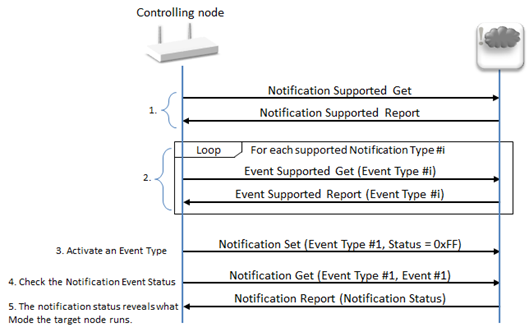
If the supporting node does not support the AGI Command Class, proceed with the following Notification Command Class test:

  1. Discover the list of supported Notification Types by issuing a Notification Supported Get Command.

  2. For each supported Notification Type, query the supported Events/States via the Event Supported Get Command.

  3. Set the status of one of the Supported Notification Types at the target node using a Notification Set Command with the following values:

    1. Notification Type = (a supported type discovered in step 1)

    2. Notification Status = 0xFF

  4. Issue a Notification Get Command with the following values:

    1. Notification Type = (Same as step 3.a).

    2. Notification Event = (a supported Event/State discovered in step 2).

  5. The supporting node returns a Notification Report Command.

    1. If the Notification Status is 0xFF, the target node implements Push Mode

    2. If the Notification Status is 0xFE or 0x00, the target node implements Pull Mode

    3. If the target node did not return a report within 10 seconds, it implements Pull Mode

The Notification Command Class test is illustrated in Figure 6.18.

Push/Pull Node Discovery, Notification Command Class test

Figure 6.18 Push/Pull Node Discovery, Notification Command Class test

6.2.15.4.1.3. Unknown Notifications

\requirement{CL:0071.01.52.05.1}{0}

This Command Class defines some Notifications as event or states. It is RECOMMENDED to treat an unknown Notification as its own state variable.

6.2.15.4.1.4. State idle

\requirement{CL:0071.01.52.06.1}{4}

A controlling node receiving a “State idle” Notification for an event or state of which the “State idle” Notification does not apply (e.g. the “heartbeat” event) SHOULD ignore the Notification. Refer to [37] for state variables to which the “State idle” notification applies.

\requirement{CL:0071.01.52.07.2}{8} \requirement{CL:0071.01.53.02.1}{12}

It is not mandatory for nodes supporting Notification Command Class, version 7 or older to send a “State idle” Notification for returning a state variable to idle. Thus, there is a risk that a “State idle” is never sent. A controlling node SHOULD NOT use timeouts to consider a state variable to be idle for example 5 minutes after the last received Notification for v8 or newer supporting nodes. It MAY allow the end user to mark states variables as idle.

6.2.15.4.1.5. Parameter encapsulation

\requirement{CL:0071.01.53.03.1}{0}

A node implementing version 5 or older MAY use the following parameter encapsulation format: (User ID, User Code Report Command) instead of (User Code Report Command).

\requirement{CL:0071.01.52.08.1}{0}

A controlling node SHOULD accept the end user Code Report Event Parameter with a User ID byte prefixed at the beginning of the Notification Event Parameter for backwards compatibility. A controlling node can detect the beginning of the end user Code Report by finding the following consecutive bytes: {byte x= COMMAND_CLASS_USER_CODE, byte x+1 = USER_CODE_REPORT}.

6.2.15.4.1.6. Controlling Pull Mode Sensors

The following sections present guidelines for controlling Pull sensors nodes.

6.2.15.4.1.6.1. Notification Get Command

This command is used to retrieve the next Notification from the receiving node’s queue. Below are recommendations for what values controlling nodes should set in the fields of this command.

Notification Type (8 bits)

\requirement{CL:0071.01.52.09.1}{0}

A controlling node SHOULD set the Notification Type field to 0xFF.

Earlier specification text suggested that Pull nodes must not ignore this command if the Notification Type is set to a supported type; rather than 0xFF. Therefore, Pull sensors may respond to a Notification Get for a supported Notification type by retrieving the next notification in the queue matching the specified Notification Type.

Notification Event /State (8 bits)

\requirement{CL:0071.01.52.0A.1}{0}

A controlling node SHOULD set this field to 0x00.

A receiving node will have an unpredictable behavior if this field is set to a supported Event.

6.2.15.4.1.6.2. Detecting and clearing persistent notifications

It is optional for Pull nodes to specify a sequence number in notifications.

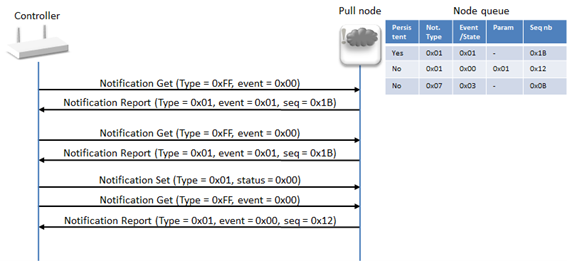
\requirement{CL:0071.01.52.0B.1}{0}

A controlling node receiving twice the same Notification with identical sequence number SHOULD consider the Notification as persistent. An example is given in Figure 6.19.

Detecting and Clearing Persistent Notifications, identical sequence numbers

Figure 6.19 Detecting and Clearing Persistent Notifications, identical sequence numbers

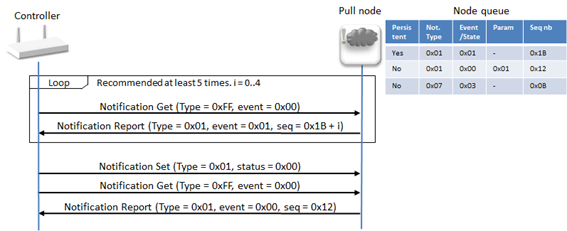
\requirement{CL:0071.01.52.0C.1}{4}

Due to unclear specification text, sensors may issue persistent Notifications without a sequence number field or with a new sequence number every time. Therefore, a controlling node SHOULD consider a notification to be persistent if it receives the same Notification (type and event/state) 5 times or more. An example is given in Figure 6.20.

Detecting and clearing persistent notifications with incremental sequence numbers

Figure 6.20 Detecting and clearing persistent notifications with incremental sequence numbers

6.2.15.4.1.6.3. Status and queue empty

\requirement{CL:0071.01.52.0D.1}{0}

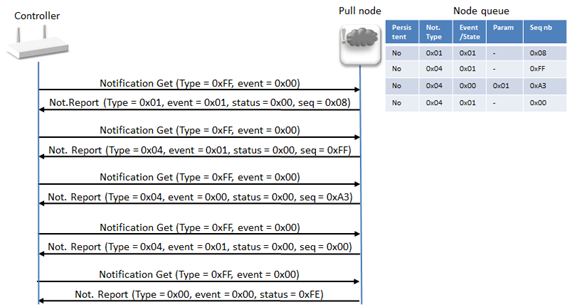
A controlling node SHOULD stop issuing Notification Get Commands when receiving a Queue empty notification (0xFE). Illustration is given in Figure 6.21.

\requirement{CL:0071.01.53.04.1}{0}

All fields following the Status field MAY be omitted in the Notification Report if it advertises a Status of 0xFE (queue empty).

Pull node event retrieval until receiving queue empty

Figure 6.21 Pull node event retrieval until receiving queue empty

6.2.16. Simple AV Control Command Class, version 1-4

6.2.16.1. Mandatory Node interview

\requirement{CL:0094.01.21.01.1}{0}

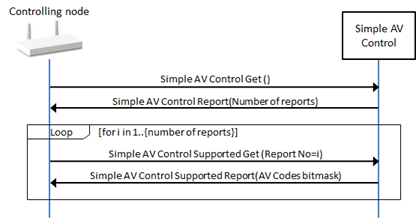
A node controlling this command class MUST perform a supporting node interview according to Figure 6.22.

Simple AV Control Command Class interview

Figure 6.22 Simple AV Control Command Class interview

6.2.16.2. Minimum end user functionalities

\requirement{CL:0094.01.31.01.1}{0}

A node controlling this command class MUST allow the end user to perform the actions described below.

6.2.16.2.1. Send a supported AV code

\requirement{CL:0094.01.31.02.1}{0}

When the end user performs this action, the issued command MUST comply with Table 6.23.

Table 6.23 Simple AV Control::Send a supported AV code

Field

Value

Command

SIMPLE_AV_CONTROL_SET

Sequence number

Controlling node defined. This field MUST be incremented every time the end user perform this action

Key attributes

User defined

Command x

User defined among supported AV codes

\requirement{CL:0094.01.31.03.1}{0}

The end user MUST be able to select among all supported AV codes even if the controlling node does not know what the code actually represents.

6.2.16.3. Node properties

\requirement{CL:0094.01.41.01.1}{0}

Controller SHOULD have a UI allowing the end user to see the following properties:

  • List of supported AV Codes

6.2.17. Sound Switch Command Class, version 1

6.2.17.1. Mandatory node interview

\requirement{CL:0079.01.21.01.1}{0}

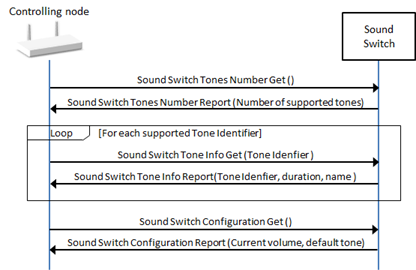
A node controlling this command class MUST perform a supporting node interview according to Figure 6.23.

Sound Switch Command Class interview

Figure 6.23 Sound Switch Command Class interview

6.2.17.2. Minimum end user functionalities

\requirement{CL:0079.01.31.01.1}{0}

A node controlling this command class MUST allow the end user to perform the actions described below.

6.2.17.2.1. Configure the sound switch

\requirement{CL:0079.01.31.02.1}{0}

The end user MUST be able to configure the volume and default tone at the supporting node. When the end user performs this action, the issued command MUST comply with Table 6.24.

Table 6.24 Sound Switch::Configure the sound switch

Field

Value

Command

SOUND_SWITCH_CONFIGURATION_SET

Volume

User defined among 0x00..0x64 or 0xFF

Default Tone identifier

User defined among supported or 0x00

6.2.17.2.2. Play/stop a selected or default tone

\requirement{CL:0079.01.31.03.1}{0}

The end user MUST be able to play the default tone, play a selected tone or stop playing a tone. When the end user performs this action, the issued command MUST comply with Table 6.25.

Table 6.25 Sound Switch::Play/stop a selected or default tone

Field

Value

Command

SOUND_SWITCH_TONE_PLAY_SET

Tone identifier

User defined among supported tones, 0x00 and 0xFF.

6.2.17.3. Node properties

\requirement{CL:0079.01.42.01.1}{0}

Controller SHOULD allow the end user to see/access the following properties:

  • (Last known) configured volume

  • (Last known) configured default tone

  • List of supported tones and their duration

6.2.18. Thermostat Mode Command Class, version 1-3

6.2.18.1. Mandatory interview

\requirement{CL:0040.01.21.01.1}{0}

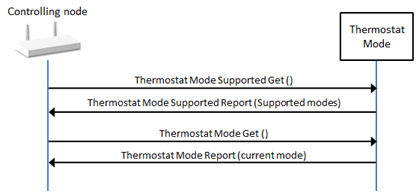
A node controlling this command class MUST perform a supporting node interview according to Figure 6.24.

Thermostate Mode Command Class interview

Figure 6.24 Thermostat Mode Command Class interview

6.2.18.2. Minimum end user functionalities

\requirement{CL:0040.01.31.01.1}{0}

A node controlling this command class MUST allow the end user to perform the actions described below.

6.2.18.2.1. Change mode

\requirement{CL:0040.01.31.02.1}{0}

When the end user performs this action, the issued command MUST comply with Table 6.26.

Table 6.26 Thermostat Mode::Change mode

Field

Value

Command

THERMOSTAT_MODE_SET

Mode

User defined among supported modes

\requirement{CL:0040.01.31.03.1}{0}

The end user MUST be able to select between all supported modes by the supporting node, even if the controlling node does not know what a given mode represents.

6.2.18.3. Node properties

\requirement{CL:0040.01.42.01.1}{0}

A controlling node SHOULD have a UI allowing the end user to see the following properties:

  • Last known mode

6.2.19. Thermostat Setback Command Class, version 1

6.2.19.1. Mandatory interview

\requirement{CL:0047.01.21.01.1}{0}

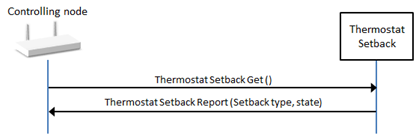
A node controlling this command class MUST perform a supporting node interview according to Figure 6.25.

Thermostate Setback Command Class interview

Figure 6.25 Thermostat Setback Command Class interview

6.2.19.2. Minimum end user functionalities

\requirement{CL:0047.01.31.01.1}{0}

A node controlling this command class MUST allow the end user to perform the actions described below.

6.2.19.2.1. Configure setback

\requirement{CL:0047.01.31.02.1}{0}

When the end user performs this action, the issued command MUST comply with Table 6.27.

Table 6.27 Thermostat Setback::Change setback for a supported type

Field

Value

Command

THERMOSTAT_SETBACK_SET

Setback Type

User defined among 0x00..0x02

Setpoint State

User defined among 0x00..0x7A and 0x80..0xFF

6.2.19.3. Node properties

\requirement{CL:0047.01.42.01.1}{0}

Controller SHOULD have a UI allowing the end user to see the following properties:

  • Last known setback type and state.

6.2.20. Thermostat Setpoint Command Class, version 1-3

6.2.20.1. Mandatory interview

\requirement{CL:0043.01.21.01.1}{0}

A node controlling this command class MUST perform a supporting node interview according to Figure 6.26.

Thermostate Setpoint Command Class interview

Figure 6.26 Thermostat Setpoint Command Class interview

It has been found that early implementations of this Command Class applied two non-interoperable interpretations of the bit mask advertising the support for specific Setpoint Types in the Thermostat Setpoint Supported Report Command.

Refer to the Thermostat Setpoint Command Class definition (Section 2.2.116, Section 2.2.117) for the possible bitmask interpretations.

\requirement{CL:0043.01.22.01.1}{0}

A controlling node SHOULD determine the supported Setpoint Types of a version 1 and version 2 supporting node by sending one Thermostat Setpoint Get Command at a time while incrementing the requested Setpoint Type.

\requirement{CL:0043.01.21.03.1}{0}

If the same Setpoint Type is advertised in the returned Thermostat Setpoint Report Command, the controlling node MUST conclude that the actual Setpoint Type is supported.

\requirement{CL:0043.01.21.04.1}{4}

If the Setpoint Type 0x00 (type N/A) is advertised in the returned Thermostat Setpoint Report Command, the controlling node MUST conclude that the actual Setpoint Type is not supported.

6.2.20.2. Minimum end user functionalities

\requirement{CL:0043.01.31.01.1}{0}

A node controlling this command class MUST allow the end user to perform the actions described below.

6.2.20.2.1. Change setpoint for a supported type

\requirement{CL:0043.01.31.02.2}{0}

When the end user performs this action, the issued command MUST comply with Table 6.28.

Table 6.28 Thermostat Setpoint::Change setpoint for a supported type

Field

Value

Command

THERMOSTAT_SETPOINT_SET

Setpoint Type

User defined among supported

Setpoint Value

If nodes are version 3 or newer: User defined among supported values

If nodes are version 1 or 2: User defined.

Precision

Controller defined

Scale

Controller defined

Size

Controller defined

\requirement{CL:0043.01.31.03.1}{0}

If controlling a version 1 or 2 supporting node, the controlling node MUST allow the user to define the Setpoint Value freely. The controlling node MUST read back the value with a Thermostat Mode Get(Setpoint type) or use Supervision Get encapsulation and indicate to the end user if the operation was successful.

\requirement{CL:0043.01.31.04.1}{0}

The end user MUST be able to set the setpoint for any setpoint type, even if the controlling node does not know what a given type represents.

\requirement{CL:0043.01.31.05.1}{0}

The Precision, Scale and Size field values MUST be identical to one of the combinations received in a Thermostat Setpoint Report or Thermostat Setpoint Capabilities Report for the actual Setpoint Type, either during the node interview or later.

\requirement{CL:0043.01.31.06.1}{0}

Setpoint values that cannot be represented using a supported combination of Precision and Size MUST be rounded to match.

\requirement{CL:0043.01.42.01.1}{0}

The controlling node SHOULD let the user define the Setpoint Value in their preferred scale but MUST convert the value into the supporting node’s scale for issuing the Z-Wave Command.

6.2.20.3. Node properties

\requirement{CL:0043.01.42.01.1}{0}

A controlling node SHOULD have a UI allowing the end user to see the following properties:

  • Last known setpoint value for each supported setpoint type.

6.2.21. User Code Command Class, version 1-2

6.2.21.1. Mandatory interview

\requirement{CL:0063.01.21.01.2}{0}

A node controlling this command class MUST perform a supporting node interview according to Figure 6.27.

User Code Command Class interview

Figure 6.27 User Code Command Class interview

For a node controlling version 2 or newer:

  • It is OPTIONAL to send an Extended User Code Get Command for every User Identifier to a node supporting version 2 or newer if:

    • The controlling node requested the checksum and it is set to 0, or

    • The controlling node issues an Extended User Code Set Command (User ID = 0, User ID Status = 0) to delete all user codes, or

    • The supporting node reports that no more User Identifiers are set in the Extended User Code Report Command with the Next User Identifier field.

  • It is OPTIONAL to send a User Code Get Command for every User Identifier to a node supporting version 1 if the controlling node issues a User Code Set Command (User ID = 0, User ID Status = 0) to delete all user codes.

\requirement{CL:0063.01.21.03.1}{0}

For a node controlling version 1:

  • It is OPTIONAL to send a User Code Get Command for every User Identifier to any supporting node if the controlling node issues a User Code Set Command (User ID = 0, User ID Status = 0) to delete the user codes below User ID 256.

\requirement{CL:0063.01.22.01.1}{0}

A controlling node SHOULD NOT automatically delete any user code unless it is the initial interview right after having included the supporting node in the network.

6.2.21.2. Minimum end user functionalities

\requirement{CL:0063.01.31.01.1}{0}

A node controlling this command class MUST allow the end user to perform the actions described below.

6.2.21.2.1. Set/modify a User Code

\requirement{CL:0063.01.31.02.1}{0}

When the end user performs this action, the issued command MUST comply with Table 6.29 if nodes are v1 or Table 6.30 if nodes are v2 or newer.

Table 6.29 User Code::Set a User Code

Field

Value

Command

USER_CODE_SET (0x01)

User Identifiers

User defined or controlling node defined among supported User Identifiers.

User ID Status

User defined among 0x01 and 0x02

0x02 must be used to set a reserved/forbidden user code.

User Code

User defined among 0x30..0x39 with a length in the range 4..10 bytes.

A forbidden or reserved User Code is a User Code that cannot be used at the supporting node and cannot be allocated to a new user, for example if User Code can also be updated locally via a user interface.

Table 6.30 User Code::Set a User Code (v2)

Field

Value

Command

EXTENDED_USER_CODE_SET (0x0B)

Number of User Codes (v2)

Controlling node defined

User Identifier 1..M (v2)

User defined or controlling node defined among supported User Identifiers.

User ID status (v2)

User defined among supported User ID statuses.

User Code Length (v2)

Controlling node defined based on the length of the User Code field.

User Code (v2)

User defined among supported ASCII characters with a length in the range 4..10 bytes.

6.2.21.2.2. Erase a User Code

\requirement{CL:0063.01.31.03.1}{0}

When the end user performs this action, the issued command MUST comply with Table 6.31 if nodes are v1 and Table 6.32 if nodes are v2 or newer.

Table 6.31 User Code::Erase a User Code

Field

Value

Command

USER_CODE_SET

User Identifiers

User defined or controlling node defined among supported User Identifiers.

User ID Status

0x00

User Code

0x00000000

\requirement{CL:0063.01.31.04.1}{0}

A controlling node MAY allow the end user to erase all user codes at once. In this case, the User Identifier field MUST be set to 0x00.

Table 6.32 User Code::Erase a User Code

Field

Value

Command

EXTENDED_USER_CODE_SET (0x0B)

Number of User Codes (v2)

Controlling node defined

User Identifier 1..M (v2)

User defined or controlling node defined among supported User Identifiers.

User ID status (v2)

0x00

User Code Length (v2)

0x00

User Code (v2)

Omitted

6.2.21.2.3. Set the keypad mode (v2)

\requirement{CL:0063.01.31.05.1}{0}

This action MUST be available to the end user if nodes are v2 or newer and the supporting node supports more than one keypad mode. When the end user performs this action, the issued command MUST comply with Table 6.33.

Table 6.33 User Code::Set the Keypad Mode

Field

Value

Command (v2)

USER_CODE_KEYPAD_MODE_SET (0x08)

Keypad Mode (v2)

User defined among supported keypad modes.

6.2.21.2.4. Set the Admin Code (v2)

\requirement{CL:0063.01.31.06.1}{0}

This action MUST be available to the end user if nodes are v2 or newer and the supporting node supports the Admin Code functionality. When the end user performs this action, the issued command MUST comply with Table 6.34.
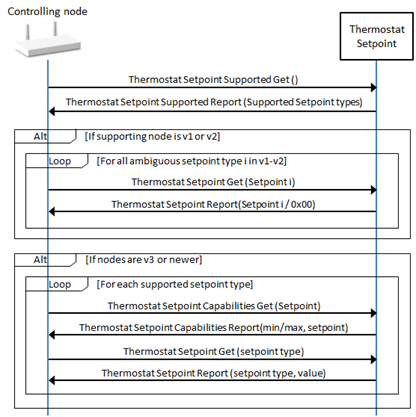
Table 6.34 User Code::Set the Admin Code

Field

Value

Command (v2)

ADMIN_CODE_SET (0x0E)

Admin Code Length (v2)

Controlling node defined based on the length of the User Code field.

It MUST be possible to de-activate the Admin Code if the supporting node supports Admin Code Deactivation.

Admin Code (v2)

User defined among supported ASCII characters with a length in the range 4..10 bytes.

6.2.21.3. Node properties

\requirement{CL:0063.01.41.01.1}{0}

Controller MUST have a UI allowing the end user to see the following properties:

  • Number of supported User Codes

  • The list of last known set User Codes

  • The current keypad mode, if the supporting node supports more than one (v2)

  • The current set Admin Code, if the supporting node supports a Admin Code (v2)

6.2.21.4. Additional control requirements

It has been found that some version 1 nodes wrongfully report obfuscated User Codes in the User Code Report (e.g. ‘******’).

\requirement{CL:0063.01.52.01.1}{0}

A controlling node SHOULD understand that a code has been set correctly but cannot be read back with such nodes.

\requirement{CL:0063.01.52.02.1}{0}

If nodes are version 2 or newer, a controlling node SHOULD verify the User Code checksum (if supported) periodically (e.g. once a day) to ensure that User Code databases are synchronized.

6.2.22. User Credential Command Class, version 1-2

6.2.22.1. User Management Overview

Both

are cumulatively referred to as the User Management Command Classes.

While they are related in purpose, they differ drastically in scope and implementation and can be challenging to securely operate together on a supporting node. Nodes that advertise support for both of these command classes for backwards compatibility purposes can opt to support both simultaneously so that their Users, Credentials and User Codes coexist in a shared database, or they can opt to migrate support from User Credentials to User Codes, and vice versa, based on the capabilities of the controlling node.

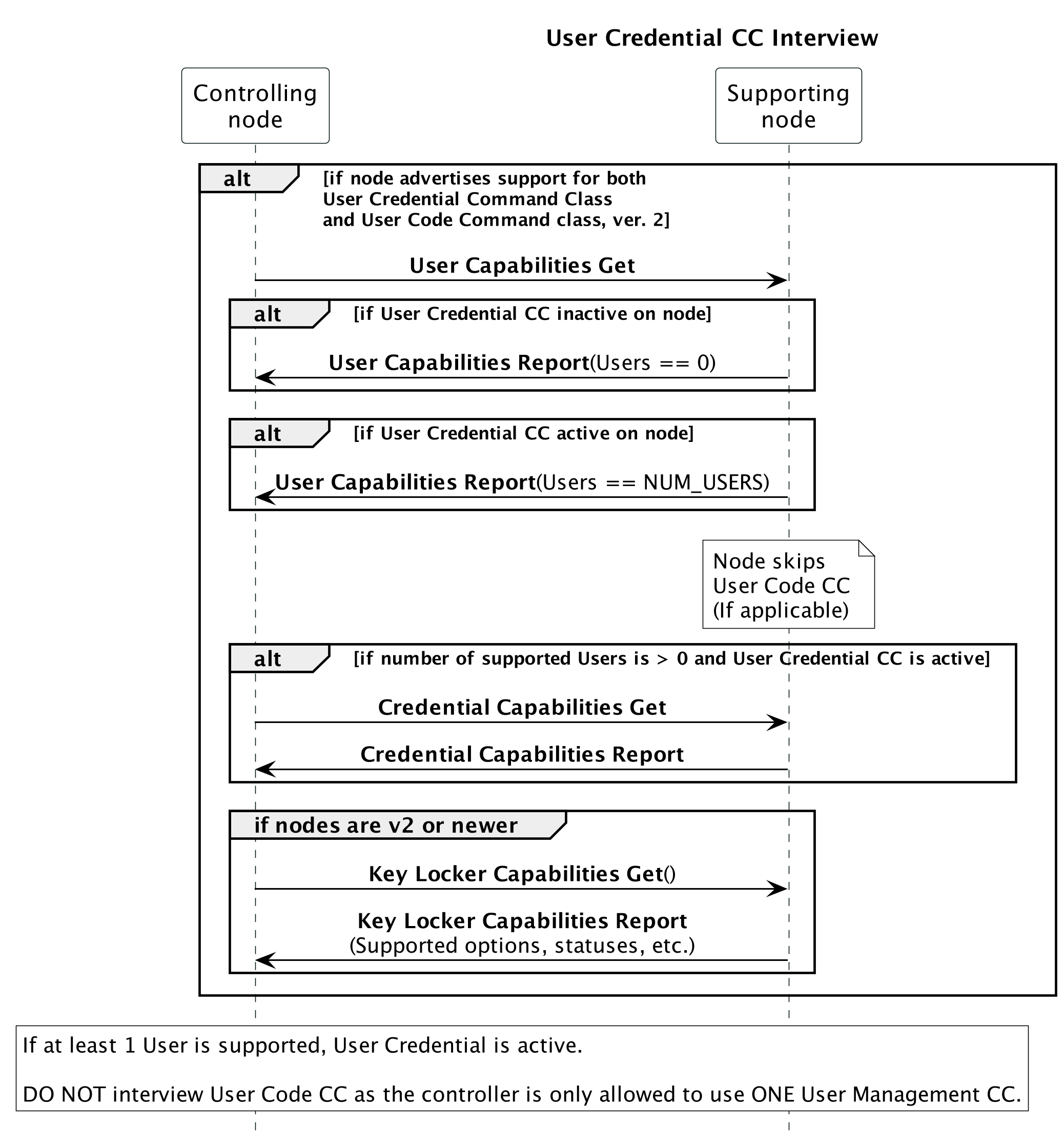
If a controlling node controls both the User Credential Command Class and the User Code Command Class, and a supporting node advertises support for both as well, then the following apply:

\requirement{CL:0083.01.21.00.2}{0}

  • The controlling node MUST only use ONE of the User Management Command Classes to control a supporting node, and cache which User Management CC is used for each node.

\requirement{CL:0083.01.23.00.3}{0}

  • The Command Class used is node-specific - a controlling node MAY use User Code CC to control one node on the network and User Credential to control another.

\requirement{CL:0083.01.21.00.4}{0}

\requirement{CL:0083.01.21.00.5}{0}

User Management Interview::User Credential

Figure 6.28 User Management Interview::User Credential

At this point, if there are User slots available on the supporting node (signified with at least one (1) supported User in the Credential Capabilities Report Command), then the controlling node stops the interview here, skips User Code, and moves on to the next CC to interview.

However, certain nodes may currently be storing User Codes and will require migration of those User Codes to Users and PIN codes - for example, when the supporting node had already been included in the network and the original interviewing node ONLY supports User Code CC. This is signified to any interviewing node by reporting a ‘0’ for the number of supported Users in the User Capabilities Report Command.

\requirement{CL:0083.01.21.00.6}{0}

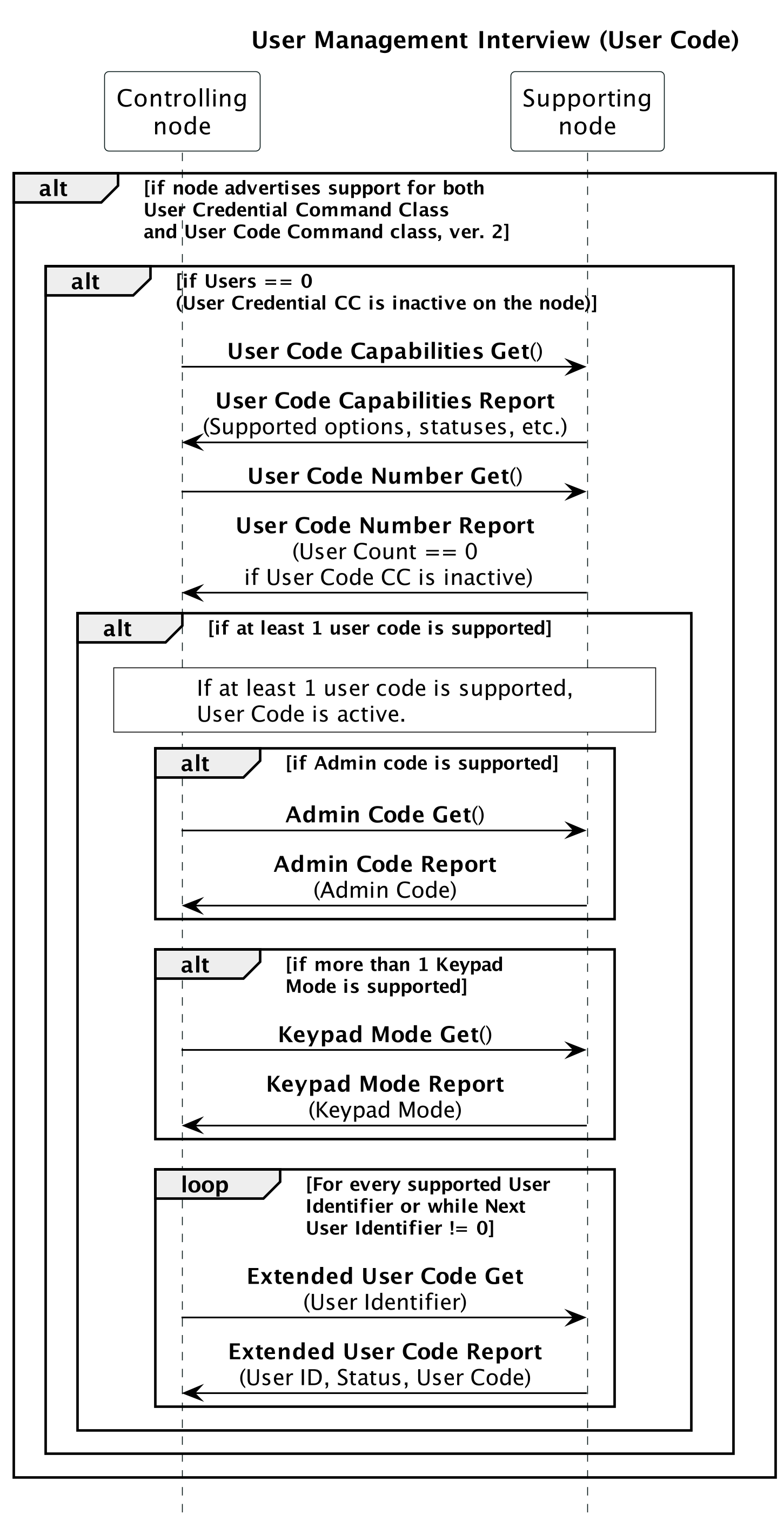
A controlling node MUST NOT control the User Code on a supporting node that otherwise supports User Credential unless no Users are currently supported on the supporting node.

\requirement{CL:0083.01.21.00.7}{0}

In this case, the node MUST continue to interview the supporting node as follows in User Management Interview::User Code:

User Management Interview::User Code

Figure 6.29 User Management Interview::User Code

If a supporting node only supports one User Management CC, then the controlling node need only interview the CC using the process described in the ‘Mandatory Interview’ section of that CC’s control specification.

6.2.22.2. Mandatory interview

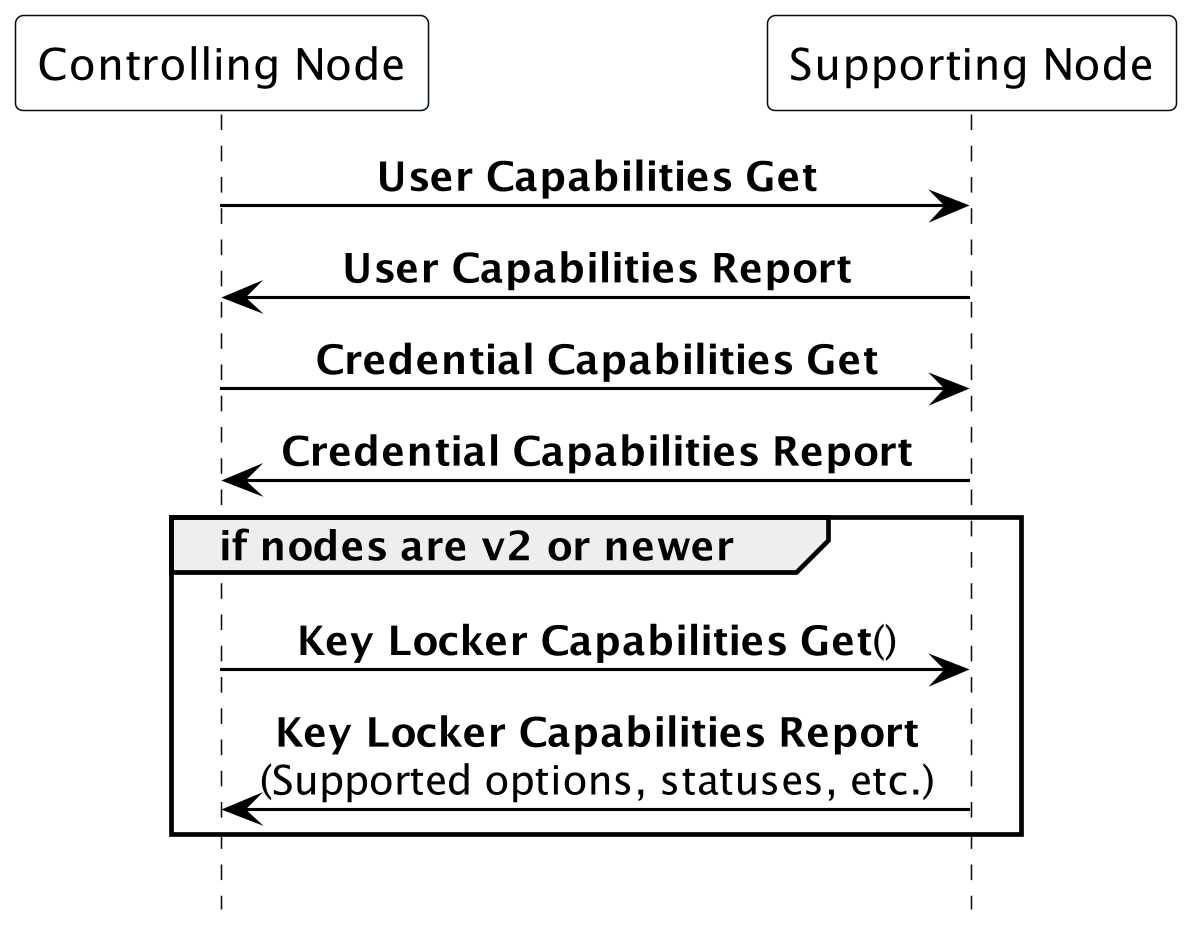
\requirement{CL:0083.01.21.01.1}{0}

A node controlling this command class MUST perform a supporting node interview according to Figure 6.30.

User Credential Command Class interview

Figure 6.30 User Credential Command Class interview

\requirement{CL:0083.01.22.02.1}{0}

If the All Users Checksum Support field is set in the User Capabilities Report Command, the controlling node SHOULD send an All Users Checksum Get Command to check if there are existing Users or Credentials present on the supporting node.

\requirement{CL:0083.01.22.03.1}{0}

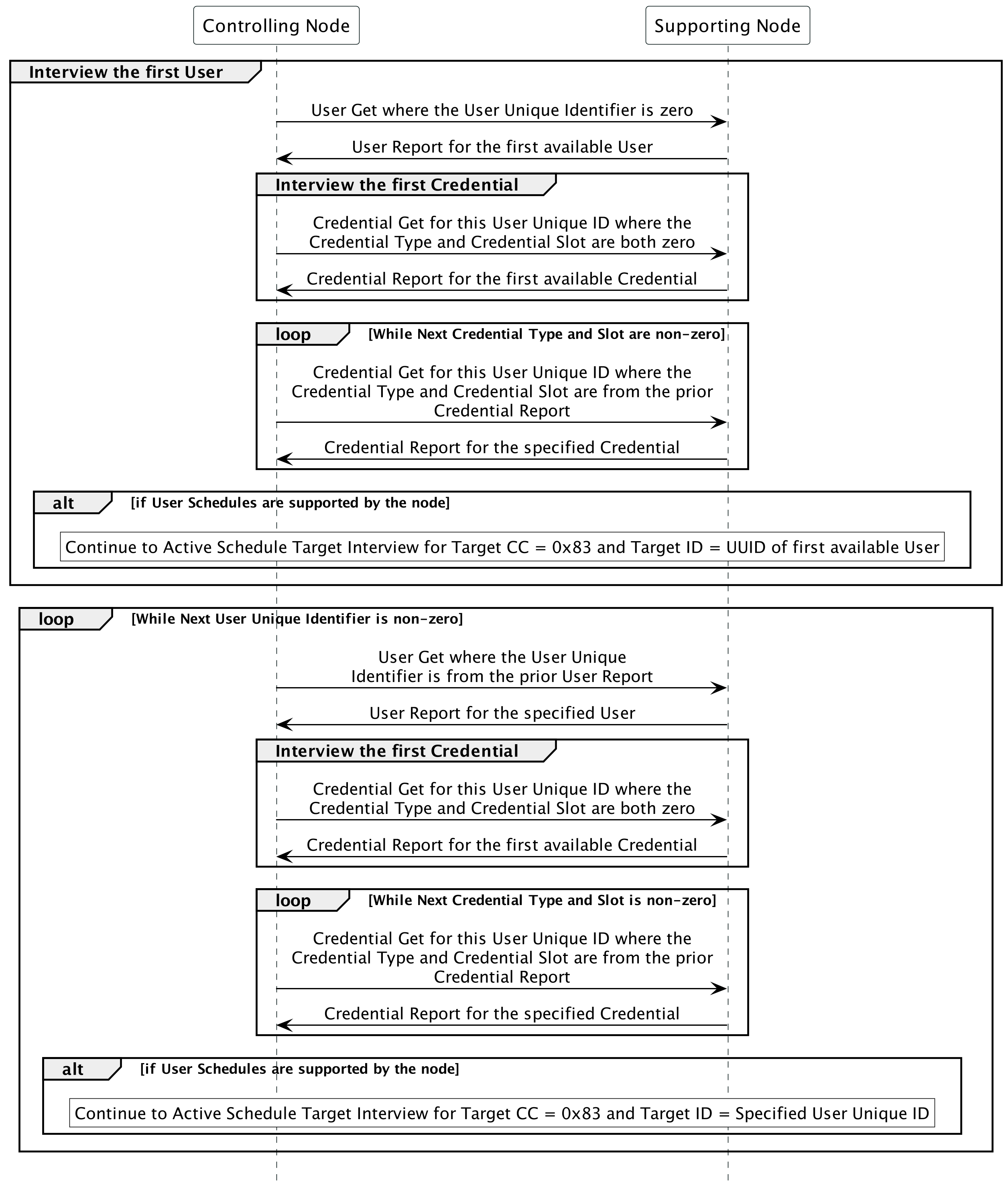
If the supporting node does not support the All Users Checksum Get Command, or if it does and the All Users Checksum field of the All Users Checksum Report Command is non-zero, the controlling node SHOULD perform an interview of the existing Users and Credentials (and schedules, if User Schedules are supported by the node) according to Figure 6.31.

User Credential Command Class optional interview

Figure 6.31 User Credential Command Class optional interview

Schedule data interview process referred to in Figure 6.31 is defined in Figure 6.2 under the Target Schedule Data Interview section.

6.2.22.3. Minimum end user functionalities

\requirement{CL:0083.01.31.04.1}{0}

A node controlling this command class MUST allow the end user to perform the actions described below.

6.2.22.3.1. Add/Modify a User

\requirement{CL:0083.01.31.05.1}{0}

When the end user performs this action, the issued command MUST comply with Table 6.35.

Table 6.35 User Credential::Add/Modify a User

Field

Value

Command

USER_SET (0x05)

Operation Type

Controlling node defined as Add (0x00) or Modify (0x01).

User Unique Identifier

User defined or controlling node defined among supported User Identifiers in the range of what was specified as supported in the User Capabilities Report Command.

User Type

User defined or controlling node defined among the Supported User Types as specified in the User Capabilities Report Command.

User Active State

User defined or controlling node defined.

Credential Rule

User defined or controlling node defined among the Supported Credential Rules as specified in the User Capabilities Report Command.

Expiring Timeout Minutes

User defined or controlling node defined. This MUST be non-zero if the User Type is Expiring User (0x07) and MUST be zero if the User Type is not Expiring User (0x07).

User Name Encoding

Controlling node defined among the supported User Name Encoding schemas as specified in the User Capabilities Report Command.

User Name Length

Controlling node defined based on the length of the User Name.

User Name

User defined or controlling node defined among supported User Name Encoding characters and User Name Length.

\requirement{CL:0083.01.33.06.1}{0}

\requirement{CL:0083.01.32.07.1}{4}

\requirement{CL:0083.01.31.08.1}{8}

A controlling node MAY offer the User Types under different names. If they are renamed they SHOULD be accompanied by a description, and the name mapping MUST be noted in the product documentation.

\requirement{CL:0083.01.31.09.1}{0}

If a controlling node does not offer all User Types, it MUST make note of which User Types are not controlled in the product documentation.

\requirement{CL:0083.01.31.10.1}{0}

If a controlling node does not offer all Credential Rules, it MUST make note of which Credential Rules are not controlled in the product documentation.

6.2.22.3.2. Delete a User

\requirement{CL:0083.01.31.11.1}{0}

When the end user performs this action, the issued command MUST comply with Table 6.36.

Table 6.36 User Credential::Delete a User

Field

Value

Command

USER_SET (0x05)

Operation Type

Controlling node defined as Delete (0x02).

User Unique Identifier

User defined or controlling node defined among supported User Identifiers in the range of what was specified as supported in the User Capabilities Report Command.

User Type

Omitted or controlling node defined as the default value.

User Active State

Omitted or controlling node defined as the default value.

Credential Rule

Omitted or controlling node defined as the default value.

Expiring Timeout Minutes

Omitted or controlling node defined as the default value.

User Name Encoding

Omitted or controlling node defined as the default value.

User Name Length

Omitted or controlling node defined as the default value.

User Name

Omitted or controlling node defined as the default value.

\requirement{CL:0083.01.33.12.1}{0}

\requirement{CL:0083.01.31.13.1}{4}

A controlling node MAY allow the end user to erase all Users and their associated Credentials and schedules at once. In this case, the User Unique Identifier field MUST be set to 0x0000.

\requirement{CL:0083.01.31.33.1}{0}

If Schedules are supported by the node, all of the User’s Schedule slots MUST be cleared when the User is deleted.

6.2.22.3.3. Add/Modify a Credential

\requirement{CL:0083.01.31.14.1}{0}

When the end user performs this action, the issued command MUST comply with Table 6.37.

Table 6.37 User Credential::Add/Modify a Credential

Field

Value

Command

CREDENTIAL_SET (0x0A)

User Unique Identifier

User defined or controlling node defined among supported User Identifiers in the range of what was specified as supported in the User Capabilities Report Command.

Credential Type

User defined or controlling node defined among supported Credential Types specified in the Credential Capabilities Report Command.

Credential Slot

User defined or controlling node defined in the range of one to the Number of Supported Credential Slots for the given Credential Type in the Credential Capabilities Report Command.

Operation Type

Controlling node defined as Add (0x00) or Modify (0x01).

Credential Length

Controlling node defined based on the length of the Credential Data. MUST not be less than the Min Length of Credential Data for the specific Credential Type specified in the Credential Capabilities Report Command and MUST not be more than the Max Length of Credential Data for the specific Credential Type specified in the Credential Capabilities Report Command.

Credential Data

User defined.

\requirement{CL:0083.01.33.15.1}{0}

A controlling node MAY infer the Credential Type from the Credential Data provided by the end user.

\requirement{CL:0083.01.31.16.1}{0}

If a controlling node does not offer all Credential Types, it MUST make note of which Credential Types are not controlled in the product documentation.

6.2.22.3.4. Delete a Credential

\requirement{CL:0083.01.31.17.1}{0}

When the end user performs this action, the issued command MUST comply with Table 6.38.

Table 6.38 User Credential::Delete a Credential

Field

Value

Command

CREDENTIAL_SET (0x0A)

User Unique Identifier

User defined or controlling node defined among supported User Identifiers in the range of what was specified as supported in the User Capabilities Report Command.

Credential Type

User defined or controlling node defined among supported Credential Types specified in the Credential Capabilities Report Command.

Credential Slot

User defined or controlling node defined in the range of one to the Number of Supported Credential Slots for the given Credential Type in the Credential Capabilities Report Command.

Operation Type

Controlling node defined as Delete (0x02).

Credential Length

Zero or controlling node defined.

Credential Data

Omitted or User defined.

\requirement{CL:0083.01.33.18.1}{0}

\requirement{CL:0083.01.31.19.1}{4}

A controlling node MAY allow the end user to erase all Credentials of a Credential Type for a User Unique Identifier at once. In this case, the User Unique Identifier and Credential Type MUST be non-zero and the Credential Slot MUST be 0x0000.

\requirement{CL:0083.01.33.20.1}{0}

\requirement{CL:0083.01.31.21.1}{4}

A controlling node MAY allow the end user to erase all Credentials of all Credential Types for a User Unique Identifier at once. In this case, the User Unique Identifier MUST be non-zero and the Credential Type MUST be 0x00.

\requirement{CL:0083.01.33.22.1}{0}

\requirement{CL:0083.01.31.23.1}{4}

A controlling node MAY allow the end user to erase all Credentials for all Users at once. In this case, the User Unique Identifier MUST be 0x0000.

\requirement{CL:0083.01.33.24.1}{0}

\requirement{CL:0083.01.31.25.1}{4}

A controlling node MAY allow the end user to erase all Credentials for a Credential Type at once. In this case, the User Unique Identifier and Credential Slot MUST be 0x0000 and the Credential Type MUST be non-zero.

6.2.22.3.5. Set the Admin PIN Code

\requirement{CL:0083.01.31.32.1}{0}

This action MUST be available to the end user if the supporting node supports the Admin PIN Code functionality. When the end user performs this action, the issued command MUST comply with Table 6.39.
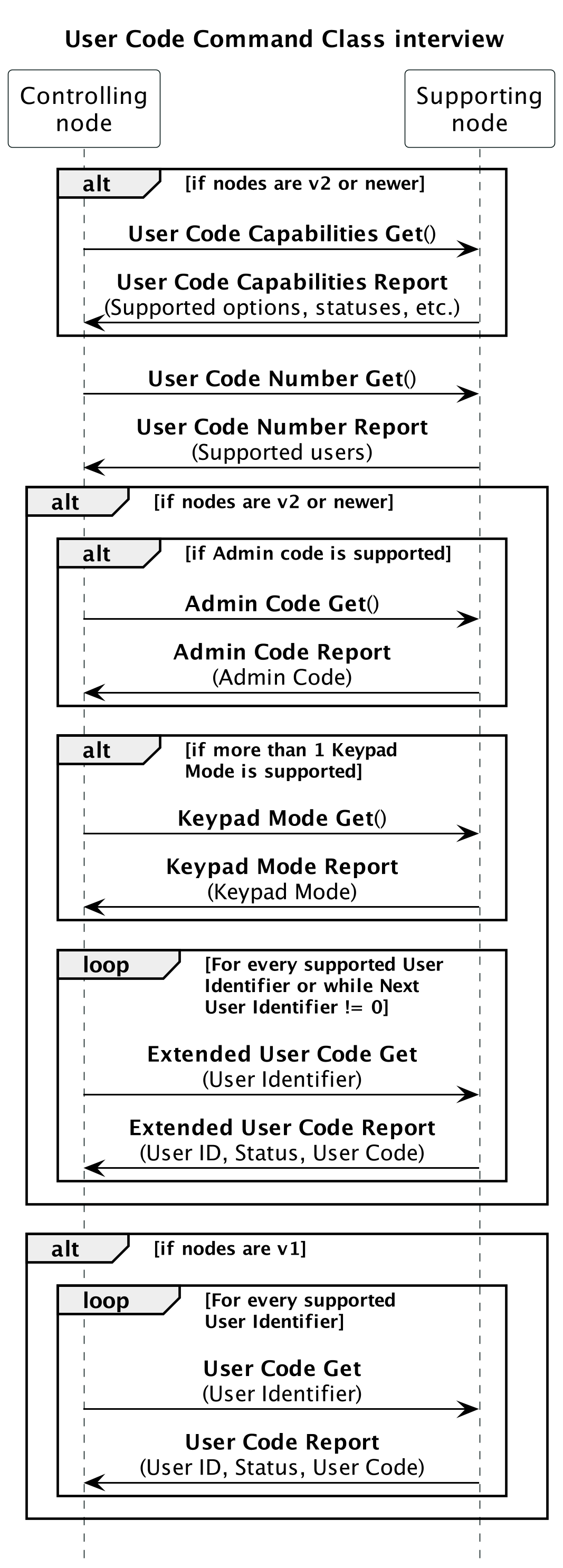
Table 6.39 User Credential::Set the Admin PIN Code

Field

Value

Command

ADMIN_PIN_CODE_SET (0x1A)

Admin PIN Code Length

0 for Admin PIN Code deactivation, else in accordance with the Min..Max Credential Length of Credential Type PIN Code. It MUST be possible to de-activate the Admin PIN Code if the supporting node supports Admin Code Deactivation.

Admin PIN Code

User defined among supported ASCII characters (digits 0..9) with a length in the range 4..10 bytes. Zero length if deactivating the Admin PIN Code.

6.2.22.3.6. Add/Modify a Key Locker Entry

If the node supports User Credential Command Class, version 2, when the end user performs this action, the issued command MUST comply with Table 6.40.

Table 6.40 User Credential::Add/Modify Key Locker Entry

Field

Value

Command

KEY_LOCKER_ENTRY_SET (0x1F)

Entry Type

User defined or controlling node defined among the Supported Entry Types as specified in the Key Locker Capabilities Report Command.

Entry Slot

A value in the range of one to ‘Number of Supported Entry Slots’ for the given Entry Type, inclusive (see Key Locker Capabilities Report Command).

Operation Type

Controlling node defined as Add (0x00) or Modify (0x01). See Table 2.570.

Entry Length

A value in the range of ‘Min. Length of Entry Data’ to ‘Max. Length of Entry Data’ for the given Entry Type, inclusive (see Key Locker Capabilities Report Command).

Entry Data

The Entry Data with length equal to Entry Length

6.2.22.3.7. Delete a Key Locker Entry

If the node supports User Credential Command Class, version 2, when the end user performs this action, the issued command MUST comply with Table 6.41.

Table 6.41 User Credential::Delete Key Locker Entry

Field

Value

Command

KEY_LOCKER_ENTRY_SET (0x1F)

Entry Type

User defined or controlling node defined among the Supported Entry Types as specified in the Key Locker Capabilities Report Command.

The value may also be 0x00 to delete all Entry Types.

Entry Slot

A value in the range of one to ‘Number of Supported Entry Slots’ for the given Entry Type, inclusive (see Key Locker Capabilities Report Command).

The value may also be 0x00 to delete all Entry Slots.

Operation Type

Controlling node defined as Delete (0x02). See Table 2.570.

Entry Length

This value is ignored for Delete operations and should be set to 0x00.

Entry Data

This data is ignored for Delete operations and should be omitted in accordance with an Entry Length of 0x00.

6.2.22.4. Node properties

\requirement{CL:0083.01.41.26.1}{0}

A controlling node MUST have a UI allowing the end user to see the following properties:

  • The list of Users and their basic properties:

    • The User Name

    • The User Active State

    • The Credentials assigned to a User and their basic properties:

      • The Credential Type

    • If Scheduling is supported by the node:

      • Whether Schedules for the User are active or inactive

\requirement{CL:0083.01.42.27.1}{0}

A controlling node SHOULD have a UI allowing the end user to see the following properties:

  • The number of supported User Unique Identifiers

  • The supported Credential Rules (Single, Dual, Triple)

  • The supported Credential Types

  • The list of Users and their additional properties:

    • The User Unique Identifier

    • The User Type

    • The Credential Rule

    • The Expiring Timeout Minutes, if the User Type is Expiring User (0x07)

    • The Credentials assigned to a User and their additional properties:

      • The Credential Slot

      • The Credential Data

    • If Scheduling is supported by the node:

      • Which Schedule slots are in use for the User

      • the Schedule data for each occupied slot

  • If the node supports User Credential Command Class, version 2:

    • The supported Key Locker Entry Types

    • The number of Key Locker Entry Slots

    • The minimum and maximum length of Key Locker Entry data

    • The list of Key Locker Entries

      • The Entry Report Type

      • The Entry Type

      • The Entry Slot

      • Whether the Entry Slot contains data or is empty

\requirement{CL:0083.01.41.28.1}{0}

A node controlling this command class MUST also control the Notification Command Class, version 8 or newer and have a UI allowing the end user to see Notification Reports with the following Notification Types.

  • Notification Type “Access Control” (0x06)
    • “Credential lock/close operation” (0x23)

    • “Credential unlock/open operation” (0x24)

    • “Valid credential access denied due to User Active State being set to Occupied Disabled” (0x2F)

    • “Valid credential access denied due to the User’s schedule being inactive” (0x30)

    • “User access denied due to not enough credentials entered for the User’s Credential Rule” (0x31)

    • “Invalid credential used to access the node” (0x32)

    • “Non-Access credential entered via local interface” (0x33)

  • Notification Type “Emergency Alarm” (0x0A)
    • “Panic Alert” (0x04)

6.2.22.5. Additional control requirements

\requirement{CL:0083.01.51.29.1}{0}

If a node controlling this command class supports setting schedules for Unique User Identifiers, then they MUST also control the Active Schedule Command Class, version 1 [NEVER CERTIFIED], or higher.

\requirement{CL:0083.01.52.30.1}{0}

If the supporting node supports the All Users Checksum Report Command, the controlling node SHOULD verify the All Users Checksum periodically (e.g. once a day) to ensure that the Users and Credentials are synchronized between the supporting and controlling nodes.

\requirement{CL:0083.01.52.31.1}{0}

A node controlling this command class SHOULD be resilient to receiving error messages in the User Report Type or Credential Report Type fields in User Report Command and Credential Report Command when sending a User Set Command or a Credential Set Command, respectively, and try to resend the command with corrected fields.

6.2.23. Window Covering Command Class, version 1

6.2.23.1. Mandatory interview

\requirement{CL:006A.01.21.01.1}{0}

A node controlling this command class MUST perform a supporting node interview according to Figure 6.32.

Window Covering Command Class interview

Figure 6.32 Window Covering Command Class interview

6.2.23.2. Minimum end user functionalities

\requirement{CL:006A.01.31.02.1}{0}

A node controlling this command class MUST allow the end user to perform the actions described below.

6.2.23.2.1. Go to position

\requirement{CL:006A.01.31.02.1}{0}

This action MUST be available to the end user for parameters ID with known positions (odd parameters IDs). When the end user performs this action, the issued command MUST comply with Table 6.42.

Table 6.42 Window Covering::Go to a Position

Field

Value

Command

WINDOW_COVERING_SET

Parameter count

User defined (≥ 0x01)

Parameter ID x

User defined among supported (odd values)

Value x

User defined among 0x00..0x63

Duration

User defined or 0xFF

6.2.23.2.2. Start level change up or down

\requirement{CL:006A.01.31.03.1}{0}

This action MUST be available to the end user for all supported parameters ID. When the end user performs this action, the issued command MUST comply with Table 6.43.

Table 6.43 Window Covering::Start Level Change Up or Down

Field

Value

Command

WINDOW_COVERING_START_LEVEL_CHANGE

Up/Down

User defined among 0x00 and 0x01

Parameter ID

User defined among supported parameters ID

Duration

User defined or 0xFF

6.2.23.2.3. Stop level change

\requirement{CL:006A.01.31.04.1}{0}

This action MUST be available to the end user for all supported parameters ID. When the end user performs this action, the issued command MUST comply with Table 6.44.

Table 6.44 Window Covering::Stop Level Change

Field

Value

Command

WINDOW_COVERING_STOP_LEVEL_CHANGE

Parameter ID

User defined among supported parameters ID

6.2.23.3. Node properties

\requirement{CL:006A.01.42.01.1}{0}

Controller SHOULD have a UI allowing the end user to see the following properties:

  • Last known position/value for all parameters IDs with known position

6.2.23.4. Additional control requirements

\requirement{CL:006A.01.51.01.2}{0}

A controlling node MUST NOT interview and provide controlling functionalities for the Multilevel Switch Command Class for a node (or endpoint) supporting this Command Class, as it is a fully redundant and less precise application functionality.