2.2.120. User Credential Command Class, version 1
The User Credential Command Class is used to manage user Credentials for gaining access to properties, typically through unlocking or opening doors. Those properties could be residential or commercial. Credential types include PIN Codes, Passwords, Radio-Frequency Identification (RFID), Bluetooth Low Energy (BLE), Near Field Communication (NFC), Ultra-Wideband (UWB), and Biometrics. This command class employs a user-centric model, allowing multiple Credentials to be associated with one User Unique Identifier.
\requirement{CC:0083.01.00.11.000}{0}
Setting schedules for User Unique Identifiers is not required. However, if setting schedules for Unique User Identifiers is supported, then they MUST be supported using the Schedule Entry Lock Command Class, version 4 [OBSOLETED] [NEVER CERTIFIED] or higher.
\requirement{CC:0083.01.00.11.001}{0}
To prompt notifications based on activity for these User Unique Identifiers/Credentials, the Notification Command Class MUST be used.
\requirement{CC:0083.01.00.12.002}{0}
When a node is first enrolled in a Z-Wave network, the controlling device SHOULD query the node for any existing User/Credential information before setting up new User Unique Identifiers. It is possible that nodes have already been populated with desired User Unique Identifiers before network inclusion using some other home automation technology or using a local interface.
2.2.120.1. Terminology
The terms ‘ASCII’, ‘Extended ASCII’ and ‘UTF-16 encoding’ are used in this document as shorthand for:
Using standard ASCII codes (values 128-255 are ignored)
Using standard and OEM Extended ASCII codes
Unicode UTF-16, in big endian order
respectively. For more information on text encoding, please refer to ASCII Codes.
It must also be noted that not all ‘Extended ASCII’ tables are equivalent. The specification used in this document for Extended ASCII is the original code page for the IBM PC known as OEM-US or Code page (CCSID) 437. This encoding differs from the more common IEC-8859 or Windows-1252 character sets, and care should be taken to ensure that the supported characters match the characters defined in Figure 9.2 on both sending and receiving nodes.
Credentials are configured on a supporting node for different User Unique Identifiers. Each User Unique Identifier is associated with none, one, or multiple Credentials. A Credential can only have one user.
A User Unique Identifier is used in the database to associate Credentials and schedules to a single User Unique Identifier slot within the node and Z-Wave network.
A Credential can be identified by a combination of its Credential Type and Credential Slot Number.
Credentials are also referred to in this document as belonging to either a Biometric and Non-Biometric credential type. Biometric Credential Types are marked correspondingly in Table 2.557.
\requirement{CC:0083.01.00.11.002}{0}
Once a Credential is assigned a Slot Number, this slot is considered occupied and MUST NOT be reused until the Credential is deleted or moved to a different slot.
The entry of a Credential can trigger different outcomes, such as opening a door, sending a command to an associated device, triggering a notification, or ignoring the Credential. This can be configured with the User Type. A User Type determines the category of access allowed.
\requirement{CC:0083.01.00.13.001}{0}
A node MAY support the Admin Code functionality. The Admin Code is a separate unique PIN code that exists outside of the User and Credential databases, used to get access to the node’s administrator functions, such as the network settings and/or User and Credential management. This functionality is also referred to as AC Support.
Note: The term ‘Admin PIN Code’ is also used in this document for compatibility reasons and is completely interchangeable with the term ‘Admin Code’.
\requirement{CC:0083.01.00.13.002}{0}
A node MAY require the Admin Code to be always set and in this case advertise that the Admin Code can be modified but cannot be deactivated using Z-Wave. This functionality is referred to as ACD Support (Admin Code Deactivation).
\requirement{CC:0083.01.00.11.003}{0}
When ACD is supported, the Admin Code MUST be able to be deactivated using Z-Wave.
2.2.120.2. Compatibility Considerations
2.2.120.2.1. User Code Command Class Dependencies
\requirement{CC:0083.01.00.23.007}{0}
For backwards compatibility considerations, a device MAY support both the User Code Command Class and User Credential Command Class.
In this case the data backing User Code Command Class is defined to be a user code credential table for numeric PIN codes.
If the User Code Command Class is supported (no matter the version):
\requirement{CC:0083.01.00.21.004}{0}
The Credential Set Command and Credential Get Command / Credential Report Command for Credential Type 0x01 (PIN Code) MUST act on the same data as the User Code Command Class.
\requirement{CC:0083.01.00.21.014}{0}
The User Credential Command Class’s Credential Data Length for Credential Type 0x01 (PIN Code) MUST have Min value of 4 and Max value of 10.
\requirement{CC:0083.01.00.21.018}{0}
The User Credential Command Class MUST report the actual Credential Data for Credential Type 0x01 (PIN Code), i.e. Credential Read Back (CRB) MUST be set to 1.
If User Code Command Class, version 1 only is supported:
\requirement{CC:0083.01.00.21.015}{0}
The User Credential Command Class’s number of supported Credential Slots for Credential Type 0x01 (PIN Code) MUST NOT exceed 255.
\requirement{CC:0083.01.00.21.017}{0}
The User Credential Command Class MUST NOT support User Types “Duress User” nor “Disposable User”.
If User Code Command Class, version 2 or higher is supported:
\requirement{CC:0083.01.00.21.016}{0}
The User Code Command Class MUST support all numeric keys (decimal digits 0..9, i.e. ASCII 0x30..0x39) and MUST NOT support any other key.
If Admin Code functionality is supported along with User Code Command Class, ver. 2 or higher:
\requirement{CC:0083.01.00.21.019}{0}
Admin Code data manipulated through User Credential Command Class MUST be exactly reflected in User Code Command Class and vice versa.
\requirement{CC:0083.01.00.21.020}{0}
Data MUST be mapped such that User Code Command Class’s User Identifier (or Extended User Identifier) is equivalent to User Credential Command Class’s Credential Slot, such that modifications using either API modify the same underlying credential.
\requirement{CC:0083.01.00.21.021}{0}
The User Credential (Type PIN Code) / User Code mapping MUST be in accordance with Table 2.546 and Table 2.547.
\requirement{CC:0083.01.00.21.006}{0}
When the User Code Command Class is used to add a new User Identifier (Slot), the device MUST also add a new User Unique Identifier to tie the new credential to.
For example, a Credential Set Command modify for User Unique Identifier 0x0001, Credential Type 0x01 (PIN Code), and Credential Slot 0x0007 will modify the same data as a User Code Set for User Identifier (Slot) 0x07 or Extended User Code Set for User ID (Slot) 0x0007.
\requirement{CC:0083.01.00.22.008}{0}
It is RECOMMENDED for a controlling device to use one common method for controlling a node supporting both User Credential Command Class and User Code Command Class.
User Credential CC |
User Code CC v1 |
User Code CC v2 |
|
|---|---|---|---|
Credential Set |
User Code Report |
(Ext.) User Code Report |
|
User ID Status (v1) |
User ID Status (v2) |
||
PIN Code credential is deleted or does not exist. |
0x00 Available |
||
User Set – for the user the credential belongs to |
User Code Report |
(Ext.) User Code Report |
|
User Active State |
User Type |
User ID Status (v1) |
User ID Status (v2) |
0x00 Occupied Disabled |
any |
0x02 Reserved by administrator |
0x02 Disabled |
0x01 Occupied Enabled |
0x00 General User |
0x01 Occupied |
0x01 Enabled / Grant Access |
0x03 Programming User |
|||
0x04 Non-Access User |
0x02 Reserved by administrator |
0x03 Messaging |
|
0x05 Duress User |
0x01 Occupied |
0x01 Enabled / Grant Access |
|
0x06 Disposable User |
|||
0x07 Expiring User |
|||
0x09 Remote Only User |
|||
User Code CC v1 |
User Code CC v2 |
User Credential CC |
||
|---|---|---|---|---|
User Code Set |
(Ext.) User Code Set |
Credential Report / User Report |
||
User ID Status (v1) |
User ID Status (v2) |
|||
0x00 Available |
PIN Code credential is deleted. But belonging user is unchanged. |
|||
User Code Set |
(Ext.) User Code Set |
User Report – of the user the credential belongs to |
||
User ID Status (v1) |
User ID Status (v2) |
User Active State |
User Type |
|
If the credential existed and is modified via the User Code CC |
Else, if the credential is newly added via the User Code CC |
|||
0x01 Occupied |
0x01 Enabled / Grant Access |
0x01 Occupied Enabled |
Belonging user’s type is unchanged. |
0x00 General User |
0x02 Reserved by administrator |
0x02 Disabled |
0x00 Occupied Disabled |
||
n.a. |
0x03 Messaging |
0x01 Occupied Enabled |
0x04 Non-Access User |
|
n.a. |
0x04 Passage Mode |
Belonging user’s type is unchanged. |
0x00 General User |
|
0xFE Status not available [1] |
n.a. |
0x00 Occupied Disabled |
||
2.2.120.2.2. Schedule Entry Lock Command Class Dependencies
\requirement{CC:0083.01.00.23.009}{0}
This Command Class MAY be used in conjunction with the Schedule Entry Lock Command Class, version 4 [OBSOLETED] [NEVER CERTIFIED] to schedule access for users.
2.2.120.2.3. Notification Command Class Dependencies
\requirement{CC:0083.01.00.21.010}{0}
This Command Class MUST be used with the Notification Command Class, version 3-8.
2.2.120.2.4. Door Lock Command Class Dependencies
\requirement{CC:0083.01.00.21.011}{0}
A node supporting this Command Class MUST either:
Support the Door Lock Command Class, version 4.
Control the Door Lock Command Class via association groups.
\requirement{CC:0083.01.00.21.012}{0}
A supporting node MUST reflect Credential inputs in the door lock status when relevant. For example, when the node becomes unsecured by a Credential input, the Door Lock Operation mode is updated to unsecure.
\requirement{CC:0083.01.00.23.013}{0}
A node supporting this Command Class MAY have an Association group issuing the corresponding Door Lock Operation Set Commands when valid Credentials are input to control several door locks simultaneously.
2.2.120.3. Security Considerations
On top of those referenced in User Code Command Class, version 2, the following security measures should be taken into consideration:
\requirement{CC:0083.01.00.42.014}{0}
Numeric PIN codes SHOULD NOT be allowed if they contain solely consecutive digits (e.g. 123456 or 654321).
\requirement{CC:0083.01.00.42.015}{0}
Numeric PIN codes SHOULD NOT be allowed if there is solely one repeating digit (e.g. 111111).
\requirement{CC:0083.01.00.41.016}{0}
Numeric PIN codes MUST be at least 4 digits long.
\requirement{CC:0083.01.00.41.017}{0}
If a Credential is rejected, and the Credential Set Command was sent with Supervision Encapsulation, the Supervision Report Command MUST have a status of FAIL.
2.2.120.4. User Capabilities Get Command
This command is used to request User capabilities and limits from the node.
\requirement{CC:0083.01.01.11.000}{0}
This command MUST NOT be issued via multicast addressing.
\requirement{CC:0083.01.01.11.001}{0}
A receiving node MUST NOT return a response if this command is received via multicast addressing. The Z-Wave Multicast frame, the broadcast Node ID and the Multi Channel Multi-End Point destination are all considered multicast addressing methods.
\requirement{CC:0083.01.01.11.002}{0}
The User Capabilities Report Command MUST be returned in response to this command.
7 |
6 |
5 |
4 |
3 |
2 |
1 |
0 |
|---|---|---|---|---|---|---|---|
Command Class = COMMAND_CLASS_USER_CREDENTIAL (0x83) |
|||||||
Command = USER_CAPABILITIES_GET (0x01) |
|||||||
2.2.120.5. User Capabilities Report Command
This command is used to report User capabilities and limits from the node.
7 |
6 |
5 |
4 |
3 |
2 |
1 |
0 |
|---|---|---|---|---|---|---|---|
Command Class = COMMAND_CLASS_USER_CREDENTIAL (0x83) |
|||||||
Command = USER_CAPABILITIES_REPORT (0x02) |
|||||||
Number of supported User Unique Identifiers (MSB) |
|||||||
Number of supported User Unique Identifiers (LSB) |
|||||||
Supported Credential Rules Bit Mask |
|||||||
Max Length of User Name |
|||||||
User Schedule Support |
All Users Checksum Support |
User Checksum Support |
User Name Encoding Support |
||||
UTF-16 |
Extended ASCII |
ASCII |
|||||
Supported User Types Bit Mask Length |
|||||||
Supported User Types Bit Mask 1 |
|||||||
… |
|||||||
Supported User Types Bit Mask N |
|||||||
Number of supported User Unique Identifiers (16 bits)
This field advertises the maximum number of Users supported by the node. Refer to User Set Command for details.
\requirement{CC:0083.01.02.11.000}{0}
This field MUST NOT be set to zero.
Supported Credential Rules Bit Mask (8 bits)
This field advertises the supported Credential Rules at the sending node. Refer to Table 2.552 for details.
\requirement{CC:0083.01.02.11.001}{0}
A supporting node MUST support at least one Credential Rule.
\requirement{CC:0083.01.02.11.002}{0}
This field MUST be encoded according to the following interpretation:
\requirement{CC:0083.01.02.11.003}{0}
Bit 0 in Bit Mask MUST be set to 0.
Bit 1 in Bit Mask represents Credential Rule = 0x01 (Single).
Bit 2 in Bit Mask represents Credential Rule = 0x02 (Dual).
Bit 3 in Bit Mask represents Credential Rule = 0x03 (Triple).
\requirement{CC:0083.01.02.11.004}{0}
If a Credential Rule is supported, the corresponding bit MUST be set to ‘1’.
\requirement{CC:0083.01.02.11.005}{0}
If a Credential Rule is not supported, the corresponding bit MUST be set to ‘0’.
\requirement{CC:0083.01.02.11.006}{0}
The bits set MUST comply with Table 2.552.
Max Length of User Name (8 bits)
This field advertises the maximum number of bytes of the User Name field supported by the node. Refer to User Set Command for details.
\requirement{CC:0083.01.02.11.019}{0}
The value MUST be even in order to fit possible UTF-16 encoding.
\requirement{CC:0083.01.02.13.007}{0}
If a User Name is received which is longer than the maximum allowed length, it MAY be truncated to fit.
\requirement{CC:0083.01.02.11.008}{0}
A node MUST NOT send a User Name longer than the Max Length of User Name reported in the User Capabilities report.
User Schedule Support (1 bit)
This field indicates if the sending node supports scheduling access for a User Unique Identifier.
\requirement{CC:0083.01.02.11.009}{0}
The value 1 MUST indicate that the User Schedule functionality is supported.
\requirement{CC:0083.01.02.11.010}{0}
The value 0 MUST indicate that the User Schedule functionality is not supported.
\requirement{CC:0083.01.02.11.027}{0}
This value MUST be zero if a node advertises support for version 1 of the User Credential Command Class.
All Users Checksum Support (1 bit)
This field indicates if the sending node supports the All Users Checksum functionality. Refer to All Users Checksum Get Command for details.
\requirement{CC:0083.01.02.11.011}{0}
The value 1 MUST indicate that the All Users Checksum functionality is supported.
\requirement{CC:0083.01.02.11.012}{0}
The value 0 MUST indicate that the All Users Checksum functionality is not supported.
\requirement{CC:0083.01.02.12.013}{0}
If only one checksum is going to be supported, it is RECOMMENDED that the All Users Checksum functionality be supported over User Checksum Get Command and Credential Checksum Get Command.
User Checksum Support (1 bit)
This field indicates if the sending node supports the User Checksum functionality. Refer to User Checksum Get Command for details.
\requirement{CC:0083.01.02.11.014}{0}
The value 1 MUST indicate that the User Checksum functionality is supported.
\requirement{CC:0083.01.02.11.015}{0}
The value 0 MUST indicate that the User Checksum functionality is not supported.
User Name Encoding Support (3 bits)
This field specifies to the receiving node which encodings for User Names are supported by the sending node. Each separate encoding is given its own bit, from bit 0 to bit 2, respectively:
Bit 0 specifies that Standard ASCII codes (values 128-255 are ignored) are supported
Bit 1 specifies that Standard and OEM Extended ASCII codes are supported
Bit 2 specifies that Unicode UTF-16, in big endian order, is supported
\requirement{CC:0083.01.02.11.025}{0}
If the corresponding bit for an encoding is set to ‘1’ by the receiving node, User Names encoded with that encoding MUST be accepted.
\requirement{CC:0083.01.02.12.001}{0}
If the corresponding bit for an encoding is set to ‘0’ by the receiving node, User Names encoded with that encoding SHOULD be ignored by the receiving node.
\requirement{CC:0083.01.02.11.026}{0}
At least one encoding MUST be supported and advertised. If none are advertised, for backwards compatibility purposes, it MUST be assumed that ASCII, OEM Extended ASCII and UTF16-BE are all supported.
\requirement{CC:0083.01.02.11.024}{0}
All other values are reserved and MUST NOT be used by a sending node. Reserved values MUST be ignored by a receiving node.
Reserved (3 bits)
\requirement{CC:0083.01.02.11.016}{0}
This field MUST be set to zero by a sending node and MUST be ignored by a receiving node.
Supported User Types Bit Mask Length (8 bits)
This field advertises the number of bytes in the following Supported User Types Bit Mask. Refer to Table 2.549 for details.
Supported User Types Bit Mask (N bytes)
This field advertises the supported User Types at the sending node. Refer to Table 2.549 for details.
\requirement{CC:0083.01.02.11.017}{0}
A supporting node MUST support at least one User Type.
\requirement{CC:0083.01.02.11.018}{0}
This field MUST be encoded according to the following interpretation:
Bit 0 in Bit Mask 1 represents User Type = 0x00 (General User).
Bit 3 in Bit Mask 1 represents User Type = 0x03 (Programming User).
Bit 4 in Bit Mask 1 represents User Type = 0x04 (Non-Access User).
…
\requirement{CC:0083.01.02.11.022}{0}
If a User Type is supported, the corresponding bit MUST be set to ‘1’.
\requirement{CC:0083.01.02.11.020}{0}
If a User Type is not supported, the corresponding bit MUST be set to ‘0’.
\requirement{CC:0083.01.02.11.021}{0}
The bits set MUST comply with Table 2.549.
2.2.120.6. Credential Capabilities Get Command
This command is used to request Credential capabilities and limits from the node.
\requirement{CC:0083.01.03.11.000}{0}
The Credential Capabilities Report Command MUST be returned in response to this command.
\requirement{CC:0083.01.03.11.001}{0}
This command MUST NOT be issued via multicast addressing.
\requirement{CC:0083.01.03.11.002}{0}
A receiving node MUST NOT return a response if this command is received via multicast addressing. The Z-Wave Multicast frame, the broadcast Node ID and the Multi Channel Multi-End Point destination are all considered multicast addressing methods.
7 |
6 |
5 |
4 |
3 |
2 |
1 |
0 |
|---|---|---|---|---|---|---|---|
Command Class = COMMAND_CLASS_USER_CREDENTIAL (0x83) |
|||||||
Command = CREDENTIAL_CAPABILITIES_GET (0x03) |
|||||||
2.2.120.7. Credential Capabilities Report Command
This command is used to report Credential capabilities and limits from the node.
7 |
6 |
5 |
4 |
3 |
2 |
1 |
0 |
|---|---|---|---|---|---|---|---|
Command Class = COMMAND_CLASS_USER_CREDENTIAL (0x83) |
|||||||
Command = CREDENTIAL_CAPABILITIES_REPORT (0x04) |
|||||||
Credential Checksum Support |
Admin Code Support |
Admin Code Deactivation Support |
Reserved |
||||
Number of Supported Credential Types |
|||||||
Credential Type [Type N] |
|||||||
… |
|||||||
Credential Type [Type M] |
|||||||
CL Support [Type N] |
Reserved |
||||||
… |
|||||||
CL Support [Type M] |
Reserved |
||||||
Number of Supported Credential Slots [Type N] (MSB) |
|||||||
Number of Supported Credential Slots [Type N] (LSB) |
|||||||
… |
|||||||
Number of Supported Credential Slots [Type M] (MSB) |
|||||||
Number of Supported Credential Slots [Type M] (LSB) |
|||||||
Min Length of Credential Data [Type N] |
|||||||
… |
|||||||
Min Length of Credential Data [Type M] |
|||||||
Max Length of Credential Data [Type N] |
|||||||
… |
|||||||
Max Length of Credential Data [Type M] |
|||||||
CL Recommended Timeout [Type N] |
|||||||
… |
|||||||
CL Recommended Timeout [Type M] |
|||||||
CL Number of Steps [Type N] |
|||||||
… |
|||||||
CL Number of Steps [Type M] |
|||||||
Maximum Credential Hash Length [Type N] |
|||||||
… |
|||||||
Maximum Credential Hash Length [Type M] |
|||||||
Credential Checksum Support (1 bit)
This field indicates if the sending node supports the Credential Checksum functionality. Refer to Credential Checksum Get Command for details.
\requirement{CC:0083.01.04.11.000}{0}
The value 1 MUST indicate that the Credential Checksum functionality is supported.
\requirement{CC:0083.01.04.11.001}{0}
The value 0 MUST indicate that the Credential Checksum functionality is not supported.
Admin Code Support (1 bit)
This field indicates if the node supports an Admin Code (AC). Refer to Terminology for details.
\requirement{CC:0083.01.04.11.013}{0}
The value 1 MUST indicate that the Admin Code functionality is supported.
\requirement{CC:0083.01.04.11.014}{0}
The value 0 MUST indicate that the Admin Code functionality is not supported.
Admin Code Deactivation Support (1 bit)
This field indicates if the node supports Admin Code Deactivation (ACD). Refer to Terminology for details.
\requirement{CC:0083.01.04.11.015}{0}
The value 1 MUST indicate that the Admin Code Deactivation functionality is supported.
\requirement{CC:0083.01.04.11.016}{0}
The value 0 MUST indicate that the Admin Code Deactivation functionality is not supported.
Reserved (5 bits)
\requirement{CC:0083.01.04.11.002}{0}
This field MUST be set to zero by a sending node and MUST be ignored by a receiving node.
Number of Supported Credential Types (8 bits)
This field advertises the number of supported Credential Types.
\requirement{CC:0083.01.04.11.012}{0}
This field MUST be followed by the following eight blocks of this number each:
Credential Type (8 bits * Number of Supported Credential Types)
Credential Learn Support flag and 7 Reserved bits (8 bits * Number of Supported Credential Types)
Number of Supported Credential Slots for Type (16 bits * Number of Supported Credential Types)
Min Length of Credential Data per Slot for Type fields (8 bits * Number of Supported Credential Types)
Max Length of Credential Data per Slot for Type fields (8 bits * Number of Supported Credential Types)
Credential Learn (CL) Recommended Timeout (8 bits * Number of Supported Credential Types)
Credential Learn (CL) Number of Steps (8 bits * Number of Supported Credential Types)
Maximum Credential Hash Length (8 bits * Number of Supported Credential Types)
Credential Type (8 bits)
This field advertises a supported Credential Type by this node.
\requirement{CC:0083.01.04.11.004}{0}
This field MUST comply with values listed in Table 2.557.
Credential Learn (CL) Support (1 bit)
This field indicates if the sending node supports the Credential Learn functionality for that specific Credential Type.
\requirement{CC:0083.01.04.11.005}{0}
The value 1 MUST indicate that the Credential Learn functionality is supported for that specific Credential Type.
\requirement{CC:0083.01.04.11.006}{0}
The value 0 MUST indicate that the Credential Learn functionality is not supported for that specific Credential Type.
Reserved (7 bits)
\requirement{CC:0083.01.04.11.007}{0}
This field MUST be set to zero by a sending node and MUST be ignored by a receiving node.
Number of Supported Credential Slots (16 bits)
This field advertises the total number of supported Credential Slots for the given Credential Type. Refer to Credential Set Command for details.
\requirement{CC:0083.01.04.13.008}{0}
Those Credential Slots MAY be distributed amongst Users unequally.
\requirement{CC:0083.01.04.11.009}{0}
This field MUST NOT be set to zero.
Min Length of Credential Data (8 bits)
This field advertises the minimum number of bytes of the Credential Data per Slot for the given Credential Type. Refer to Credential Set Command for details.
\requirement{CC:0083.01.04.11.027}{0}
This field MUST NOT be set to zero if the credential can be read back.
\requirement{CC:0083.01.04.11.026}{0}
Any Credential Type subject to other Data Length requirements MUST still comply with those requirements; e.g. PIN Codes with regards to User Code Command Class Dependencies.
\requirement{CC:0083.01.04.13.009}{0}
This field MAY be set to zero if the credential cannot be read back and if there are no other requirements to the contrary.
\requirement{CC:0083.01.04.11.020}{0}
If UTF-16 encoding is used, the value MUST be even (e.g. applies for password credentials).
Max Length of Credential Data (8 bits)
This field advertises the maximum number of bytes of the Credential Data per Slot for the given Credential Type. Refer to Credential Set Command for details.
\requirement{CC:0083.01.04.11.021}{0}
The value MUST NOT be less than the Min Length of Credential Data.
\requirement{CC:0083.01.04.11.024}{0}
If the value of the Min Length of Credential Data is 0 (pursuant to previously stated requirements), the value MUST also be set to 0.
\requirement{CC:0083.01.04.11.025}{0}
If the Min and Max Data Length fields are both equal to 0 on a supporting node, this MUST signify to the controlling node that credential data of the respective type cannot be added or modified through a Credential Set Command. In this case, the node MUST still support deletion using this command, and the documentation MUST specify how to add or modify credential data of that type in another manner.
\requirement{CC:0083.01.04.12.001}{0}
If the Min and Max Length of Credential Data fields are both equal to 0, the credential type SHOULD support Credential Learn.
\requirement{CC:0083.01.04.11.022}{0}
If UTF-16 encoding is used, the value MUST be even (e.g. applies for password credentials).
\requirement{CC:0083.01.04.11.017}{0}
For all credential types where CRB is set to 1 the value MUST be chosen so that the node is able to actually report these credentials (e.g. fit the Z-Wave frame). Refer to the CRB flag of the Credential Report Command. For PIN codes also refer to the User Code Command Class Dependencies.
Credential Learn (CL) Recommended Timeout (8 bits)
\requirement{CC:0083.01.04.11.010}{0}
This field indicates the recommended timeout for each step in the credential learn flow in seconds. If this credential type cannot be learned, this field MUST be 0. If this credential type can be learned, this field MUST NOT be 0.
Credential Learn (CL) Number of Steps (8 bits)
\requirement{CC:0083.01.04.11.011}{0}
This field indicates the number of steps required in the credential learn flow. If this credential type cannot be learned, this field MUST be 0. If this credential type can be learned, this field MUST NOT be 0.
Maximum Credential Hash Length (8 bits)
This indicates the maximum length in bytes of a credential hash for a given credential type.
\requirement{CC:0083.01.04.11.023}{0}
If credentials of a given credential type cannot be read back, then this value MUST be greater than 0, and the hashed credential data MUST be present in the Credential Report Command.
\requirement{CC:0083.01.04.11.019}{0}
If credentials of a given credential type can be read back, then this value MUST be 0.
2.2.120.8. User Set Command
This command is used to add, delete, or modify Users in the node.
7 |
6 |
5 |
4 |
3 |
2 |
1 |
0 |
|---|---|---|---|---|---|---|---|
Command Class = COMMAND_CLASS_USER_CREDENTIAL (0x83) |
|||||||
Command = USER_SET (0x05) |
|||||||
Reserved |
Operation Type |
||||||
User Unique Identifier (MSB) |
|||||||
User Unique Identifier (LSB) |
|||||||
User Type |
|||||||
Reserved |
User Active State |
||||||
Credential Rule |
|||||||
Expiring Timeout Minutes (MSB) |
|||||||
Expiring Timeout Minutes (LSB) |
|||||||
Reserved |
User Name Encoding |
||||||
User Name Length |
|||||||
User Name |
|||||||
Reserved (6 bits)
\requirement{CC:0083.01.05.11.000}{0}
This field MUST be set to zero by a sending node and MUST be ignored by a receiving node.
Operation Type (2 bits)
The Operation Type field indicates the event to change User data.
\requirement{CC:0083.01.05.11.001}{0}
This field MUST comply with Table 2.548.
\requirement{CC:0083.01.05.11.002}{0}
Value |
Name |
Definition |
|---|---|---|
0x00 |
Add |
A user with this User Unique Identifier is added. |
0x01 |
Modify |
A user with this User Unique Identifier is modified. The fields in this command MUST overwrite existing user data unless the data is rejected as invalid. |
0x02 |
Delete |
A user with this User Unique Identifier is deleted. Other fields aside from the User Unique Identifier and Delete Operation Type in this command MUST be ignored. Other fields aside from the User Unique Identifier and Delete Operation Type MAY be set to default values or not included at all. All Credentials and schedules associated with this user MUST also be deleted. |
\requirement{CC:0083.01.05.11.003}{0}
All other values are reserved and MUST NOT be used by a sending node. Reserved values MUST be ignored by a receiving node.
User Unique Identifier (16 bits)
The User Unique Identifier is used to recognize the user identity across the devices in a single network. This is a sixteen bit value that is supplied by the controller at the time of User Unique Identifier creation. Or, this value is specified by the node at creation time if the User Unique Identifier is locally generated via the node’s local interface.
\requirement{CC:0083.01.05.11.004}{0}
A User Unique Identifier MUST be any number in the range 1-65535.
\requirement{CC:0083.01.05.13.005}{0}
A node MAY only support fewer than 65535 Users, as advertised in the User Capabilities Report Command.
\requirement{CC:0083.01.05.11.006}{0}
Zero is an invalid User Unique Identifier and MUST NOT be used by the node unless in a User Report Command which is being returned in response to a User Get Command containing a User Unique Identifier of 0, and there are no existing users at the node.
\requirement{CC:0083.01.05.11.007}{0}
Zero MUST be ignored by the receiving node unless received with the Delete Operation Type, in which case all users and their associated credentials and schedules MUST be deleted.
\requirement{CC:0083.01.05.11.008}{0}
If the User Unique Identifier is set to 0, all other fields aside from the Operation Type MUST be ignored, and those other fields MAY be set to default values or not included at all.
\requirement{CC:0083.01.05.11.009}{0}
To clear all Users and their associated Credentials and schedules, the User Unique Identifier MUST be set to 0 with the Delete Operation Type.
\requirement{CC:0083.01.05.11.055}{0}
If the clear all Users operation is encapsulated in Supervision and takes longer than one second, it MUST return a Supervision Report with status Working.
\requirement{CC:0083.01.05.11.010}{0}
If all users are deleted, a User Report Command with User Report Type “User(s) Deleted” (0x02) and User Unique Identifier of 0x0000 MUST be returned to the sender and sent to the lifeline.
\requirement{CC:0083.01.05.11.011}{0}
If a user is added, a User Report Command with User Report Type “User Added” (0x00) MUST be returned to the sender and sent to the lifeline.
\requirement{CC:0083.01.05.11.012}{0}
If a user is modified, a User Report Command with User Report Type “User Modified” (0x01) MUST be returned to the sender and sent to the lifeline.
\requirement{CC:0083.01.05.11.013}{0}
If a single user is deleted, a User Report Command with User Report Type “User(s) Deleted” (0x02) MUST be returned to the sender and sent to the lifeline, even if that user is the last one on the node.
\requirement{CC:0083.01.05.11.014}{0}
If a User Unique Identifier is specified in this command as greater than the max advertised in the User Capabilities Report Command, a receiving node MUST ignore the command.
\requirement{CC:0083.01.05.11.015}{0}
If a User Unique Identifier is specified in this command as zero for an Add or Modify Operation Type, a receiving node MUST ignore the command
\requirement{CC:0083.01.05.11.016}{0}
Any Credential added to the node MUST be associated with a User Unique Identifier.
\requirement{CC:0083.01.05.11.017}{0}
There MUST NOT be a limit to the number of credentials that can be assigned to a single User Unique Identifier.
\requirement{CC:0083.01.05.12.018}{0}
However, all credentials SHOULD NOT be put on a single user.
User Type (8 bits)
\requirement{CC:0083.01.05.11.019}{0}
The User Type determines the category of access given to a user. It is used to assign the user when created or modified. This field MUST comply with Table 2.549.
\requirement{CC:0083.01.05.11.020}{0}
Numeric Value (User Set Command) |
Bit Value (User Capabilities Report Command) |
Name |
Definition |
|---|---|---|---|
0x00 |
0x01 |
General User |
User has access, provided proper Credential is supplied. |
0x01 |
0x02 |
Reserved |
N/A. |
0x02 |
0x04 |
Reserved |
N/A. |
0x03 |
0x08 |
Programming User |
User has the ability to both program and MAY operate the node. This user can manage the users and user schedules. In all other respects the user matches the general (default) user. Programming User is the only user that can disable the user interface (keypad, remote, etc.). This can also be referred to as admin user. |
0x04 |
0x10 |
Non-Access User |
User is recognized by the node but does not have the ability to open the node. This user will only cause the node to generate the appropriate event notification to any associated device. When a non-access event is generated, a Notification Report Command with Notification Type “Access Control” (0x06), Notification Event “Non-Access credential entered via local interface” (0x33), and Event/State parameters containing only Credential Usage Data MUST be sent. |
0x05 |
0x20 |
Duress User |
User has the ability to open the node but a Notification Report Command with Notification Type “Emergency Alarm” (0x0A) and Notification Event “Panic Alert” (0x04) MUST also be sent to the Lifeline association group when a Credential is used to alert emergency services or contacts. |
0x06 |
0x40 |
Disposable User |
User has the ability to open the node once after which the node MUST change the corresponding user record User Active State value to Occupied Disabled automatically by the node. The User Active State MUST NOT be set to Occupied Disabled if there is an enabled, inactive schedule attached to the user. |
0x07 |
0x80 |
Expiring User |
User has the ability to open the node for a specified time in Expiring Timeout Minutes after the first use of the PIN code, RFID code, Fingerprint, or other Credential. After the time has elapsed, the User Active State value MUST be set to Occupied Disabled automatically by the node. The node MUST persist the timeout across reboots such that the specified time is honored. If this user has an enabled schedule attached to it, the Expiring Timeout Minutes countdown MUST NOT start unless the credential is entered during that schedule’s active period. |
0x08 |
0x01 (second byte) |
Reserved |
N/A. |
0x09 |
0x02 (second byte) |
Remote Only User |
User access and PIN code is restricted to remote lock/unlock commands only. This type of user might be useful for regular delivery services to prevent a PIN code Credential created for them from being used at the keypad. The PIN code Credential would only be provided over-the-air for the lock/unlock commands. |
\requirement{CC:0083.01.05.11.021}{0}
All other values are reserved and MUST NOT be used by a sending node. Reserved values MUST be ignored by a receiving node.
Byte |
|---|
User Unique Identifier (MSB) |
User Unique Identifier (LSB) |
Number of Credentials |
Credential Type [Credential N] |
Credential Slot Number (MSB) [Credential N] |
Credential Slot Number (LSB) [Credential N] |
… |
Credential Type [Credential M] |
Credential Slot Number (MSB) [Credential M] |
Credential Slot Number (LSB) [Credential M] |
\requirement{CC:0083.01.05.11.022}{0}
All User Types except the Programming User (0x03) MUST be allowed to be assigned a schedule.
\requirement{CC:0083.01.05.11.023}{0}
Programming User (0x03) MUST NOT be scheduled.
\requirement{CC:0083.01.05.11.024}{0}
If a User Type is updated from a different User Type to Programming User (0x03) and the user has an associated schedule, the schedule MUST be deleted automatically by the node.
\requirement{CC:0083.01.05.11.025}{0}
If a user has a schedule and it is enabled but inactive, the node MUST NOT allow the user to access the node with its assigned Credential(s) and MAY instead send a Notification Report Command with Notification Type “Access Control” (0x06), Notification Event “Valid credential access denied due to the User’s schedule being inactive” (0x30), and Event/State parameters containing only Credential Usage Data MUST be sent.
\requirement{CC:0083.01.05.11.026}{0}
If a user has a schedule and it is disabled, the node MUST allow the user 24/7 permanent access to the node with its assigned Credential(s).
\requirement{CC:0083.01.05.11.027}{0}
If a user’s credential is used to lock/close the node where the User Type is not Non-Access User, a Notification Report Command with Notification Type “Access Control” (0x06), Notification Event “Credential lock/close operation” (0x23), and Event/State parameters containing only Credential Usage Data MUST be sent.
\requirement{CC:0083.01.05.11.028}{0}
If a user’s credential is used to unlock/open the node where the User Type is not Non-Access User, a Notification Report Command with Notification Type “Access Control” (0x06), Notification Event “Credential unlock/open operation” (0x24), and Event/State parameters containing only Credential Usage Data MUST be sent.
\requirement{CC:0083.01.05.11.029}{0}
If a Non-Access User Type’s credential is entered at the node and that user’s access is valid (User Active State is Occupied Enabled and access is not restricted via schedule at the time the credential is entered), a Notification Report Command with Notification Type “Access Control” (0x06), Notification Event “Non-Access credential entered via local interface” (0x33), and Event/State parameters containing only Credential Usage Data MUST be sent.
\requirement{CC:0083.01.05.11.030}{0}
If a User Type is specified in this command as one not advertised as supported in the User Capabilities Report Command, a receiving node MUST ignore the command.
Reserved (7 bits)
\requirement{CC:0083.01.05.11.031}{0}
This field MUST be set to zero by a sending node and MUST be ignored by a receiving node.
User Active State (1 bit)
The User Active State determines whether a user is allowed to access the node or not with its assigned Credentials. It is used to assign the user when created or modified.
\requirement{CC:0083.01.05.11.032}{0}
This field MUST comply with Table 2.551.
Value |
Name |
Definition |
|---|---|---|
0x00 |
Occupied Disabled |
Access not Granted |
0x01 |
Occupied Enabled |
Access Granted |
\requirement{CC:0083.01.05.11.033}{0}
All other values are reserved and MUST NOT be used by a sending node. Reserved values MUST be ignored by a receiving node.
\requirement{CC:0083.01.05.11.034}{0}
If a User Active State is set to Occupied Disabled, the node MUST NOT allow the user to access the node with its assigned Credential(s) and MAY instead send a Notification Report Command with Notification Type “Access Control” (0x06), Notification Event “Valid credential access denied due to User Active State being set to Occupied Disabled” (0x2F), and Event/State parameters containing only Credential Usage Data MUST be sent.
Credential Rule (8 bits)
The Credential Rule is used to identify multi-factor authentication for the user.
\requirement{CC:0083.01.05.11.035}{0}
The Credential Rule enumeration used in various commands MUST indicate the Credential rule that can be applied to a particular user.
\requirement{CC:0083.01.05.11.036}{0}
This field MUST comply with Table 2.552.
\requirement{CC:0083.01.05.11.037}{0}
Numeric Value (User Set Command) |
Bit Value (User Capabilities Report Command) |
Name |
Definition |
|---|---|---|---|
0x01 |
0x02 |
Single |
Only one Credential is REQUIRED for node operation. |
0x02 |
0x04 |
Dual |
Any two Credentials are REQUIRED for node operation. |
0x03 |
0x08 |
Triple |
Any three Credentials are REQUIRED for node operation. |
\requirement{CC:0083.01.05.11.038}{0}
All other values are reserved and MUST NOT be used by a sending node. Reserved values MUST be ignored by a receiving node.
\requirement{CC:0083.01.05.11.039}{0}
If a Credential Rule is specified in this command as one not advertised as supported in the User Capabilities Report Command, a receiving node MUST ignore the command.
\requirement{CC:0083.01.05.11.040}{0}
If a user enters at least one but not enough credentials for the User’s Credential Rule, the node MUST NOT allow the user to access the node and MAY instead send a Notification Report Command with Notification Type “Access Control” (0x06), Notification Event “User access denied due to not enough credentials entered for the User’s Credential Rule” (0x31), and Event/State parameters containing only Credential Usage Data for each entered credential MUST be sent.
Expiring Timeout Minutes (16 bits)
\requirement{CC:0083.01.05.11.041}{0}
If the User Type is Expiring User, then this is the time, in minutes, the user is able to use their Credentials before User Active State value MUST be automatically set to Occupied Disabled.
\requirement{CC:0083.01.05.11.042}{0}
If the User Type is Expiring User, this field MUST be set to a non-zero value.
\requirement{CC:0083.01.05.11.053}{0}
For all other User Types, this field MUST be set to zero and MUST be ignored by a receiving node.
Reserved (5 bits)
\requirement{CC:0083.01.05.11.043}{0}
This field MUST be set to zero by a sending node and MUST be ignored by a receiving node.
User Name Encoding (3 bits)
\requirement{CC:0083.01.05.11.044}{0}
This field is used to indicate the character encoding for the User Name char field. This field MUST comply with Table 2.553.
Value |
Description |
|---|---|
0x00 |
Using standard ASCII codes, see ASCII Codes (values 128-255 are ignored) |
0x01 |
Using standard and OEM Extended ASCII codes, see ASCII Codes. |
0x02 |
Unicode UTF-16, in big endian order |
\requirement{CC:0083.01.05.11.045}{0}
All other values are reserved and MUST NOT be used by a sending node. Reserved values MUST be ignored by a receiving node.
\requirement{CC:0083.01.05.11.056}{0}
If the User Name Encoding specified in this command is one not advertised as supported in the User Capabilities Report Command, a receiving node MUST ignore the command.
User Name Length (8 bits)
This field specifies the length of the following User Name field, in bytes.
\requirement{CC:0083.01.05.12.046}{0}
The User Name SHOULD be no longer than “Max Length of User Name” specified in the User Capabilities Report Command.
\requirement{CC:0083.01.05.13.047}{0}
If the name is longer, it MAY be truncated.
\requirement{CC:0083.01.05.11.054}{0}
If the name causes the full z-wave command not to respect the Z-Wave MAC frame size or Transport service limits, it MUST be truncated.
User Name (Variable Length)
This field specifies the User’s name.
\requirement{CC:0083.01.05.13.048}{0}
Names are human readable identifiers that MAY be shared between multiple sources controlling the same node.
\requirement{CC:0083.01.05.11.049}{0}
The User Name MUST be consistent with the given encoding scheme and length.
\requirement{CC:0083.01.05.11.050}{0}
The User Name is not NULL-terminated. User Name Length MUST be used to determine a name’s length.
\requirement{CC:0083.01.05.12.051}{0}
If the User Name is not provided (User Name Length field is zero), it SHOULD be set to the default value.
\requirement{CC:0083.01.05.12.052}{0}
The default value SHOULD be “User-[UniqueUserIdentifier]” where [UniqueUserIdentifier] is the decimal User Unique Identifier without padding (e.g. User-7, User-275).
2.2.120.9. User Get Command
This command is used to retrieve data about a specified User.
\requirement{CC:0083.01.06.11.000}{0}
The User Report Command MUST be returned in response to this command.
\requirement{CC:0083.01.06.11.001}{0}
This command MUST NOT be issued via multicast addressing.
\requirement{CC:0083.01.06.11.002}{0}
A receiving node MUST NOT return a response if this command is received via multicast addressing. The Z-Wave Multicast frame, the broadcast Node ID and the Multi Channel Multi-End Point destination are all considered multicast addressing methods.
7 |
6 |
5 |
4 |
3 |
2 |
1 |
0 |
|---|---|---|---|---|---|---|---|
Command Class = COMMAND_CLASS_USER_CREDENTIAL (0x83) |
|||||||
Command = USER_GET (0x06) |
|||||||
User Unique Identifier (MSB) |
|||||||
User Unique Identifier (LSB) |
|||||||
User Unique Identifier (16 bits)
For this field’s description, refer to the User Set Command.
\requirement{CC:0083.01.06.11.003}{0}
If the User Unique Identifier is zero, then the first existing User Unique Identifier MUST be returned in the User Report Command.
\requirement{CC:0083.01.06.11.004}{0}
If the specified User Unique Identifier does not exist, then a responding node MUST return a User Report Command with the User Modifier Type set to 0x00 “DNE”.
\requirement{CC:0083.01.06.11.005}{0}
If the requested User Unique Identifier was 0, indicating that the first existing User Unique Identifier be returned, but there are no existing Users at the node, then a responding node MUST return a User Report Command with the User Modifier Type set to 0x00 “DNE” and the User Unique Identifier set to 0.
2.2.120.10. User Report Command
This command returns the User data.
7 |
6 |
5 |
4 |
3 |
2 |
1 |
0 |
|---|---|---|---|---|---|---|---|
Command Class = COMMAND_CLASS_USER_CREDENTIAL (0x83) |
|||||||
Command = USER_REPORT (0x07) |
|||||||
User Report Type |
|||||||
Next User Unique Identifier (MSB) |
|||||||
Next User Unique Identifier (LSB) |
|||||||
User Modifier Type |
|||||||
User Modifier Node ID (MSB) |
|||||||
User Modifier Node ID (LSB) |
|||||||
User Unique Identifier (MSB) |
|||||||
User Unique Identifier (LSB) |
|||||||
User Type |
|||||||
Reserved |
User Active State |
||||||
Credential Rule |
|||||||
Expiring Timeout Minutes (MSB) |
|||||||
Expiring Timeout Minutes (LSB) |
|||||||
Reserved |
User Name Encoding |
||||||
User Name Length |
|||||||
User Name |
|||||||
For “User Unique Identifier”, “User Type”, “User Active State”, “Credential Rule”, “Expiring Timeout Minutes”, “User Name Encoding”, “User Name Length”, and “User Name” descriptions, refer to the User Set Command.
User Report Type (8 bits)
This field indicates the reason for sending the User Report message.
This field can be an error when setting User data has failed due to the current state of the node. This helps provide more information to the controller but is not meant to provide errors for bad data being sent, such as an unsupported User Unique Identifier. Commands that are never valid will be ignored.
\requirement{CC:0083.01.07.11.004}{0}
This field MUST comply with Table 2.554 and Table 2.555.
Value |
Name |
Definition |
Report Data |
Report Destination |
|---|---|---|---|---|
0x00 |
User Added |
A new user was added. |
The new data. |
Return to sender and send to lifeline. |
0x01 |
User Modified |
An existing user was modified. |
The new data. |
Return to sender and send to lifeline. |
0x02 |
User(s) Deleted |
A single or bulk user deletion was performed. |
The User Unique Identifier from the request MUST be in the report back. If the User Unique Identifier was zero, zero MUST be in the report. If a non-zero User Unique Identifier deletion was requested, this report MUST contain the deleted data. |
Return to sender and send to lifeline. |
0x03 |
User Unchanged |
A user add, delete or modify action was performed where no data changed. If a controlling node receives the ‘Unchanged’ Report Type, it SHOULD consider re-interviewing the node to refresh the node’s state. |
The data already occupying the User Unique Identifier. |
Return to sender but do not send to lifeline. |
0x04 |
Response to Get |
This report is in response to a User Get request. |
The data at the node. |
Return to sender but do not send to lifeline. |
0x05 |
User Add Rejected Location Occupied |
A user add operation is rejected due to the User Unique Identifier already being occupied. If attempting to add a user where a user at that User Unique Identifier already exists, and the new user data differs, the Add operation MUST be rejected and this command MUST be sent instead. If an Add is rejected, a Modify operation MAY be used instead. If all fields in the User Add command match the data at the node, a “User Unchanged” (0x03) User Report Type MUST be returned instead. |
The data already occupying the User Unique Identifier. |
Return to sender but do not send to lifeline. |
Value |
Name |
Definition |
Report Data |
Report Destination |
|---|---|---|---|---|
0x06 |
User Modify Rejected Location Empty |
A user modify operation is rejected due to the User Unique Identifier location being empty. If attempting to modify a user where a user at that User Unique Identifier does not exist, the Modify operation MUST be rejected and this command MUST be sent instead. If a Modify is rejected, an Add MAY be used instead. |
The rejected data (Modifier Type: DNE). |
Return to sender but do not send to lifeline. |
0x07 |
Zero Expiring Minutes Invalid |
A user add/modify command contained zero Expiring Timeout Minutes where the node’s current state does not allow this. This MUST be returned when a User Set command is sent with Expiring User Type and zero Expiring Timeout Minutes where the current User Type is Non-Expiring. Other combinations of User Type and Expiring Minutes should either result in different User Report Types or no response at all. |
The data already occupying the User Unique Identifier. |
Return to sender but do not send to lifeline. |
\requirement{CC:0083.01.07.11.005}{0}
All other values are reserved and MUST NOT be used by a sending node. Reserved values MUST be ignored by a receiving node.
\requirement{CC:0083.01.07.11.007}{0}
If a User is specified in a User Set command for an Add or Modify operation for a User Unique Identifier where that User data is already located at the specified User Unique Identifier, the receiving node MUST send a User Report Command with User Report Type “User Unchanged” (0x03).
Next User Unique Identifier (16 bits)
The Next User Unique Identifier is used to iterate through all Users in the User database.
\requirement{CC:0083.01.07.11.000}{0}
This MUST be a non-zero value if there is at least one occupied entry after the requested User Unique Identifier in the User database and MUST be zero if there are no more occupied entries.
An example of a using the Next User Unique Identifier to interview Users and Credentials is given in Figure 2.27.
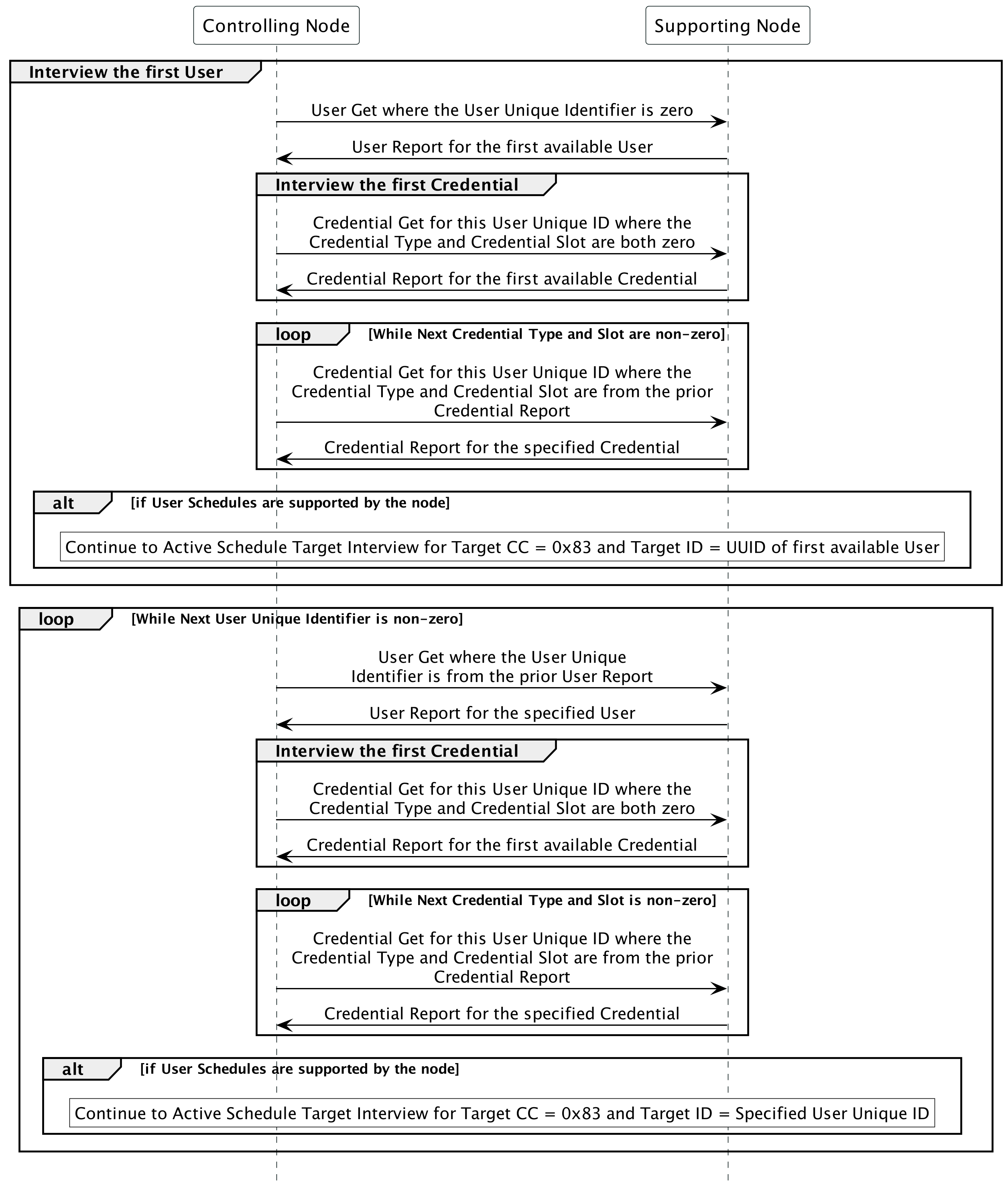
Figure 2.27 Using Next User Unique Identifier to interview Users
User Modifier Type (8 bits)
The User Modifier Type indicates how this user was last modified on the node.
\requirement{CC:0083.01.07.13.001}{0}
This MAY be used to audit all users on a node.
\requirement{CC:0083.01.07.11.002}{0}
This field MUST comply with Table 2.556.
Value |
Name |
Definition |
|---|---|---|
0x00 |
DNE |
The user / credential does not exist and therefore has no modifier. |
0x01 |
Unknown |
The user / credential was added via an unknown source. |
0x02 |
Z-Wave |
The user / credential was added with a Z-Wave command. |
0x03 |
Locally |
The user / credential was added locally, such as by using a keypad or admin card. |
0x04 |
Mobile app or other IoT technology |
The user / credential was added with a mobile app without a Z-Wave connection (BLE, Wi-Fi, etc.). |
\requirement{CC:0083.01.07.11.003}{0}
All other values are reserved and MUST NOT be used by a sending node. Reserved values MUST be ignored by a receiving node.
\requirement{CC:0083.01.07.11.006}{0}
If no user data is modified, the “User Modifier Type” and “User Modifier Node ID” MUST remain unchanged.
User Modifier Node ID (16 bits)
The User Modifier Node ID indicates which specific source last changed this user on the node.
\requirement{CC:0083.01.07.11.008}{0}
When the User Modifier Type is Z-Wave, this field MUST be the Node ID of the specific node which changed the user.
\requirement{CC:0083.01.07.11.009}{0}
When the User Modifier Type is DNE (“does not exist”), this field MUST be set to zero.
For all other User Modifier Types this field’s definition is manufacturer-specific.
2.2.120.11. Credential Set Command
This command adds, removes, or modifies Credentials in a node for an existing user.
7 |
6 |
5 |
4 |
3 |
2 |
1 |
0 |
|---|---|---|---|---|---|---|---|
Command Class = COMMAND_CLASS_USER_CREDENTIAL (0x83) |
|||||||
Command = CREDENTIAL_SET (0x0A) |
|||||||
User Unique Identifier (MSB) |
|||||||
User Unique Identifier (LSB) |
|||||||
Credential Type |
|||||||
Credential Slot (MSB) |
|||||||
Credential Slot (LSB) |
|||||||
Reserved |
Operation Type |
||||||
Credential Length |
|||||||
Credential Data |
|||||||
User Unique Identifier (16 bits)
See User Set Command for this field’s description.
Credential Type (8 bits)
\requirement{CC:0083.01.0A.11.000}{0}
The type of this specific Credential. This field MUST comply with Table 2.557.
Value |
Name |
Definition |
|---|---|---|
0x00 |
None |
Reserved for Next Credential Type in Credential Report |
0x01 |
PIN Code |
A numeric code typed in at the node |
0x02 |
Password |
Alpha-numeric code typed in at the node |
0x03 |
RFID Code |
A numeric code entered over a Radio Frequency ID connection |
0x04 |
BLE |
A numeric code entered over a Bluetooth Low energy connection |
0x05 |
NFC |
A numeric code entered over a Near Field Communication connection |
0x06 |
UWB |
A numeric code entered over an Ultra-Wideband connection |
0x07 |
Eye Biometric |
Biometric data relating to the eye(s) such as an iris, retina, or scleral vein which is scanned at the node |
0x08 |
Face Biometric |
Biometric data relating to the face which is scanned at the node |
0x09 |
Finger Biometric |
Biometric data relating to the finger(s) such as finger geometry or a fingerprint which is scanned at the node |
0x0A |
Hand Biometric |
Biometric data relating to the hand(s) such as a palm print or hand geometry which is scanned at the node |
0x0B |
Unspecified Biometric |
Biometric data that does not fall into other biometric types specified in this Credential Type which is scanned at the node |
Biometric examples referenced from [18].
\requirement{CC:0083.01.0A.11.001}{0}
All other values are reserved and MUST NOT be used by a sending node. Reserved values MUST be ignored by a receiving node.
\requirement{CC:0083.01.0A.11.002}{0}
If a Credential Type is specified in this command as one not advertised as supported in the Credential Capabilities Report Command, a receiving node MUST ignore the command.
\requirement{CC:0083.01.0A.11.020}{0}
PIN Codes MUST be transmitted in ASCII format.
\requirement{CC:0083.01.0A.11.021}{0}
Passwords MUST be transmitted in Unicode UTF-16 format, in big endian order.
Credential Slot (16 bits)
The Credential Slot is a sixteen bit address used to store Credentials.
\requirement{CC:0083.01.0A.11.003}{0}
The range of values MUST be one to Number of Supported Credential Slots for the given Credential Type, inclusive (see Credential Capabilities Report Command). Zero is an invalid Credential Slot unless being using in a Delete operation.
\requirement{CC:0083.01.0A.11.004}{0}
If a Credential Slot is specified in this command as one not advertised as supported in the Credential Capabilities Report Command for that Credential Type, a receiving node MUST ignore the command.
\requirement{CC:0083.01.0A.11.005}{0}
If a Credential Slot of zero is specified in this command for a non-Delete Operation Type, a receiving node MUST ignore the command.
Credential Slots are unique per Credential Type. For example, Credential Type 2, Slot 1 is distinct from Credential Type 3, Slot 1.
Reserved (6 bits)
\requirement{CC:0083.01.0A.11.006}{0}
This field MUST be set to zero by a sending node and MUST be ignored by a receiving node.
Operation Type (2 bits)
The Operation Type field indicates the event to change Credential data.
\requirement{CC:0083.01.0A.11.007}{0}
This field MUST comply with Table 2.558.
\requirement{CC:0083.01.0A.11.008}{0}
Value |
Name |
Definition |
|---|---|---|
0x00 |
Add |
A Credential for the given User Unique Identifier of the given Credential Type is added to the given Credential Slot. |
0x01 |
Modify |
A Credential for the given User Unique Identifier is modified. The fields in this command MUST overwrite existing user data unless the new data is determined to be invalid. |
0x02 |
Delete |
One or more Credentials are deleted. Other fields aside from the User Unique Identifier, Credential Type, Credential Slot and Delete Operation Type in this command MUST be ignored. Those MAY be set to default values or not included at all. If the Credential Type and Credential Slot are non-zero, then that Credential MUST be deleted if the User Unique Identifier matches the belonging user or is set to zero. The receiving node MUST then send a Credential Report Command with Credential Report Type “Credential Deleted” (0x02) with the deleted data to the sender. If the node’s state changed, the report MUST also be sent to the lifeline. If the User Unique Identifier and Credential Type are non-zero and Credential Slot is zero, then all Credentials of that Credential Type for that User Unique Identifier MUST be deleted. The receiving node MUST then send a Credential Report Command with Credential Report Type “Credential Deleted” (0x02) with the User Unique Identifier, Credential Type, and Credential Slot echoed back to the sender. If the node’s state changed, the report MUST also be sent to the lifeline. If the User Unique Identifier is non-zero and Credential Type is zero, then all Credentials of all Credential Types for that User Unique Identifier MUST be deleted. The receiving node MUST then send a Credential Report Command with Credential Report Type “Credential Deleted” (0x02) with the User Unique Identifier, Credential Type, and Credential Slot echoed back to the sender. If the node’s state changed, the report MUST also be sent to the lifeline. If the User Unique Identifier, Credential Type, and Credential Slot are zero, then all Credentials for all Users MUST be deleted. The receiving node MUST then send a Credential Report Command with Credential Report Type “Credential Deleted” (0x02) with the User Unique Identifier, Credential Type, and Credential Slot echoed back to the sender. If the node’s state changed, the report MUST also be sent to the lifeline. If the User Unique Identifier and Credential Slot are zero, and Credential Type is non-zero, then everything for that Credential Type MUST be deleted. The receiving node MUST then send a Credential Report Command with Credential Report Type “Credential Deleted” (0x02) with the User Unique Identifier, Credential Type, and Credential Slot echoed back to the sender. If the node’s state changed, the report MUST also be sent to the lifeline. |
\requirement{CC:0083.01.0A.11.009}{0}
All other values are reserved and MUST NOT be used by a sending node. Reserved values MUST be ignored by a receiving node.
\requirement{CC:0083.01.0A.11.024}{0}
If the clear all Credentials operation is encapsulated in Supervision and takes longer than one second, it MUST return a Supervision Report with status Working.
\requirement{CC:0083.01.0A.11.023}{0}
A supporting node receiving ‘Add’ or ‘Modify’ operations for a credential type that reports a Min and Max Length of Credential Data of 0 in the Credential Capabilities Report Command MUST ignore this command.
\requirement{CC:0083.01.0A.11.010}{0}
If all credentials are deleted, a Credential Report Command with Credential Report Type “Credential Deleted (0x02) MUST be returned to the sender and sent to the lifeline.
\requirement{CC:0083.01.0A.11.011}{0}
If a credential is added, a Credential Report Command with Credential Report Type “Credential Added” (0x00) MUST be returned to the sender and sent to the lifeline.
\requirement{CC:0083.01.0A.11.012}{0}
If a credential is modified, a Credential Report Command with Credential Report Type “Credential Modified” (0x01) MUST be returned to the sender and sent to the lifeline.
\requirement{CC:0083.01.0A.11.013}{0}
If a credential is deleted, a Credential Report Command with Credential Report Type “Credential Deleted” (0x02) MUST be returned to the sender and sent to the lifeline.
Credential Length (8 bits)
Credential Length is the length of the following Credential data, in bytes.
\requirement{CC:0083.01.0A.11.014}{0}
The length of the Credential data MUST be no longer than the Max Length of Credential Data for the specific Credential Type specified in the Credential Capabilities Report Command.
\requirement{CC:0083.01.0A.11.015}{0}
The length of the Credential data MUST be no shorter than the Min Length of Credential Data for the specific Credential Type specified in the Credential Capabilities Report Command.
\requirement{CC:0083.01.0A.13.016}{0}
This MAY be zero when deleting Credentials.
Credential Data (Variable Length)
The Credential data to set for the Credential being added or modified.
\requirement{CC:0083.01.0A.11.018}{0}
Duplicate credentials within a Credential Type MUST NOT be allowed.
If a node also supports Admin Code: .. raw:: latex
requirement{CC:0083.01.0A.11.022}{0}
The DuplicateCredential Credential Report Type requirement detailed in Table 2.560 MUST also apply to a received Credential Set command that meets the following conditions: - The Credential Set command has Credential Type PIN Code. - The PIN Code credential data is a duplicate of the Admin Code.
\requirement{CC:0083.01.0A.13.019}{0}
If a credential is used at the node that does not match any existing credential, a Notification Report Command with Notification Type “Access Control” (0x06) and Notification Event “Invalid credential used to access the node” (0x32) MAY be sent.
2.2.120.12. Credential Get Command
This command is used to retrieve Credential data for a given User Unique Identifier, type, and slot.
\requirement{CC:0083.01.0B.11.000}{0}
The Credential Report Command MUST be returned in response to this command.
\requirement{CC:0083.01.0B.11.001}{0}
This command MUST NOT be issued via multicast addressing.
\requirement{CC:0083.01.0B.11.002}{0}
A receiving node MUST NOT return a response if this command is received via multicast addressing. The Z-Wave Multicast frame, the broadcast Node ID and the Multi Channel Multi-End Point destination are all considered multicast addressing methods.
7 |
6 |
5 |
4 |
3 |
2 |
1 |
0 |
|---|---|---|---|---|---|---|---|
Command Class = COMMAND_CLASS_USER_CREDENTIAL (0x83) |
|||||||
Command = CREDENTIAL_GET (0x0B) |
|||||||
User Unique Identifier (MSB) |
|||||||
User Unique Identifier (LSB) |
|||||||
Credential Type |
|||||||
Credential Slot (MSB) |
|||||||
Credential Slot (LSB) |
|||||||
For fields’ description, refer to the Credential Set Command.
This command can be used to request a specific credential associated with a specific slot of a specific credential type:
\requirement{CC:0083.01.0B.11.003}{0}
If the User Unique Identifier, Credential Type, and Credential Slot are all non-zero, then the Credential associated with that user, type, and slot MUST be returned.
\requirement{CC:0083.01.0B.11.004}{0}
If no Credential exists for that user or type or slot (of that type), a Credential with length zero MUST be returned.
\requirement{CC:0083.01.0B.11.008}{0}
If the User Unique Identifier is zero and the Credential Type and Credential Slot are both non-zero, then the Credential associated with that type and slot MUST be returned.
\requirement{CC:0083.01.0B.11.009}{0}
If no Credential exists for type or slot (of that type), a Credential with length zero MUST be returned.
This command can also be used to request the first credential associated with a user or a credential type:
\requirement{CC:0083.01.0B.11.010}{0}
If the User Unique Identifier is non-zero, the Credential Type is non-zero and the Credential Slot is zero, then the first available Credential for that User Unique Identifier and that type MUST be returned.
\requirement{CC:0083.01.0B.11.005}{0}
If the User Unique Identifier is non-zero and the Credential Type and Credential Slot are both zero, then the first available Credential for that User Unique Identifier MUST be returned.
\requirement{CC:0083.01.0B.11.007}{0}
If the User Unique Identifier is zero, the Credential Type is non-zero and the Credential Slot is zero, then the first available Credential of that type MUST be returned.
\requirement{CC:0083.01.0B.11.011}{0}
If the User Unique Identifier, the Credential Type and the Credential Slot are all zero, then the first available Credential MUST be returned.
\requirement{CC:0083.01.0B.11.012}{0}
If no Credential exists for the user and type combination requested, a Credential with length zero MUST be returned.
\requirement{CC:0083.01.0B.11.006}{0}
Other combinations of zero and non-zero User Unique Identifier, Credential Type, and Credential Slot are considered invalid and MUST be ignored.
2.2.120.13. Credential Report Command
This command reports data about a Credential on a node for an existing user.
7 |
6 |
5 |
4 |
3 |
2 |
1 |
0 |
|---|---|---|---|---|---|---|---|
Command Class = COMMAND_CLASS_USER_CREDENTIAL (0x83) |
|||||||
Command = CREDENTIAL_REPORT (0x0C) |
|||||||
Credential Report Type |
|||||||
User Unique Identifier (MSB) |
|||||||
User Unique Identifier (LSB) |
|||||||
Credential Type |
|||||||
Credential Slot (MSB) |
|||||||
Credential Slot (LSB) |
|||||||
CRB |
Reserved |
||||||
Credential Length |
|||||||
Credential Data |
|||||||
Credential Modifier Type |
|||||||
Credential Modifier Node ID (MSB) |
|||||||
Credential Modifier Node ID (LSB) |
|||||||
Next Credential Type |
|||||||
Next Credential Slot (MSB) |
|||||||
Next Credential Slot (LSB) |
|||||||
For “User Unique Identifier”, “Credential Type”, and “Credential Slot” descriptions, refer to the Credential Set Command.
\requirement{CC:0083.01.0C.11.010}{0}
When used in a Credential Get Command, the non-zero value is used to iterate through credentials associated with a specific user and type. The zero value is used to iterate globally through all credentials associated with a type. However, when responding to a Credential Get Command, the User Unique Identifier field MUST be set to the User Unique Identifier of the user associated with this credential.
Credential Report Type (8 bits)
This field indicates the reason for sending the Credential Report message.
This field can be an error when setting Credential data has failed due to the current state of the node. This helps provide more information to the controller but is not meant to provide errors for bad data being sent, such as an unsupported Credential Slot. Commands that are never valid will be ignored.
\requirement{CC:0083.01.0C.11.011}{0}
This field MUST comply with Table 2.559, Table 2.560, and Table 2.561.
Value |
Name |
Definition |
Report Data |
Report Destination |
|---|---|---|---|---|
0x00 |
Credential Added |
A new credential was added. |
The new data. |
Return to sender and send to lifeline. |
0x01 |
Credential Modified |
An existing credential was modified. |
The new data. |
Return to sender and send to lifeline. |
0x02 |
Credential Deleted |
A single or bulk credential deletion request was made. |
For bulk deletions, the User Unique Identifier, Credential Type, and Credential Slot from the request MUST be echoed back. If the User Unique Identifier, Credential Type, and/or Credential Slot were zero, zero MUST be echoed back for the respective fields. For single deletions, when the Credential Type and Credential Slot are both non-zero in the deletion request, this report MUST contain the actually deleted data. This means, if the User Unique Identifier was set to zero in the Credential Set Command (where Credential Type and Slot were non-zero), the resulting Credential Report Command MUST contain the actual User Unique Identifier the deleted credential belonged to. |
Return to sender and send to lifeline. |
0x03 |
Credential Unchanged |
A credential add, delete or modify action was performed where no data changed. If a controlling node receives the ‘Unchanged’ Report Type, it SHOULD consider re-interviewing the node to refresh the node’s state. |
The data already occupying the User Unique Identifier, Credential Type, and Credential Slot. |
Return to sender but do not send to lifeline. |
0x04 |
Response to Get |
This report is in response to a Credential Get request. |
The data at the node. |
Return to sender but do not send to lifeline. |
0x05 |
Credential Add Rejected Location Occupied |
A credential add operation is rejected due to the Credential Type and Credential Slot already being occupied. If attempting to add a credential where a credential of that Credential Type at that Credential Slot already exists, and the new credential data differs, the Add operation MUST be rejected and this command MUST be sent instead. If an Add is rejected, a Modify operation MAY be used instead. |
The data already occupying the Credential Type and Credential Slot. |
Return to sender but do not send to lifeline. |
Value |
Name |
Definition |
Report Data |
Report Destination |
|---|---|---|---|---|
0x06 |
Credential Modify Rejected Location Empty |
A credential modify operation for an existing user is rejected due to the Credential Type and Credential Slot location being empty. If attempting to modify a credential where a credential of that Credential Type at that Credential Slot does not exist, the Modify operation MUST be rejected and this command MUST be sent instead. If a Modify is rejected, an Add operation MAY be used instead. |
The rejected data (Modifier Type: DNE). |
Return to sender but do not send to lifeline. |
0x07 |
Duplicate Credential |
If a duplicate credential is specified in a Credential Set Command for a Credential Type where that duplicate is located at a different Credential Slot or attached to a different User Unique Identifier, the receiving node MUST reject the command and instead send this command. If the duplicate is with the Admin Code, the Credential Report Type MUST be Duplicate Admin PIN Code (0x0A) instead. |
This report MUST contain the existing credential data. For example, if PIN Code 1234 is at Credential Slot 0x0002 but a Credential Set Command contains Credential Slot 0x0003, this command containing the Credential data with Credential Slot 0x0002 MUST be sent. Or, for example, if PIN Code 1234 is at Credential Slot 0x0002 for User Unique Identifier 0x0003 but a Credential Set Command contains User Unique Identifier 0x0004 and Credential Slot 0x0002, this command containing the Credential data with User Unique Identifier 0x0003 and Credential Slot 0x0002 MUST be sent. Controllers MAY re-assign credentials using User Credential Association Set Command. |
Return to sender but do not send to lifeline. |
0x08 |
Manufacturer Security Rules |
If a credential is rejected by the node due to not following manufacturer security rules, such as a node not allowing a PIN Code of only repeating digits, this command MUST be sent. |
This report MUST contain the rejected data (Modifier Type: DNE). |
Return to sender but do not send to lifeline. |
Value |
Name |
Definition |
Report Data |
Report Destination |
|---|---|---|---|---|
0x09 |
Wrong User Unique Identifier |
If the Credential Type and Credential Slot are already assigned to a different User Unique Identifier where the credential is not a duplicate, this command MUST be returned. Or, if the Credential Type and Credential Slot are not already assigned to a different User Unique Identifier where the credential is not a duplicate, but the User Unique Identifier is empty, this command MUST be returned with Modifier Type “Does Not Exist” (0x00). |
This report MUST contain the existing credential data if the location is assigned to a different user or the rejected data with Modifier Type “Does Not Exist” (0x00) if the User Unique Identifier, Credential Type, and Credential Slot are all empty. |
Return to sender but do not send to lifeline. |
0x0A |
Duplicate Admin PIN Code |
If a duplicate PIN Code is specified in a Credential Set Command for a PIN Code Credential Type where that duplicate is the Admin Code, the receiving node MUST reject the command and instead send this command. |
This report MUST contain the rejected data (Modifier Type: DNE). |
Return to sender but do not send to lifeline. |
\requirement{CC:0083.01.0C.11.012}{0}
All other values are reserved and MUST NOT be used by a sending node. Reserved values MUST be ignored by a receiving node.
\requirement{CC:0083.01.0C.11.013}{0}
If a credential is specified in this command for an Add or Modify operation for a User Unique Identifier, Credential Type, and Credential Slot where that credential is already located at the specified Credential Slot for the specified User Unique Identifier and Credential Type, the receiving node MUST send a Credential Report Command with Credential Report Type “Credential Unchanged” (0x03).
\requirement{CC:0083.01.0C.11.014}{0}
If no credential data is modified, the “Credential Modifier Type” and “Credential Modifier Node ID” MUST remain unchanged.
Credential Read Back (CRB) (1 bit)
This field is set to one if Credential Length and Credential Data contain the actual credential, and to zero if the credential cannot be read back from the device.
\requirement{CC:0083.01.0C.11.001}{0}
The Credential Read Back field MUST always be set to the same value within a credential type, even if the requested credential slot does not exist. If the requested credential type is not supported by the device, Credential Read Back field MUST set to zero.
\requirement{CC:0083.01.0C.11.021}{0}
If the credential can be read back (Maximum Credential Hash Length 0 in the Credential Capabilities Report Command), the CRB flag MUST be set to 1. Otherwise (Maximum Credential Hash Length is greater than 0 in the Credential Capabilities Report Command), the CRB flag MUST be set to 0.
\requirement{CC:0083.01.0C.11.020}{0}
Credentials of type PIN code MUST be reported by the node (CRB is set to 1) if mapped to the User Code Command Class.
\requirement{CC:0083.01.0C.12.002}{0}
In any case, non-biometric credential types SHOULD be reported by the node (CRB is set to 1).
\requirement{CC:0083.01.0C.11.000}{0}
If the credential cannot be read back (CRB is zero), the node MUST instead report a hash sum of the credential.
This hash sum can be used by the controlling node to track credential changes without revealing the actual Credential Data. It is up to the supporting node to choose the hashing algorithm.
\requirement{CC:0083.01.0C.12.003}{0}
The hashing algorithm SHOULD allow easy detection of Credential updates by either complying with modern hash-function requirements or being a sequence number.
\requirement{CC:0083.01.0C.12.004}{0}
The hashing algorithm SHOULD be one way.
Reserved (7 bits)
\requirement{CC:0083.01.0C.11.005}{0}
This field MUST be set to zero by a sending node and MUST be ignored by a receiving node.
Credential Length (8 bits)
See Credential Set Command for this field’s description.
\requirement{CC:0083.01.0C.11.006}{0}
In addition, this length MUST refer to the length of the hash sum of the Credential if Credential Read Back (CRB) is set to zero.
\requirement{CC:0083.01.0C.11.019}{0}
If CRB is zero, the Minimum and Maximum Length of Credential Data as advertised in the Credential Capabilities Report Command do not matter. However, the Credential Length MUST NOT be zero.
\requirement{CC:0083.01.0C.11.023}{0}
If the credential cannot be read back, the Credential Length MUST be smaller than or equal to the Maximum Credential Hash Length in the Credential Capabilities Report Command for this credential type.
Credential Data (Variable Length)
See Credential Set Command for this field’s description.
\requirement{CC:0083.01.0C.11.007}{0}
In addition, this data MUST be the hash sum of the Credential if Credential Read Back is set to zero.
Credential Modifier Type (8 bits)
The Credential Modifier Type indicates how this credential was last modified on the node.
\requirement{CC:0083.01.0C.13.026}{0}
This MAY be used to audit all credentials on a node.
\requirement{CC:0083.01.0C.11.027}{0}
This field MUST comply with Table 2.556.
\requirement{CC:0083.01.0C.11.028}{0}
All other values are reserved and MUST NOT be used by a sending node. Reserved values MUST be ignored by a receiving node.
\requirement{CC:0083.01.0C.11.029}{0}
If no credential data is modified, the “Credential Modifier Type” and “Credential Modifier Node ID” MUST remain unchanged.
Credential Modifier Node ID (16 bits)
The Credential Modifier Node ID indicates which specific source last changed this credential on the node.
\requirement{CC:0083.01.0C.11.030}{0}
When the Credential Modifier Type is Z-Wave, this field MUST be the Node ID of the specific node which changed the credential.
\requirement{CC:0083.01.0C.11.031}{0}
When the Credential Modifier Type is DNE (“does not exist”), this field MUST be set to zero.
For all other Credential Modifier Types this field’s definition is manufacturer-specific.
Next Credential Type (8 bits)
The Next Credential Type is used in tandem with the Next Credential Slot to iterate through all credentials for a given user (if User Unique Identifier is non-zero) or a given Credential Type (if User Unique Identifier is zero). It indicates the Credential Type for the next Credential to request when iterating.
\requirement{CC:0083.01.0C.11.002}{0}
This means: If in a valid Credential Get Command, the returned data MUST comply with Table 2.562.
Request |
Response (current) |
Response (next) |
Iterate by |
Filter by (AND) |
|||||
|---|---|---|---|---|---|---|---|---|---|
UUID |
Type |
Slot |
Exists |
User DNE |
Cred.DNE |
UUID |
Type |
||
0 |
0 |
0 |
First |
2nd |
N/A |
N/A |
Type (0,NZ,NZ) |
||
0 |
NZ |
0 |
First for type |
2nd |
N/A |
N/A |
Type (0,NZ,NZ) |
Type |
|
0 |
NZ |
NZ |
Requested |
Next |
N/A |
Next after requested |
Type (0,NZ,NZ) |
Type |
|
NZ |
0 |
0 |
First for user |
2nd |
None |
N/A |
UUID (NZ,NZ,NZ) |
UUID |
|
NZ |
NZ |
0 |
First for user and type |
2nd |
None |
N/A |
UUID (NZ,NZ,NZ) |
UUID |
Type |
NZ |
NZ |
NZ |
Requested |
Next |
None |
Next after requested |
UUID (NZ,NZ,NZ) |
UUID |
|
\requirement{CC:0083.01.0C.11.022}{0}
If the requested user has been non-zero but does not exist, then these Next Credential fields MUST set to zero
\requirement{CC:0083.01.0C.11.024}{0}
If the requested user has been non-zero (no matter the requested type or slot) and exists, then these Next Credential fields MUST advertise the next existing credential for that user after the reported credential (among all credential types, but no credentials of other users).
\requirement{CC:0083.01.0C.11.025}{0}
If the requested user has been zero (no matter the requested type or slot), then these Next Credential fields MUST advertise the next existing credential for that user after the reported credential (among all credential types).
\requirement{CC:0083.01.0C.11.016}{0}
If the requested user has been non-zero and the requested slot has been non-zero but does not exist (for the requested user), then these Next Credential fields MUST advertise the next existing credential for that user after the requested credential (among all credential types, but no credentials of other users).
\requirement{CC:0083.01.0C.11.017}{0}
If the requested user has been zero and the requested slot has been non-zero but does not exist (for all users), then these Next Credential fields MUST advertise the next existing credential after the requested credential (among all credential types despite the user).
\requirement{CC:0083.01.0C.11.018}{0}
This field MUST comply with the values listed in Table 2.557.
\requirement{CC:0083.01.0C.11.008}{0}
This MUST be a non-zero value if there is at least one more credential for this user (or credential type) and MUST be set to 0x00 if there are no more credentials for this user (or credential type).
\requirement{CC:0083.01.0C.12.018}{0}
During the iteration throught credentials using Credential Get Command it is RECOMMENDED for the controlling node to use the same value of the requested user (zero or non-zero) as in the first Credential Get Command request.
Next Credential Slot (16 bits)
The Next Credential Slot is used in tandem with the Next Credential Type to iterate through all credentials for a given user (if User Unique Identifier is non-zero) or a given Credential Type (if User Unique Identifier is zero). It indicates the Credential Slot for the next Credential to request when iterating. The value can range from one to the maximum number of credentials supported by this type.
\requirement{CC:0083.01.0C.11.009}{0}
This MUST be a non-zero value if there is at least one more credential for this user (or credential type) and MUST be set to zero if there are no more credentials for this user (or credential type).
2.2.120.14. Credential Learn Start Command
This command initiates the local credential learn process on the supporting node.
\requirement{CC:0083.01.0F.11.000}{0}
The Credential Learn Status Report Command MUST be returned at the end of the learn process (successful, unsuccessful, or canceled).
\requirement{CC:0083.01.0F.11.001}{0}
If the learn process is successful, the Credential Report Command MUST be returned at the end of the learn process.
\requirement{CC:0083.01.0F.11.002}{0}
If a credential is rejected as invalid during the learn process, the same Credential Report Command that would be sent if the node received a Credential Set Command with that credential MUST be sent. For example, if the credential is a duplicate and rejected for this reason, a Credential Report Command with a Credential Report Type of Duplicate Credential (0x07) will be sent.
7 |
6 |
5 |
4 |
3 |
2 |
1 |
0 |
|---|---|---|---|---|---|---|---|
Command Class = COMMAND_CLASS_USER_CREDENTIAL (0x83) |
|||||||
Command = CREDENTIAL_LEARN_START (0x0F) |
|||||||
User Unique Identifier (MSB) |
|||||||
User Unique Identifier (LSB) |
|||||||
Credential Type |
|||||||
Credential Slot (MSB) |
|||||||
Credential Slot (LSB) |
|||||||
Reserved |
Operation Type |
||||||
Credential Learn Timeout |
|||||||
For “User Unique Identifier”, “Credential Type”, and “Credential Slot” descriptions, refer to the Credential Set Command.`.
\requirement{CC:0083.01.0F.11.003}{0}
If a Credential Type is specified in this command as one not advertised as supported in the Credential Capabilities Report Command, a receiving node MUST ignore the command.
\requirement{CC:0083.01.0F.11.004}{0}
If a Credential Type is specified in this command as one not advertised as having Credential Learn Support in the Credential Capabilities Report Command, a receiving node MUST ignore the command.
\requirement{CC:0083.01.0F.11.005}{0}
If a User Unique Identifier is specified in this command as one not advertised as supported in the User Capabilities Report Command, a receiving node MUST ignore the command.
\requirement{CC:0083.01.0F.11.006}{0}
If a Credential Slot for the Credential Type is specified in this command as one not advertised as supported in the Credential Capabilities Report Command, a receiving node MUST ignore the command.
Reserved (6 bits)
\requirement{CC:0083.01.0F.11.007}{0}
This field MUST be set to zero by a sending node and MUST be ignored by a receiving node.
Operation Type (2 bits)
The Operation Type field indicates the event to change Credential data.
\requirement{CC:0083.01.0F.11.008}{0}
This field MUST comply with Table 2.563.
\requirement{CC:0083.01.0F.11.009}{0}
Value |
Name |
Definition |
|---|---|---|
0x00 |
Credential Learn Add |
A Credential for the given User Unique Identifier of the given Credential Type is added to the given Credential Slot. If a Credential at this index already exists, this operation MUST be rejected and a Credential Learn Modify operation MAY be used instead. |
0x01 |
Credential Learn Modify |
A Credential for the given User Unique Identifier of the given Credential Type is modified for the given Credential Slot. If a Credential at this index does not already exist, this operation MUST be rejected and a Credential Learn Add operation MAY be used instead. |
\requirement{CC:0083.01.0F.11.010}{0}
All other values are reserved and MUST NOT be used by a sending node. Reserved values MUST be ignored by a receiving node.
Credential Learn Timeout (8 bits)
Timeout for each credential learn step on the node, in seconds.
\requirement{CC:0083.01.0F.13.011}{0}
The node MAY choose to return a timeout failure earlier than the specified timeout value.
\requirement{CC:0083.01.0F.11.012}{0}
The node MUST NOT continue the learn process after the provided timeout has elapsed.
If no credential was learned and timeout (either provided or less than provided) was reached:
\requirement{CC:0083.01.0F.11.013}{0}
The node MUST stop the learn process.
\requirement{CC:0083.01.0F.12.014}{0}
The node SHOULD advertise the user with audio-visual effect that the learn process has ended.
\requirement{CC:0083.01.0F.11.015}{0}
The node MUST report back to the initiating node the Credential Learn Status Report Command command with a timeout status.
This command is from the GET commands family and a successful Supervision Report does not necessarily indicate learn status.
2.2.120.15. Credential Learn Cancel Command
This command cancels the local credential learn process on the supporting node.
\requirement{CC:0083.01.10.11.000}{0}
The Credential Learn Status Report Command MUST be returned in response to this command with a Credential Learn Status of “Ended Not Due to Timeout”.
\requirement{CC:0083.01.10.11.001}{0}
The learn process MUST end in response to this command.
7 |
6 |
5 |
4 |
3 |
2 |
1 |
0 |
|---|---|---|---|---|---|---|---|
Command Class = COMMAND_CLASS_USER_CREDENTIAL (0x83) |
|||||||
Command = CREDENTIAL_LEARN_CANCEL (0x10) |
|||||||
2.2.120.16. Credential Learn Status Report Command
This command reports data about a Credential Learn on a node for an existing user.
7 |
6 |
5 |
4 |
3 |
2 |
1 |
0 |
|---|---|---|---|---|---|---|---|
Command Class = COMMAND_CLASS_USER_CREDENTIAL (0x83) |
|||||||
Command = CREDENTIAL_LEARN_REPORT (0x11) |
|||||||
Credential Learn Status |
|||||||
User Unique Identifier (MSB) |
|||||||
User Unique Identifier (LSB) |
|||||||
Credential Type |
|||||||
Credential Slot (MSB) |
|||||||
Credential Slot (LSB) |
|||||||
Credential Learn Steps Remaining |
|||||||
For “User Unique Identifier”, “Credential Type”, and “Credential Slot” descriptions, refer to the Credential Set Command
\requirement{CC:0083.01.11.11.004}{0}
This command MUST be sent for each step of the Credential Learn process and on completion of the credential learn.
Credential Learn Status (8 bits)
This field indicates the result of the credential learn process.
\requirement{CC:0083.01.11.11.000}{0}
This field MUST comply with Table 2.564.
\requirement{CC:0083.01.11.11.001}{0}
Value |
Name |
Definition |
|---|---|---|
0x00 |
Started |
Credential learn step has started. |
0x01 |
Success |
A Credential was learned and stored in the corresponding slot. |
0x02 |
Already in Progress |
The node is already in the learning process. The current step of the learn process MUST continue until the original timeout (provided or less than provided) expires. |
0x03 |
Ended Not Due to Timeout |
The learn process has ended before the timeout (provided or less than provided) expired. If this status is returned, the learn process MUST end. No credential was learned, and the slot was left untouched. For example, a node could decide to stop the learn process after determining the first credential attempt is invalid, or it could decide to allow additional attempts as part of the same Credential Learn Start Command. This status MUST be returned in response to the Credential Learn Cancel Command. |
0x04 |
Timeout |
A Credential Learn process timed out. No credential was learned, and the slot was left untouched. |
0x05 |
Credential Learn Step Retry |
One step of the credential learn process was not completed correctly and MUST be retried. |
0xFE |
Invalid Credential Learn Add Operation Type |
The requested add operation type is invalid. If a Credential Learn Add is requested when a credential already exists at the specified slot, this status MUST be returned. If this status is returned, the learn process MUST NOT be entered. No credential was learned, and the slot was left untouched. |
0xFF |
Invalid Credential Learn Modify Operation Type |
The requested modify operation type is invalid. If a Credential Learn Modify is requested when no credential exists at the specified slot, this status MUST be returned. If this status is returned, the learn process MUST NOT be entered. No credential was learned, and the slot was left untouched. |
\requirement{CC:0083.01.11.11.002}{0}
All other values are reserved and MUST NOT be used by a sending node. Reserved values MUST be ignored by a receiving node.
Credential Learn Steps Remaining (8 bits)
\requirement{CC:0083.01.11.11.003}{0}
This field indicates the number of remaining steps in the credential learn process for the learn process to be completed. This field MUST NOT be 0 if Credential Learn Status is Started, Already in Progress, or Credential Learn Step Retry. This field MUST be 0 for all other defined Credential Learn Status values. For the first step in a flow where the Credential Learn Status is Started, this value MUST be the total number of steps required to learn the credential.
2.2.120.17. User Credential Association Set Command
This command is used to associate an existing credential with an updated user, in place of the user it is currently linked to.
For example, a biometric credential might be added directly to a lock using a lock’s local interface. Those limited local interfaces can make it challenging to associate the newly added biometric credential with an already existing user, and as a result the lock may automatically create a new user entry for the credential. That user may later want to use an interface on their controller to move that biometric credential over to a previously existing user (that may have been programmed through the controller, and have existing credentials like an RFID card and a PIN Code). They can use this command to accomplish that goal. At the end of this process, the credential will no longer be associated with its starting user.
\requirement{CC:0083.01.12.11.000}{0}
A node receiving this command MUST respond by sending a User Credential Association Report Command.
\requirement{CC:0083.01.12.11.001}{0}
This command MUST NOT be issued via multicast addressing.
\requirement{CC:0083.01.12.11.002}{0}
A receiving node MUST NOT return a response if this command is received via multicast addressing. The Z-Wave Multicast frame, the broadcast Node ID and the Multi Channel Multi-End Point destination are all considered multicast addressing methods.
7 |
6 |
5 |
4 |
3 |
2 |
1 |
0 |
|---|---|---|---|---|---|---|---|
Command Class = COMMAND_CLASS_USER_CREDENTIAL (0x83) |
|||||||
Command = USER_CREDENTIAL_ASSOCIATION_SET (0x12) |
|||||||
Credential Type |
|||||||
Credential Slot (MSB) |
|||||||
Credential Slot (LSB) |
|||||||
Destination User Unique Identifier (MSB) |
|||||||
Destination User Unique Identifier (LSB) |
|||||||
\requirement{CC:0083.01.12.11.003}{0}
The Destination User Unique Identifier MUST be non-zero, and MUST reference an existing User Unique Identifier.
\requirement{CC:0083.01.12.11.004}{0}
The Credential Type MUST be one supported by the receiving device.
\requirement{CC:0083.01.12.11.005}{0}
The Credential Slot MUST contain an existing credential.
Credential Type (8 bits)
This field advertises the Credential Type of the Credential that will be associated with a different User Unique Identifier.
\requirement{CC:0083.01.12.11.006}{0}
This field MUST comply with values listed in Table 2.557.
Credential Slot (16 bits)
This field advertises the Credential Slot of the Credential that will be associated with a different User Unique Identifier.
Destination User Unique Identifier (16 bits)
The Destination User Unique Identifier is used to identify the User Unique Identifier that will be linked to the credential after the operation of this command.
\requirement{CC:0083.01.12.11.007}{0}
If the Destination User Unique Identifier does not reference an already existing User Unique Identifier, then the node receiving this command MUST report back to the initiating node with a failure status and MUST NOT change the User or Credential data in response to this command.
2.2.120.18. User Credential Association Report Command
This command is used to make other nodes aware of the action taken in response to the User Credential Association Set Command.
\requirement{CC:0083.01.13.11.002}{0}
Besides to the node that sent the User Credential Association Set Command, this command MUST also be sent to the Lifeline if an existing credential is successfully moved to another user and/or credential slot. Refer to status “Success” in Table 2.565.
7 |
6 |
5 |
4 |
3 |
2 |
1 |
0 |
|---|---|---|---|---|---|---|---|
Command Class = COMMAND_CLASS_USER_CREDENTIAL (0x83) |
|||||||
Command = USER_CREDENTIAL_ASSOCIATION_REPORT (0x13) |
|||||||
Credential Type |
|||||||
Credential Slot (MSB) |
|||||||
Credential Slot (LSB) |
|||||||
Destination User Unique Identifier (MSB) |
|||||||
Destination User Unique Identifier (LSB) |
|||||||
User Credential Association Status |
|||||||
For “Credential Type”, “Credential Slot”, and “Destination User Unique Identifier” descriptions, refer to the User Credential Association Set Command.
User Credential Association Status (8 bits)
This field indicates the result of the user credential association set process.
\requirement{CC:0083.01.13.11.000}{0}
This field MUST comply with Table 2.565.
Value |
Name |
Definition |
Report Destination |
|---|---|---|---|
0x00 |
Success |
The operation was performed successfully, and the Source Credential is now associated with the Destination User Unique Identifier. |
Sender of Set command and Lifeline |
0x01 |
Credential Type Invalid |
The Credential Type does not reference a valid credential type for the target device, for example because the identifier provided does not refer to a credential type supported by that device. |
Sender of Set command |
0x02 |
Credential Slot Invalid |
The Credential Slot does not reference a valid credential slot within the given Credential Type, for example because the identifier provided is outside the allowed range. |
Sender of Set command |
0x03 |
Credential Slot Empty |
The Credential Slot does not reference an existing credential within the given Credential Type on the target device. |
Sender of Set command |
0x04 |
Destination User Unique Identifier Invalid |
The Destination User Unique Identifier does not reference a valid user identifier, for example because the identifier provided is outside the allowed range. |
Sender of Set command |
0x05 |
Destination User Unique Identifier Nonexistent |
The Destination User Unique Identifier does not reference an existing user on the target device. |
Sender of Set command |
\requirement{CC:0083.01.13.11.001}{0}
All other values are reserved and MUST NOT be used by a sending node. Reserved values MUST be ignored by a receiving node.
2.2.120.19. All Users Checksum Get Command
This command is used to request an All Users checksum representing the User Unique Identifiers, User Types, User Active States, Credential Rules, User Name Encodings, User Name Lengths, User Names, and all the Credentials currently set at the receiving node for all User Unique Identifiers with any data.
\requirement{CC:0083.01.14.11.000}{0}
This command MUST be ignored by a node advertising no support for the All Users Checksum functionality in the User Capabilities Report Command.
\requirement{CC:0083.01.14.11.001}{0}
The All Users Checksum Report Command MUST be returned in response to this command if the All Users Checksum functionality is advertised as supported in the User Capabilities Report Command.
\requirement{CC:0083.01.14.11.002}{0}
This command MUST NOT be issued via multicast addressing.
\requirement{CC:0083.01.14.11.003}{0}
A receiving node MUST NOT return a response if this command is received via multicast addressing. The Z-Wave Multicast frame, the broadcast NodeID and the Multi Channel Multi-End Point destination are all considered multicast addressing methods.
7 |
6 |
5 |
4 |
3 |
2 |
1 |
0 |
|---|---|---|---|---|---|---|---|
Command Class = COMMAND_CLASS_USER_CREDENTIAL (0x83) |
|||||||
Command = ALL_USERS_CHECKSUM_GET (0x14) |
|||||||
2.2.120.20. All Users Checksum Report Command
This command is used to advertise the current All Users checksum representing the User Unique Identifiers, User Types, User Active States, Credential Rules, User Name Encodings, User Name Lengths, User Names, and all the Credentials set at the sending node for all User Unique Identifiers with any data. For these field’s definitions, refer to the User Set Command and the Credential Set Command.
7 |
6 |
5 |
4 |
3 |
2 |
1 |
0 |
|---|---|---|---|---|---|---|---|
Command Class = COMMAND_CLASS_USER_CREDENTIAL (0x83) |
|||||||
Command = ALL_USERS_CHECKSUM_REPORT (0x15) |
|||||||
All Users Checksum (MSB) |
|||||||
All Users Checksum (LSB) |
|||||||
All Users Checksum (16 bits)
This field is used to advertise the checksum representing the User Unique Identifiers, User Types, User Active States, Credential Rules, User Name Encodings, User Name Lengths, User Names, and all Credentials set at the sending node for all User Unique Identifiers with any data.
\requirement{CC:0083.01.15.11.000}{0}
The checksum MUST be calculated using the CRC-CCITT polynomium using initialization value equal to 0x1D0F and 0x1021 (normal representation). Refer to CRC-CCITT Source Code for details.
\requirement{CC:0083.01.15.11.012}{4} \requirement{CC:0083.01.15.12.013}{8} \requirement{CC:0083.01.15.13.014}{12}
If the on-demand calculation of the checksum of the full database on that particular device might take longer than one second, the Application Status Command Class MUST be supported and an Application Busy Command MUST be returned if one second is exceeded. To avoid this, it is RECOMMENDED to calculate the checksum in the background after each database modification. Alternatively, the device MAY skip supporting the All Users Checksum feature.
\requirement{CC:0083.01.15.11.001}{0}
The checksum data MUST be built by concatenating the User Unique Identifier, User Type, User Active State, Credential Rule, User Name Encoding, User Name Length, User Name, and then defined Credentials data in the ascending Credential Type and then Slot Number order for the User Unique Identifier where User Unique Identifier is also in ascending order.
\requirement{CC:0083.01.15.11.002}{0}
Each User Unique Identifier checksum MUST be formatted as follows:
User Unique Identifier (16 bits) | User Type (8 bits) | User Active State (8 bits) | Credential Rule (8 bits) | User Name Encoding (8 bits) | User Name Length (8 bits) | User Name (User Name Length bytes)
Followed with each defined User Unique Identifier Credential data formatted as follows:
Credential Type (8 bits) | Credential Slot (16 bits) | Credential Length (8 bits) | Credential Data (Credential Length bytes)
\requirement{CC:0083.01.15.11.003}{0}
Credential Length and Credential Data MUST be set to what is reported in the Credential Report Command.
\requirement{CC:0083.01.15.11.004}{0}
If a Credential Length of 0 is reported or a hashed value is reported rather than the full Credential Data, that Credential Length of 0 or hashed Credential Data value MUST be used in the checksum calculation.
\requirement{CC:0083.01.15.11.005}{0}
If there is no Credential data set for a User Unique Identifier, the checksum MUST NOT be modified other than for the User Unique Identifier data.
\requirement{CC:0083.01.15.11.006}{0}
If there is no Users data (and thus no Credentials data) set at the node at all, the checksum MUST be set to 0x0000.
For example, a node with Users Data:
User Unique Identifier 0x0003, User Type 0x04 (Non-Access User), User Active State 0x01 (Occupied Enabled), Credential Rule 0x01 (Single), User Name Encoding 0x00 (Standard ASCII), User Name Length 0x06, User Name Jackie
and 4 Credentials that are set as follows:
Credential Type 0x01 (PIN Code), Credential Slot 0x0002, Credential Length 4, Credential Data 9277
Credential Type 0x01 (PIN Code), Credential Slot 0x0004, Credential Length 6, Credential Data 954988
Credential Type 0x02 (Password), Credential Slot 0x0001, Credential Length 34 (Unicode UTF-16 format, in big endian order), Credential Data zwavenodepassword
Credential Type 0x09 (Finger Biometric), Credential Slot 0x0008, Credential Length 2, Credential Data 0x4583 (Hashed Biometric Data)
User Unique Identifier 0x0005, User Type 0x00 (General User), User Active State 0x01 (Occupied Enabled), Credential Rule 0x01 (Single), User Name Encoding 0x00 (Standard ASCII), User Name Length 0x04, User Name Mike
and 2 Credentials that are set as follows:
Credential Type 0x01 (PIN Code), Credential Slot 0x0003, Credential Length 4, Credential Data 4812
Credential Type 0x08 (Face Biometric), Credential Slot 0x0003, Credential Length 2, Credential Data 0x2755 (Hashed Biometric Data)
User Unique Identifier 0x0007, User Type 0x06 (Disposable User), User Active State 0x01 (Occupied Enabled), Credential Rule 0x01 (Single), User Name Encoding 0x00 (Standard ASCII), User Name Length 0x00
and no Credentials set
\requirement{CC:0083.01.15.11.007}{0}
In this case, data for the User Unique Identifier MUST be concatenated to obtain the checksum data in this way:
0x0003 | 0x04 | 0x01 | 0x01 | 0x00 | 0x06 | 0x4A 61 63 6B 69 65
0x01 | 0x0002 | 0x04 | 0x39 32 37 37
0x01 | 0x0004 | 0x06 | 0x39 35 34 39 38 38
0x02 | 0x0001 | 0x22 | 0x00 7A 00 77 00 61 00 76 00 65 00 6E 00 6F 00 64 00 65 00 70 00 61 00 73 00 73 00 77 00 6F 00 72 00 64
0x09 | 0x0008 | 0x02 | 0x45 83
0x0005 | 0x00 | 0x01 | 0x01 | 0x00 | 0x04 | 0x4D 69 6B 65
0x01 | 0x0003 | 0x04 | 0x34 38 31 32
0x08 | 0x0003 | 0x02 | 0x27 55
0x0007 | 0x06 | 0x01 | 0x01 | 0x00 | 0x00
\requirement{CC:0083.01.15.11.008}{0}
The checksum data MUST be: 0x000304010100064A61636B6965010002043932373701000406393534393838 02000122007A0077006100760065006E006F0064006500700061007300730077006F00720064 090008024583000500010100044D696B65010003043438313208000302275500070601010000
\requirement{CC:0083.01.15.11.009}{0}
The returned All Users Checksum field MUST be set to: 0xE602.
\requirement{CC:0083.01.15.11.010}{0}
For another example, a node with no Users Data set, MUST return 0x0000 since there are no Users or Credentials at the node.
For nodes that support Admin Code functionality:
\requirement{CC:0083.01.15.11.011}{0}
Admin Code information is NOT included in All Users Checksum, so a controlling node MUST separately request an Admin PIN Code Report with an Admin PIN Code Get Command to get the Admin Code information.
2.2.120.21. User Checksum Get Command
This command is used to request a User checksum representing the User Type, User Active State, Credential Rule, and all the Credentials currently set at the receiving node for a User Unique Identifier. For these field’s definitions, refer to the User Set Command and the Credential Set Command.
\requirement{CC:0083.01.16.11.000}{0}
This command MUST be ignored by a node advertising no support for the User Checksum functionality in the User Capabilities Report Command.
\requirement{CC:0083.01.16.11.001}{0}
The User Checksum Report Command MUST be returned in response to this command if the User Checksum functionality is advertised as supported in the User Capabilities Report Command.
\requirement{CC:0083.01.16.11.002}{0}
This command MUST NOT be issued via multicast addressing.
\requirement{CC:0083.01.16.11.003}{0}
A receiving node MUST NOT return a response if this command is received via multicast addressing. The Z-Wave Multicast frame, the broadcast NodeID and the Multi Channel Multi-End Point destination are all considered multicast addressing methods.
7 |
6 |
5 |
4 |
3 |
2 |
1 |
0 |
|---|---|---|---|---|---|---|---|
Command Class = COMMAND_CLASS_USER_CREDENTIAL (0x83) |
|||||||
Command = USER_CHECKSUM_GET (0x16) |
|||||||
User Unique Identifier (MSB) |
|||||||
User Unique Identifier (LSB) |
|||||||
User Unique Identifier (16 bits)
See User Set Command for this field’s description.
2.2.120.22. User Checksum Report Command
This command is used to advertise the current User checksum representing the User Type, User Active State, Credential Rule, User Name Encoding, User Name Length, User Name, and all the Credentials set at the sending node for a User Unique Identifier.
7 |
6 |
5 |
4 |
3 |
2 |
1 |
0 |
|---|---|---|---|---|---|---|---|
Command Class = COMMAND_CLASS_USER_CREDENTIAL (0x83) |
|||||||
Command = USER_CHECKSUM_REPORT (0x17) |
|||||||
User Unique Identifier (MSB) |
|||||||
User Unique Identifier (LSB) |
|||||||
User Checksum (MSB) |
|||||||
User Checksum (LSB) |
|||||||
User Unique Identifier (16 bits)
See User Set Command for this field’s description.
User Checksum (16 bits)
This field is used to advertise the checksum representing the User Type, User Active State, Credential Rule, User Name Encoding, User Name Length, User Name, and all Credentials set at the sending node for a User Unique Identifier.
\requirement{CC:0083.01.17.11.000}{0}
The checksum MUST be calculated using the CRC-CCITT polynomium using initialization value equal to 0x1D0F and 0x1021 (normal representation). Refer to CRC-CCITT Source Code for details.
\requirement{CC:0083.01.17.11.001}{0}
The checksum data MUST be built by concatenating the User Type, User Active State, Credential Rule, User Name Encoding, User Name Length, User Name, and then defined Credentials data in the ascending Credential Type and then Slot Number order for the User Unique Identifier.
\requirement{CC:0083.01.17.11.002}{0}
Each User Unique Identifier checksum MUST be formatted as follows:
User Type (8 bits) | User Active State (8 bits) | Credential Rule (8 bits) | User Name Encoding (8 bits) | User Name Length (8 bits) | User Name (User Name Length bytes)
Followed with each defined User Unique Identifier Credential data formatted as follows:
Credential Type (8 bits) | Credential Slot (16 bits) | Credential Length (8 bits) | Credential Data (Credential Length bytes)
\requirement{CC:0083.01.17.11.003}{0}
Credential Length and Credential Data MUST be set to what is reported in the Credential Report Command.
\requirement{CC:0083.01.17.11.004}{0}
If a Credential Length of 0 is reported or a hashed value is reported rather than the full Credential Data, that Credential Length of 0 or hashed Credential Data value MUST be used in the checksum calculation.
\requirement{CC:0083.01.17.11.005}{0}
If there is no Credential data set for a User Unique Identifier, the checksum MUST NOT be modified other than for the User Unique Identifier data.
\requirement{CC:0083.01.17.11.006}{0}
If there is no User data (and thus no Credentials data) set at the node for a User Unique Identifier, the checksum MUST be set to 0x0000.
For example, a node with User Data:
User Type 0x04 (Non-Access User), User Active State 0x01 (Occupied Enabled), Credential Rule 0x01 (Single), User Name Encoding 0x00 (Standard ASCII), User Name Length 0x04, User Name Matt
and 4 Credentials that are set as follows:
Credential Type 0x01 (PIN Code), Credential Slot 0x0002, Credential Length 4, Credential Data 9277
Credential Type 0x01 (PIN Code), Credential Slot 0x0004, Credential Length 6, Credential Data 954988
Credential Type 0x02 (Password), Credential Slot 0x0001, Credential Length 34 (Unicode UTF-16 format, in big endian order), Credential Data zwavenodepassword
Credential Type 0x0A (Hand Biometric), Credential Slot 0x0008, Credential Length 2, Credential Data 0x7199 (Hashed Biometric Data)
\requirement{CC:0083.01.17.11.007}{0}
In this case, data for the User Unique Identifier MUST be concatenated to obtain the checksum data in this way:
0x04 | 0x01 | 0x01 | 0x00 | 0x04 | 0x4D 61 74 74
0x01 | 0x0002 | 0x04 | 0x39 32 37 37
0x01 | 0x0004 | 0x06 | 0x39 35 34 39 38 38
0x02 | 0x0001 | 0x22 | 0x00 7A 00 77 00 61 00 76 00 65 00 6E 00 6F 00 64 00 65 00 70 00 61 00 73 00 73 00 77 00 6F 00 72 00 64
0x0A | 0x0008 | 0x02 | 0x71 99
\requirement{CC:0083.01.17.11.008}{0}
The checksum data MUST be: 0x04010100044D617474010002043932373701000406393534393838 02000122007A0077006100760065006E006F0064006500700061007300730077006F007200640A0008027199.
\requirement{CC:0083.01.17.11.009}{0}
The returned User Credential Checksum field MUST be set to: 0x9024.
For another example, a node with User Data:
User Type 0x04 (Non-Access User), User Active State 0x01 (Occupied Enabled), Credential Rule 0x01 (Single), User Name Encoding 0x00 (Standard ASCII), User Name Length 0x06, User Name Lillie
and no Credentials set.
\requirement{CC:0083.01.17.11.010}{0}
In this case, data for the User Unique Identifier MUST be concatenated to obtain the checksum data in this way:
0x04 | 0x01 | 0x01 | 0x00 | 0x06 | 0x4C 69 6C 6C 69 65
\requirement{CC:0083.01.17.11.011}{0}
The checksum data MUST be: 0x04010100064C696C6C6965.
\requirement{CC:0083.01.17.11.012}{0}
The returned User Credential Checksum field MUST be set to: 0xF900.
\requirement{CC:0083.01.17.11.013}{0}
For another example, a node with no User Data set at User Unique Identifier 0x0010, MUST return 0x0000 since there is no User at that User Unique Identifier.
2.2.120.23. Credential Checksum Get Command
This command is used to request a Credential checksum representing the Credential Slots, Credential Lengths, and Credential Data at the receiving node for a Credential Type. For these field’s definitions, refer to the Credential Set Command.
\requirement{CC:0083.01.18.11.000}{0}
This command MUST be ignored by a node advertising no support for the Credential Checksum functionality in the Credential Capabilities Report Command.
\requirement{CC:0083.01.18.11.001}{0}
The Credential Checksum Report Command MUST be returned in response to this command if the Credential Checksum functionality is advertised as supported in the Credential Capabilities Report Command.
\requirement{CC:0083.01.18.11.002}{0}
This command MUST NOT be issued via multicast addressing.
\requirement{CC:0083.01.18.11.003}{0}
A receiving node MUST NOT return a response if this command is received via multicast addressing. The Z-Wave Multicast frame, the broadcast NodeID and the Multi Channel Multi-End Point destination are all considered multicast addressing methods.
7 |
6 |
5 |
4 |
3 |
2 |
1 |
0 |
|---|---|---|---|---|---|---|---|
Command Class = COMMAND_CLASS_USER_CREDENTIAL (0x83) |
|||||||
Command = CREDENTIAL_CHECKSUM_GET (0x18) |
|||||||
Credential Type |
|||||||
Credential Type (8 bits)
\requirement{CC:0083.01.18.11.004}{0}
This field MUST comply with values listed in Table 2.557.
2.2.120.24. Credential Checksum Report Command
This command is used to advertise the current Credential checksum representing the Credential Slots, Credential Lengths, and Credential Data at the receiving node for a Credential Type.
7 |
6 |
5 |
4 |
3 |
2 |
1 |
0 |
|---|---|---|---|---|---|---|---|
Command Class = COMMAND_CLASS_USER_CREDENTIAL (0x83) |
|||||||
Command = CREDENTIAL_CHECKSUM_REPORT (0x19) |
|||||||
Credential Type |
|||||||
Credential Checksum (MSB) |
|||||||
Credential Checksum (LSB) |
|||||||
Credential Type (8 bits)
\requirement{CC:0083.01.19.11.000}{0}
This field MUST comply with values listed in Table 2.557.
Credential Checksum (16 bits)
This field is used to advertise the current Credential checksum representing the Credential Slots, Credential Lengths, and Credential Data at the receiving node for a Credential Type.
\requirement{CC:0083.01.19.11.001}{0}
The checksum MUST be calculated using the CRC-CCITT polynomium using initialization value equal to 0x1D0F and 0x1021 (normal representation). Refer to CRC-CCITT Source Code for details.
\requirement{CC:0083.01.19.11.002}{0}
The checksum data MUST be built by concatenating the Credential Slot, Credential Length, and Credential Data in the ascending Credential Slot order for the Credential Type.
\requirement{CC:0083.01.19.11.003}{0}
Each Credential checksum MUST be formatted as follows:
Credential Slot (16 bits) | Credential Length (8 bits) | Credential Data (Credential Length bytes)
\requirement{CC:0083.01.19.11.004}{0}
Credential Length and Credential Data MUST be set to what is reported in the Credential Report Command.
\requirement{CC:0083.01.19.11.005}{0}
If a Credential Length of 0 is reported or a hashed value is reported rather than the full Credential Data, that Credential Length of 0 or hashed Credential Data value MUST be used in the checksum calculation.
\requirement{CC:0083.01.19.11.006}{0}
If there is no Credentials data set at the node for a Credential Type, the checksum MUST be set to 0x0000.
For example, a node with Credential data:
Credential Type 0x01 (PIN Code), Credential Slot 0x0002, Credential Length 4, Credential Data 9277
Credential Type 0x01 (PIN Code), Credential Slot 0x0004, Credential Length 6, Credential Data 954988
Credential Type 0x02 (Password), Credential Slot 0x0001, Credential Length 34 (Unicode UTF-16 format, in big endian order), Credential Data zwavenodepassword
Credential Type 0x07 (Eye Biometric), Credential Slot 0x0008, Credential Length 2, Credential Data 0x2401 (Hashed Biometric Data)
\requirement{CC:0083.01.19.11.007}{0}
In this case, data for the Credential Type PIN Code MUST be concatenated to obtain the checksum data in this way:
0x0002 | 0x04 | 0x39 32 37 37 | 0x0004 | 0x06 | 0x39 35 34 39 38 38
\requirement{CC:0083.01.19.11.008}{0}
The checksum data MUST be: 0x00020439323737000406393534393838.
\requirement{CC:0083.01.19.11.009}{0}
The returned Credential Checksum field MUST be set to: 0xD867.
\requirement{CC:0083.01.19.11.010}{0}
In this case, data for the Credential Type Password MUST be concatenated to obtain the checksum data in this way:
0x0001 | 0x11 | 0x00 7A 00 77 00 61 00 76 00 65 00 6E 00 6F 00 64 00 65 00 70 00 61 00 73 00 73 00 77 00 6F 00 72 00 64
\requirement{CC:0083.01.19.11.011}{0}
The checksum data MUST be: 0x000122007A0077006100760065006E006F0064006500700061007300730077006F00720064
\requirement{CC:0083.01.19.11.012}{0}
The returned Credential Checksum field MUST be set to: 0x6F76.
\requirement{CC:0083.01.19.11.013}{0}
In this case, data for the Credential Type Eye Biometric MUST be concatenated to obtain the checksum data in this way:
0x0008 | 0x02 | 0x24 01
\requirement{CC:0083.01.19.11.014}{0}
The checksum data MUST be: 0x0008022401
\requirement{CC:0083.01.19.11.015}{0}
The returned Credential Checksum field MUST be set to: 0xC06E.
\requirement{CC:0083.01.19.11.016}{0}
In this case, data for the Credential Type RFID Code MUST return 0x0000 since there are no RFID Codes set at the node.
2.2.120.25. Admin Code Information
The Admin Code (also ‘Admin PIN Code’) is the mechanism by which compatibility is maintained with the User Code Command Class, version 2 if the node supports Admin Code within the User Code Command Class. Some nodes have a need for a method of ingress or manipulation that is tied to the node, and not a specific User. The Admin Code is intended to exist statically, with no attachment to a specific User or Credential.
In practical terms, it can be visualized similarly to a permanent Programming User with a persistent PIN Code Credential, albeit with a few differences:
There are not multiple Admin Codes
The ‘user’ does not have a UUID and cannot be modified, deleted or moved
The ‘user’ only has 1 PIN Code and no other Credentials, and no other credentials may be added
The PIN Code cannot be moved or deleted, but can be modified or deactivated (if deactivation is supported by the node).
Delete All Users or All Credentials do not affect Admin Code.
In-depth requirements and functions are explained in detail below.
This functionality is primarily intended to ensure minimization of undefined or undesired behavior when nodes supporting User Code and User Credential exist on a network.
\requirement{CC:0083.01.00.13.003}{0}
If the User Code Command Class is NOT supported by the node, only User Credential, the Admin Code functionality MAY still be used if needed to fulfill other operational requirements of the node.
\requirement{CC:0083.01.00.12.003}{0}
However, it is RECOMMENDED that in the case where User Code is NOT supported, a Programming User(s) SHOULD be used instead.
If the Admin Code is supported:
\requirement{CC:0083.01.00.11.005}{0}
PIN Code Credentials MUST be supported.
\requirement{CC:0083.01.00.11.010}{0}
The Maximum Data Length and Minimum Data Length of a PIN Code Credential MUST be greater than 0 as reported in the User Capabilities Report Command.
\requirement{CC:0083.01.00.11.006}{0}
The Admin Code MUST NOT be tied to any other Credential Type (RFID, Fingerprint, etc).
\requirement{CC:0083.01.00.11.007}{0}
The Admin Code MUST be subject to all of the restrictions and requirements of the PIN Code Credential Type.
\requirement{CC:0083.01.00.11.008}{0}
The Admin Code MUST NOT conflict with the operation of any existing PIN Code Credentials and vice versa.
\requirement{CC:0083.01.00.11.009}{0}
The Admin Code MUST NOT be a duplicate of any existing PIN Code Credentials and vice versa.
\requirement{CC:0083.01.00.21.013}{0}
In the case that the node supports both User Code and User Credential Command Classes, requirements in Compatibility Considerations MUST supersede the requirements for the following commands:
2.2.120.26. Admin PIN Code Set Command
This command is used to set the Admin Code in the receiving node.
\requirement{CC:0083.01.1A.13.001}{0}
When a node advertising AC Support receives an Admin PIN Code Set, an Admin PIN Code Report with an appropriate Result Code (see Table 2.566) MAY be required to be returned to the sender and/or Lifeline association group, subject to the later requirements in this section.
\requirement{CC:0083.01.1A.12.001}{0}
In the case of no appropriate code, Unspecified Node Error (0x0F) SHOULD be used.
\requirement{CC:0083.01.1A.11.001}{0}
When a node receives an Admin PIN Code Set that is successful in changing the Admin Code, an Admin PIN Code Report with Result Code 0x01 (Modified) MUST be returned to sender and sent to the Lifeline association group.
\requirement{CC:0083.01.1A.13.002}{0}
When a node not advertising AC support receives an Admin PIN Code Set command, the node MAY either return an Admin PIN Code Report with Result Code 0x0D (AC Not Supported) to the sender or ignore the command.
\requirement{CC:0083.01.1A.11.002}{0}
7 |
6 |
5 |
4 |
3 |
2 |
1 |
0 |
|---|---|---|---|---|---|---|---|
Command Class = COMMAND_CLASS_USER_CREDENTIAL (0x83) |
|||||||
Command = ADMIN_PIN_CODE_SET (0x1A) |
|||||||
Reserved |
Admin PIN Code Length |
||||||
Admin PIN Code 1 |
|||||||
… |
|||||||
Admin PIN Code N |
|||||||
Reserved
\requirement{CC:0083.01.1A.11.003}{0}
This field MUST be set to 0 by a sending node and MUST be ignored by a receiving node.
Admin PIN Code Length (4 bits)
This field is used to advertise the length in bytes of the Admin PIN Code field in the command.
\requirement{CC:0083.01.1A.11.015}{0}
This field MUST be set to 0 or within the range Min..Max Credential Length of Credential Type PIN Code.
\requirement{CC:0083.01.1A.11.016}{0}
Values greater than 0 and in accordance with the supported range MUST indicate that the receiving node MUST set the Admin Code as indicated in the Admin PIN Code field.
\requirement{CC:0083.01.1A.11.006}{0}
The value 0 MUST indicate that the receiving node MUST deactivate the Admin Code if ACD is supported by the node.
\requirement{CC:0083.01.1A.13.003}{0}
When a node not advertising ACD support receives an Admin PIN Code Set with code length 0, the node MAY either return an Admin PIN Code Report with Result Code 0x0E (ACD Not Supported) to the sender, or ignore the command.
Admin PIN Code (N bytes)
This field is used to advertise the Admin Code to be set for the node.
\requirement{CC:0083.01.1A.11.007}{0}
The length of this field MUST be set according to the Admin PIN Code Length field value.
\requirement{CC:0083.01.1A.11.008}{0}
Each byte in this field MUST be encoded with ASCII representation.
\requirement{CC:0083.01.1A.11.009}{0}
Unless superseded by other requirements, the encoding and characters that the Admin Code supports MUST match the characters and encoding supported by credentials of Credential Type PIN Code.
\requirement{CC:0083.01.1A.11.010}{0}
A supporting node receiving a non-supported ASCII character MUST ignore the command.
\requirement{CC:0083.01.1A.13.004}{0}
A supporting node receiving an Admin Code identical to the current Admin Code MAY either return an Admin PIN Code Report with a result code of 0x03 (Unmodified) to the sending node, or ignore the command.
\requirement{CC:0083.01.1A.13.005}{0}
A supporting node receiving an Admin Code identical to a PIN Code that already exists in a current Credential MAY either return an Admin PIN Code Report with a result code of 0x07 (Duplicate Credential) to the sending node, or ignore the command.
\requirement{CC:0083.01.1A.11.011}{0}
A supporting node receiving an Admin Code that fails a manufacturer security rule check MUST return an Admin PIN Code Report with a result code of 0x08 (Manufacturer Security Rule) to the sending node.
\requirement{CC:0083.01.1A.11.012}{0}
A supporting node receiving an Admin Code with an invalid length, format, or encoding MUST ignore the command.
When the Admin Code is input, the node:
\requirement{CC:0083.01.1A.11.013}{0}
MUST indicate that the code is accepted
\requirement{CC:0083.01.1A.11.014}{0}
MUST grant access to administrator functionalities, such as the network settings and/or User Credential management interface.
\requirement{CC:0083.01.1A.13.007}{0}
MAY operate the node
2.2.120.27. Admin PIN Code Get Command
This command is used to request the Admin Code currently set at the receiving node.
\requirement{CC:0083.01.1B.13.001}{0}
If AC functionality is NOT supported, an Admin PIN Code Report Command with Result Code AC Not Supported (0x0D) MAY be returned to the sending node in response to this command, or simply ignored.
\requirement{CC:0083.01.1B.11.001}{0}
If AC functionality is supported, the Admin PIN Code Report Command with an appropriate Result Code MUST be returned in response to this command.
- The supported Get result codes are:
0x04: Response to Get
0x0F: Unspecified Node Error
See Table 2.566 for further information on allowed result codes.
\requirement{CC:0083.01.1B.11.002}{0}
This command MUST NOT be issued via multicast addressing.
\requirement{CC:0083.01.1B.11.003}{0}
A receiving node MUST NOT return a response if this command is received via multicast addressing. The Z-Wave Multicast frame, the broadcast NodeID and the Multi Channel multi-End Point destination are all considered multicast addressing methods.
7 |
6 |
5 |
4 |
3 |
2 |
1 |
0 |
|---|---|---|---|---|---|---|---|
Command Class = COMMAND_CLASS_USER_CREDENTIAL (0x83) |
|||||||
Command = ADMIN_PIN_CODE_GET (0x1B) |
|||||||
2.2.120.28. Admin PIN Code Report Command
This command is used to advertise the Admin Code currently set at the sending node.
\requirement{CC:0083.01.1C.11.001}{0}
When a node’s Admin Code is updated using a local method (keypad, mobile application, etc.), an Admin PIN Code Report with Result Code 0x01 (Modified) MUST be sent to the Lifeline association group.
\requirement{CC:0083.01.1C.11.002}{0}
Admin PIN Code Reports with operation result codes not specified in Table 2.566 MUST be ignored.
7 |
6 |
5 |
4 |
3 |
2 |
1 |
0 |
|---|---|---|---|---|---|---|---|
Command Class = COMMAND_CLASS_USER_CREDENTIAL (0x83) |
|||||||
Command = ADMIN_PIN_CODE_REPORT (0x1C) |
|||||||
Admin PIN Code Operation Result |
Admin PIN Code Length |
||||||
Admin PIN Code 1 |
|||||||
… |
|||||||
Admin PIN Code N |
|||||||
Admin PIN Code Operation Result
See Admin PIN Code Set and Admin PIN Code Get for specific requirements for the Operation Result field.
This field allows a node to pass information about the result of an Admin Code operation to another node.
\requirement{CC:0083.01.1C.11.003}{0}
Numeric Value |
Operation (Get/Set) |
Name |
Description |
|---|---|---|---|
0x01 |
Modified |
Set |
Admin Code was modified. Reports with this code MUST be returned to the sender and sent on the Lifeline association group. |
0x03 |
Unmodified |
Set |
Admin Code was not modified as the current code is identical. |
0x04 |
Response to Get |
Get |
Successful Get operation. |
0x07 |
Fail - Duplicate Credential |
Set |
Admin Code was not modified - a duplicate PIN code exists in the Credential database. |
0x08 |
Fail - Manufacturer Security Rule |
Set |
Admin Code was not modified as the provided code fails a manufacturer security rule. |
0x0D |
Error - AC Not Supported |
Get/Set |
Operation cannot be completed as Admin Code functionality is unsupported. |
0x0E |
Error - ACD Not Supported |
Set |
Operation cannot be completed as Admin Code cannot be disabled. |
0x0F |
Unspecified Node Error |
Get/Set |
Issue with Get or Set not explicitly stated in the specification. |
Admin PIN Code Length (4 bits)
This field is used to advertise the length in bytes of the Admin PIN Code field in the command.
\requirement{CC:0083.01.1C.11.008}{0}
If the Admin Code is set and advertised in this command, this field MUST be set to a value greater than 0 and within the range Min..Max Credential Length of Credential Type PIN Code.
\requirement{CC:0083.01.1C.11.005}{0}
This field MUST be set to 0 if the Admin Code is deactivated or if the sending node advertises no support for the Admin Code functionality (AC Support) in the Credential Capabilities Report Command.
Admin PIN Code (N bytes)
This field is used to advertise the Admin Code currently set at the sending node.
\requirement{CC:0083.01.1C.11.006}{0}
The length of this field MUST be set according to the Admin PIN Code Length field value. If the Admin PIN Code Length is set to 0, this field MUST be omitted.
\requirement{CC:0083.01.1C.11.007}{0}
Each byte in this field MUST be encoded with ASCII representation.
