7.2. Common Z-Wave Plus v2 Device Type Requirements
7.2.1. How to detect Z-Wave Plus v2 compliant nodes
\requirement{DT:00.11.0001.1}{0}
A Z-Wave Plus v2 node MUST advertise version 0x02 in the Z-Wave Plus Version field of the Z-Wave Plus Info Report. Multi Channel End Points MUST advertise the same version number in their Z-Wave Plus Info Report
\requirement{DT:00.11.0002.1}{0}
A Z-Wave Plus v2 node MUST set the Optional Functionality bit to 1 in its NIF. For the NIF’s description, refer to Section 2.
7.2.2. Command Classes Support Requirements
\requirement{DT:00.11.0003.1}{0}
A Z-Wave Plus v2 node MUST support the command classes listed in the following sections. When a version number is indicated, the node MUST support or control the indicated version or a newer one.
7.2.2.1. Root Device level
\requirement{DT:00.11.0004.1}{0}
All Root Devices or nodes MUST support:
Association, version 2
Association Group Information
Device Reset Locally
Firmware Update Meta Data, version 5
Indicator, version 3
Manufacturer Specific
Multi Channel Association, version 3
Powerlevel
Security 2
Supervision
Transport Service, version 2
Version, version 2
Z-Wave Plus Info, version 2
7.2.2.2. End Point level
\requirement{DT:00.11.0005.1}{0}
All Multi Channel End Points MUST support:
Association, version 2
Association Group Information
Multi Channel Association, version 3
Supervision
Z-Wave Plus Info, version 2
7.2.3. Identify
\requirement{DT:00.11.0006.2}{0}
A Z-Wave Plus v2 node MUST support an Identify indicator (Indicator ID 0x50) which can be used for an Identify function.
\requirement{DT:00.12.0004.1}{0}
The node is RECOMMENDED to use a visible LED for an identify function if it has an LED. If the node is itself a light source, e.g. a light bulb, this MAY be used in place of a dedicated LED.
\requirement{DT:00.11.0007.1}{0}
The Root Device of a node MUST support the Indicator Command Class, version 3 or newer and support the Indicator ID 0x50 (Identify) and Properties ID 0x03, 0x04 and 0x05.
\requirement{DT:00.13.0001.1}{0}
Multi Channel devices MAY support an Identify indicator on End Points, if the corresponding End Point has its own LED or light source.
\requirement{DT:00.11.0008.1}{0}
If a Multi Channel device only implements a single indicator for the entire device, the End Points MUST NOT support the Identify Indicator, while the Root Device MUST support the Identify Indicator.
7.2.4. Dynamic Capabilities and Node Discovery
\requirement{DT:00.11.0009.1}{0}
A controller MUST have a menu or method for an (advanced) end user to request the controller to perform a capability discovery for a given node (i.e. to perform a complete commissioning interview)
\requirement{DT:00.13.0002.1}{0}
Nodes (and their End Points) MAY change capabilities based on a user action, such as changing configuration parameters or the physical addition/removal of a module.
\requirement{DT:00.11.000A.1}{0}
End Point changing capabilities based on a user action MUST NOT be advertised as Dynamic End Points.
\requirement{DT:00.13.0003.1}{0}
If supporting Configuration Command Class, nodes MAY issue a Configuration Report advertising a dynamic capabilities parameter value change in order to let the lifeline destination(s) know that some capabilities have changed.
\requirement{DT:00.11.000B.1}{0}
However, a controlling node MUST NOT perform the node interview unless instructed to do so by the end user.
\requirement{DT:00.11.000C.1}{0}
The configuration of Command Classes that are available before and after a capability change MUST remain unchanged. For instance, the Lifeline Association Group destination and Wake Up destination MUST stay identical when a node changes capabilities.
\requirement{DT:00.11.000D.1}{0}
A node MUST stay compliant and observe Z-Wave Plus v2 Device Type requirements when and after changing capabilities. A node MAY change its Device Type when altering its capabilities.
\requirement{DT:00.11.000E.1}{0}
A node being able to change between a secure only Device Type (S2 Access Control) and a regular S2 Device Type MUST observe the S2 Access Control Device Type requirements (3.6.8.2.1) even if configured to be a regular Device Type.
7.2.5. Controller Functionalities
A controller plays an important role in a Z-Wave network because this device hosts important functionality to create, maintain and configure the network and the home automation application. The following sections describe important rules to ensure that a controller is capable of fulfilling this important role.
7.2.5.1. Interoperability
\requirement{DT:00.11.0011.1}{0}
To ensure interoperability, a controller MUST comply with the following requirements:
It is not acceptable to block interoperability by any means.
It is not acceptable to prevent inclusion of certified devices into a system or force exclusion of non- preferred devices after inclusion.
Devices from non-preferred manufacturers MAY be placed in a special section of the user interface; this section should be referred to as “Additional Z-Wave Ecosystem Devices”. Additionally, it is acceptable to inform the user, upon inclusion of non-preferred devices that the device being included is not part of the vendors preferred ecosystem, and that control and support of the device by the vendor may be limited.
a. It is not permitted to display additional pop-ups, ask for pin codes or implement any other blocking or discouraging behavior for inclusion or control of non-preferred devices. b. The Z-Wave Alliance recommends wording as follows. “You are about to include a Z-Wave compatible device that is not promoted by ‘service provider name’ for use in this application. While the device will work as expected the device may or may not support all of the features of the ‘service provider name’ recommended device.”
7.2.5.2. Minimal Control Functionality
\requirement{DT:00.11.0012.1}{0}
If a controller product supports short range wireless non-Z-Wave technology smarthome products (e.g. light bulbs, thermostats, door locks and the like) and Z-Wave technology products, it MUST, at a minimum, control the following Command Classes:
Door Lock Command Class
Binary Switch Command Class
Multilevel Switch Command Class
Thermostat Mode Command Class
Thermostat Setpoint Command Class
It is acceptable to provide additional controlling functionalities for nodes from a preferred manufacturer as long as the controller provides the minimal required control functionalities for all nodes. Refer to Section 6 for Command Class control requirements.
7.2.6. Command Class Support Specific Requirements
Certain rules must be fulfilled depending on which command classes are supported. The following subsections detail the requirements of special command classes. Details about individual Command Classes can be found in Section 2, Section 3, Section 4 and Section 5.
7.2.6.1. Anti-theft Command Class
\requirement{DT:00.11.002A.1}{0}
If the Anti-Theft Command Class is supported, it MUST be version 3 or newer.
7.2.6.2. Application Status Command Class
\requirement{DT:00.11.0015.1}{0}
If a node is temporarily not capable to service a Get or Set Command request, it MUST support the Application Status Command Class and return an Application Busy Report Command to the initiator of the Get or Set.
\requirement{DT:00.13.0004.1}{0}
If a node is always capable of servicing the Get and Set requests, it is OPTIONAL to support the Application Status Command Class.
7.2.6.3. Association requirements
7.2.6.3.1. Mandatory groups
\requirement{DT:00.11.0016.1}{0}
The Root Device and End Points of a Z-Wave Plus v2 node MUST advertise the Association Groups indicated in Table 7.1 as a minimum.
Group identifier |
Profile (2 bytes) |
Command Class & Command list (N bytes) |
Group name (UTF-8) (M bytes) |
|---|---|---|---|
1 |
General:Lifeline |
Refer to Section 7.2.6.3.2 |
Lifeline |
\requirement{DT:00.11.0017.1}{0}
A Node or Root Device MUST advertise a “Max Nodes Supported” value of 1 or more for the Lifeline Association group in the Association Report and Multi Channel Association Report Commands.
\requirement{DT:00.12.0006.1}{0}
It is RECOMMENDED to support 5 lifeline destinations.
\requirement{DT:00.11.0018.1}{0}
End Points MUST advertise a “Max Nodes Supported” of 0 for the Lifeline Group and MUST report their Lifeline Commands via the Root Device’s Lifeline Group when an End Point Association is established for the Lifeline Group. (Refer to Multi Channel Association Command Class)
7.2.6.3.2. Lifeline reports
\requirement{DT:00.11.0019.1}{0}
A Z-Wave Plus v2 node MUST issue all the commands defined in [24] via the Lifeline Association Group to reflect its state changes if the corresponding command is supported by the node.
\requirement{DT:00.12.0001.1}{0}
Report or Notification Commands SHOULD NOT be issued while performing a transitions from a Command Class state to another, but only when the supporting node has reached a final state. Intermediate transition state values SHOULD be advertised only if a long transition takes place (e.g. transition longer than 1 minute)
\requirement{DT:00.12.0002.1}{0}
Any other Command Class state or configuration relevant to the control of the node or relevant for GUI information SHOULD be reported via the Lifeline when changed.
\requirement{DT:00.11.001A.1}{0}
If the state change was triggered by other means than a Z-Wave Command, a node MUST issue the corresponding Report/Notification Command immediately to the lifeline destination(s).
If the state change was triggered by a Z-Wave Command:
\requirement{DT:00.12.0003.1}{0}
A node SHOULD NOT issue any Report/Notification Commands via the Lifeline if the actual lifeline destination issued the Set Command.
\requirement{DT:00.11.001B.1}{0}
A node MUST NOT issue any Report/Notification Command after a Command received via Multicast/broadcast addressing.
\requirement{DT:00.11.002D.1}{0}
A node MUST issue a Report/Notification Command after a Command received via Singlecast using Multi Channel multi-endpoint bit addressing.
\requirement{DT:00.11.001C.1}{0}
Unless the lifeline destination issued the command, a node MUST issue a Report/Notification Command after a command was received using singlecast addressing (including Multi Channel multi-End Point destination) via the Lifeline.
\requirement{DT:00.11.001D.1}{0}
If a node has more than one lifeline destination, it MUST issue a Report/Notification Command after a command was received using singlecast addressing (including Multi Channel multi-End Point destination) via the Lifeline.
An example of the expected frame flow is shown in Figure 7.1.
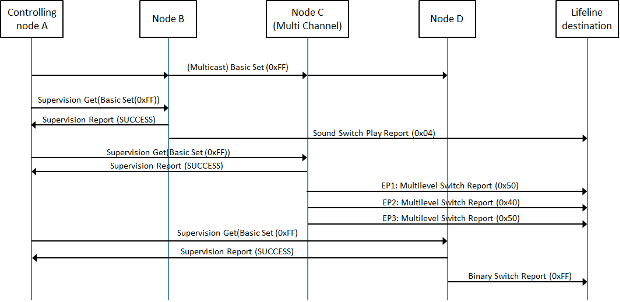
Figure 7.1 Lifeline status reports frame flow after multicast (example)
7.2.6.4. Configuration Command Class
\requirement{DT:00.11.001E.1}{0}
If the Configuration Command Class is implemented, it MUST NOT replace any existing Command Class functionality.
\requirement{DT:00.11.001F.1}{0}
If the Configuration Command Class is supported, it MUST be version 4 as a minimum.
7.2.6.5. Firmware Update Meta Data Command Class
\requirement{DT:00.11.0020.1}{0}
The configuration of Command Classes that are available before and after a firmware update MUST remain unchanged. For instance, the Lifeline Association Group destination, Wake Up destination and any command class setting MUST stay identical before and after performing a firmware update.
7.2.6.5.1. SmartStart QR Code accuracy
\requirement{DT:00.11.0032.1}{0}
A node undergoing a firmware update MAY have inaccurate data in its QR Code TLVs. An OTA Firmware Update MUST NOT lead to a loss of functionality that is indicated as supported in the QR Code.
\requirement{DT:00.13.0005.1}{0}
The following TLVs MAY be inaccurate after a firmware update:
The Product Type
The ProductID
\requirement{DT:00.11.0033.1}{0}
The following information MUST remain accurate after a firmware update:
The DSK
The requested keys (for non-SmartStart S2 inclusions)
UUID16 TLV
\requirement{DT:00.12.0005.1}{0}
The Supported Protocols TLV MAY become inaccurate. The Supported Protocol SHOULD only be inaccurate if more Protocols are supported than what the QR Code’s Supported Protocols TLV indicates
7.2.6.6. Wake Up Command Class
\requirement{DT:00.11.0021.1}{0}
If the node supports the Wake Up Command Class, the node MUST support manual Wake Up triggered by a user activation.
7.2.6.7. Multi Channel support
\requirement{DT:00.11.0022.1}{0}
Actuator functionalities MUST reside in individual Multi Channel End Points according to the list of actuator Device Types.
\requirement{DT:00.11.0023.1}{0}
Multi Channel devices MUST support the Multi Channel Command Class, version 4 or newer
\requirement{DT:00.11.0024.1}{0}
A node supporting the Multi Channel Command Class MUST issue commands to the Lifeline destination from all of its End Points if an End Point Association has been established on the Root Device Lifeline association group.
\requirement{DT:00.11.0025.1}{0}
A command issued to the Lifeline destination from a Multi Channel End Point MUST be Multi Channel encapsulated if an End Point Association has been established.
7.2.6.8. Security 2 Command Class
7.2.6.8.1. S2 bootstrapping and functionalities
\requirement{DT:00.21.0001.1}{0}
After network inclusion, a node MUST consider S2 Bootstrapping as started after receiving the S2 KEX Get Command.
\requirement{DT:00.21.0002.1}{0}
If a node times out waiting for security bootstrapping after network inclusion, it MUST NOT consider that bootstrapping failed and MUST consider that it was included non-securely.
\requirement{DT:00.23.0001.1}{0}
If S2 bootstrapping started and did not complete successfully, a supporting node MAY remove support of its implemented command classes until re-included. Refer to Section 2 regarding NIF contents depending on network inclusion and security bootstrapping.
\requirement{DT:00.21.0003.1}{0}
A node supporting S2 MUST consider any Security Class lower than its highest granted Security Class as unsecure communication. Certain command classes, such as Transport Service or Z-Wave Plus Info, must always be supported non-securely and present in the NIF if they are supported by a node. In this case, non-secure support requirements are specified in each individual command class definition. A list of these special Command Classes is also available in [26] under “Additional Comments”.
\requirement{DT:00.21.0004.1}{0}
By default, a node supporting S2 MUST support its Command Classes only at the highest granted Security Class. If no Security Class was granted, the node MUST support all its Command Class using non-secure communication. This does not apply to S2 Access Control nodes, which MAY (or sometimes MUST) remove support for some Command Classes if a particular Security Class has not been granted.
7.2.6.8.2. S2 Security Classes requirements
Security 2 (S2) Command Class, version 1 defines several Security Classes.
\requirement{DT:00.21.0005.1}{0}
A Z-Wave Plus v2 node MUST request either S2 Access Control or S2 Authenticated as its highest key.
\requirement{DT:00.21.0006.1}{0}
An S2 supporting node MUST comply with the requirements indicated in the subsection below (Section 7.2.6.8.2.1 or Section 7.2.6.8.2.2) associated to its highest requested Security Class during S2 bootstrapping.
\requirement{DT:00.21.0007.1}{0}
Nodes requesting the S0 Security Class MUST also comply with requirement indicated in 3.6.8.3.
\requirement{DT:00.21.0008.1}{0}
A Multi Channel Root Device and all its End Points MUST share the same highest S2 Security Class.
7.2.6.8.2.1. S2 Access Control Security Class
The S2 Access Control Class is the most trusted class and is intended for home access control devices such as door locks, garage door openers or central controllers.
\requirement{DT:00.21.0009.1}{0}
A node requesting the S2 Access Control Security Class MUST carry a representation of its DSK on itself and/or make it visible on its UI at any time when Learn Mode is enabled. Refer to Section 7.2.6.8.4 for DSK format and representation.
\requirement{DT:00.21.000A.1}{0}
A node based on a controlling Device Type (4.3) requesting S2 Access Control Security Class MUST request S2 Authenticated and S2 Unauthenticated Security Classes when being S2 bootstrapped.
\requirement{DT:00.23.0002.1}{0}
A node based on a controlling Device Type (4.3) requesting the S2 Access Control Security Class MAY decide to not support a set of its implemented Command Classes if it has not been granted a certain Security Class during S2 bootstrapping.
\requirement{DT:00.23.0003.1}{0}
A node based on a supporting Device Type (4.2) requesting S2 Access Control Security Class MAY request any other Security Class for control purposes.
\requirement{DT:00.21.000B.1}{0}
A node based on a supporting Device Type (4.2) MUST support its Command Classes depending on Security bootstrapping as follows:
\requirement{DT:00.21.000C.1}{0}
If security bootstrapped, it MUST support its Command Classes only if the highest granted key is S0 or S2 Access Control Security Class. It MUST NOT support its Command Classes at all if its highest granted Security Class is any other class than S0 or S2 Access Control.
\requirement{DT:00.21.000D.1}{0}
If it timed out waiting for security bootstrapping or S0/S2 bootstrapping failed, it MUST NOT support its Command Classes non-securely.
\requirement{DT:00.21.000E.1}{0}
The above two requirements MUST NOT apply for Command Classes that MUST always be in the NIF (refer to Section 7.2.6.8.1 and [26]).
7.2.6.8.2.2. S2 Authenticated Security Class
The S2 Authenticated Class is the 2nd most trusted class and is intended for secure applications in home control deployments.
\requirement{DT:00.21.000F.1}{0}
A node requesting the S2 Authenticated Security Class MUST carry a representation of its DSK on itself and/or make it visible on its UI at any time when Learn Mode is enabled. Refer to Section 7.2.6.8.4 for DSK format and representation.
7.2.6.8.3. S0 Security Class requirements
The S0 Class is used for backwards compatibility with S0 supporting nodes.
\requirement{DT:00.21.0011.1}{0} \requirement{DT:00.21.0012.1}{4}
An S2 node MUST NOT request the S0 Security Class if it does not support the Security 0 Command Class. An S2 node MUST NOT request the S0 Security Class without requesting an S2 Security Class.
\requirement{DT:00.21.0013.1}{0}
An S2 node MUST NOT allow S0 bootstrapping after a failed S2 bootstrapping initiated by the controller.
\requirement{DT:00.22.0001.1}{0}
Nodes with controlling capabilities and controllers SHOULD request the S0 Security Class for application control purposes.
7.2.6.8.4. DSK format and representations
The S2 Command Class defines a Device Specific Key (DSK) that enables authentication as part of the S2 Bootstrapping process.
The DSK can be represented with the following pre-defined formats: PIN code, DSK string and QR code.
\requirement{DT:00.21.0012.1}{0}
The PIN code MUST be 5 decimal digits representing the value of the first 2 bytes of the node’s DSK and MUST be constructed according to Figure 7.2.

Figure 7.2 PIN code format
\requirement{DT:00.21.0013.1}{0}
The DSK string MUST be 8 groups of 5 decimal digits, each representing 2 bytes of the DSK, separated with hyphens and MUST be constructed according to Figure 7.3.
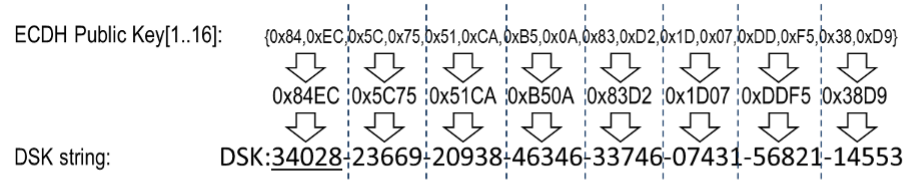
Figure 7.3 DSK String format
\requirement{DT:00.21.0014.1}{0}
The first five digits of the DSK string MUST be underlined to help the user identify the PIN code portion of the DSK string.
\requirement{DT:00.21.0015.2}{0}
The QR code format MUST comply with the “Gen2” format defined in [30]. The QR code MUST include two TLV blocks: Type 0 (Product Type) and TLV Type 1 (Product ID) as defined by [29].
Additional formatting requirements for the market certification are given by the Z-Wave Alliance, refer to [31].
7.2.6.8.5. Mandatory DSK representations
\requirement{DT:00.21.0016.1}{0}
If a node supports Learn Mode, the DSK representations present on a product MUST comply with Table 7.2 and the subsections below.
On the Product |
On the leaflet |
On the box/package |
|
|---|---|---|---|
PIN Code |
At least one Required. |
OPTIONAL |
OPTIONAL |
DSK String |
|||
Required in at least one place |
|||
QR Code |
Required if the node supports to be included using SmartStart inclusion |
OPTIONAL |
OPTIONAL |
7.2.6.8.5.1. DSK on the product or UI
\requirement{DT:00.21.0017.1}{0}
A product MUST have a QR code printed on the its outside or on its UI if it supports to be included using SmartStart inclusion.
\requirement{DT:00.21.0018.1}{0}
A product MUST carry or display the DSK string or PIN code.
\requirement{DT:00.21.0019.1}{0}
If the product carries the PIN code representation of the DSK, the product leaflet, documentation or packaging MUST contain the DSK string.
7.2.6.8.5.2. DSK on documentation or leaflet
\requirement{DT:00.22.0002.1}{0}
It is RECOMMENDED that a leaflet inside the product’s box, advertises the QR code and the full DSK string.
7.2.6.8.5.3. DSK on the product’s box/package
\requirement{DT:00.22.0003.1}{0}
The product packaging SHOULD carry the QR code and DSK string on its outside.
7.2.6.8.6. Filtering Security Class for controlling nodes
\requirement{DT:00.23.0004.1}{0}
For Command Classes always supported non-securely (always in the NIF), a controlling node MAY accept a command at any security level shared with a sending S2 node.
\requirement{DT:00.21.001A.1}{0}
For Command Classes supported securely, a controlling node MUST discard the command from a supporting node if not received at the highest common security level between the controlling node and the sending S2 node.
\requirement{DT:00.21.001B.1}{0}
A controlling node MUST NOT discard a command if the sending node does not support the S2 Command Class.
A node is considered controlling or supporting based on which command it sends or receives. Each command node’s role is marked in [26].
\requirement{DT:00.22.0006.1}{0}
Further, a controller node that has performed S2 bootstrapping to a Node A SHOULD discard controlling commands from Node A if not received using the highest common security level for Command Classes that are always supported non-securely (always in the NIF).
7.2.6.8.7. Controlling nodes: Security Class learning
Any Z-Wave Plus v2 node controlling Command Classes (not using association groups) MUST discover the destination capabilities using every Security Class. If it intends to create associations between 2 other nodes, it MUST also discover which keys have been granted to both nodes.
If the controller is the SIS, it SHOULD skip the discovery as it knows which keys have been granted. If the controller is not the SIS or does not know which security levels to use with a destination, the following discovery algorithm is RECOMMENDED:
Request the NIF and read its contents, look for S2/Supervision and S0
If S2 is supported, for every S2 key starting from the highest:
Issue the S2 Commands Supported Get
If receiving no answer (or S2 Nonce Reports), conclude that the corresponding Security Class has not been granted to the node
ii. If receiving an S2 Commands Supported Report with an empty list, conclude that the corresponding Security Class has been granted and is not the highest
iii. If received an S2 Commands Supported Report with a non-empty list, conclude that the corresponding Security Class has been granted and is the highest.
If S0 is supported, discover if S0 key was granted:
Issue a S0 encrypted S0 Security Command Supported Get command
If S2 was in the NIF :
If not receiving any response, conclude that the S0 Security Class has not been granted to the node
If receiving an S0 Commands Supported Report with an empty list, conclude that the S0 Security Class has been granted and is not the highest
If receiving an S0 Commands Supported Report with a non-empty list, conclude that the S0 Security Class has been granted and is the highest
If S2 was not in the NIF:
If receiving an S0 Commands Supported Report, conclude that S0 is the highest granted key
If not receiving any response, conclude that the S0 Security Class has not granted to the node
The Role Type Specification provides recommended timeouts when waiting for responses to get type commands.
7.2.7. Command Class Control Specific Requirements
Certain rules must be fulfilled depending on which command classes are controlled. The following subsections detail the requirements of special command classes. Details about individual Command Class control can be found in Section 6.
\requirement{DT:00.11.0034.1}{0}
If a Device Type mandates that a Command Class MUST be controlled, that Command Class MUST be fully controlled. Partial control is not acceptable for Command Classes that have mandatory control requirements. Refer to Command Class Control for full and partial control definitions.
7.2.7.1. Anti-Theft Command Class
Control of this command class is limited to an entity that has been granted permission by the Z-Wave Alliance to control this Command Class and has been granted a locking entity ID. The list of granted locking entity IDs is defined in [23].
Any node controlling this Command Class without authorization will be failed in certification.
\requirement{DT:00.11.002B.1}{0}
A node controlling this Command Class MUST NOT provide access to the locking functionality feature of the Command Class to a consumer/end-user of the node; i.e. end users MUST NOT be able to lock nodes themselves.
\requirement{DT:00.11.002C.1}{0}
Control of this command class by a node which is also offered in a non-service market where an end consumer has access to network control features MUST use a different Product ID and Product Type ID between the service and consumer versions of the product.
7.2.8. SmartStart Requirements
\requirement{DT:00.11.0026.1}{0}
A Z-Wave Plus v2 node MUST either support to be included in a network using SmartStart inclusion or provide SmartStart inclusion of other nodes. A controller providing SmartStart inclusion of other nodes MAY also support being included in a network using SmartStart inclusion.
\requirement{DT:00.11.0027.1}{0}
A SmartStart product documentation MUST respect the requirements described in 3.10.4 Documentation related to SmartStart.
\requirement{DT:00.11.0028.1}{0}
A node supporting to be included using SmartStart inclusion MUST have a QR code printed on its outside or its UI. (refer to Section 7.2.6.8.5). The QR code MUST indicate version 1 (SmartStart enabled nodes).
\requirement{DT:00.11.0029.1}{0}
A SmartStart node MUST carry and keep the same Learn Mode DSK during its entire lifetime. Refer to Section 7.2.6.8.2 and Section 7.2.6.8.4.
7.2.9. Z-Wave Long Range Support
7.2.9.1. Nodes supporting to be included with Z-Wave Long Range
\requirement{DT:00.11.002E.1}{0}
Nodes supporting Z-Wave Long Range MUST have a QR code printed on its outside or its UI (refer to 3.6.8.5 Mandatory DSK representations). The QR code MUST include a Type 4 (Supported Protocols) TLV block (refer to [29]) and indicate that Z-Wave Long Range is supported.
\requirement{DT:00.11.002F.1}{0}
A node supporting Z-Wave Long Range MUST only request any Security Class that require Authentication for the S2 Bootstrapping during a Z-Wave Long Range SmartStart inclusion.
7.2.9.2. Nodes supporting to include using Z-Wave Long Range
\requirement{DT:00.11.0030.1}{0}
Controller nodes that can include other nodes using Z-Wave Long Range MUST allow to configure the Bootstrapping Mode TLV of provisioning list entries to “Z-Wave Long Range SmartStart” (value 0x02) for entries that advertise Z-Wave Long Range as a supported protocol
\requirement{DT:00.11.0031.1}{0}
A controller node MUST only grant Security Classes that require Authentication for the S2 Bootstrapping during a Z-Wave Long Range SmartStart inclusion.
7.2.10. Required Documentation
The following requirements for end user documentation apply to all Z-Wave Plus v2 compliant products. The documentation may be provided as product manuals, quick start guides, electronic help files, web pages, etc.
7.2.10.1. Terminology
\requirement{DT:00.31.0001.1}{0}
The product documentation MUST use the terminology indicated in Table 7.3 for Z-Wave related functionality.
Z-Wave functionality |
Documentation terminology |
Example |
|---|---|---|
Inclusion |
Add |
The process of adding a node to the Z-Wave network. |
Exclusion |
Remove |
The process of removing a node from the Z-Wave network. |
Replication |
Copy |
The process of copying network information from one controller to another. |
7.2.10.2. Additional documentation required for Z-Wave Certification
\requirement{DT:00.31.0002.1}{0}
In addition to the rules defined above the following technical documentation MUST be made available to the certification test lab upon submitting the product for certification:
Documentation about how to activate any functionality available in the device related to Z-Wave behavior
If any special procedures are REQUIRED to test any item in the certification form, such procedures MUST be clearly described
If the product is a Z-Wave controller, documentation on how to send any controlled command from the controller MUST be included, refer to Section 6.
7.2.10.3. Documentation for Classic Inclusion and Exclusion
\requirement{DT:00.31.0003.1}{0}
For Z-Wave end nodes Role Types, the documentation MUST describe:
How to include and exclude the device in an existing network when using Classic inclusion.
\requirement{DT:00.31.0004.2}{0}
For Z-Wave controller Role Types, the documentation MUST describe:
How to include and exclude the device in an existing network using classic inclusion.
How to include and exclude other devices.
How to put the controller into learn mode to receive network information from another controller.
7.2.10.6. Documentation for Association Command Class
\requirement{DT:00.31.0009.1}{0}
The documentation MUST include a description of the association groups available in the product.
\requirement{DT:00.31.000A.1}{0}
Each group MUST include the following information:
Grouping identifier
Maximum number of devices that can be added to the group
Description of how the association group is used and/or triggered by the product
Description of any mapping between groups (e.g. Root Device mirrored End Point group)
7.2.10.7. Documentation for Configuration Command Class
\requirement{DT:00.31.000B.1}{0}
If the product implements support of the Configuration Command Class, the documentation MUST include a description of each configuration parameter available in the product.
\requirement{DT:00.31.000C.1}{0}
Each configuration parameter MUST be listed with the following information:
Parameter number
Description of parameter and its effect on the product
Default value and allowed values
Size (number of bytes)
\requirement{DT:00.32.0001.1}{0}
The documentation SHOULD also list other configuration parameter properties such as read-only or advanced flag, etc.
7.2.10.8. Documentation for Wake Up Command Class
\requirement{DT:00.31.000D.1}{0}
If the node supports the Wake Up Command Class, the product documentation MUST describe how to manually Wake Up the node.
7.2.10.9. Documentation for Security 2 Command Class
\requirement{DT:00.31.000E.2}{0}
If a node based on an end node Role Type supports its Command Classes only when granted the Access Control Security key, the documentation MUST indicate that an S2 security enabled controller is required to operate the product.
\requirement{DT:00.31.000F.1}{0}
The documentation MUST list the supported Command Classes, their version and their required Security class if any.
For example, a Lock Device Type list and a Binary Switch Device Type list are given in Table 7.4 and Table 7.5.
Command Class |
Version |
Required Security Class |
|---|---|---|
Association |
2 |
S0 or Access Control |
Association Group Information |
3 |
S0 or Access Control |
Basic |
2 |
S0 or Access Control |
Device Reset Locally |
1 |
S0 or Access Control |
Door Lock |
4 |
S0 or Access Control |
Firmware Update Meta Data |
5 |
S0 or Access Control |
Indicator |
3 |
S0 or Access Control |
Manufacturer Specific |
1 |
S0 or Access Control |
Multi Channel Association |
3 |
S0 or Access Control |
Powerlevel |
1 |
S0 or Access Control |
Security 0 |
1 |
None |
Security 2 |
1 |
None |
Supervision |
1 |
None |
Transport Service |
2 |
None |
Version |
3 |
S0 or Access Control |
Z-Wave Plus Info |
2 |
None |
Command Class |
Version |
Required Security Class |
|---|---|---|
Association |
2 |
Highest granted Security Class |
Association Group Information |
3 |
Highest granted Security Class |
Basic |
2 |
Highest granted Security Class |
Binary Switch |
2 |
Highest granted Security Class |
Device Reset Locally |
1 |
Highest granted Security Class |
Firmware Update Meta Data |
5 |
Highest granted Security Class |
Indicator |
3 |
Highest granted Security Class |
Manufacturer Specific |
1 |
Highest granted Security Class |
Multi Channel Association |
3 |
Highest granted Security Class |
Powerlevel |
1 |
Highest granted Security Class |
Security 2 |
1 |
None |
Supervision |
1 |
None |
Transport Service |
2 |
None |
Version |
3 |
Highest granted Security Class |
Z-Wave Plus Info |
2 |
None |
7.2.10.10. Documentation for Supervision Command Class
\requirement{DT:00.31.0015.1}{0}
If a node supports the Supervision Command Class, the product documentation MUST describe the list of cases and/or conditions where it would issue a Supervision Report Command with a status indicating WORKING or FAIL, for a valid and supported set of parameters in the encapsulated command.
For example, it is not necessary to describe that a Supervision encapsulated Association Set Command would return FAIL if trying to establish a new association in a group that is already full.
7.2.10.11. Documentation for Basic Command Class
\requirement{DT:00.31.0014.2}{0}
If the product supports Basic Command Class, the product documentation MUST include information on the usage of the Basic Command Class and the resulting product behavior
7.2.10.12. Documentation for Notification Command Class
\requirement{DT:00.31.0015.1}{0}
If the product implements support of the Notification Command Class, the documentation MUST specify the implemented Notification Type(s) and Event(s).
7.2.10.13. Documentation for dynamic capabilities
\requirement{DT:00.31.0010.1}{0}
If the product can alter its capabilities depending on a configuration parameter or based on a user interaction, the documentation MUST include a list of all events that can trigger capability change and describe:
How to perform such actions
What capabilities are being altered.
\requirement{DT:00.31.0011.1}{0}
The product documentation MUST indicate to the end user that it is necessary to ask a controlling node to rediscover the product’s capabilities after altering capabilities.
\requirement{DT:00.31.0012.1}{0}
The product documentation MUST indicate that it is necessary to re-include the node in the network if the controller does not have any capability rediscovery option.
\requirement{DT:00.31.0013.1}{0}
For nodes based on a controlling Device Type (4.3), the documentation MUST describe how an (advanced) end user can perform a capability rediscovery of a chosen node.
7.2.10.14. Documentation for Identity function
\requirement{DT:00.31.0016.1}{0}
The product documentation MUST describe how product can be identified using the Indicator Command Class with the Indicator ID 0x50 (identify).
7.2.10.15. Documentation for Z-Wave Long Range
\requirement{DT:00.31.0017.1}{0}
Nodes supporting Z-Wave Long Range MUST indicate in their documentation if they can be included and/or if they can include other nodes using Z-Wave Long Range.
7.2.10.15.1. Nodes supporting to include using Z-Wave Long Range
\requirement{DT:00.31.0018.1}{0}
Controller nodes that can include other nodes using Z-Wave Long Range MUST indicate how to change the bootstrapping mode (Z-Wave SmartStart vs Z-Wave Long Range SmartStart) of provisioning list entries.
