8.2. Z-Wave Compliance Overview
\requirement{RT:00.11.0001.1}{4}
The following sections present Z-Wave properties applying to all Z-Wave Plus Role Types defined in this document. Requirements presented in this chapter MUST be respected by all Z-Wave Plus devices
8.2.1. SIS Assignment
8.2.1.1. Non-SIS capable Primary Controllers
A Z-Wave network may have no SIS capable controller. For instance this is the case if the network consists of a Portable Controller (PC) which is used to include a number of Always On End Nodes (AOEN). In this case, the PC acts as the Primary Controller.
\requirement{RT:00.11.0006.2}{0}
If no SIS is present in the network, when including a controller supporting SIS functionality, a non-SIS capable Primary Controller MUST assign the SIS role to the newly included controller.
8.2.1.2. SIS capable controllers
\requirement{RT:00.11.0007.2}{0}
All controllers that support the SIS functionality MUST accept to become SIS upon request from a Primary Controller.
\requirement{RT:00.11.0008.2}{0}
A controller that supports SIS functionality MUST assume the SIS role when creating a new network.
8.2.1.3. SIS return route assignment
\requirement{RT:00.11.0009.1}{0}
When the SIS is present, an including node MUST always assign SIS return route when including an end node.
8.2.2. Network Inclusion and Exclusion
Learn Mode
\requirement{RT:00.11.000A.1}{0}
A Z-Wave Plus compliant node MUST support both direct-range and Network Wide Inclusion (NWI).
Inclusion Process outlines the inclusion process.
Add Mode
Add mode is used by a controller for including a new node to a network.
\requirement{RT:00.11.003E.2}{0}
The SIS MUST show the new added nodes in the list of included nodes after an inclusion has been carried out by an Inclusion Controller.
8.2.3. Security bootstrapping
8.2.3.1. Security 0 Command Class
\requirement{RT:00.21.0001.1}{0}
Controllers MUST be able to perform Security 0 bootstrapping if they support the Security 0 Command Class. Refer to [35].
\requirement{RT:00.21.0002.1}{4}
If a controller has the Inclusion Controller role in a network and includes a node that supports Security 0 Command Class only (i.e. does not support Security 2 Command Class), it MUST perform Security 0 bootstrapping immediately after including the node.
\requirement{RT:00.21.0003.1}{4}
If the SIS and the Inclusion Controller both support the Inclusion Controller Command Class, the inclusion controller MUST NOT perform S0 bootstrapping unless instructed by the SIS with an Inclusion Controller Initiate Command (S0_INCLUSION).
\requirement{RT:00.21.0005.1}{4}
If the SIS and the Inclusion Controller both support the Inclusion Controller Command Class, the SIS MUST NOT perform S0 bootstrapping. The SIS should instruct the Inclusion Controller to perform S0 bootstrapping or interview the included node non-securely.
\requirement{RT:00.21.0004.1}{8}
If an error happens during S0 bootstrapping of an S0 capable controller, the included controller MAY refuse to provide network functions (others than Learn Mode). In this case, the included controller MUST indicate to the user that it needs to be excluded and re-included in the Z-Wave network.
8.2.3.1.1. Upgrading non-secure networks
\requirement{RT:00.23.0001.1}{0}
If a controller is included in a non-secure network as an inclusion controller, it MAY start using its own S0 network key and perform S0 bootstrapping with newly included nodes.
A controller MUST NOT start using its own S0 network key if S0/S2 bootstrapping failed.
8.2.3.2. Security 2 Command Class
The following sections describe requirements for controllers supporting the Security 2 Command Class
8.2.3.2.1. Bootstrapping capabilities
Security 2 mandates certain functionalities depending on the controller’s role in the network.
If a controller has the SIS role:
\requirement{RT:00.21.0006.1}{0}
It MUST support the SIS side of the Inclusion Controller Command Class
\requirement{RT:00.21.0007.1}{0}
It MUST perform Security 2 bootstrapping.
\requirement{RT:00.21.0008.1}{0}
It MUST support inclusion of nodes that implement any combination of Security 2 Security Classes
\requirement{RT:00.21.0009.1}{0}
It MUST have input and display method for support of all Security Classes.
\requirement{RT:00.21.0006.1}{0}
It MAY support inclusion using CSA
If a controller has the Inclusion Controller role:
\requirement{RT:00.21.000A.1}{0}
It MUST support the Inclusion Controller side of the Inclusion Controller Command Class
\requirement{RT:00.21.000B.1}{0}
It MUST NOT perform Security 2 bootstrapping
If a controller has the Primary Controller role:
\requirement{RT:00.21.0003.1}{0}
It MAY perform Security 2 bootstrapping
8.2.3.2.2. Granting Security Classes
\requirement{RT:00.21.000C.1}{0}
A controller with a user interface for PIN code input (and optionally a QR scanning capability) MUST comply with following when bootstrapping S2 nodes:
It MUST grant membership of all requested Classes if the joining node requests membership of the S2 Access Control Class (unless specified otherwise by a user).
It MAY ask the user for confirmation before granting S2 Authenticated Class key if the node does not request membership of the S2 Access Control Class.
It SHOULD provide a way to inspect and adjust the list of the Security Class memberships that will be granted to the joining node
\requirement{RT:00.21.000D.1}{4}
A constrained controller with no QR scanning capability and no user interface for PIN code input MUST comply with following when bootstrapping S2 nodes:
It MUST grant membership of the S2 Unauthenticated Security Class if the joining node requests membership of the S2 Unauthenticated Security Class.
It MUST grant membership of the S0 Security Class (during S2 bootstrapping) if the joining node requests membership of the S0 Security Class and the constrained controller is also capable of S0 bootstrapping.
It MUST abort the S2 bootstrapping entirely (grant no key) if the joining node does not request membership of the S2 Unauthenticated Class.
8.2.3.2.3. Informing the user about security
\requirement{RT:00.21.000E.1}{4} \requirement{RT:00.22.0001.1}{8}
If a node has been security bootstrapped with the S0 Command Class in a S2 capable network, the SIS/Primary controller MUST issue a warning message to the user informing that the node has not been included securely. The SIS/Primary controller SHOULD request a new NIF to the included node after security bootstrapping to verify if the included node supports S2 before issuing the message to the user.
This is made to ensure that the end user is aware of which security level a node has been bootstrapped and therefore identify if a S0 downgrade attack took place during bootstrapping or if a non-S2 inclusion controller bootstrapped the joining node.
\requirement{RT:00.21.000F.1}{4}
If an S2 node has not been granted the highest requested S2 key during bootstrapping, the SIS/Primary controller MUST issue a warning message to the user informing that the node has not been included with the highest security. This is OPTIONAL if the user has actively chosen which keys to grant and security bootstrapping completed successfully.
In an Inclusion Controller scenario, the SIS’ UI may not be active during S2 bootstrapping. In this case, the following rules apply:
\requirement{RT:00.23.0005.1}{4}
If the SIS automatically grants unauthenticated key for a node that request the S2 Unauthenticated Class, it MAY notify the end user the next time it uses the UI.
\requirement{RT:00.22.0002.1}{0}
If the SIS timed out during S2 bootstrapping, it SHOULD instruct the end user that the node needs to be excluded and re-included.
8.2.4. Device Reset Locally support
\requirement{RT:00.11.000B.1}{0}
If a device can be reset to factory default locally on the device, the device MUST be able to issue a Device Reset Locally Command via its Lifeline to notify the Lifeline destination that the device has been reset to its factory default state. The product documentation MUST include instructions on how to perform a reset to factory default operation.
\requirement{RT:00.11.000C.1}{0}
If a device cannot be locally (or manually) reset to factory default, the device MUST NOT implement the Device Reset Locally functionality and MUST NOT list the Device Reset Locally Command Class identifier in the NIF.
\requirement{RT:00.11.000D.1}{0}
If a device is reset, it MUST perform the reset operation regardless of whether the delivery of the Device Reset Locally Notification is successful or not. It is RECOMMENDED that devices implement a mechanism that allows the user to determine when the reset operation is completed.
When a node is reset:
\requirement{RT:00.11.000E.1}{0}
it MUST forget its current HomeID and consider itself excluded from the network.
\requirement{RT:00.13.0001.1}{0}
The configuration of Application Command Classes MAY stay unchanged (e.g configuration parameters, Thermostat Setpoint, Clock, Door lock Timeout configuration, User codes, …)
\requirement{RT:00.11.000F.1}{4}
8.2.5. Node interview and response timeouts
\requirement{RT:00.11.0010.1}{4}
During a node capability discovery or interview, as well as traffic generated due to user activation, a controlling nodes MUST timeout waiting for responses (reports) as part of the capability discovery or controlling scenarios.
Two timers named CommandTime and ReportTime are used for timing out during a node discovery interview. Illustrations are given for secure and non-secure cases in Figure 8.1 and Figure 8.2
CommandTime is measured by the application
\requirement{RT:00.12.0001.1}{0}
ReportTime timeout SHOULD be set to CommandTime + 1 second.
The communication flow MUST be as shown in Figure 8.1 and Figure 8.2
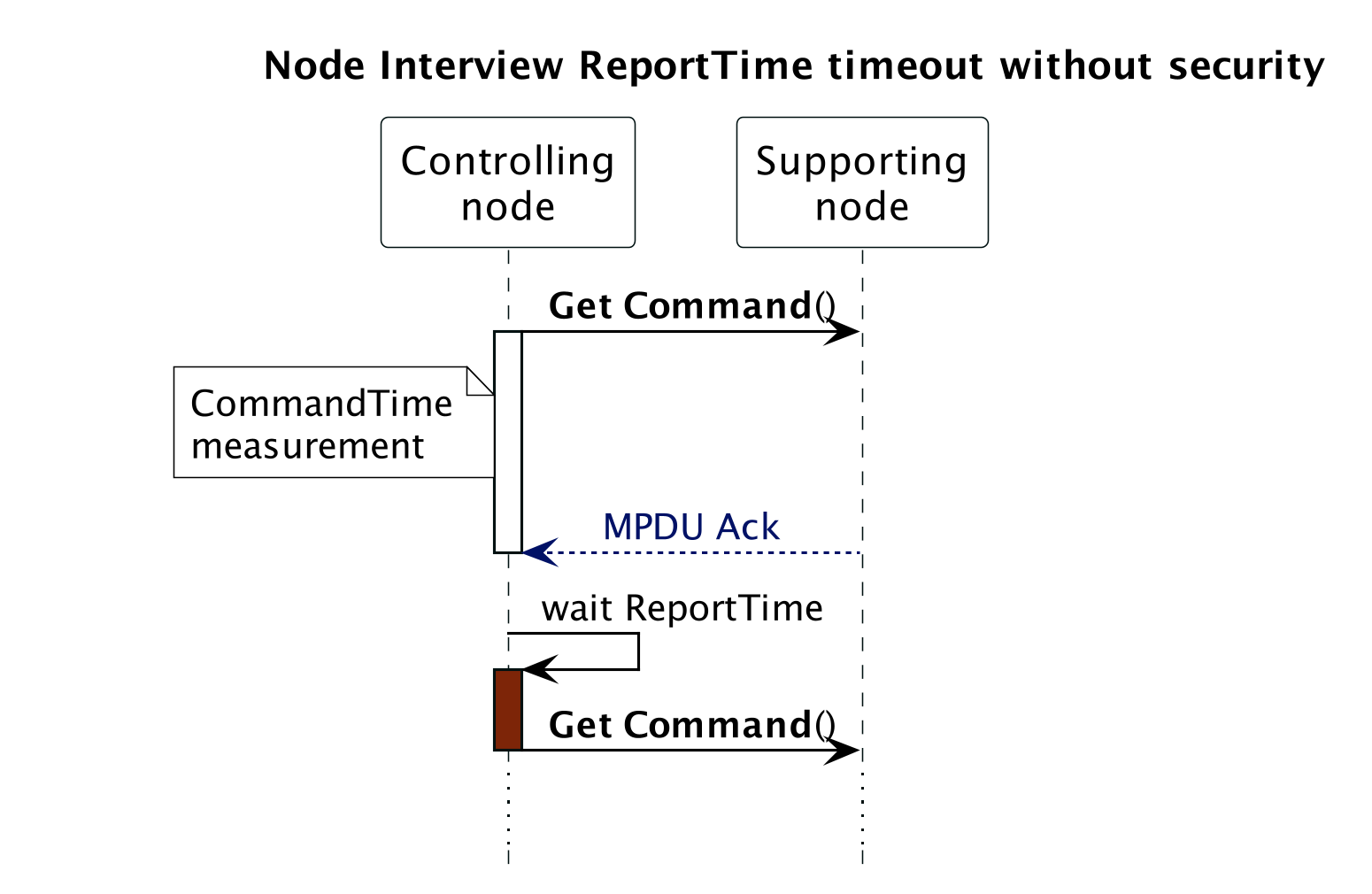
Figure 8.1 Node Interview ReportTime timeout without security
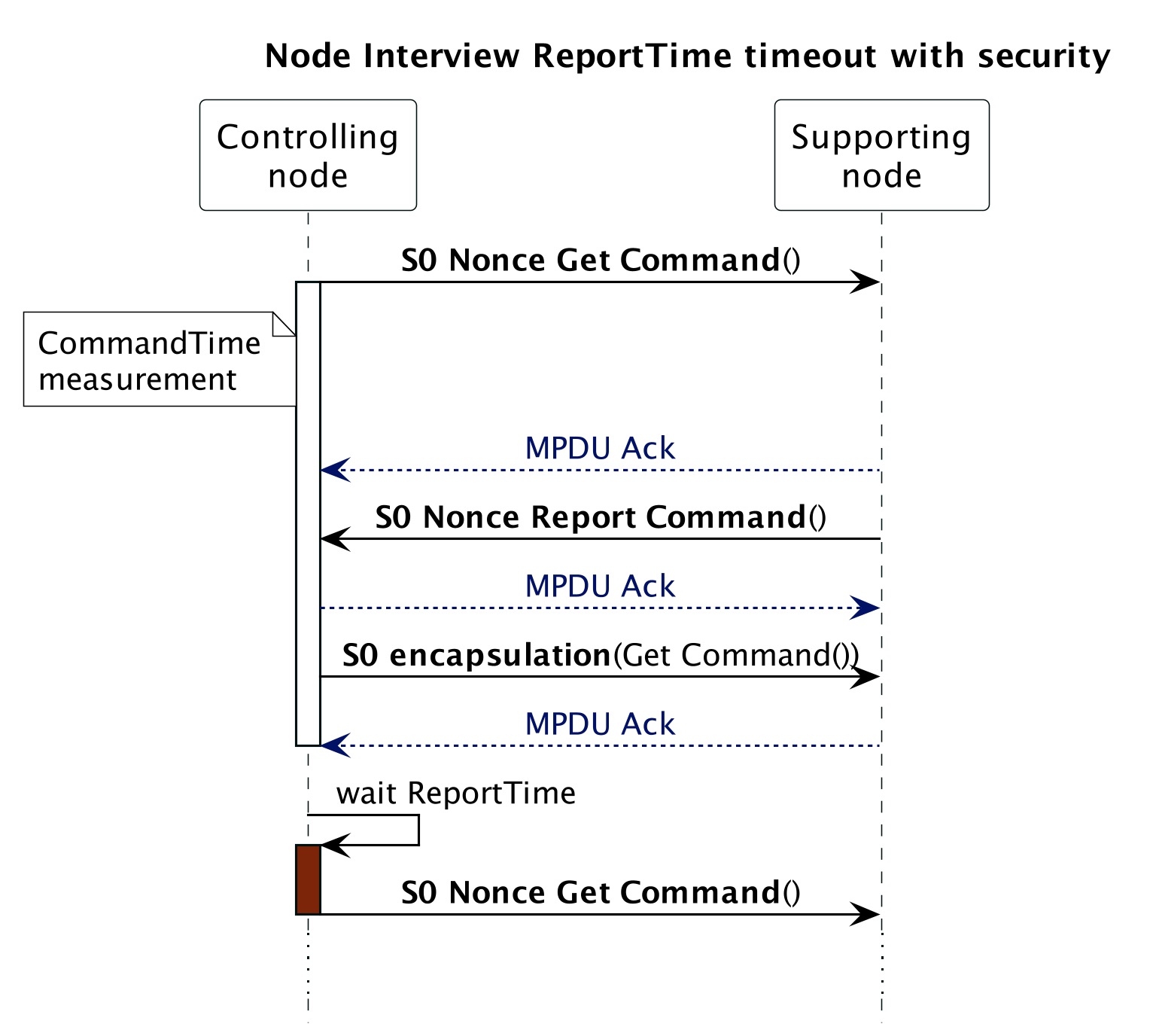
Figure 8.2 Node Interview ReportTime timeout with security
8.2.6. Polling Devices
A controlling device may monitor nodes or issue requests for status information.Communication patterns include, but are not limited to, the transmission of a:
No Operation (NOP) Command to verify that a node is operational
Get Command requesting status information in a Report Command
Set Command followed by a Get Command requesting status information in a Report Command
\requirement{RT:00.11.0011.1}{0}
Communication MUST be considered polling if a controlling device autonomously sends requests to one or more nodes in a repeating fashion to monitor nodes or to get information from nodes. This applies to any combination of commands.
\requirement{RT:00.11.0012.1}{4}
Z-Wave is a radio technology with limited bandwidth. Therefore, it is NOT RECOMMENDED to use polling. If used, polling communication MUST comply with the requirements stated in the following subsections Polling with no errors, Polling with transmit error and Polling with missing Report Frame
\requirement{RT:00.11.0013.1}{0}
Communication MUST NOT be considered as polling if:
A node issues one or more commands in a burst initiated by a user action. This applies to any combination of commands; also requests.
A node issues one or more commands initiated by the inclusion of another node. This applies to any combination of commands; also requests.
8.2.6.1. Polling with no errors
Two timers named CommandTime and PollTime are used for polling requirements with no error. Illustrations are given for secure and non-secure cases in Figure 8.3 and Figure 8.4
The following requirements apply to the normal case where a polling request is successful:
\requirement{RT:00.11.0014.1}{0}
CommandTime MUST be measured by the application
\requirement{RT:00.11.0015.1}{0}
The application MUST wait PollTime before polling any other node
\requirement{RT:00.12.0002.1}{0}
PollTime SHOULD be 10 seconds + CommandTime or more
\requirement{RT:00.11.0016.1}{0}
PollTime MUST NOT be less than 1 second + CommandTime
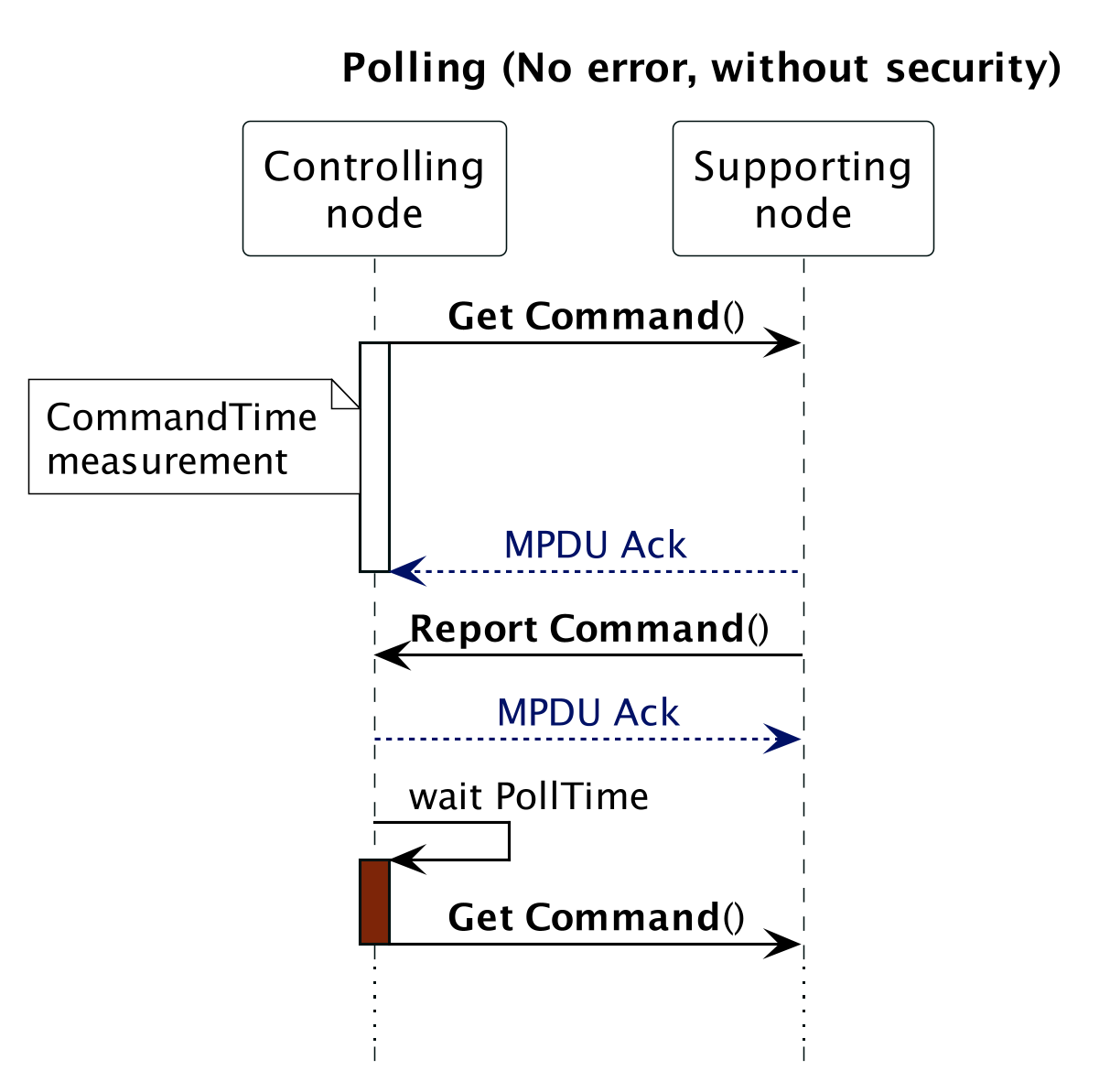
Figure 8.3 Polling (No errors, without security)
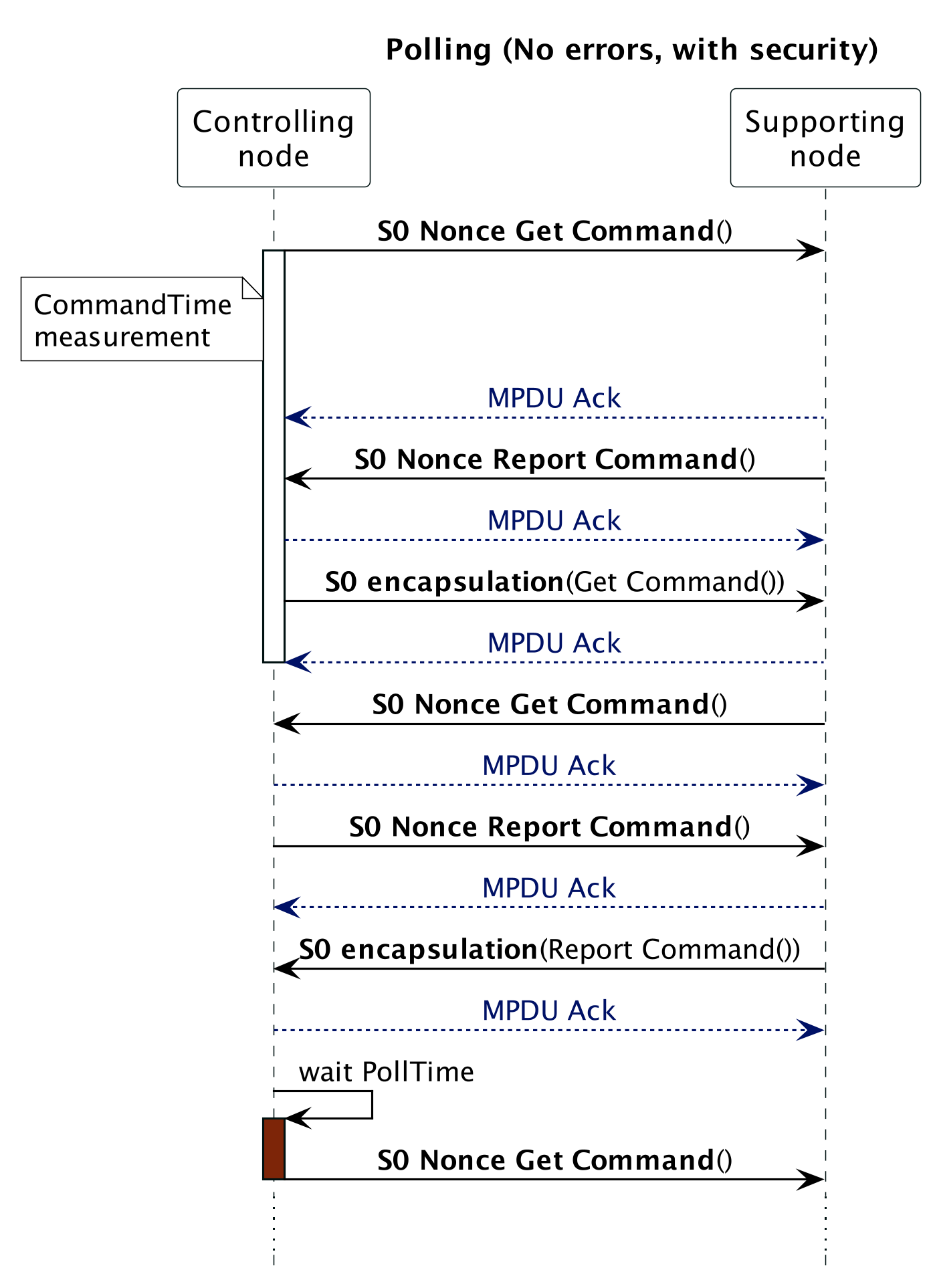
Figure 8.4 Polling (No errors, with security)
8.2.6.2. Polling with transmit error
Two timers named CommandTime and PollTime are used for polling requirements with transmission error. Illustrations are given for secure and non-secure cases in Figure 8.5 and Figure 8.6.
\requirement{RT:00.11.0017.1}{0}
Note that in the case of a missing Ack, the Sending node MUST transmit the Get Command 3 times before considering the Ack to be missing. CommandTime is measured from the first Get Command transmission to the timeout.
The following requirements apply to the case where a polling request is not successful.
\requirement{RT:00.11.0018.1}{0}
If the transmission fails, the application MUST wait PollTime before polling any other node. PollTime MUST be 10 seconds + CommandTime or more
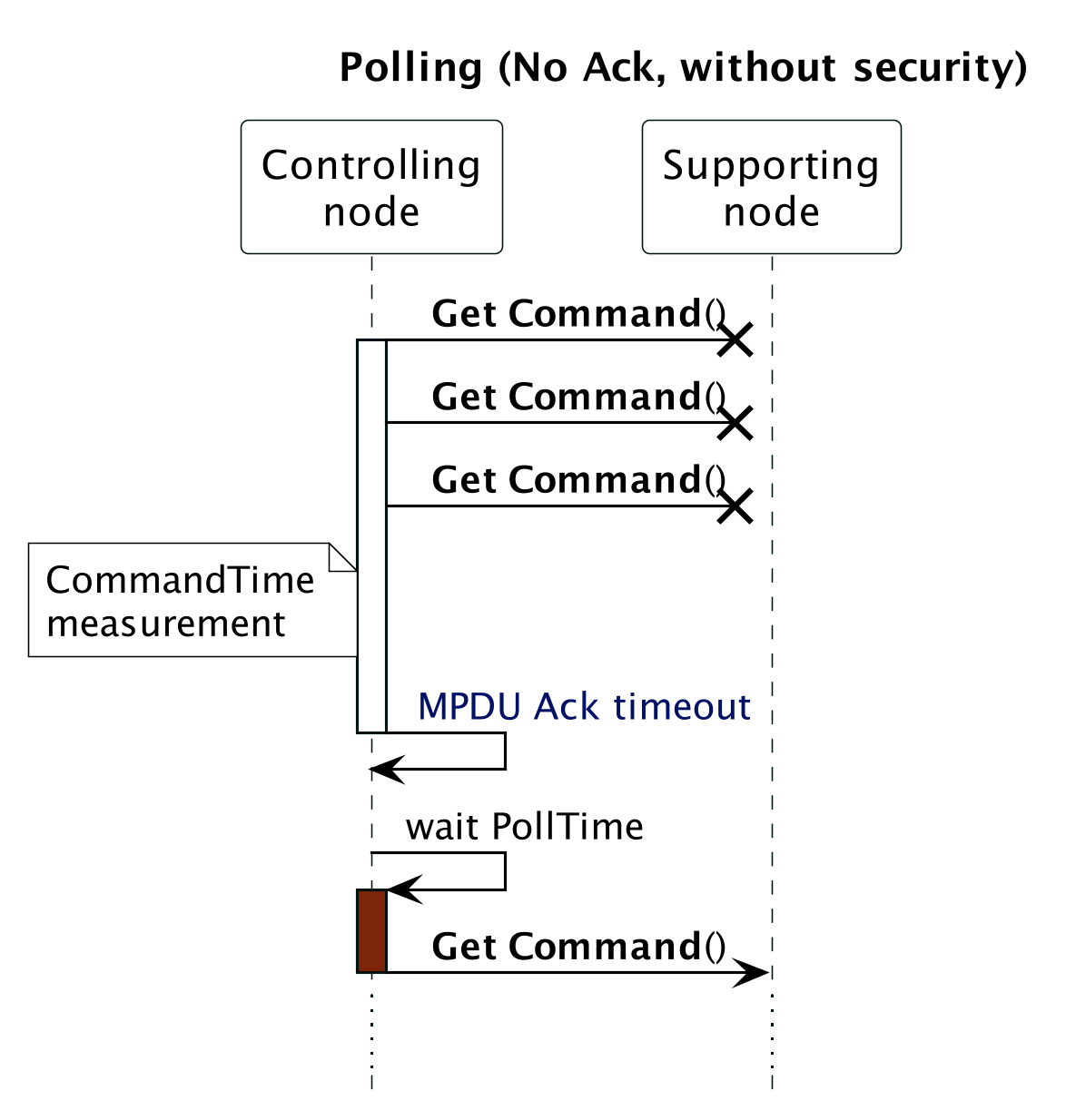
Figure 8.5 Polling (No Ack, without security)
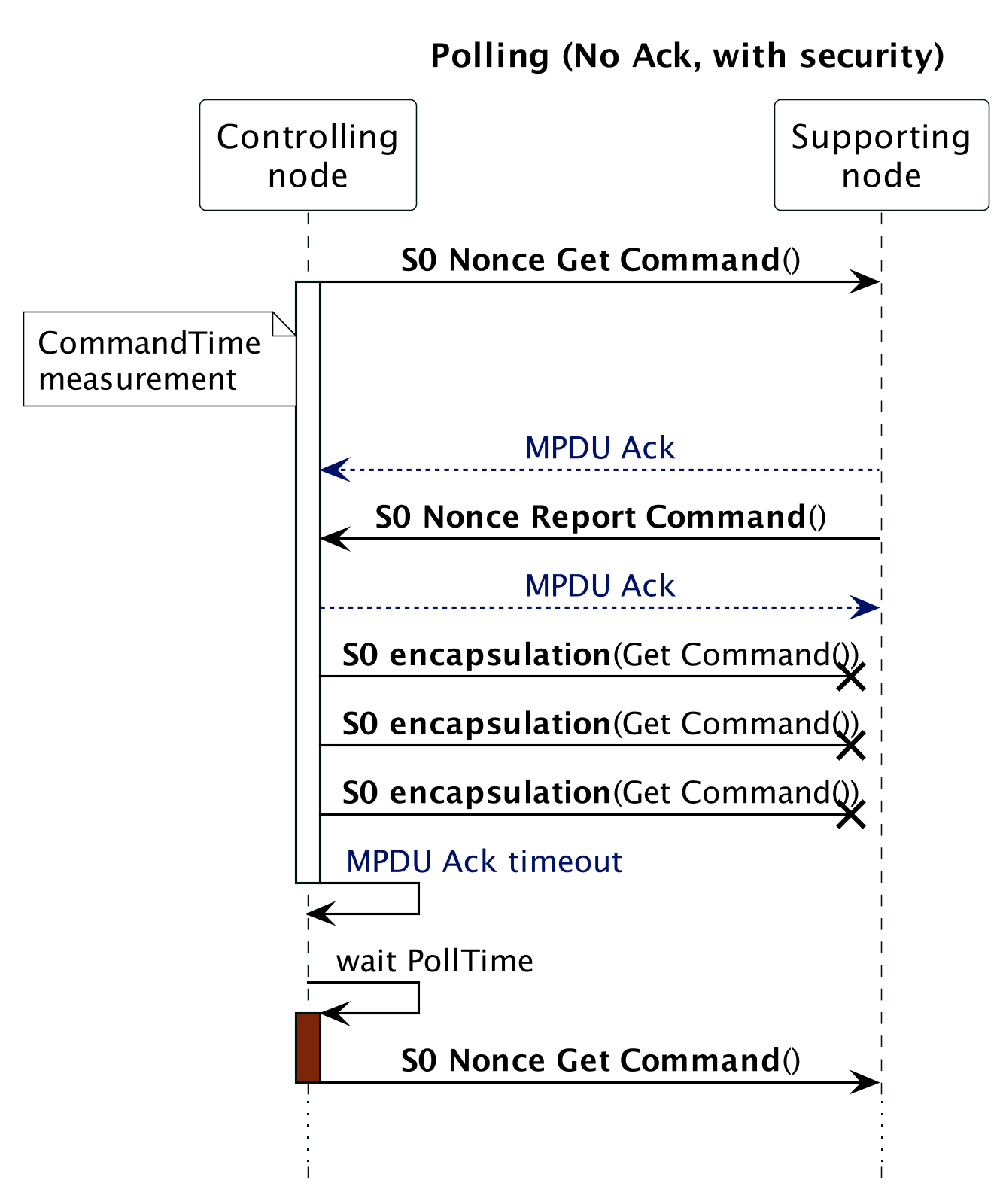
Figure 8.6 Polling (no ack with Security 0)
8.2.6.3. Polling with missing Report Frame
Two timers named CommandTime and ReportTime are used for polling requirements when transmission is successful but with missing report. Illustrations are given for secure and non-secure cases in Figure 8.7 and Figure 8.8.
The following requirements apply to the case where a polling request is successful but no Report frame is received.
\requirement{RT:00.11.0019.1}{0}
The application MUST wait ReportTime for the reply from node X before polling any other node
\requirement{RT:00.11.001A.1}{0}
ReportTime MUST be CommandTime + 10 seconds or more

Figure 8.7 Polling (no Report frame, without security)

Figure 8.8 Polling (no Report frame, with security)
8.2.7. Unsolicited communication
\requirement{RT:00.13.0002.1}{0}
A device MAY autonomously send control commands or status information in response to physical events or in response to a timer.
Unsolicited communication patterns include, but are not limited to, the transmission of a:
Control command turning on light in response to a detected movement
Power meter report sending a usage report
Different requirements apply to unsolicited data collection communication and unsolicited control communication, respectively.
8.2.7.1. Unsolicited data collection communication
\requirement{RT:00.11.001B.1}{4}
Bursts of one or more commands which carry status information transmitted repeatedly without any user intervention MUST be considered to be unsolicited data collection communication.
Using the transmission of a control command or a NOP command as a heartbeat indication MUST also be considered unsolicited data collection communication.
\requirement{RT:00.11.001C.1}{0}
To save bandwidth, data collection communication MUST comply with the following requirements.
A device MAY issue unsolicited data collection communication in any burst size
A device MUST NOT issue new unsolicited data collection communication less than 30 seconds since the last burst.
8.2.7.2. Unsolicited control communication
\requirement{RT:00.11.001D.1}{4}
Bursts of one or more control commands initiated by a user action, a physical event or a time trigger MUST be considered control communication. Control communication MUST comply with the following requirements:
A device MAY issue unsolicited control communication in any burst size.
A device MAY issue unsolicited control communication at any interval since the last burst
8.2.8. Runtime communication
8.2.8.1. Routing
\requirement{RT:00.11.001E.1}{0}
A Z-Wave Plus node MUST use by default the last working route to communicate with a target node. An illustration is given in Figure 8.9
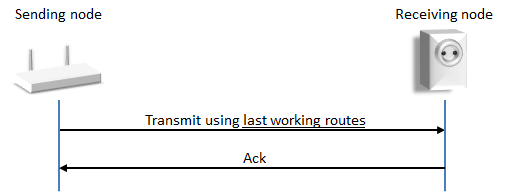
Figure 8.9 Successful transmission using last working routes
\requirement{RT:00.11.001F.1}{4}
Over time, there is a risk that nodes are moved or stop working. To ensure that nodes adapt to changing network topology and failing repeaters, a Z-Wave Plus node MUST enable dynamic route resolution. Dynamic route resolution consists of trying the following routes:
Last working routes
Calculated routes
Explorer Frame
Illustrations are given in Figure 8.10 and Figure 8.11.
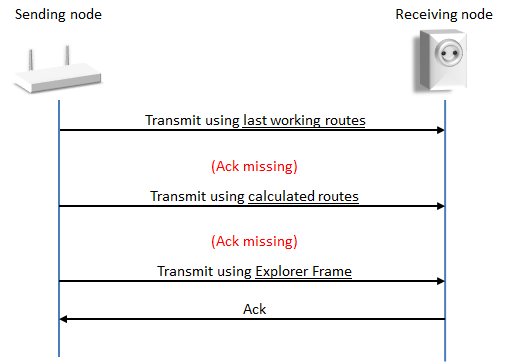
Figure 8.10 Successful transmission using Explorer Frame
\requirement{RT:00.11.0020.1}{0}
A node MUST perform 3 routing attempts based on last working routes and/or calculated routes before sending an Explorer Frame. As outlined in Figure 8.10, controllers may calculate routes using the local neighbor map.
\requirement{RT:00.13.0003.1}{0}
Listening Sleeping End Nodes (LSEN) and Reporting Sleeping End Nodes (RSEN) MAY use return routes injected by a controller. The outlined sequence of transmission attempts is handled entirely by the routing protocol.
\requirement{RT:00.13.0004.1}{8}
In case the destination is not reachable, all routed transmission attempts will fail and ultimately, the routing protocol will have to give up delivering the frame. After a failed transmission, the application MAY try to transmit again in case a new event occurs, e.g. because the user issues a new button press.
\requirement{RT:00.12.0003.1}{8}
The steps in Figure 8.11 involve at least three routing attempts. When all routing attempts are unsuccessful, it is very unlikely that any other transmission attempt to the same target will succeed. The sending node SHOULD give up the frame transmission.
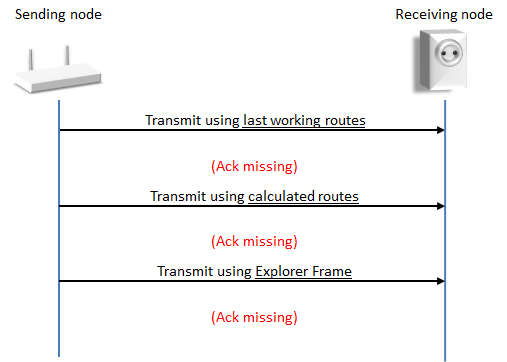
Figure 8.11 Unsuccessful transmission
\requirement{RT:00.13.0005.1}{0}
Nodes based on a controller role type MAY skip transmission attempts if they are associated to a non-existing NodeID.
8.2.8.2. Wake-Up communication timeout protection
A battery powered node supporting Wake-Up communication sends a Wake Up Notification Command to get attention when it is awake and receives a Wake Up No More Information Command when it can safely return to sleep.
\requirement{RT:00.11.0004.1}{0}
A node supporting Wake-Up communication MUST implement a timeout mechanism which makes the node return to sleep if the node does not receive a Wake Up No More Information Command. For details refer to Wake Up Command Class, version 1.
\requirement{RT:00.11.0021.2}{4} \requirement{RT:00.13.0022.1}{20}
If no Wake Up No More Information Command is received from the Wake Up destination, the node MUST respond to the Wake Up destination until 10 seconds have elapsed since the last transmission or reception of an application frame supported by the node, a NOP frame or a Request Node Info Frame with the Wake Up destination. This does not apply for the Wake On Event Role Type (which in Self-Powered Mode will not send a Wake Up Notification and will fall to sleep as soon as possible or when energy runs out, and which in Configuration Mode MAY stay awake forever).
An illustration is given in Figure 8.12.
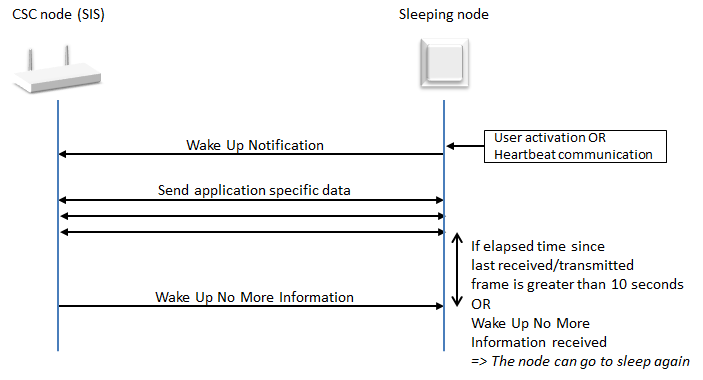
Figure 8.12 Wake Up Command Class
8.2.9. Network maintenance
\requirement{RT:00.12.0005.1}{0}
The network rediscovery (Request neighbor update) feature SHOULD only be used as last resort in case the runtime communication fails.
8.2.10. SmartStart requirements
8.2.10.1. Support requirements
8.2.10.1.1. SmartStart learn mode activation
\requirement{RT:00.11.0023.1}{0}
A node supporting SmartStart inclusion MUST enter SmartStart Learn Mode by default when ready after powering up, regardless of network inclusion status.
\requirement{RT:00.11.0024.1}{0}
A node supporting SmartStart inclusion MUST fall back on SmartStart Learn Mode after deactivating Learn Mode.
8.2.10.1.2. Higher Inclusion Request Interval
\requirement{RT:00.11.0025.1}{12}
If a very power-constrained battery node is designed to settle at a higher Max Inclusion Request Interval (aNwkSmartStartMaxInclusionRequestInterval in [36]) than the default 512 seconds, this value MUST be advertised in the node’s provisioning information (QR Code, refer to [35] and [29]).
8.2.10.2. Control requirements
\requirement{RT:00.11.002B.1}{0}
A controller providing control of the SmartStart functionality is NOT REQUIRED to support the SmartStart functionality and support being included in a network using SmartStart inclusion.
8.2.10.2.1. Command Class support
\requirement{RT:00.11.002E.2}{0}
A Z/IP Gateway providing the SmartStart functionality MUST support the following Command Classes on the IP side:
Network Management Inclusion Command Class, version 3 or newer
\requirement{RT:00.12.0009.1}{0}
A Z/IP Gateway providing the SmartStart functionality SHOULD support the following Command Classes on the IP side:
Node Provisioning Command Class
8.2.10.2.2. User interface
\requirement{RT:00.11.0032.3}{0}
A controller providing control of the SmartStart functionality MUST:
Provide a method for the end user to view the Node Provisioning List entries with their network inclusion status (included/ not included or failed).
Provide a method for the end user to manually add and remove entries in the Node Provisioning List.
Provide a method for the end user to edit available settings for each entry in the Node Provisioning List. (e.g., Inclusion setting, Advanced joining). A controller application MAY provide no available settings.
Support S2 inclusion with authentication using the DSK PIN code.
\requirement{RT:00.11.0033.1}{4}
If a user removes a node from the Node Provisioning List and the node is still included in the Z-Wave network, the controller MUST inform the end user that the node will stay in the network and requires to be excluded manually or reset to factory default in order to leave the Z-Wave Network.
\requirement{RT:00.11.0034.1}{0}
A controller MUST inform the end user that S2 only (non-SmartStart) nodes present in the Provisioning List require to perform a classic inclusion to add them into the Z-Wave network.
8.2.10.2.3. QR Code scanning capability
\requirement{RT:00.12.0006.1}{0}
A controller providing the SmartStart functionality SHOULD provide a QR Code scanning capability.
If the controller offers a QR Code scanning capability:
\requirement{RT:00.11.0035.1}{0}
It MUST support the addition of nodes using QR Code format defined in [30] in its Provisioning List when scanning the QR Code.
\requirement{RT:00.12.0007.1}{0}
It SHOULD support scanning of S2 only QR codes representing the DSK String prefixed with “zws2dsk:”. (example: “zws2dsk:34028-23669-20938-46346-33746-07431-56821-14553”) in order to simplify the S2 bootstrapping process.
