5.2.2. IP Configuration Command Class, version 1 [OBSOLETED]
Warning
THIS COMMAND CLASS HAS BEEN OBSOLETED New implementations MUST NOT use the IP configuration Command Class. Refer to the Z/IP and Network management Command Classes.
The IP Configuration Command Class is used to configure network identifiers for IPV4 devices. The intended use of the command class is illustrated in the figure below.
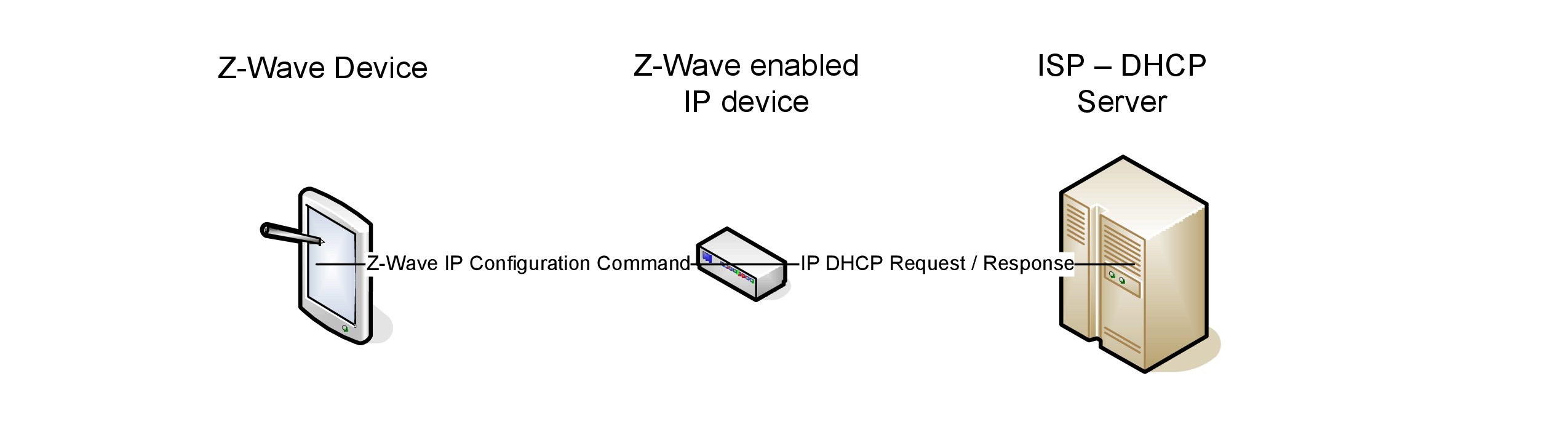
Figure 5.2 Configuration of network identifiers for IPV4 devices
In the figure the Z-Wave Remote to the left, sends an IP Configuration Command to the Z-Wave enabled IP device, telling it to acquire its configuration using DHCP. The Z-Wave enabled IP device will now perform a standard DHCP IP request to the DHCP server over an IP based network.
Another example might be where the Z-Wave Remote statically configures the Z-Wave enabled IP device with fixed IP, subnet, DNS etc. by sending an IP Configuration Command.
Note that this class is only intended for IPV4 and not IPV6 support.
5.2.2.1. IP configuration set command
The IP Configuration Set Command used to configure IPV4 settings in a device.
7 |
6 |
5 |
4 |
3 |
2 |
1 |
0 |
|---|---|---|---|---|---|---|---|
Command Class = COMMAND_CLASS_IP_CONFIGURATION (0x9A) |
|||||||
Command = IP_CONFIGURATION_SET (0x01) |
|||||||
Reserved |
Auto IP |
Auto DNS |
|||||
IP Address 1 |
|||||||
IP Address 2 |
|||||||
IP Address 3 |
|||||||
IP Address 4 |
|||||||
Subnet Mask 1 |
|||||||
Subnet Mask 2 |
|||||||
Subnet Mask 3 |
|||||||
Subnet Mask 4 |
|||||||
Gateway 1 |
|||||||
Gateway 2 |
|||||||
Gateway 3 |
|||||||
Gateway 4 |
|||||||
DNS1 1 |
|||||||
DNS1 2 |
|||||||
DNS1 3 |
|||||||
DNS1 4 |
|||||||
DNS2 1 |
|||||||
DNS2 2 |
|||||||
DNS2 3 |
|||||||
DNS2 4 |
|||||||
Reserved
This field MUST be set to 0 by a sending node and MUST be ignored by a receiving node.
Auto IP (1bit)
If Auto IP bit is set, the following fields are ignored: IP Address, Subnet Mask, and Gateway. And are allocated by DHCP or BOOTP instead.
Auto DNS (1bit)
The Auto DNS if set indicates to ignore DNS1 and DNS2 and allocate DNS by DHCP instead. Note that some devices might not support Auto DNS without Auto IP set.
IP Address (32 bit)
The IP Address indicates the static IP address of the device itself. The first byte is the most significant byte.
Subnet mask (32 bits)
The Subnet Mask determines the portion of the IP address that represents the subnet. The first byte is the most significant byte.
Gateway (32 bits)
The Gateway indicates the default gateway that serves as an access point to another network. The first byte is the most significant byte.
DNS1 (32 bits)
The DNS1 allows the use of domain name system (DNS) server names instead of using numerical IP addresses for management packet routing. In case the device will not need DNS, and SHOULD NOT query it from DHCP then leave field as all zeroes. The first byte is the most significant byte.
DNS2 (32 bits)
The DNS2 provides a secondary DNS server name. In case only one DNS server is available or the device will not need DNS then leave field as all zeroes. The first byte is the most significant byte.
5.2.2.2. IP configuration get command
The IP Configuration Get Command is used to request the IPV4 settings in a device.
The IP Configuration Report Command MUST be returned in response to this command.
This command MUST NOT be issued via multicast addressing. A receiving node MUST NOT return a response if this command is received via multicast addressing. The Z-Wave Multicast frame, the broadcast NodeID and the Multi Channel multi-End Point destination are all considered multicast addressing methods.
7 |
6 |
5 |
4 |
3 |
2 |
1 |
0 |
|---|---|---|---|---|---|---|---|
Command Class = COMMAND_CLASS_IP_CONFIGURATION (0x9A) |
|||||||
Command = IP_CONFIGURATION_GET (0x02) |
|||||||
5.2.2.3. IP configuration report command
The IP Configuration Report Command used to return IPV4 settings in a device.
7 |
6 |
5 |
4 |
3 |
2 |
1 |
0 |
|---|---|---|---|---|---|---|---|
Command Class = COMMAND_CLASS_IP_CONFIGURATION (0x9A) |
|||||||
Command = IP_CONFIGURATION_REPORT (0x03) |
|||||||
Reserved |
Auto IP |
Auto DNS |
|||||
IP Address 1 |
|||||||
IP Address 2 |
|||||||
IP Address 3 |
|||||||
IP Address 4 |
|||||||
Subnet Mask 1 |
|||||||
Subnet Mask 2 |
|||||||
Subnet Mask 3 |
|||||||
Subnet Mask 4 |
|||||||
Gateway 1 |
|||||||
Gateway 2 |
|||||||
Gateway 3 |
|||||||
Gateway 4 |
|||||||
DNS1 1 |
|||||||
DNS1 2 |
|||||||
DNS1 3 |
|||||||
DNS1 4 |
|||||||
DNS2 1 |
|||||||
DNS2 2 |
|||||||
DNS2 3 |
|||||||
DNS2 4 |
|||||||
LeaseTime 1 |
|||||||
LeaseTime 2 |
|||||||
LeaseTime 3 |
|||||||
LeaseTime 4 |
|||||||
Refer to explanation of parameters in IP Configuration Set Command description.
Lease Time (32 bits)
The lease time specifies the time the IP address has been granted, if Auto IP is being used (in seconds). If the device does not know its lease period it MUST return 0 for the lease time fields.
5.2.2.4. IP configuration DHCP release command
The IP Configuration DHCP Release Command used to release the DHCP lease.
7 |
6 |
5 |
4 |
3 |
2 |
1 |
0 |
|---|---|---|---|---|---|---|---|
Command Class = COMMAND_CLASS_IP_CONFIGURATION (0x9A) |
|||||||
Command = IP_CONFIGURATION_RELEASE (0x04) |
|||||||
5.2.2.5. IP configuration DHCP renew command
The IP Configuration DHCP Renew Command used to force the renewal of the DHCP lease.
7 |
6 |
5 |
4 |
3 |
2 |
1 |
0 |
|---|---|---|---|---|---|---|---|
Command Class = COMMAND_CLASS_IP_CONFIGURATION (0x9A) |
|||||||
Command = IP_CONFIGURATION_RENEW (0x05) |
|||||||
