5.2.1. Inclusion Controller Command Class, version 1
The Inclusion Controller Command Class is used after a node’s network inclusion between the SIS and an inclusion controller to inform each other of the remaining setup required for the included node.
Examples of such setup operations could be Z-Wave Plus Lifeline configuration or Security 2 bootstrapping.
\requirement{CC:0074.01.00.11.001}{13}
If the S2 bootstrapping is handled by a SIS after the Z-Wave network inclusion has been handled by an inclusion controller, the joining node will detect two different NodeIDs for Network inclusion and S2 bootstrapping. The NodeID of the including controller is not relevant for the authentication of the joining node. Therefore, the joining node MUST NOT abort the S2 bootstrapping in response to a changing NodeID.
\requirement{CC:0074.01.00.11.002}{0}
The SIS, inclusion controller and joining node MUST follow the frame flow illustrated in Figure 5.1.
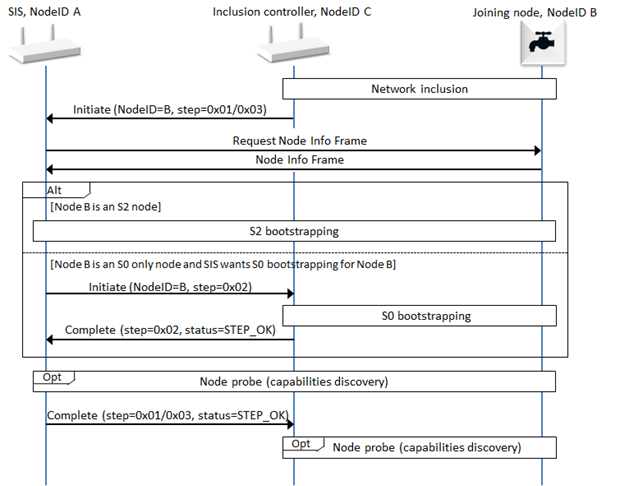
Figure 5.1 Inclusion Controller Frame Flow
\requirement{CC:0074.01.00.11.003}{0}
The SIS, inclusion controller and joining node MUST comply with the following steps:
\requirement{CC:0074.01.00.11.004}{4} \requirement{CC:0074.01.00.11.005}{12} \requirement{CC:0074.01.00.11.006}{16}
Inclusion Controller, C, performs network inclusion of Joining Node, B.
Inclusion Controller, C, MUST send Inclusion Controller Initiate to SIS, A, immediately following the network inclusion.
SIS, A, MUST request a Node Info Frame from Joining Node, B.
Joining Node, B, MUST respond to SIS, A, with a Node Info Frame
Option 1: If Joining Node B supports S2:
\requirement{CC:0074.01.00.11.007}{0} \requirement{CC:0074.01.00.11.008}{8}
SIS, A, MUST start the Security 2 bootstrapping as described in Security 2 (S2) Command Class, version 1, including user dialogs.
Joining Node, B, MUST accept being S2 bootstrapped by the SIS
Option 2: If Joining Node, B does not support S2 and supports S0
\requirement{CC:0074.01.00.11.00A}{8} \requirement{CC:0074.01.00.11.00B}{16}
If SIS, A wants S0 bootstrapping performed for Joining Node, B, it will send an Inclusion Controller Initiate(S0_INCLUSION) to Inclusion Controller, C
Inclusion Controller, C MUST perform S0 bootstrapping if it has the S0 network key after receiving Inclusion Controller Initiate(S0_INCLUSION)
Inclusion Controller, C MUST return an Inclusion Controller Complete to SIS, A to indicate if S0 bootstrapping attempt took place and if it was successful.
Following the Security bootstrapping, regardless whether it failed, successful or was not applicable:
\requirement{CC:0074.01.00.12.001}{0} \requirement{CC:0074.01.00.11.009}{4} \requirement{CC:0074.01.00.12.002}{8}
SIS, A, SHOULD perform any probing needed of the Joining Node, B.
SIS, A, MUST send an Inclusion Controller Complete Command to the Inclusion Controller, C.
Inclusion Controller, C, SHOULD perform any probing needed of the Joining Node, B.
5.2.1.1. Compatibility considerations
5.2.1.1.1. Node information frame (NIF)
\requirement{CC:0074.01.00.21.002}{0}
A supporting node MUST always advertise the Inclusion Controller Command Class in its NIF, regardless of the security bootstrapping outcome when having the SIS or Inclusion Controller role.
\requirement{CC:0074.01.00.23.001}{0}
A supporting node MAY keep or remove the Inclusion Controller Command Class in/from its NIF if it has the primary or secondary controller role.
5.2.1.1.2. Legacy controllers
\requirement{CC:0074.01.00.22.001}{16}
If an Inclusion Controller that does not support the Inclusion Controller Command Class includes a new node in a network, the SIS will never receive an Inclusion Controller Initiate Command. If no Initiate Command has been received approximately 10 seconds after a new node has been added to a network, the SIS SHOULD start interviewing the newly included node (step 10 above).
\requirement{CC:0074.01.00.21.003}{4}
If an Inclusion Controller includes a node and the SIS does not support the Inclusion Controller Command Class, the Inclusion Controller MUST perform S0 bootstrapping immediately after inclusion if applicable.
5.2.1.2. Inclusion controller initiate command
This command is used to ask a receiving node to perform specific steps in the inclusion/bootstrapping process.
\requirement{CC:0074.01.01.13.001}{8}
The initiate command asks the controller to perform a specific step of the inclusion process. The Inclusion Controller Initiate Command is first sent from an inclusion controller to the SIS, then the SIS MAY choose to perform the rest of the inclusion by itself or it MAY ask the inclusion controller to perform one or more of the inclusion steps.
\requirement{CC:0074.01.01.11.001}{0} \requirement{CC:0074.01.01.11.005}{20}
This command MUST be sent through highest common Security Class of the SIS and Inclusion Controller, if no common Security Class exists, non-secure is allowed. Inclusion Controllers MUST send this command following a successful network inclusion. It also means that if the SIS receives this command at a less-secure than the highest common Security class, it MUST ignore this command. E.g. Non-secure Initiate Commands MUST be ignored by the SIS, unless the SIS has a record of including the Inclusion Controller non-securely.
\requirement{CC:0074.01.01.11.002}{0}
This command MUST NOT be issued via multicast addressing. A receiving node MUST NOT return a response if this command is received via multicast addressing. The Z-Wave Multicast frame, the broadcast NodeID and the Multi Channel multi-End Point destination are all considered multicast addressing methods.
7 |
6 |
5 |
4 |
3 |
2 |
1 |
0 |
|---|---|---|---|---|---|---|---|
Command Class = COMMAND_CLASS_INCLUSION_CONTROLLER (0x74) |
|||||||
Command = INITIATE (0x01) |
|||||||
Node ID |
|||||||
Step ID |
|||||||
Node ID
\requirement{CC:0074.01.01.11.003}{0}
This field is used to indicate the NodeID of the node being included. The receiving node MUST perform the steps on the NodeID indicated by this field
Step ID
\requirement{CC:0074.01.01.11.004}{0}
This field is used to indicate which step is to be performed on the specified. The field MUST comply with :Table 5.2
Value |
Identifier |
Description |
|---|---|---|
0x01 |
PROXY_INCLUSION |
This Value MUST be used only when:
This Value is used to indicate the SIS that it MUST take over the node inclusion and perform S2 bootstrapping if releveant. The SIS MUST return an Inclusion Controller Complete Command when the step has been completed. The SIS MAY ask the inclusion controller to perform some of the steps by itself before returning an Inclusion Controller Complete Command. |
0x02 |
S0_INCLUSION |
This value MUST be used only when:
This value is used to indicate to the inclusion controller that it MUST perform S0 bootstrapping. The inclusion controller MUST reply with an Inclusion Controller Complete Command when the S0 bootstrapping has been performed (or attempted). |
0x03 |
PROXY_INCLUSION_REPLACE |
This value MUST be used only when:
This value is identical to PROXY_INCLUSION but is used in case the newly included node has replaced a failed node. This value is used to indicate the SIS that it MUST take over the node inclusion and perform S2 bootstrapping if relevant. The SIS MUST return an Inclusion Controller Complete Command when the step has been completed. The SIS MAY ask the inclusion controller to perform some of the steps by itself before returning an Inclusion Controller Complete Command. |
All other values are reserved and MUST NOT be used by a sending node. Reserved values MUST be ignored by a receiving node.
5.2.1.3. Inclusion controller complete command
\requirement{CC:0074.01.02.11.001}{0}
This command MUST be sent after a controller has completed the requested inclusion steps.
\requirement {CC:0074.01.02.11.002}{0}
This command MUST be sent using the highest common Security Class of the SIS and Inclusion Controller. If no common Security Class exists, non-secure transmission is allowed.
\requirement{CC:0074.01.02.11.003}{0} \requirement{CC:0074.01.02.11.004}{4}
An inclusion controller MUST perform optional node interview after receiving a Inclusion Controller Complete Command with Step ID, PROXY_INCLUSION. A SIS MUST do its device probe before sending the COMPLETE command with step ID PROXY_INCLUSION.
7 |
6 |
5 |
4 |
3 |
2 |
1 |
0 |
|---|---|---|---|---|---|---|---|
Command Class = COMMAND_CLASS_INCLUSION_CONTROLLER (0x74) |
|||||||
Command = COMPLETE (0x02) |
|||||||
Step ID |
|||||||
Status |
|||||||
Step ID
This field is used to indicate the step that has been completed.
\requirement{CC:0074.01.02.11.005}{0}
A sending node MUST set this field to the same value as the last received Inclusion Controller Initiate Command.
Status
\requirement{CC:0074.01.02.11.006}{0}
This field is used to indicate the status of the advertised Step ID. It MUST comply with Table 5.4
Value |
Status CODE identifier |
Description |
|---|---|---|
0x01 |
STEP_OK |
The performed step was completed without error. |
0x02 |
STEP_USER_REJECTED |
The step was rejected by user |
0x03 |
STEP_FAILED |
The step failed, because of a communication or protocol error. |
0x04 |
STEP_NOT_SUPPORTED |
The step failed, because it Is not supported by the sending node. |
All other values are reserved and MUST NOT be used by a sending node. Reserved values MUST be ignored by a receiving node.
