5.2.3. Mailbox Command Class, version 1
The Mailbox Command Class is intended for IP based gateway deployments with distributed mailbox resources. One example is a constrained gateway device which is offloaded by another IP host with sufficient memory to host the Mailbox Service. The Mailbox Service may be hosted by a LAN host or an Internet server.
The Mailbox Command Class allows any mailbox capable device to either make itself into a Mailbox Service, or utilize another Mailbox Service in the network.
5.2.3.1. Mailbox framework
The Mailbox Command Class describes a framework that consists of two specific Mailbox Modes described below:
Mailbox Proxy, which forwards mailbox requests to a Mailbox Service.
Mailbox Service, which accepts the forwarded mailbox requests and stores them until the designated recipient announces that it is awake.
A mailbox device MAY support one or both of the two Mailbox Modes. However, a mailbox device MUST NOT take both Mailbox Modes in a network.
Before configuring Mailbox Proxy forwarding, a configuring node MUST ensure that the forwarding and receiving devices support their respective required modes. The information can be found using the Mailbox Configuration Get Command and Mailbox Configuration Report Command.
5.2.3.1.1. Mailbox proxy
The Mailbox Proxy device forwards all received frames that are destined for a non-listening node to the configured Mailbox Service. Before forwarding the frame, it MUST be attempted to send the frame to the node first as it may be awake following a manual activation or inclusion. If the Mailbox Proxy can deliver the frame to the non-listening node, the Mailbox Proxy MUST NOT forward the frame to the Mailbox Service.
The Mailbox Proxy MUST support the Wake Up Command Class.
5.2.3.1.2. Mailbox service
The Mailbox Service serves as a conventional mailbox, with the addition that it may receive forwarded frames from a Mailbox Proxy. A Mailbox Service may have a finite mailbox queue capacity, which is reported in the Mailbox Configuration Report. The Mailbox Service MUST NOT communicate with a Z/IP client directly, since it may not be able to route messages to the client.
5.2.3.1.3. Frame flow
Figure 5.3 illustrates the communication between a Z/IP Client (1) attempting communication to a non-listening node (4). The communication is passing through the Mailbox Proxy (2) which initially will attempt direct communication with (4). If failing to reach (4), the frame will be forwarded to the Mailbox Service (3) using the Mailbox Queue Command with Push Operation.
Following the Mailbox Queue push, the Mailbox Service will send a Mailbox Queue Command with Waiting Operation to the proxy, piggybacking the original UDP command on the message. The Proxy will build a ”NACK Waiting” Z/IP Command targeted for the Z/IP node, based on the piggy backed message from the Proxy Service. The Proxy Service MUST also append the Expected Delay header extension to the ”NACK Waiting” Z/IP Command. This step MUST be repeated every 60s seconds as long as the message is in the mailbox.
Upon wake-up, the non-listening node (4) will transmit a Wake Up Notification to the Mailbox Proxy (2), which must be configured using the Wake Up Command Class. Whenever the Mailbox Proxy (2) receives a Wake Up Notification, the notification will be forwarded as a Z/IP Packet to the Mailbox Service (4). The Mailbox Service inspects the queue to see if there are any frames for (4) and responds with either an empty Mailbox Queue Command Pop operation with ”Last” bit set to 1 or any frames that may be in queue, finishing with the last frame having ”Last” bit set to 1.
Mailbox Proxy (2) receives the Mailbox Queue Pop frame on which it performs a Virtual Node Rewrite to match the original sender of the UDP frame of the Mailbox Queue Pop command. The frame is sent from the virtual node to (4) followed by a ”Wake Up No More Information” Command. Any eventual reports will be replied to the virtual node that forwards them to (1). The proxy MUST send a Mailbox Queue Command with ACK operation to the Proxy Service when it has delivered the frame and potentially the ”No more information”
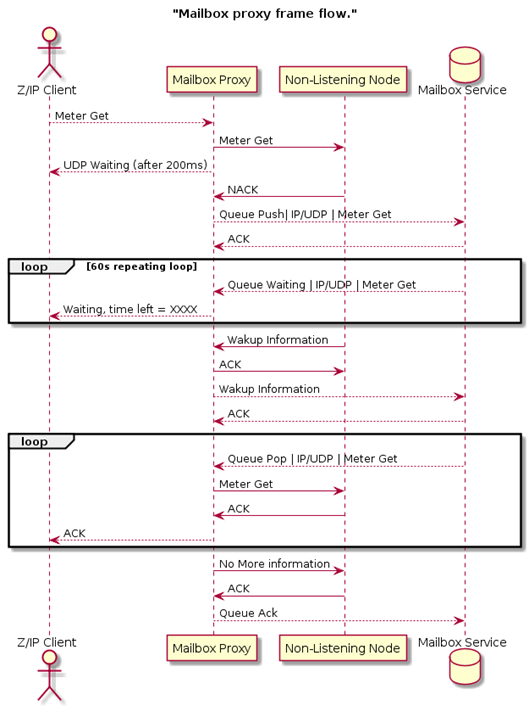
Figure 5.3 Mailbox Frame Flow
5.2.3.2. Mailbox configuration get command
The Mailbox Configuration Get Command is used to request the Mailbox configuration from a supporting device.
The Mailbox Configuration Report command MUST be returned in response to a Mailbox Configuration Get command.
This command MUST NOT be issued via multicast addressing.
A receiving node MUST NOT return a response if this command is received via multicast addressing. The Z-Wave Multicast frame, the broadcast NodeID and the Multi Channel multi-End Point destination are all considered multicast addressing methods.
7 |
6 |
5 |
4 |
3 |
2 |
1 |
0 |
|---|---|---|---|---|---|---|---|
Command Class = COMMAND_CLASS_MAILBOX (0x69) |
|||||||
Command = MAILBOX_CONFIGURATION_GET (0x01) |
|||||||
5.2.3.3. Mailbox configuration set command
7 |
6 |
5 |
4 |
3 |
2 |
1 |
0 |
|---|---|---|---|---|---|---|---|
Command Class = COMMAND_CLASS_MAILBOX (0x69) |
|||||||
Command = MAILBOX_CONFIGURATION_SET (0x02) |
|||||||
Reserved |
Mode |
||||||
Forwarding Destination Ipv6 Address – Byte 1 |
|||||||
… |
|||||||
Forwarding Destination Ipv6 Address – Byte 16 |
|||||||
UDP Port Number – Byte 1 |
|||||||
UDP Port Number – Byte 2 |
|||||||
Reserved (5 bits)
This field MUST be set to 0 by a sending node and MUST be ignored by a receiving node.
Mode (3 bits)
The Mode field is used to advertise the Mailbox mode to be configured in the node. This field MUST be encoded according to Table 5.12.
Value |
Description |
|---|---|
0x00 |
Disable Mailbox Service Disable Mailbox Proxy forwarding |
0x01 |
Enable Mailbox Service |
0x02 |
Enable Mailbox Proxy forwarding |
Forwarding Destination Ipv6 Address (16 bytes)
If the Mailbox Proxy Forwarding is enabled in the Mode field, the Forwarding Destination Ipv6 Address field MUST specify the Forwarding Destination Ipv6 Address. The field MUST specify an Ipv6 formatted address of the Mailbox Service to receive forwarded mailbox packages. If the Forwarding Destination is identified by an Ipv4 address this field MUST be formatted as an Ipv4-mapped Ipv6 address RFC 4291.
If the Mailbox Proxy Forwarding is not enabled in the Mode field, the Forwarding Destination Ipv6 Address MUST be set to 0 by a sending node and MUST be ignored by a receiving node.
UDP Port Number (2 bytes)
This field indicates the UDP Port number of the Mailbox Service running at the Forwarding Destination.
If the Mailbox Proxy Forwarding is not enabled in the Mode field, this field MUST be set to 0 by a sending node and MUST be ignored by a receiving node.
5.2.3.4. Mailbox configuration report command
7 |
6 |
5 |
4 |
3 |
2 |
1 |
0 |
|---|---|---|---|---|---|---|---|
Command Class = COMMAND_CLASS_MAILBOX (0x69) |
|||||||
Command = MAILBOX_CONFIGURATION_REPORT (0x03) |
|||||||
Reserved |
Supported Modes |
Mode |
|||||
Mailbox Capacity – Byte 1 |
|||||||
Mailbox Capacity – Byte 2 |
|||||||
Forwarding Destination Ipv6 Address – Byte 1 |
|||||||
… |
|||||||
Forwarding Destination Ipv6 Address – Byte 16 |
|||||||
UDP Port Number – Byte 1 |
|||||||
UDP Port Number – Byte 2 |
|||||||
Reserved
This field MUST be set to 0 by a sending node and MUST be ignored by a receiving node.
Supported Modes (2 bits)
The Supported Modes bit field is used to advertise the functionalities supported by the node. This field MUST be encoded according to Table 5.14
Value |
Description |
|---|---|
0x01 |
Mailbox Service supported |
0x02 |
Mailbox Proxy supported |
Mode (3 bits)
Refer to Section 5.2.3.3.
Mailbox Capacity (2 bytes)
This field advertises the number of frames (at a maximum of 1280 bytes per frame) that may be stored in the mailbox while waiting for a Wake Up Notification.
A value of 0 MUST indicate that the mailbox will only support mailbox forwarding to another Mailbox Service.
A value of 0xFFFF MUST indicate that the mailbox in effect have no storage limitation.
Forwarding Destination Ipv6 Address (16 bytes)
Refer to Section 5.2.3.3.
UDP Port Number (2 bytes)
Refer to Section 5.2.3.3.
5.2.3.5. Mailbox queue command
The Mailbox Queue Command is a container for various operations between a mailbox proxy and a Mailbox Service.
7 |
6 |
5 |
4 |
3 |
2 |
1 |
0 |
|---|---|---|---|---|---|---|---|
Command Class = COMMAND_CLASS_MAILBOX (0x69) |
|||||||
Command = MAILBOX_QUEUE (0x04) |
|||||||
Reserved |
Last |
Operation |
|||||
Queue Handle |
|||||||
Mailbox Entry – Byte 1 |
|||||||
… |
|||||||
Mailbox Entry – Byte N |
|||||||
Reserved (6 Bit)
This field MUST be set to 0 by a sending node and MUST be ignored by a receiving node.
Last (1 bit)
The Last field is used to indicate if the current mailbox frame is the last in the queue for the specific device. The Last bit only applies when the ”Pop” Operation is used.
The value 1 MUST indicate that the frame is the last on the queue.
The value 0 MUST indicate that more frames will follow.
Operation (3 bits)
The encoding of the Operation field MUST be according to Table 5.16.
Value |
Description |
|---|---|
0x00 |
Push. Queue a message from the proxy to the Mailbox Service |
0x01 |
Pop. Dequeue a message from the Mailbox Service to the Mailbox Proxy for delivery on the PAN |
0x02 |
Waiting. Service->Proxy: send waiting messages to the client. |
0x03 |
Ping. Service->Proxy: send UDP ping messages to the client. |
0x04 |
ACK. Proxy->Service: Frame has been delivered. Service->Proxy: Frame has been queued. |
0x05 |
NACK. Proxy->Service: Frame was not queued. Wait for ACK before attempting queuing. Service->Proxy: Node is not responding. Keep in queue. |
0x06 |
Queue Full. Proxy->Service: The capacity of the Mailbox Service has been reached. Wait until queue has been emptied. |
All other values are reserved and MUST NOT be used by a sending node.
Reserved values MUST be ignored by a receiving node.
Queue Handle (8 bits)
The Queue Handle field is used to identify the queue this message belongs to. A service uses this handle with the source IP of the MAILBOX_QUEUE message to identify the queue to which a message belongs to.
Mailbox Entry (N Bytes)
The Mailbox Entry field contains the entire received UDP Package. Including, ZIP headers and Z-Wave Payload.
To avoid duplicate entries, the Mailbox Service MUST maintain a list of CRC16 checksums for each mailbox entry. All mailbox entries MUST be unique, if a matching CRC16 exists for an incoming package, the incoming package MUST be discarded.
When WAITING timer elapses the mailbox MUST send a WAITING message to all clients that has posted entries to the mailbox.
5.2.3.6. Mailbox wake up notification command
This command allows a mailbox proxy resource to notify a Mailbox Service resource that a wake up device is currently awake.
A Mailbox Proxy resource MAY send this command to a Mailbox Service resource.
A Mailbox Service resource MUST NOT send this command to a mailbox proxy resource.
7 |
6 |
5 |
4 |
3 |
2 |
1 |
0 |
|---|---|---|---|---|---|---|---|
Command Class = COMMAND_CLASS_MAILBOX (0x69) |
|||||||
Command = MAILBOX_WAKEUP_NOTIFICATION (0x05) |
|||||||
Queue Handle |
|||||||
Queue Handle (8 bits)
This field is used to specify the actual queue handle to send notification to.
5.2.3.7. Mailbox failing node command
This command allows a mailbox proxy resource to notify a Mailbox Service resource that a wake up device is no longer available.
A Mailbox Proxy resource MAY send this command to a Mailbox Service resource.
A Mailbox Service resource MUST NOT send this command to a mailbox proxy resource.
7 |
6 |
5 |
4 |
3 |
2 |
1 |
0 |
|---|---|---|---|---|---|---|---|
Command Class = COMMAND_CLASS_MAILBOX (0x69) |
|||||||
Command = MAILBOX_NODE_FAILING (0x06) |
|||||||
Queue Handle |
|||||||
Queue Handle (8 bits)
This field is used to specify the actual queue.
A receiving Mailbox Service resource MUST discard all state information and enqueued messages for the actual queue.
5.2.3.8. Frame flow diagrams Examples
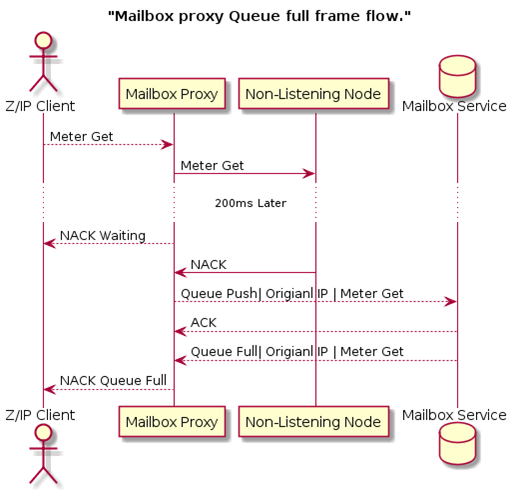
Figure 5.4 Mailbox proxy queue full frame flow
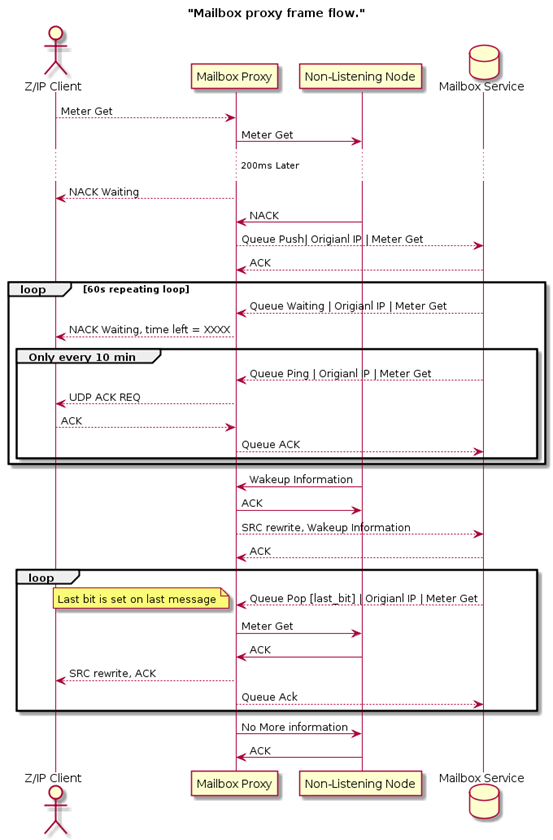
Figure 5.5 Normal frame flow
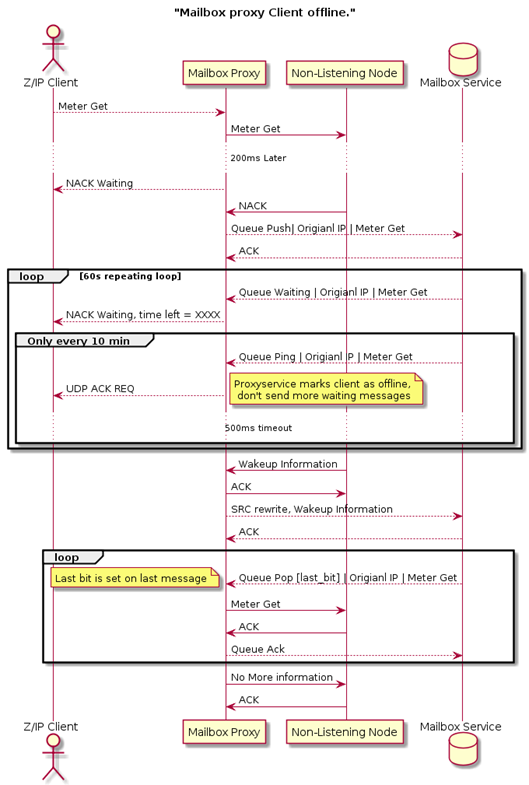
Figure 5.6 Z/IP Client goes offline and stops replying to UDP ping
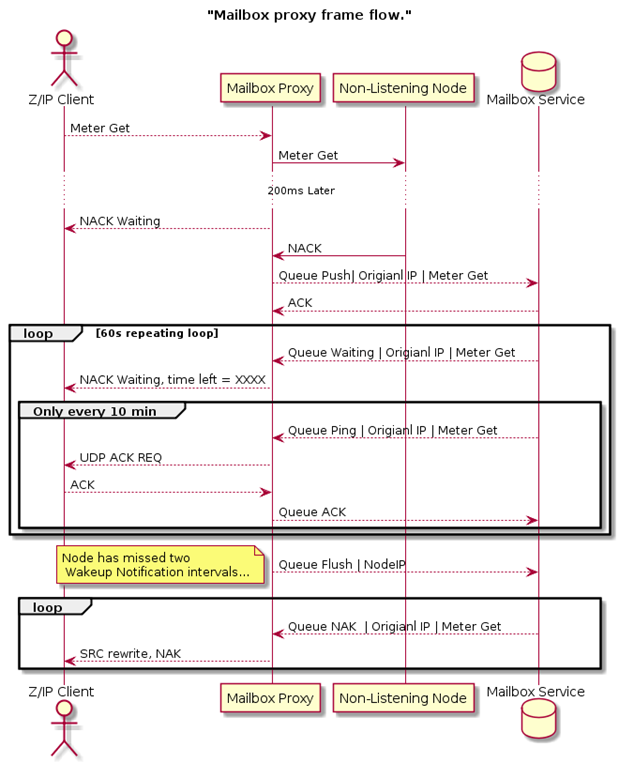
Figure 5.7 Sleeping node misses 2 Wake Up intervals and proxy tells service to flush queue
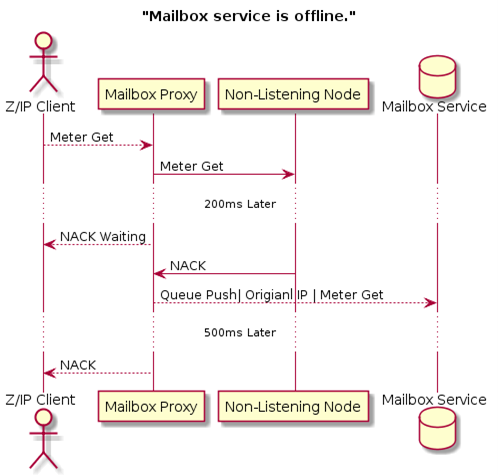
Figure 5.8 Mailbox Service is offline
