4.2.7. Security 2 (S2) Command Class, version 2
The Security 2 Command Class is a framework for allowing nodes to communicate securely in a Z-Wave network.
\requirement{CC:009F.02.00.11.001}{4}
Security 2 (S2) Command Class, version 2 is backwards compatible with the Security 2 (S2) Command Class, version 1. Fields and commands not described in this version MUST remain unchanged from version 1.
4.2.7.1. Network Layer Security (NLS) Introduction
Network Layer Security or NLS is a feature embedded within the Security 2 Command Class and provides a secure alternative for performing certain lower level mesh network protocol operations previously not addressed by S2 Security.
Some example operations that NLS covers:
Network exclusion
Remove Failed Node
Replace Failed Node
Request Node Neighbors
\requirement{CC:009F.02.00.11.002}{0}
A node supporting Security 2 Command Class version 2 MUST support NLS.
\requirement{CC:009F.02.00.13.001}{0}
NLS MAY be enabled at a later point in time from the Security 2 bootstrapping process. This allows existing nodes on the network with Security 2 (S2) Command Class, version 1 to be updated via OTA and enable NLS without being re-included into the network.
\requirement{CC:009F.02.00.11.009}{0}
NLS MUST NOT be disabled once enabled for a network.
\requirement{CC:009F.02.00.13.002}{0}
NLS is supported on a node-by-node basis and networks MAY operate with a mixture of NLS enabled and disabled.
\requirement{CC:009F.02.00.13.003}{0}
Legacy nodes MAY continue to operate without NLS support.
\requirement{CC:009F.02.00.13.004}{0}
A SIS or a Primary Controller that is NLS-capable MUST enable NLS on an NLS-capable node as soon as it becomes aware the node supports NLS. This can occur in the following situations:
Immediately after S2 bootstrapping of an NLS node
Immediately after interview of an NLS node if it notices that NLS is not enabled
Immediately after OTA firmware update and subsequent interview of the Security S2 Command Class discovering the NLS support
\requirement{CC:009F.02.00.13.005}{0}
If a controller is not the SIS or Primary Controller, it SHOULD discover the NLS capability of a node after the Security Class Learning for Controlling Nodes by sending an encrypted NLS State Get Command to the node.
\requirement{CC:009F.02.00.11.003}{0}
If NLS is enabled for a node on the network that includes a SIS, the SIS MUST use the secure NLS commands to perform low level network protocol operations.
\requirement{CC:009F.02.00.11.004}{0}
If NLS is enabled for a node on the network, the node MUST allow for a physical way (button, touchscreen, power toggle sequence) to reset the node locally and wipe its network settings. This prevents orphaned nodes without operating controllers from being stuck in their old network.
\requirement{CC:009F.02.00.11.005}{0}
An NLS-enabled node MUST accept protocol commands [in accordance with the lists in section Commands covered by NLS] only when communication is using its highest Security Class granted during security bootstrapping.
\requirement{CC:009F.02.00.11.006}{0}
A SIS or Primary Controller supporting NLS MUST accept protocol commands [in accordance with the lists in section Commands covered by NLS]
from an NLS-enabled node: only when communication is using the highest common Security Class shared between the SIS or Primary Controller and the sending node (i. e. its highest granted Security Class),
otherwise: no matter which security level.
\requirement{CC:009F.02.00.11.007}{0}
The NLS state MUST be disabled during exclusion and reset.
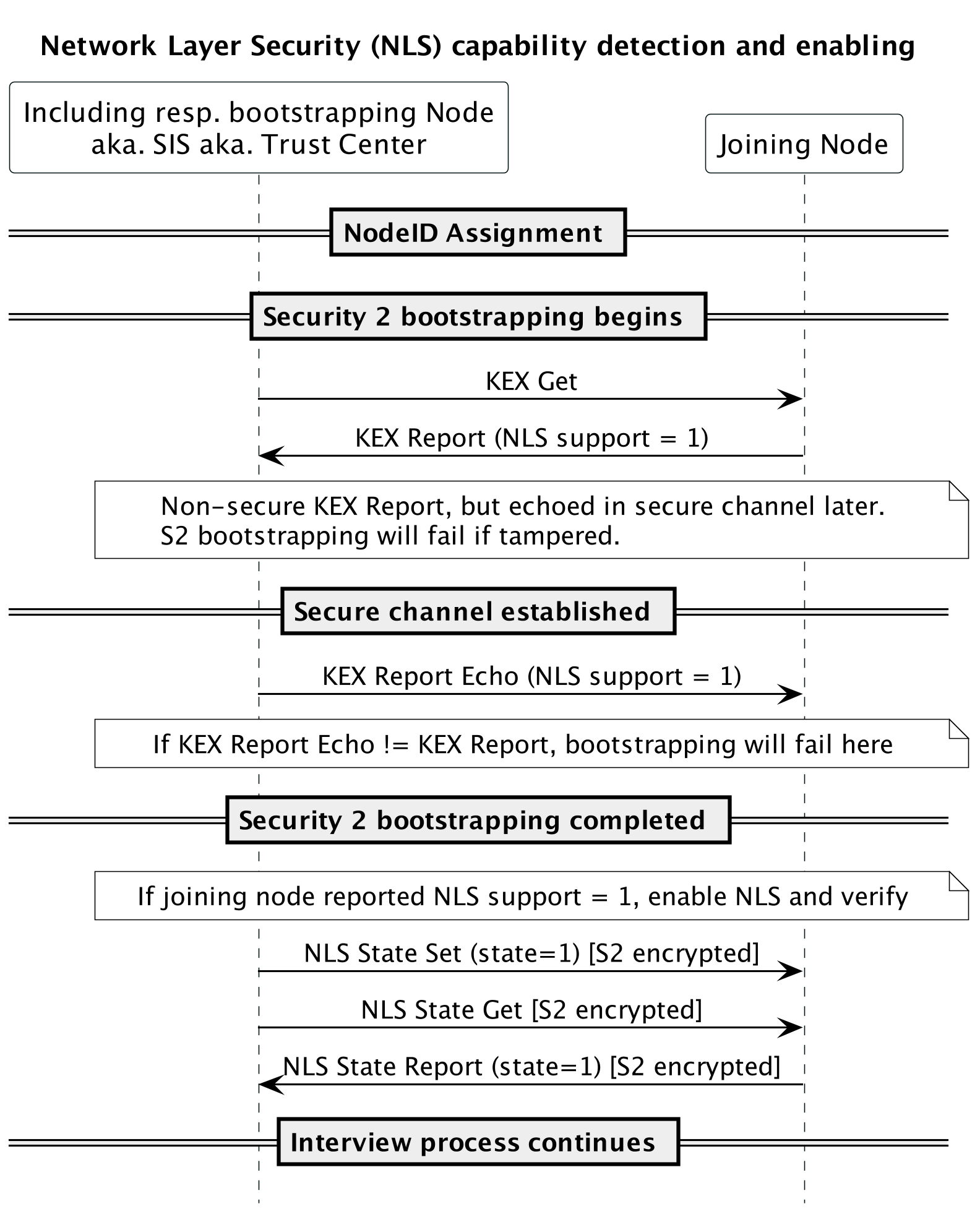
Figure 4.20 Inclusion with NLS
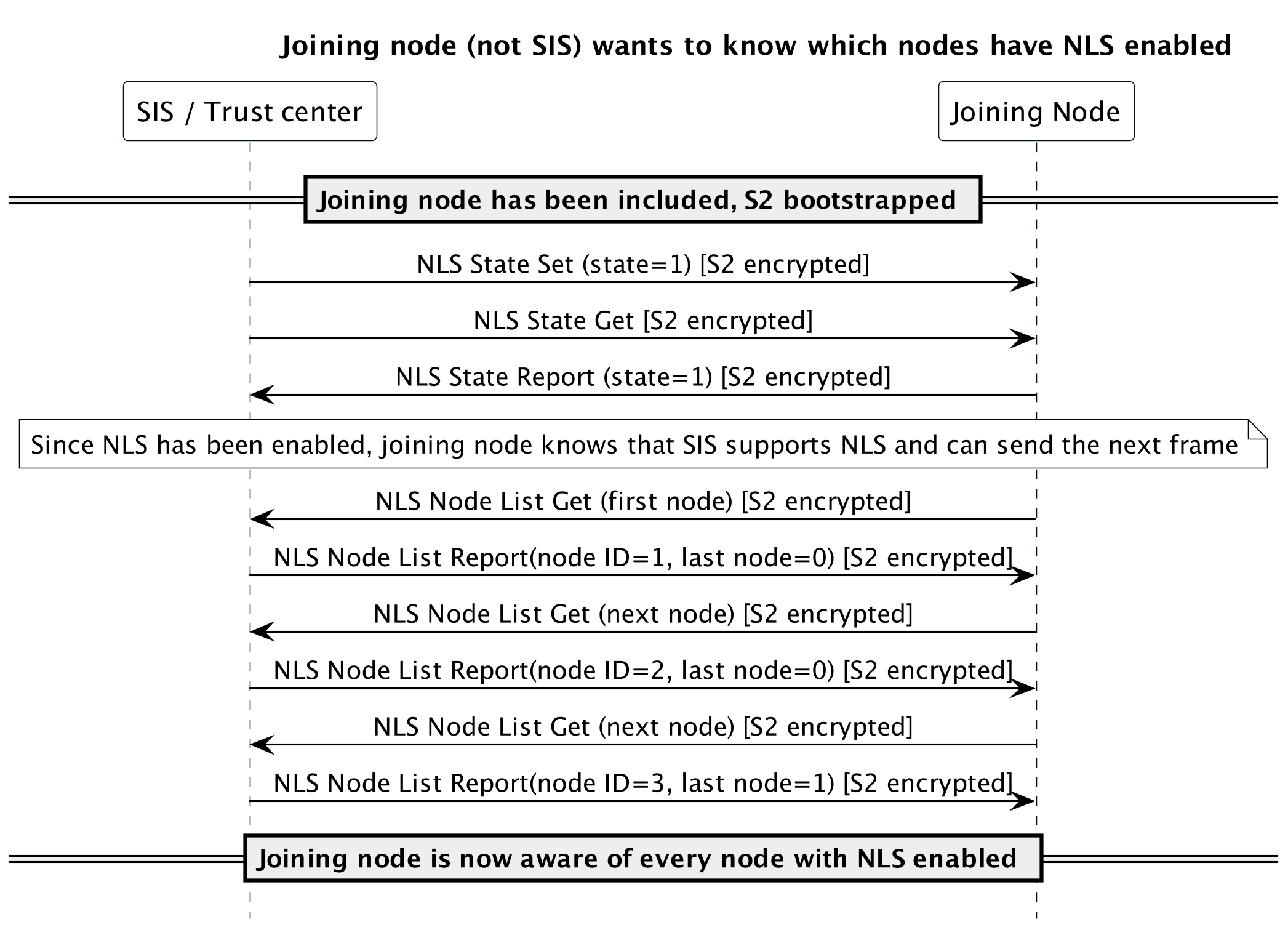
Figure 4.21 Joining node asks for NLS enabled nodes
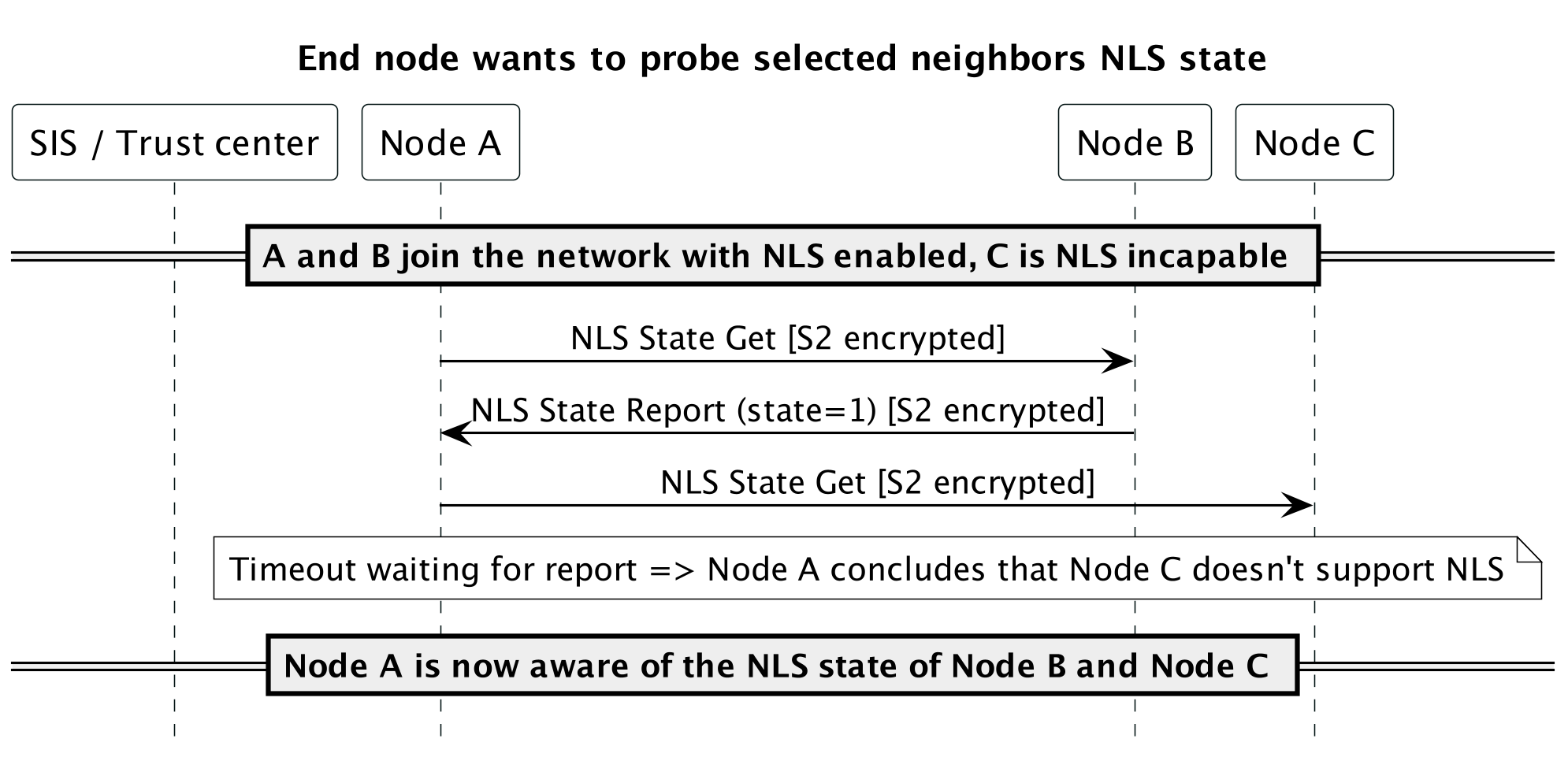
Figure 4.22 Node A probes other nodes for NLS state
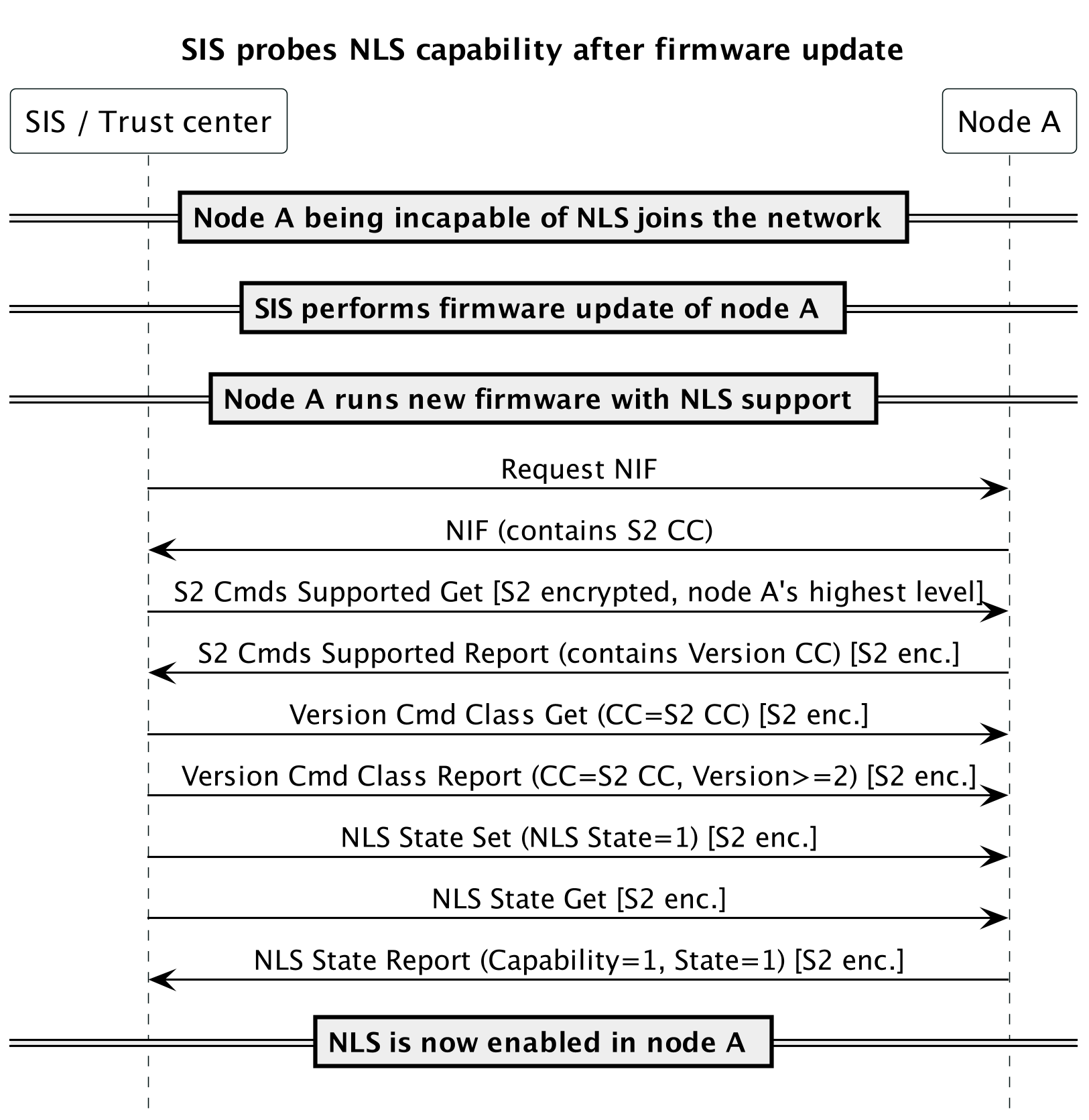
Figure 4.23 SIS probes NLS capability after firmware update
4.2.7.2. Compatibility considerations
\requirement{CC:009F.02.00.21.008}{0}
Compatibility consideration requirements from version 1 MUST also be observed by a version 2 supporting node.
The following command has been extended to report whether a node supports NLS or not:
The following commands are added for managing NLS:
4.2.7.3. Security considerations
\requirement{CC:009F.02.00.42.001}{0}
NLS increases the security on the network layer and it is therefore RECOMMENDED to enable this for as many devices as possible taking the interoperability considerations below into account.
4.2.7.4. Interoperability considerations
A Z-Wave network consisting of both NLS enabled devices and non-NLS devices is considered a mixed network and will have certain limitations.
Example: A primary controller supporting NLS will be able to communicate with both NLS and non-NLS devices, but an inclusion controller that does not support NLS will be able to exchange network layer frames only with non-NLS devices and devices where NLS is not enabled yet.
4.2.7.5. Commands covered by NLS
\requirement{CC:009F.02.00.11.010}{0}
Secure protocol commands marked as “Supervised” in the following tables MUST be sent with Supervision encapsulation.
4.2.7.5.1. Z-Wave Network Layer commands ALWAYS covered by NLS
ID |
Command |
Supervision |
|---|---|---|
Z-Wave Protocol Command Class (0x01) |
||
0x0C |
Assign Return Route |
Supervised |
0x0D |
New Node Registered |
Supervised |
0x0E |
New Range Registered |
Supervised |
0x10 |
Automatic Controller Update Start |
Not supervised |
0x12 |
Set SUC |
Not supervised |
0x13 |
Set SUC ACK |
Not supervised |
0x15 |
Static Route Request |
Not supervised |
0x19 |
Reserve Node IDs |
Not supervised |
0x1A |
Reserved IDs |
Not supervised |
0x1F |
Nodes Exist |
Not supervised |
0x20 |
Nodes Exist Reply |
Not supervised |
0x24 |
Assign Return Route Priority |
Supervised |
0x25 |
Assign SUC Return Route Priority |
Supervised |
4.2.7.5.2. Z-Wave Network Layer commands covered by NLS after secure bootstrapping
ID |
Command |
Supervision |
|---|---|---|
Z-Wave Protocol Command Class (0x01) |
||
0x04 |
Find Nodes in Range |
Supervised |
0x05 |
Get Nodes in Range |
Not supervised |
0x06 |
Range Info |
Not supervised |
0x07 |
Command Complete |
Not supervised |
0x09 |
Transfer Node Information |
Supervised |
0x0A |
Transfer Range Information |
Supervised |
0x0B |
Transfer End |
Not supervised |
0x0F |
Transfer New Primary Controller Complete |
Supervised |
0x11 |
SUC Node ID |
Not supervised |
0x14 |
Assign SUC Return Route |
Supervised |
4.2.7.5.3. Z-Wave Network Layer commands NOT covered by NLS
\requirement{CC:009F.02.00.11.011}{0}
The commands listed in Table 4.23 MUST always be available non-securely.
\requirement{CC:009F.02.00.13.012}{0}
However, they MAY be used with any higher Security Class.
ID |
Command |
Supervision |
|---|---|---|
Z-Wave Protocol Command Class (0x01) |
||
0x01 |
Node Information Frame |
Not supervised |
0x02 |
Request Node Information Frame |
|
4.2.7.5.4. Z-Wave Network Layer commands NEVER covered by NLS
\requirement{CC:009F.02.00.11.013}{0}
The commands listed in Table 4.24 MUST always be used non-securely.
ID |
Command |
Supervision |
|---|---|---|
No Operation Command Class (0x00) |
||
none |
No command |
Not supervised |
Z-Wave Protocol Command Class (0x01) |
||
0x03 |
Assign IDs |
Not supervised |
0x08 |
Transfer Presentation |
|
0x16 |
Lost |
|
0x17 |
Accept Lost |
|
0x18 |
NOP Power |
|
0x22 |
Set NWI Mode |
|
0x23 |
Exclude Request |
|
0x26 |
SmartStart Included Node Information |
|
0x27 |
SmartStart Prime |
|
0x28 |
SmartStart Inclusion Request |
|
4.2.7.5.5. Z-Wave Long Range Network Layer commands NOT covered by NLS
\requirement{CC:009F.02.00.11.014}{0}
The commands listed in Table 4.25 MUST always be available non-securely.
\requirement{CC:009F.02.00.13.015}{0}
However, they MAY be used with any higher Security Class.
ID |
Command |
Supervision |
|---|---|---|
Z-Wave Long Range Command Class (0x04) |
||
0x01 |
Node Information Frame |
Not supervised |
0x02 |
Request Node Information Frame |
|
4.2.7.5.6. Z-Wave Long Range Network Layer commands NEVER covered by NLS
\requirement{CC:009F.02.00.11.016}{0}
The commands listed in Table 4.24 MUST always be used non-securely.
ID |
Command |
Supervision |
|---|---|---|
Z-Wave Long Range Command Class (0x04) |
||
0x00 |
No Operation |
Not supervised |
0x03 |
Assign IDs |
|
0x23 |
Exclude Request |
|
0x26 |
SmartStart Included Node Information |
|
0x27 |
SmartStart Prime |
|
0x28 |
SmartStart Inclusion Request |
|
0x29 |
Exclude Request Confirmation |
|
0x2A |
Non Secure Inclusion Step Complete |
|
4.2.7.6. KEX Report Command
This command is used for two purposes during the key exchange:
This command is used by a joining node to advertise the network keys which it intends to request from the including node. The including node subsequently grants keys which may be exchanged once a temporary secure channel has been established.
After establishment of the temporary secure channel, the including node uses this command to confirm the set of keys that the joining node intends to request.
\requirement{CC:009F.02.05.11.001}{0}
A receiving node MUST ignore this command if Add Node mode is not enabled. Refer to [36] for details.
7 |
6 |
5 |
4 |
3 |
2 |
1 |
0 |
|---|---|---|---|---|---|---|---|
Command Class = COMMAND_CLASS_SECURITY_2 (0x9F) |
|||||||
Command = KEX_REPORT (0x05) |
|||||||
Reserved |
NLS Support |
Request CSA |
Echo |
||||
Supported KEX Schemes |
|||||||
Supported ECDH Profiles |
|||||||
Requested Keys |
|||||||
NLS Support (1 bit)
This field is used to advertise that the sending node supports Network Layer Security (NLS).
\requirement{CC:009F.02.05.11.002}{0}
The value 1 MUST indicate that the sending node supports NLS.
The value 0 MUST indicate that the sending node does not support NLS.
4.2.7.7. NLS Node List Get Command
This command is used to request a list of nodes that have NLS enabled and their granted keys from the SIS.
Nodes in the network will know that the SIS supports this command if they got NLS enabled during S2 bootstrapping.
\requirement{CC:009F.02.0F.11.001}{0}
This command MUST be sent securely.
7 |
6 |
5 |
4 |
3 |
2 |
1 |
0 |
|---|---|---|---|---|---|---|---|
Command Class = COMMAND_CLASS_SECURITY_2 (0x9F) |
|||||||
Command = NLS_NODE_LIST_GET (0x0F) |
|||||||
Request |
|||||||
Request (8 bit)
This field is used to request the first node or the next node in the list.
\requirement{CC:009F.02.0F.11.002}{0}
The value 0 MUST indicate that the sending node is requesting the first node in the list.
The value 1 MUST indicate that the sending node is requesting the next node in the list.
All other values are reserved.
4.2.7.8. NLS Node List Report Command
This command is used to advertise the list of nodes that have NLS enabled and their granted keys.
\requirement{CC:009F.02.10.11.001}{0}
This command MUST be sent securely.
7 |
6 |
5 |
4 |
3 |
2 |
1 |
0 |
|---|---|---|---|---|---|---|---|
Command Class = COMMAND_CLASS_SECURITY_2 (0x9F) |
|||||||
Command = NLS_NODE_LIST_REPORT (0x10) |
|||||||
Reserved |
Last node |
||||||
ID (MSB) of node N |
|||||||
ID (LSB) of node N |
|||||||
Granted keys bitmask of node N |
|||||||
NLS state of node N |
|||||||
Last node (1 bit)
This field indicates whether the node contained in the report is the last node in the list.
\requirement{CC:009F.02.10.11.002}{0}
The value 0 MUST indicate that the received node is not the last node in the list.
The value 1 MUST indicate that the received node is the last node in the list.
All other values are reserved.
Reserved
This field MUST be set to 0 by a sending node and MUST be ignored by a receiving node.
ID of node (16 bits)
This field is used to indicate the NodeID of the node being advertised.
Granted keys bitmask of node (8 bits)
This field is used to advertise a bitmask indicating the granted keys for the current NodeID being reported.
NLS state of node (8 bits)
This field is used to advetise the NLS state for the current NodeID being reported.
4.2.7.9. NLS State Get Command
This command is used by a controller to query a node for the state of NLS.
A command that can be sent to any node in the network and will return the state of NLS in that node (Enabled/Disabled)
\requirement{CC:009F.02.11.11.001}{0}
This command MUST be sent securely.
7 |
6 |
5 |
4 |
3 |
2 |
1 |
0 |
|---|---|---|---|---|---|---|---|
Command Class = COMMAND_CLASS_SECURITY_2 (0x9F) |
|||||||
Command = NLS_STATE_GET (0x11) |
|||||||
4.2.7.10. NLS State Report Command
This command reports whether NLS is enabled or disabled for the sending node.
\requirement{CC:009F.02.12.11.001}{0}
This command MUST be sent securely.
7 |
6 |
5 |
4 |
3 |
2 |
1 |
0 |
|---|---|---|---|---|---|---|---|
Command Class = COMMAND_CLASS_SECURITY_2 (0x9F) |
|||||||
Command = NLS_STATE_REPORT (0x12) |
|||||||
Reserved |
NLS state |
Capability |
|||||
Capability (1 bit)
This field advertises whether a sending node supports NLS or not.
It enables an including node to securely verify support for NLS.
NLS state (1 bit)
This field is used to advertise whether NLS is enabled or disabled.
\requirement{CC:009F.02.12.11.002}{0}
The value 1 MUST indicate that NLS is enabled in the sending node.
The value 0 MUST indicate that NLS is disabled in the sending node.
Reserved
This field MUST be set to 0 by a sending node and MUST be ignored by a receiving node.
4.2.7.11. NLS State Set Command
This command sets the NLS state in the destination node, if supported.
\requirement{CC:009F.02.13.11.001}{0}
This command MUST be sent securely.
7 |
6 |
5 |
4 |
3 |
2 |
1 |
0 |
|---|---|---|---|---|---|---|---|
Command Class = COMMAND_CLASS_SECURITY_2 (0x9F) |
|||||||
Command = NLS_STATE_SET (0x13) |
|||||||
NLS state |
|||||||
NLS state (8 bits)
This field is used to set whether NLS must be enabled.
\requirement{CC:009F.02.13.11.002}{0}
The value 1 MUST indicate that NLS is enabled in the sending node.
All other values are reserved.
