3.2.15. Firmware Update Meta Data Command Class, version 1 [DEPRECATED]
\requirement{CC:007A.01.00.13.001}{12} \requirement{CC:007A.01.00.12.001}{16}
Warning
THIS VERSION HAS BEEN DEPRECATED
A device MAY implement support for this version of the command class, but it is RECOMMENDED that new implementations implement the Firmware Update Meta Data Command Class, version 3.
If implementing support for this version of the command class, it is RECOMMENDED that support for Firmware Update Meta Data Command Class, version 3 is also implemented.
The Firmware Update Meta Data Command Class may be used to transfer a firmware image to a Z-Wave device.
\requirement{CC:007A.01.00.11.001}{0}
A device which supports the Firmware Update CC MUST support the Version CC and the Manufacturer Specific CC to enable other devices to select the correct firmware for a specific target. The Version Command Class may be used to verify that the intended firmware version is installed.
\requirement{CC:007A.01.00.11.002}{0}
Devices implementing the Firmware Update CC MUST support a data rate of 40kbit/s or more.
\requirement{CC:007A.01.00.12.002}{0} \requirement{CC:007A.01.00.12.003}{4}
A checksum SHOULD be appended to the firmware image to ensure the integrity of the image. A receiving device SHOULD verify the integrity of the received firmware image by matching the received firmware image checksum and the firmware image checksum that is indicated by the Firmware Meta Data Report when the firmware update is initiated.
\requirement{CC:007A.01.00.12.004}{0}
It is RECOMMENDED that firmware update is enabled by out-of-band authentication (e.g. physical activation of a pushbutton). If out-of-band authentication is implemented, the device to receive a firmware update must be armed for firmware update before the Firmware Update Meta Data Request Get Command is issued.
3.2.15.1. Firmware Meta Data Get Command
The Firmware Meta Data Get Command is used to request information on the current firmware in the device.
\requirement{CC:007A.01.01.11.001}{0}
The Firmware Meta Data Report Command MUST be returned in response to this command.
\requirement{CC:007A.01.01.11.002}{0}
This command MUST NOT be issued via multicast addressing.
\requirement{CC:007A.01.01.11.003}{0}
A receiving node MUST NOT return a response if this command is received via multicast addressing. The Z-Wave Multicast frame, the broadcast NodeID and the Multi Channel multi-End Point destination are all considered multicast addressing methods.
7 |
6 |
5 |
4 |
3 |
2 |
1 |
0 |
|---|---|---|---|---|---|---|---|
Command Class = COMMAND_CLASS_FIRMWARE_UPDATE_MD (0x7A) |
|||||||
Command = FIRMWARE_MD_GET (0x01) |
|||||||
3.2.15.2. Firmware Meta Data Report Command
The Firmware Meta Data Report Command is used to advertise the status of the current firmware in the device.
7 |
6 |
5 |
4 |
3 |
2 |
1 |
0 |
|---|---|---|---|---|---|---|---|
Command Class = COMMAND_CLASS_FIRMWARE_UPDATE_MD (0x7A) |
|||||||
Command = FIRMWARE_MD_REPORT (0x02) |
|||||||
Manufacturer ID 1 |
|||||||
Manufacturer ID 2 |
|||||||
Firmware ID 1 |
|||||||
Firmware ID 2 |
|||||||
Checksum 1 |
|||||||
Checksum 2 |
|||||||
Manufacturer ID (16 bits)
The Manufacturer ID is a unique ID identifying the manufacturer of the device.
Manufacturer identifiers can be found in [33]
\requirement{CC:007A.01.02.11.001}{0}
The first byte MUST be the most significant byte.
Firmware ID (16 bits)
\requirement{CC:007A.01.02.12.001}{0}
A manufacturer SHOULD assign a unique Firmware ID to each existing product variant. A product variant may be a particular hardware version for a particular world region. When combined with the Manufacturer ID, the Firmware ID is a unique identification of a firmware image that is guaranteed to work with a particular product among all Z-Wave enabled products in the world.
If the product has no Firmware ID, the value 0x0000 MUST be returned.
\requirement{CC:007A.01.02.11.002}{0}
The first byte MUST be the most significant byte.
A user may request Manufacturer Specific information to get more detailed information on the product.
\requirement{CC:007A.01.02.12.002}{0}
A controlling device SHOULD match the advertised firmware ID for the existing firmware image to the firmware ID provided for a new image. If the firmware IDs do not match, the controlling device SHOULD abort the firmware update operation.
Checksum (16 bits)
\requirement{CC:007A.01.02.13.001}{4}
The checksum field is used to report a checksum value of the firmware image currently running in the Z-Wave chip. As an alternative, a value of zero MAY be returned.
\requirement{CC:007A.01.02.11.003}{0}
The first byte MUST be the most significant byte.
\requirement{CC:007A.01.02.12.003}{0}
It is RECOMMENDED to use a checksum algorithm that implements a CRC-CCITT polynomial using initialization value equal to 0x1D0F and 0x1021 (normal representation).
3.2.15.3. Firmware Update Meta Data Request Get Command
The Firmware Update Meta Data Request Get Command is used to request that a firmware update is initiated.
\requirement{CC:007A.01.03.11.001}{0}
The Firmware Update Meta Data Request Report Command MUST be returned in response to this command.
\requirement{CC:007A.01.03.11.002}{0}
The firmware update MUST NOT be initiated if the Manufacturer ID and the Firmware ID do not match the actual firmware image values.
\requirement{CC:007A.01.03.11.003}{0}
The firmware update MUST be aborted if the checksum does not match the calculated checksum after the firmware image has been transferred.
\requirement{CC:007A.01.03.12.001}{0}
It is RECOMMENDED that firmware update is initiated by out-of-band authentication (e.g. physical activation of a pushbutton).
\requirement{CC:007A.01.03.11.004}{0}
This command MUST NOT be issued via multicast addressing.
\requirement{CC:007A.01.03.11.005}{0}
A receiving node MUST NOT return a response if this command is received via multicast addressing. The Z-Wave Multicast frame, the broadcast NodeID and the Multi Channel multi-End Point destination are all considered multicast addressing methods.
7 |
6 |
5 |
4 |
3 |
2 |
1 |
0 |
|---|---|---|---|---|---|---|---|
Command Class = COMMAND_CLASS_FIRMWARE_UPDATE_MD (0x7A) |
|||||||
Command = FIRMWARE_UPDATE_MD_REQUEST_GET (0x03) |
|||||||
Manufacturer ID 1 |
|||||||
Manufacturer ID 2 |
|||||||
Firmware ID 1 |
|||||||
Firmware ID 2 |
|||||||
Checksum 1 |
|||||||
Checksum 2 |
|||||||
Manufacturer ID (16 bits)
The Manufacturer ID is a unique ID identifying the manufacturer of the device.
\requirement{CC:007A.01.03.11.006}{0}
Manufacturer identifiers can be found in [33]. The first byte MUST be the most significant byte.
Firmware ID (16 bits)
\requirement{CC:007A.01.03.12.002}{0}
A manufacturer SHOULD assign a unique Firmware ID to each existing product variant. A product variant may be a particular hardware version for a particular world region. When combined with the Manufacturer ID, the Firmware ID is a unique identification of a firmware image that is guaranteed to work with a particular product among all Z-Wave enabled products in the world.
\requirement{CC:007A.01.03.11.007}{0}
A receiving application MUST check that the Manufacturer ID and Firmware ID fields match the Manufacturer ID and Firmware ID values of the current firmware. While it is NOT RECOMMENDED, one MAY design a the product that has no Firmware ID.
\requirement{CC:007A.01.03.11.008}{0}
A sending node MUST specify the Firmware ID value 0x0000 to indicate an absent Firmware ID.
\requirement{CC:007A.01.03.11.009}{0}
A receiving node MUST interpret the value 0x0000 as “No Firmware ID available”.
\requirement{CC:007A.01.03.11.00A}{0}
The first byte MUST be the most significant byte.
Checksum (16 bits)
\requirement{CC:007A.01.03.11.00B}{0}
The checksum field MUST carry the checksum of the firmware image about to be transferred.
\requirement{CC:007A.01.03.11.00C}{0}
A receiving node MUST match this value and the checksum calculated from the received firmware image.
\requirement{CC:007A.01.03.12.004}{0}
It is RECOMMENDED to use a checksum algorithm that implements a CRC-CCITT polynomium using initialization value equal to 0x1D0F and 0x1021 (normal representation). Refer to CRC-CCITT Source Code.
3.2.15.4. Firmware Update Meta Data Request Report Command
This command is used to advertise if the firmware update will be initiated.
7 |
6 |
5 |
4 |
3 |
2 |
1 |
0 |
|---|---|---|---|---|---|---|---|
Command Class = COMMAND_CLASS_FIRMWARE_UPDATE_MD (0x7A) |
|||||||
Command = FIRMWARE_UPDATE_MD_REQUEST_REPORT (0x04) |
|||||||
Status |
|||||||
Status (8 bits)
\requirement{CC:007A.01.04.11.001}{0}
This field MUST comply with Table 3.81.
3.2.15.5. Firmware Update Meta Data Get Command
The Firmware Update Meta Data Get Command is used to request one or more Firmware Update Meta Data Report Commands.
\requirement{CC:007A.01.05.11.001}{0}
The Firmware Update Meta Data Report Command MUST be returned in response to this command.
\requirement{CC:007A.01.05.13.001}{4} \requirement{CC:007A.01.05.13.002}{8}
The transmission of the next Firmware Update Meta Data Get Command MAY be delayed if time is required to store the most recent firmware fragment in temporary non-volatile memory. A node MAY request multiple Firmware Update Meta Data Report Commands to improve throughput.
\requirement{CC:007A.01.05.11.002}{0}
This command MUST NOT be issued via multicast addressing.
\requirement{CC:007A.01.05.11.003}{0}
A receiving node MUST NOT return a response if this command is received via multicast addressing. The Z-Wave Multicast frame, the broadcast NodeID and the Multi Channel multi-End Point destination are all considered multicast addressing methods.
Two exceptions may apply: A noise burst may interfere the transmission or the data source may stop returning Firmware Update Meta Data Report Commands.
\requirement{CC:007A.01.05.12.001}{0}
To accommodate for bursts of RF noise, a device receiving data SHOULD repeatedly retransmit the same Firmware Update Meta Data Get Command every 10 seconds in case no Firmware Update Meta Data Report Commands are received.
\requirement{CC:007A.01.05.12.002}{0}
A device receiving data SHOULD stop retransmitting Firmware Update Meta Data Get commands 2 minutes after the last successful reception of a Firmware Update Meta Data Report Command.
7 |
6 |
5 |
4 |
3 |
2 |
1 |
0 |
|---|---|---|---|---|---|---|---|
Command Class = COMMAND_CLASS_FIRMWARE_UPDATE_MD (0x7A) |
|||||||
Command = FIRMWARE_UPDATE_MD_GET (0x05) |
|||||||
Number of Reports |
|||||||
Res |
Report number 1 |
||||||
Report number 2 |
|||||||
Res
\requirement{CC:007A.01.05.11.004}{0}
This field MUST be set to 0 by a sending node and MUST be ignored by a receiving node.
Number of Reports (8 bits)
Number of Firmware Update Meta Data Report Commands to be received in response to this Firmware Update Meta Data Get Command.
Report number 1 .. 2 (15 bits)
\requirement{CC:007A.01.05.11.005}{4}
The Report number field indicates the Firmware Update Meta Data Report Command to be requested. The report number values MUST be a sequence starting from 1. The first byte (Report number 1) is the most significant byte.
3.2.15.6. Firmware Update Meta Data Report Command
The Firmware Update Meta Data Report Command is used to transfer a firmware image fragment.
\requirement{CC:007A.01.06.11.001}{0}
If sending more than a single Firmware Update Meta Data Report Command at a time, a node MUST apply a delay between each transmitted command. The minimum required time delay and number of frames before a delay must be inserted depends on the actual bit rate.
40 kbit/s: At least 35 ms if sending more than 1 frame back-to-back
100 kbit/s: At least 15 ms if sending more than 2 frames back-to-back
\requirement{CC:007A.01.06.12.001}{0}
If needed, a controlling node SHOULD abort an ongoing transfer by responding to a Firmware Update Meta Data Get Command with a Firmware Update Meta Data Report Command with the Last bit enabled and the Data fields intentionally corrupted.
This will invalidate the calculated firmware checksum, which should eventually cause the receiving device to return a Firmware Update Meta Data Status Report Command with the status code <checksum error>.
7 |
6 |
5 |
4 |
3 |
2 |
1 |
0 |
|---|---|---|---|---|---|---|---|
Command Class = COMMAND_CLASS_FIRMWARE_UPDATE_MD (0x7A) |
|||||||
Command = FIRMWARE_UPDATE_MD_REPORT (0x06) |
|||||||
Last |
Report number 1 |
||||||
Report number 2 |
|||||||
Data 1 |
|||||||
… |
|||||||
Data N |
|||||||
Last (1 bit)
The Last flag indicates if the requested Firmware Update Meta Data Report Command carries the last firmware image fragment.
\requirement{CC:007A.01.06.11.002}{0}
The flag MUST be set to ‘1’ if this is the last fragment. Otherwise the flag MUST be ‘0’.
Report number (15 bits)
\requirement{CC:007A.01.06.11.003}{4}
The Report number field indicates the sequence number of the contained firmware fragment. The first firmware fragment MUST be identified by the Report number value 1. The sequence number of each following firmware fragment MUST be incremented.
Report number 1 is the most significant byte.
The report number may be used to calculate the offset of the data by the formula:
Offset = (Report number – 1) x Number of Data fields (N)
\requirement{CC:007A.01.06.11.004}{0} \requirement{CC:007A.01.06.13.001}{4}
Except for the last frame, each Report MUST carry the same number of Data bytes as the first fragment. The last frame MAY carry a shorter Data field.
Data (N bytes)
\requirement{CC:007A.01.06.11.005}{4} \requirement{CC:007A.01.06.13.002}{8}
The Data field is used to carry one firmware image fragment. Except for the last frame, each Firmware Update Meta Data Report Command MUST carry the same number of Data bytes as the first fragment. The last frame MAY carry a shorter Data field.
\requirement{CC:007A.01.06.11.006}{0}
A sending device MUST use a fragment size which matches the actual number of available Data bytes. The number of available Data bytes depends on the actual bit rate, the use of security encapsulation as well as the presence of Checksum bytes in the Firmware Update Meta Data Report.
\requirement{CC:007A.01.06.11.007}{0}
A receiving device MUST determine the number of Data bytes from the length of the first received frame.
3.2.15.7. Firmware Update Meta Data Status Report Command
This command is used to advertise the firmware update status.
\requirement{CC:007A.01.07.11.001}{0}
The command MUST be issued when the firmware update is completed or aborted by the device receiving the firmware.
\requirement{CC:007A.01.07.12.001}{0}
A supporting node SHOULD reboot and apply the new firmware image before issuing this command.
\requirement{CC:007A.01.07.11.002}{0}
A node MUST NOT issue Firmware Update Meta Data Get Command after receiving a Firmware Update Meta Data Status Report.
7 |
6 |
5 |
4 |
3 |
2 |
1 |
0 |
|---|---|---|---|---|---|---|---|
Command Class = COMMAND_CLASS_FIRMWARE_UPDATE_MD (0x7A) |
|||||||
Command = FIRMWARE_UPDATE_MD_STATUS_REPORT (0x07) |
|||||||
Status |
|||||||
Status (8 bits)
\requirement{CC:007A.01.07.11.003}{0}
This field MUST comply with Table 3.71.
3.2.15.8. Examples
Figure 3.3 shows a controlling node requesting the Manufacturer ID and Firmware ID of another node by issuing the Firmware Meta Data Get Command.
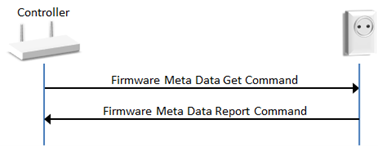
Figure 3.3 Requesting Manufacturer ID and Firmware ID of a Node
Figure 3.4 outlines the actual firmware update message flow. Prior to the firmware update, the supporting node may receive an out-of-band authentication (e.g. physical activation of a pushbutton). The controller sends a Firmware Meta Data Request Get Command to initiate the downloading a new firmware image.
The supporting node returns a Firmware Meta Data Request Report Command report to confirm the update request and the supporting node begins pulling firmware image fragments from the controller. Finally a Firmware Update Meta Data Status Report is returned to the controller to indicate the success (or failure) of the update process.
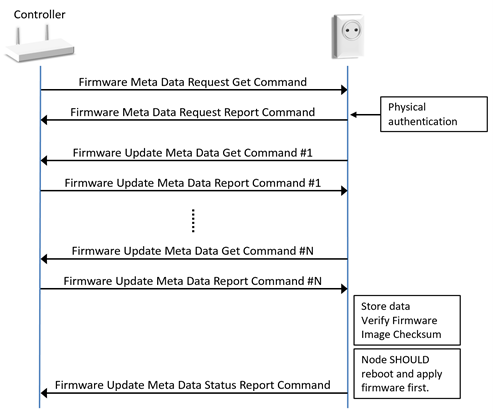
Figure 3.4 Transferring a Firmware Image to a Device
