3.2.29. IP Association Command Class, version 1
The IP Association Command Class is used to create and maintain Z-Wave application bindings between IPv6 hosts. An association group sends a predefined command to the configured destinations when triggered by an event.
IP Association identifies nodes via IPv6 addresses.
IP Association is natively Z-Wave Multi Channel End Point aware.
IP Association groups are specific to a particular End Point or Root Device.
3.2.29.1. Compatibility considerations
The IP Association Command Class extends the functionality of the Z-Wave Multi Channel Association Command Class. Z-Wave nodes may be represented as Z/IP nodes in an IP subnet. IP Associations may be mapped to classic Z-Wave Multi Channel associations.
The IP Association Remove Command extends the Multi Channel Association Remove Command by adding the ability to clear all groups in all End Points of a node. Only one IP association can be created or maintained with a single command.
In order to respond quickly and to conserve battery, it is RECOMMENDED that a Z/IP Gateway caches IP associations and corresponding Z-Wave associations and only looks up all associations when explicitly instructed to do so.
3.2.29.2. Terminology
The IP Association Command Class operates on IP primitives but works for all generations of Z-Wave technology. In the following, the term “Classic Z-Wave” refers to operations that are possible with Z-Wave only releases.
The term “Z-Wave node” is used to identify a Z-Wave node as used in Classic Z-Wave while the term “Z/IP node” denotes an IP enabled Z-Wave node that implements the ICMP echo service and the Z-Wave UDP service. A Z/IP node may implement other IP services. Such IP services are out of scope of this document.
An IP association is created by sending an IP Association Set command from a configuration tool to the association source, instructing the association source to add an association destination to an association group maintained in the association source. The association destination has no knowledge that an association is created.
A Z/IP Gateway represents classic Z-Wave nodes as Z/IP nodes in an IP environment. The Z/IP Gateway therefore maps IP association commands from Z/IP clients to relevant Association and Multi Channel Association commands for Z-Wave nodes.
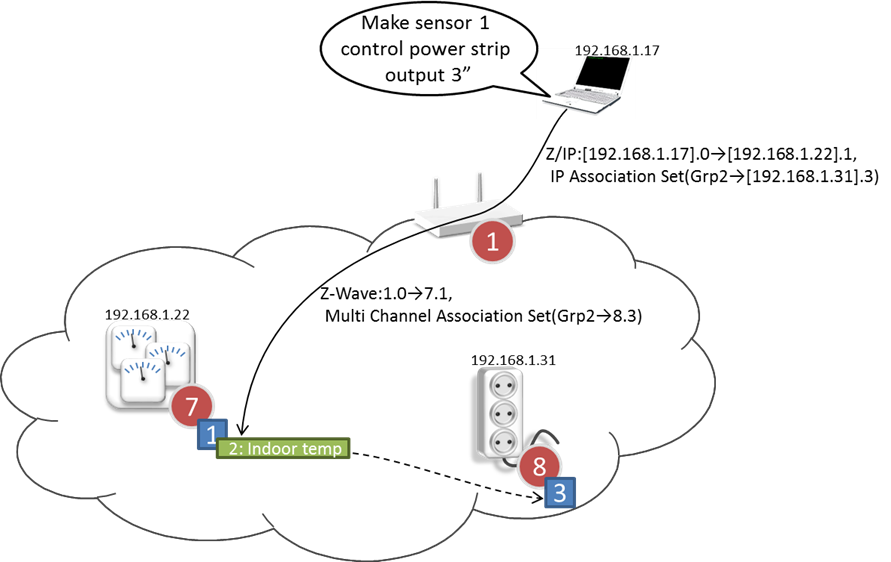
Figure 3.16 IP Association Example
3.2.29.3. Z-Wave Multi Channel compatibility considerations
IP Association is natively Multi Channel aware. The same message format is used to create an association to a logical End Point as to the Root Device.
In the Z/IP framework, End Point 0 represents the physical entity.
IP Associations are conceptually created between two Z/IP resources identified by an IPv6 address and an End Point. In case one or both parties are Z-Wave nodes represented as Z/IP nodes, the Z/IP Gateway MUST create Z-Wave associations in the following way, based on the Resource Directory information pertaining to the actual nodes.
A Z/IP gateway MUST map IP associations to Z-Wave associations according to Table 3.116.
Association Source Multi Channel Capability |
Association Destination Multi Channel Capability |
Association Type |
Creating the Association |
|---|---|---|---|
|
|
Root Device -> Root Device |
An Association Set Command MUST be sent un-encapsulated to the association source node |
|
|
End Point m -> End Point n m, n MAY be 0 |
A Multi Channel Association Set Command MUST be sent Multi Channel encapsulated to the association source End Point. A Multi Channel Association from the Lifeline association group of a sensor Root Device enables the transmission of sensor reports with different Source End Points to the Lifeline destination. |
|
|
End Point m -> Root Device |
An Association Set Command MUST be sent Multi Channel encapsulated to the association source End Point. |
|
|
Root Device -> End Point n |
An Association Set Command MUST be sent un-encapsulated to the association source node. This first association MUST target a NodeID owned by the Z/IP Gateway. A second association MUST be created from the abovementioned Z/IP Gateway to the Multi Channel End Point specified in the IP Association Set Command. |


3.2.29.4. Advertising the IP Association Command Class
The Node Information Frame emitted by Classic Z-Wave nodes does not include IP Association. To allow IP clients to issue IP Association commands, the Z/IP Gateway MUST rewrite the list of supported command classes from the node, replacing the Association and Multi Channel Association Command Classes with the IP Association Command Class in the following situations:
When a Node Info Cached Report is sent to an IP client.
When a Node Add Status is being sent to an IP client.
In both cases, rewriting MUST NOT be performed if the report is being sent to a native Z-Wave node.
Furthermore, mDNS responses to queries for nodes supporting the IP Association Command Class MUST also advertise nodes supporting the Association and Multi Channel Association Command Classes (but the command classes must be replaced with COMMAND_CLASS_IP_ASSOCIATION before advertised via mDNS).
3.2.29.5. IP Association Set Command
This command is used to add one resource to a given association group.
The receiving IPv6 host SHOULD add the specified destination resource to the specified association group.
This command MAY be ignored if the association group is already full.
Unless the association destination is a gateway, a controlling node SHOULD NOT create an association if the association destination node does not support the controlling commands (Set/Get type) that the actual association group will be sending. The AGI Command Class SHOULD be used to probe the commands that a given association group will be sending.
A controlling node SHOULD NOT create an association if the source and destination nodes are bootstrapped with different security levels.
7 |
6 |
5 |
4 |
3 |
2 |
1 |
0 |
|---|---|---|---|---|---|---|---|
Command Class = COMMAND_CLASS_IP_ASSOCIATION (0x5C) |
|||||||
Command = IP_ASSOCIATION_SET (0x01) |
|||||||
Grouping Identifier |
|||||||
IPv6 Address 1 |
|||||||
… |
|||||||
IPv6 Address 16 |
|||||||
End Point |
|||||||
Grouping identifier (8 bits)
This field is used to specify the actual association group.
Grouping Identifiers MUST be assigned in a consecutive range starting from 1.
IPv6 Address (16 bytes)
This field specifies the full IPv6 address for the association destination. The IPv6 address MUST NOT be compressed.
The IPv6 address SHOULD be in the ULA IPv6 prefix or in a globally routable IPv6 prefix.
The IPv6 address MAY be an IPv4-mapped IPv6 address.
The field MUST NOT carry a link-local IPv6 address.
End Point (8 bits)
This field is used in combination with the IPv6 Address to identify the actual resource.
The field represents the Z/IP Bit Address flag (bit 7) as well as the Z/IP 7-bit End Point identifier (bits 6..0).
The receiving node MUST treat this field as one scalar value when adding or removing associations; i.e. any 8-bit End Point value causes one association to be added.
3.2.29.6. IP Association Get Command
This command is used to request active associations for a given association group. The IP Association Report Command MUST be returned in response to this command.
This command MUST NOT be issued via multicast addressing.
A receiving node MUST NOT return a response if this command is received via multicast addressing. The Z-Wave Multicast frame, the broadcast NodeID and the Multi Channel multi-End Point destination are all considered multicast addressing methods.
7 |
6 |
5 |
4 |
3 |
2 |
1 |
0 |
|---|---|---|---|---|---|---|---|
Command Class = COMMAND_CLASS_IP_ASSOCIATION (0x5C) |
|||||||
Command = IP_ASSOCIATION_GET (0x02) |
|||||||
Grouping Identifier |
|||||||
Index |
|||||||
Grouping identifier (8 bits)
This field is used to specify the actual association group.
Grouping Identifiers MUST be assigned in a consecutive range starting from 1.
If an unsupported Grouping Identifier is specified, the IP Association Report Command returned in response to this command MUST carry IPv6 address and End Point fields which are set to all-zeros.
Index (8 bits)
This field is used to specify an entry in the association table for the group identified by the Grouping Identifier.
A requesting host SHOULD start specifying the index value 1.
The actual number of nodes in the association group may be determined from the Actual Nodes field of the IP Association Report.
3.2.29.7. IP Association Report Command
This command is used to advertise one association group entry.
7 |
6 |
5 |
4 |
3 |
2 |
1 |
0 |
|---|---|---|---|---|---|---|---|
Command Class = COMMAND_CLASS_IP_ASSOCIATION (0x5C) |
|||||||
Command = IP_ASSOCIATION_REPORT (0x03) |
|||||||
Grouping Identifier |
|||||||
Index |
|||||||
Actual Nodes |
|||||||
IPv6 Address 1 |
|||||||
… |
|||||||
IPv6 Address 16 |
|||||||
End Point |
|||||||
Grouping identifier (8 bits)
This field is used to identify the actual group of nodes.
Index (8 bits)
This field is used to advertise the actual entry in the association group identified by the Grouping Identifier.
Actual Nodes (8 bits)
This value indicates the number of nodes in the association group advertised by the Grouping Identifier field.
IPv6 Address (16 bytes)
This field carries a full IPv6 address with no compression. The address SHOULD be in the ULA IPv6 prefix or in a globally routable IPv6 prefix. The address MAY be an IPv4-mapped IPv6 address. The field MUST NOT carry a link-local IPv6 address.
If the Actual Nodes value is zero, the IPv6 Address field MUST be all zeros.
End Point (8 bits)
This field is used in combination with the IPv6 Address to identify the actual resource
If the Actual Nodes value is zero, the End Point field MUST be all zeros.
The field represents the Z/IP Bit Address flag (bit 7) as well as the Z/IP 7-bit End Point identifier (bits 6..0).
3.2.29.8. IP Association Remove Command
This command is used to remove one resource from a given association group.
7 |
6 |
5 |
4 |
3 |
2 |
1 |
0 |
|---|---|---|---|---|---|---|---|
Command Class = COMMAND_CLASS_IP_ASSOCIATION (0x5C) |
|||||||
Command = IP_ASSOCIATION_REMOVE (0x04) |
|||||||
Grouping Identifier |
|||||||
IPv6 Address 1 |
|||||||
… |
|||||||
IPv6 Address 16 |
|||||||
End Point |
|||||||
Grouping identifier (8 bits)
This field is used to specify the actual association group. Grouping Identifiers MUST be assigned in a consecutive range starting from 1.
A receiving node MUST ignore an unsupported Grouping Identifier.
This field MUST be interpreted in combination with the IPv6 Address and End Point fields.
IPv6 Address (16 bytes)
End Point (1 byte)
These fields specify the resources that are to be removed.
The Grouping identifier and these fields MUST be interpreted as follows.
Command Properties |
|||
Grouping Identifier |
IPv6 Address |
End Point ID |
Removal Operation |
> 0 |
<> 0 |
= 0 (Root Device) |
Remove destination from association group in the association source Root Device |
> 0 |
<> 0 |
> 0 (End Point) |
Remove destination from association group in the specified association source End Point |
> 0 |
= 0 |
= 0 (Root Device) |
Remove all destinations from association group in the association source Root Device |
> 0 |
= 0 |
> 0 (End Point) |
Remove all destinations from association group in the specified association source End Point |
= 0 |
= 0 |
= 0 (Root Device) |
Remove all destinations from all association groups in the association source Root Device and in all association source End Points |
= 0 |
= 0 |
> 0 (End Point) |
Remove all destinations from all groups in the specified association source End Point |
= 0 |
<> 0 |
>= 0 |
Reserved |
*) The End Point field represents the Z/IP Bit Address flag (bit 7) as well as the Z/IP 7-bit End Point identifier (bits 6..0).
The receiving node MUST treat the End Point field as one scalar value when removing associations; i.e. any 8-bit End Point value causes one association to be removed.
