3.2.19. Firmware Update Meta Data Command Class, version 5
The Firmware Update Meta Data Command Class may be used to transfer a firmware image to or from a Z-Wave node.
3.2.19.1. Compatibility considerations
\requirement{CC:007A.05.00.21.001}{0}
A device implementing Firmware Update Meta Data Command Class, version 5 MUST also implement Firmware Update Meta Data Command Class, version 4.
Firmware Update Meta Data Command Class, version 5 is backwards compatible with Firmware Update Meta Data Command Class, version 4.
All commands and fields not mentioned in this version remain unchanged from version 4.
3.2.19.1.1. New commands, fields and values
The Firmware Update Meta Data Command Class, version 5 introduces the support of a hardware identifier to uniquely identify firmware images that can be loaded on devices. This allows devices running identical software version on different hardware revisions to receive the correct firmware image.
The following commands are extended from version 4:
Firmware Meta Data Report Command
Firmware Update Meta Data Request Get Command
Firmware Update Meta Data Request Report Command
Firmware Update Meta Data Status Report Command
Firmware Update Activation Set Command
Firmware Update Activation Status Report Command
The Firmware Update Meta Data Command Class, version 5 also introduces the support firmware download from the Z-Wave node to the controller.
The following commands are introduced:
Firmware Update Meta Data Prepare Get Command
Firmware Update Meta Data Prepare Report Command
3.2.19.2. Interoperability Considerations
3.2.19.2.1. Interoperability with v1 devices
Version 2 of the Firmware Update Meta Data Report command introduces a 16-bit Checksum field to follow the variable-length Data field. No fields follow the variable-length Data field in Version 1 of the Firmware Update Meta Data Report command. Version 5 of the Firmware Update Meta Data Report command uses the version 2 format.
At the same time, the specified method for determining the length of the variable-length Data field is that the length must be calculated from the length of the received frame.
The unintended consequence is that a version 1 implementation receiving a Firmware Update Meta Data Report version 2 Command will consider the 16-bit Checksum field to be the last two bytes of the Data field.
Similarly, a version 2 implementation receiving a Firmware Update Meta Data Report version 1 Command will consider the last two bytes of the Data field to be the 16-bit Checksum field.
In either case, the transfer will fail.
\requirement{CC:007A.05.00.31.001}{4}
Therefore, a controlling device implementing the Firmware Update Meta Data Command Class, version 2 MUST do the following when initiating the transfer of a firmware image:
Request the version of the Firmware Update Meta Data Command Class from the target device
Use the version of the Firmware Update Meta Data Report implemented by the target device
Determine the number of Data bytes that can fit into the Firmware Update Meta Data Report command so that the complete command can still fit into the payload field of the transport frame. The number of available payload bytes in the frame depends on the actual bit rate, the use of security encapsulation as well as the presence of Checksum bytes in the Firmware Update Meta Data Report
3.2.19.2.2. Checksum calculation
Version 1 of the Firmware Update Meta Data Command Class introduced a 16-bit Checksum field used to verify firmware image integrity. It has been a recommendation to use the CRC-CCITT polynomial for calculating checksums. There is no way to identify what method has been used for calculating the checksum for nodes implementing version 1 to version 4. Nodes having implemented another method for calculating the checksum will find a non-matching checksum.
From Version 5 onwards, the checksum calculation method is mandatory.
For more details about the checksum calculation, refer to CRC-CCITT Source Code.
3.2.19.3. Firmware Meta Data Report Command
This command is used to advertise the status of the current firmware in the device.
7 |
6 |
5 |
4 |
3 |
2 |
1 |
0 |
|---|---|---|---|---|---|---|---|
Command Class = COMMAND_CLASS_FIRMWARE_UPDATE_MD (0x7A) |
|||||||
Command = FIRMWARE_MD_REPORT (0x02) |
|||||||
Manufacturer ID 1 |
|||||||
Manufacturer ID 2 |
|||||||
Firmware 0 ID 1 |
|||||||
Firmware 0 ID 2 |
|||||||
Firmware 0 Checksum 1 |
|||||||
Firmware 0 Checksum 2 |
|||||||
Firmware Upgradable |
|||||||
Number of Firmware Targets |
|||||||
Max Fragment Size 1 |
|||||||
Max Fragment Size 2 |
|||||||
Firmware 1 ID 1 |
|||||||
Firmware 1 ID 2 |
|||||||
… |
|||||||
Firmware N ID 1 |
|||||||
Firmware N ID 2 |
|||||||
Hardware Version |
|||||||
All fields not described below remain unchanged from version 4.
Firmware 0 Checksum (16 bits)
The checksum field is used to carry the checksum of the Firmware 0 Image.
\requirement{CC:007A.05.02.13.001}{0}
Supporting nodes MAY set this field to 0x00. In this case the field is unused.
\requirement{CC:007A.05.02.11.006}{0}
Values in the range 0x0001..0xFFFF indicate that the supporting node MUST advertise the checksum of its firmware 0 image.
\requirement{CC:007A.05.02.11.001}{0}
The checksum MUST be calculated using the CRC-CCITT polynomium using initialization value equal to 0x1D0F and 0x1021 (normal representation).
For more details, refer to CRC-CCITT Source Code.
Hardware Version (8 bits)
\requirement{CC:007A.05.02.11.002}{0}
This field MUST report a value which is unique to this particular version of the product.
\requirement{CC:007A.05.02.11.003}{0}
It MUST be possible to uniquely identify applicable firmware images via the Manufacturer ID, Firmware ID and the Hardware Version fields. This information allows selecting a firmware image that is guaranteed to work with this particular version of the product.
\requirement{CC:007A.05.02.11.004}{0}
The Hardware Version field MUST apply to the entire product and not only to the version of the Z-Wave radio chip.
\requirement{CC:007A.05.02.11.005}{0}
This field MUST report the same value as the Version CC Version Report Command: Hardware Version field.
3.2.19.4. Firmware Update Meta Data Request Get Command
This command is used to request that a firmware update is initiated by the node receiving this command.
7 |
6 |
5 |
4 |
3 |
2 |
1 |
0 |
|---|---|---|---|---|---|---|---|
Command Class = COMMAND_CLASS_FIRMWARE_UPDATE_MD (0x7A) |
|||||||
Command = FIRMWARE_UPDATE_MD_REQUEST_GET (0x03) |
|||||||
Manufacturer ID 1 |
|||||||
Manufacturer ID 2 |
|||||||
Firmware ID 1 |
|||||||
Firmware ID 2 |
|||||||
Checksum 1 |
|||||||
Checksum 2 |
|||||||
Firmware Target |
|||||||
Fragment Size 1 |
|||||||
Fragment Size 2 |
|||||||
Reserved |
Activation |
||||||
Hardware Version |
|||||||
All fields not described below remain unchanged from version 4.
Firmware Checksum (16 bits)
\requirement{CC:007A.05.03.11.001}{0}
The checksum field MUST carry the checksum of the firmware image about to be transferred.
\requirement{CC:007A.05.03.11.002}{0}
The checksum MUST be calculated using the CRC-CCITT polynomium using initialization value equal to 0x1D0F and 0x1021 (normal representation).
For more details, refer to CRC-CCITT Source Code.
Hardware Version (8 bits)
Refer to Section 3.2.19.3 Firmware Meta Data Report Command.
3.2.19.5. Firmware Update Meta Data Request Report Command
This command is used to advertise if the firmware update will be initiated.
7 |
6 |
5 |
4 |
3 |
2 |
1 |
0 |
|---|---|---|---|---|---|---|---|
Command Class = COMMAND_CLASS_FIRMWARE_UPDATE_MD (0x7A) |
|||||||
Command = FIRMWARE_UPDATE_MD_REQUEST_REPORT (0x04) |
|||||||
Status |
|||||||
Status (8 bits)
\requirement{CC:007A.05.04.11.001}{0}
This field MUST comply with Table 3.81.
3.2.19.6. Firmware Update Meta Data Status Report Command
This command is used to advertise the firmware update status.
\requirement{CC:007A.05.07.11.001}{0}
The command MUST be issued when the firmware update is completed or aborted by the device receiving the firmware.
\requirement{CC:007A.05.07.11.002}{0}
A device MUST NOT issue the Firmware Update Meta Data Get Command after receiving a Firmware Update Meta Data Status Report.
7 |
6 |
5 |
4 |
3 |
2 |
1 |
0 |
|---|---|---|---|---|---|---|---|
Command Class = COMMAND_CLASS_FIRMWARE_UPDATE_MD (0x7A) |
|||||||
Command = FIRMWARE_UPDATE_MD_STATUS_REPORT (0x07) |
|||||||
Status |
|||||||
WaitTime MSB |
|||||||
WaitTime LSB |
|||||||
All fields not described below are the same as in version 4.
Status (8 bits)
\requirement{CC:007A.05.07.11.003}{0}
This field MUST comply with Table 3.71.
\requirement{CC:007A.05.07.13.001}{0}
The status code 0xFD MAY be used by a version 4 device for confirming that an image has been successfully transferred but that the actual firmware update will not be performed until a Firmware Update Activation Set Command is received.
\requirement{CC:007A.05.07.13.002}{0}
The Firmware Update Activation Set Command MAY be delayed for any period of time. The delay may be controlled via the Schedule Command Class.
\requirement{CC:007A.05.07.13.003}{0}
The status code 0xFE MAY be used for confirming the successful transfer of an image which does not necessitate a restart, e.g. security a certificate.
\requirement{CC:007A.05.07.11.004}{0}
The status code 0xFE MUST NOT be advertised after the transfer of an image for the Firmware ID 0 target (the “Z-Wave chip” image).
\requirement{CC:007A.05.07.11.005}{8}
Controlling nodes implementing earlier versions of the Firmware Update Meta Data CC do not support status codes defined for newer versions. Therefore, a device returning the Firmware Update Meta Data Status Report Command MUST comply with the version implemented on the controlling device (device sending the image). The device returning the Firmware Update Meta Data Status Report can identify the version of the controlling device based on the Firmware Update Meta Data Request Get. This may be done as follows:
If the Firmware Update Meta Data Request Get does not include Firmware Target and Fragment Size (8 bytes), the controller is version 1 or 2
If the Firmware Update Meta Data Request Get includes Firmware Target and Fragment Size but not Activation (11 bytes), the controller is version 3
If the Firmware Update Meta Data Request Get includes Activation but not Hardware Version (12 bytes), the controller is version 4
If the Firmware Update Meta Data Request Get includes Hardware Version (13 bytes), the controller is version 5.
Status |
Description |
Version |
|---|---|---|
0x00 |
The device was unable to receive the requested firmware data without checksum error. Number of retries and request sequence of missing frames are implementation specific. The image is not stored. |
1 |
0x01 |
The device was unable to receive the requested firmware data. Number of retries and request sequence of missing frames are implementation specific. The image is not stored. |
1 |
0x02 |
The transferred image does not match the Manufacturer ID. The image is not stored. |
4 |
0x03 |
The transferred image does not match the Firmware ID. The image is not stored. |
4 |
0x04 |
The transferred image does not match the Firmware Target. The image is not stored. |
4 |
0x05 |
Invalid file header information. The image is not stored. |
4 |
0x06 |
Invalid file header format. The image is not stored. |
4 |
0x07 |
Insufficient memory. The image is not stored. |
4 |
0x08 |
The transferred image does not match the Hardware version. The image is not stored. |
5 |
… |
Reserved |
… |
0xFD |
Firmware image downloaded successfully, waiting for activation command. |
4 |
0xFE |
New image was successfully stored in temporary non-volatile memory. The device does not restart itself. This Status code MUST NOT be used when updating the Z-Wave chip image |
3 |
0xFF |
New image was successfully stored in temporary non-volatile memory and/or applied successfully. The supporting node MAY restart itself. In this case, version 3 or newer supporting nodes SHOULD use the WaitTime to indicate that reboot has not been performed yet. |
1 |
\requirement{CC:007A.05.07.11.006}{0}
All other values are reserved and MUST NOT be used by a sending node. Reserved values MUST be ignored by a receiving node.
3.2.19.7. Firmware Update Activation Set Command
This command is used to initiate the programming of a previously transferred firmware image.
Refer to the Firmware Update Meta Data Status Report Command Status code 0xFD.
\requirement{CC:007A.05.08.13.001}{0}
This command MAY be issued directly by a controlling node or MAY be scheduled for later execution via the Schedule Command Class.
\requirement{CC:007A.05.08.11.001}{0}
The Firmware Update Activation Status Report Command MUST be returned in response to this command.
7 |
6 |
5 |
4 |
3 |
2 |
1 |
0 |
|---|---|---|---|---|---|---|---|
Command Class = COMMAND_CLASS_FIRMWARE_UPDATE_MD (0x7A) |
|||||||
Command = FIRMWARE_UPDATE_ACTIVATION_SET (0x08) |
|||||||
Manufacturer ID 1 |
|||||||
Manufacturer ID 2 |
|||||||
Firmware ID 1 |
|||||||
Firmware ID 2 |
|||||||
Checksum 1 |
|||||||
Checksum 2 |
|||||||
Firmware Target |
|||||||
Hardware Version |
|||||||
All fields not described below remain unchanged from version 4.
Firmware Checksum (16 bits)
\requirement{CC:007A.05.08.11.002}{0}
The checksum field MUST carry the checksum of the firmware image about to be activated.
\requirement{CC:007A.05.08.11.003}{0}
The checksum MUST be calculated using the CRC-CCITT polynomium using initialization value equal to 0x1D0F and 0x1021 (normal representation).
For more details, refer to CRC-CCITT Source Code.
Hardware Version (8 bits)
Refer to Section 3.2.19.3 Firmware Meta Data Report Command.
3.2.19.8. Firmware Update Activation Status Report Command
This command is used to advertise the result of a firmware update operation initiated by the Firmware Update Activation Set Command.
7 |
6 |
5 |
4 |
3 |
2 |
1 |
0 |
|---|---|---|---|---|---|---|---|
Command Class = COMMAND_CLASS_FIRMWARE_UPDATE_MD (0x7A) |
|||||||
Command = FIRMWARE_UPDATE_ACTIVATION_STATUS_REPORT (0x09) |
|||||||
Manufacturer ID 1 |
|||||||
Manufacturer ID 2 |
|||||||
Firmware ID 1 |
|||||||
Firmware ID 2 |
|||||||
Checksum 1 |
|||||||
Checksum 2 |
|||||||
Firmware Target |
|||||||
Firmware Update Status |
|||||||
Hardware Version |
|||||||
All fields not described below remain unchanged from version 4.
Firmware Checksum (16 bits)
\requirement{CC:007A.05.09.11.001}{0}
The checksum field MUST carry the checksum of the firmware image activated by the Firmware Update Activation Set Command.
\requirement{CC:007A.05.09.11.002}{0}
The checksum MUST be calculated using the CRC-CCITT polynomium using initialization value equal to 0x1D0F and 0x1021 (normal representation).
For more details, refer to CRC-CCITT Source Code.
Hardware Version (8 bits)
Refer to Section 3.2.19.3 Firmware Meta Data Report Command.
Firmware Update Status (8 bits)
\requirement{CC:007A.05.09.11.003}{0}
The Firmware Update Status field MUST comply with Table 3.74.
Status |
Description |
Version |
|---|---|---|
0x00 |
Invalid combination of manufacturer ID, firmware ID and Hardware Version or Firmware Target. The received image will not be stored.The device was unable to receive the requested firmware data without checksum error. |
4 |
0x01 |
Error activating the firmware. Last known firmware image has been restored. |
4 |
… |
Reserved |
… |
0xFF |
Firmware update completed successfully. |
4 |
All other values are reserved and MUST NOT be used by a sending node. Reserved values MUST be ignored by a receiving node.
3.2.19.9. Firmware Update Meta Data Prepare Get Command
This command is used to request that a firmware download is initiated by the node sending this command.
\requirement{CC:007A.05.0A.11.001}{0}
The Firmware Update Meta Data Prepare Report Command MUST be returned in response to this command when the receiving node is ready to send the requested firmware image.
\requirement{CC:007A.05.0A.11.002}{0}
This command MUST NOT be issued via multicast addressing.
\requirement{CC:007A.05.0A.11.003}{0}
A receiving node MUST NOT return a response if this command is received via multicast addressing. The Z-Wave Multicast frame, the broadcast NodeID and the Multi Channel multi-End Point destination are all considered multicast addressing methods.
\requirement{CC:007A.05.0A.12.001}{0} \requirement{CC:007A.05.0A.11.004}{8}
Any image transferred via the Firmware Update Meta Data Command Class SHOULD include a fingerprint value to enable the validation of the integrity of the entire image after the transfer. The image and the fingerprint value MUST be packed in one entity which can be stored in one file and transferred as one entity.
7 |
6 |
5 |
4 |
3 |
2 |
1 |
0 |
|---|---|---|---|---|---|---|---|
Command Class = COMMAND_CLASS_FIRMWARE_UPDATE_MD (0x7A) |
|||||||
Command = FIRMWARE_UPDATE_MD_PREPARE_GET (0x0A) |
|||||||
Manufacturer ID 1 |
|||||||
Manufacturer ID 2 |
|||||||
Firmware ID 1 |
|||||||
Firmware ID 2 |
|||||||
Firmware Target |
|||||||
Fragment Size 1 |
|||||||
Fragment Size 2 |
|||||||
Hardware Version |
|||||||
Refer to Section 3.2.19.4 Firmware Update Meta Data Request Get Command for field description.
3.2.19.10. Firmware Update Meta Data Prepare Report Command
This command is used to advertise if the firmware image has been prepared and is ready to be transferred.
7 |
6 |
5 |
4 |
3 |
2 |
1 |
0 |
|---|---|---|---|---|---|---|---|
Command Class = COMMAND_CLASS_FIRMWARE_UPDATE_MD (0x7A) |
|||||||
Command = FIRMWARE_UPDATE_MD_PREPARE_REPORT (0x0B) |
|||||||
Status |
|||||||
Firmware Checksum 1 |
|||||||
Firmware Checksum 2 |
|||||||
Status (8 bits)
\requirement{CC:007A.05.0B.11.001}{0}
The Status field MUST comply with Table 3.77.
Status |
Description |
Version |
|---|---|---|
0x00 |
ERROR. Invalid combination of Manufacturer ID and Firmware ID. The receiving node MUST NOT initiate the firmware download. |
5 |
0x01 |
ERROR. Device expected an authentication event to enable firmware update. The receiving node MUST NOT initiate the firmware download. |
5 |
0x02 |
ERROR. The requested Fragment Size exceeds the Max Fragment Size. The receiving node MUST NOT initiate the firmware download. |
5 |
0x03 |
ERROR. This firmware target is not downloadable. The receiving node MUST NOT initiate the firmware download. |
5 |
0x04 |
ERROR. Invalid Hardware Version. The receiving node MUST NOT initiate the firmware download. |
5 |
0xFF |
OK. The receiving node can initiate the firmware download of the target specified in the Firmware Update Meta Data Prepare Get Command. |
5 |
\requirement{CC:007A.05.0B.11.002}{0}
All other values are reserved and MUST NOT be used by a sending node. Reserved values MUST be ignored by a receiving node.
Firmware Checksum (16 bits)
\requirement{CC:007A.05.0B.11.003}{0}
The checksum field MUST carry the checksum of the firmware image about to be transferred.
\requirement{CC:007A.05.0B.12.001}{0}
The checksum field value SHOULD be 0x00 if the Status field is set to a different value than 0xFF.
\requirement{CC:007A.05.0B.11.004}{0}
The checksum MUST be calculated using the CRC-CCITT polynomium using initialization value equal to 0x1D0F and 0x1021 (normal representation).
For more details, refer to CRC-CCITT Source Code.
3.2.19.11. Examples
3.2.19.11.1. Identifying firmware revisions
The different fields Manufacturer ID, Firmware ID and Hardware version are used to identify compatible firmware image with the product.
The Version Command Class is also used for identifying the Firmware version/subversion
An example of the different fields’ usage for a wall outlet is shown in Table 3.78.
Firmware Identification |
||||
Product |
Manufacturer ID |
Hardware Version |
Firmware ID |
Firmware version/ subversion |
Initial Wall Outlet |
0x0001 |
0x01 |
0x0001 |
0x01/0x01 |
New Revision |
||||
Fix previous bugs |
0x0001 |
0x01 |
0x0001 |
0x01/0x02 |
New revision |
||||
Introducing new features (e.g. multiple press) |
0x0001 |
0x01 |
0x0001 |
0x02/0x01 |
New revision |
||||
US version (initial version) |
0x0001 |
0x01 |
0x0001 |
0x02/0x01 |
China version (matching local requirements) |
0x0001 |
0x01 |
0x0002 |
0x02/0x01 |
New revision |
||||
Proximity Sensor added (US) |
0x0001 |
0x02 |
0x0001 |
0x02/0x01 |
Proximity Sensor added (China) |
0x0001 |
0x02 |
0x0002 |
0x02/0x01 |
New revision |
||||
Adding S2 Capability (without proximity sensor, US) |
0x0001 |
0x01 |
0x0001 |
0x03/0x01 |
Adding S2 Capability (without proximity sensor, China) |
0x0001 |
0x01 |
0x0002 |
0x03/0x01 |
Adding S2 Capability (with proximity sensor, US) |
0x0001 |
0x02 |
0x0001 |
0x03/0x01 |
Adding S2 Capability (with proximity sensor, China) |
0x0001 |
0x02 |
0x0002 |
0x03/0x01 |
An illustration of a controller retrieving the firmware information is given in Figure 3.5
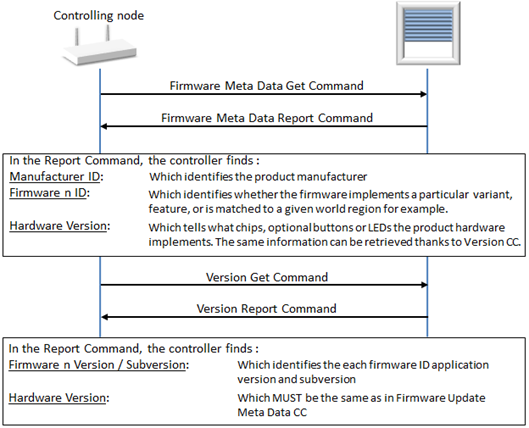
Figure 3.5 Identifying Compatible Firmware Images
3.2.19.11.2. Firmware download
The use of the Firmware Update Meta Data Prepare Get and Firmware Update Meta Data Prepare Report commands is illustrated in Figure 3.6.
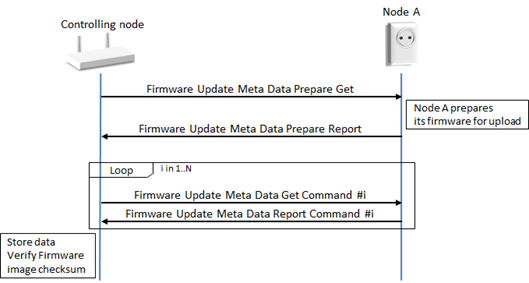
Figure 3.6 Firmware Download Flow Diagram
