3.2.22. Firmware Update Meta Data Command Class, version 8
The Firmware Update Meta Data Command Class may be used to transfer a firmware image to or from a Z-Wave node.
3.2.22.1. Compatibility Considerations
This version introduces the ability to perform firmware transfer without security encapsulation and resume aborted firmware update attempts.
Firmware Update Meta Data Command Class, version 8 is backwards compatible with the Firmware Update Meta Data Command Class, version 7.
3.2.22.2. Interoperability Considerations
3.2.22.2.1. Interoperability with v1 devices
Version 2 of the Firmware Update Meta Data Report Command introduces a 16-bit Checksum field to follow the variable-length Data field. No fields follow the variable-length Data field in Version 1 of the Firmware Update Meta Data Report Command. Subsequent versions of the Firmware Update Meta Data Command Class command use the version 2 format.
At the same time, the specified method for determining the length of the variable-length Data field is that the length must be calculated from the length of the received frame.
The unintended consequence is that a version 1 implementation receiving a Firmware Update Meta Data Report Command using version 2 format will consider the 16-bit Checksum field to be the last two bytes of the Data field.
Similarly, a version 2 implementation receiving a Firmware Update Meta Data Report Command version 1 will consider the last two bytes of the Data field to be the 16-bit Checksum field.
In either case, the transfer will fail.
\requirement{CC:007A.08.00.31.001}{4}
Therefore, a node controlling the Firmware Update Meta Data Command Class, version 2 MUST do the following when initiating the transfer of a firmware image:
Request the version of the Firmware Update Meta Data Command Class from the target device
Use the version of the Firmware Update Meta Data Report Command implemented by the supporting node.
Determine the number of Data bytes that can fit into the Firmware Update Meta Data Report Command so that the complete command can still fit into the payload field of the transport frame. The number of available payload bytes in the frame depends on the actual bit rate, the use of security encapsulation as well as the presence of Checksum bytes in the Firmware Update Meta Data Report Command.
3.2.22.2.2. Checksum calculation
Version 1 of the Firmware Update Meta Data Command Class introduced a 16-bit Checksum field used to verify firmware image integrity. It has been a recommendation to use the CRC-CCITT polynomial for calculating checksums. There is no way to identify what method has been used for calculating the checksum for nodes implementing version 1 to version 4. Nodes having implemented another method for calculating the checksum will find a non-matching checksum.
\requirement{CC:007A.08.00.31.002}{0}
From Version 5 onwards, the checksum calculation method is mandatory. A version 5 supporting node MUST calculate checksums using the CRC-CCITT polynomium using initialization value equal to 0x1D0F and 0x1021 (normal representation). For more details about the checksum calculation, refer to CRC-CCITT Source Code.
3.2.22.2.3. Firmware Activation
\requirement{CC:007A.08.00.31.003}{0}
Nodes supporting version 7 and newer MUST wait for a Firmware Update Activation Set Command before activating a firmware after download, if instructed to use activation in the Firmware Update Meta Data Request Get Command.
\requirement{CC:007A.08.00.32.001}{0}
Nodes supporting version 6 or older are not mandated to so do. Controlling nodes SHOULD NOT rely on the activation functionality for these versions.
3.2.22.3. Firmware Data fields
Firmware are identified using the following fields:
3.2.22.3.1. Manufacturer ID (16 bits)
The Manufacturer ID is a unique ID identifying the manufacturer of the device. Manufacturer identifiers can be found in Z-Wave Manufacturer ID List.xlsx.
\requirement{CC:007A.08.00.11.001}{0}
The first byte MUST be the most significant byte.
3.2.22.3.2. Firmware ID (16 bits)
Each firmware target has a Firmware ID. Firmware IDs may be identical for multiple targets.
\requirement{CC:007A.08.00.11.002}{0}
The first byte MUST be the most significant byte.
3.2.22.3.3. Firmware Checksum (16 bits)
\requirement{CC:007A.08.00.11.003}{0}
The checksum field MUST carry the checksum of the firmware image.
\requirement{CC:007A.08.00.11.004}{0}
The checksum MUST be calculated using the CRC-CCITT polynomium using initialization value equal to 0x1D0F and 0x1021 (normal representation).
For more details, refer to CRC-CCITT Source Code
3.2.22.3.4. Firmware target (8 bits)
This field MUST be used to identify the firmware image to be updated. The firmware images MUST be identified according to Table 3.84.
Firmware Target |
Description |
|---|---|
0 (0x00) |
Firmware image targeted for the Z-Wave chip. |
1 (0x01) |
Firmware image intended for target 1 defined by the manufacturer. |
… |
… |
255 (0xFF) |
Firmware image intended for target 255 defined by the manufacturer. |
3.2.22.3.5. Hardware Version (8 bits)
\requirement{CC:007A.08.00.11.005}{0}
This field MUST report a value which is unique to this particular version of the product.
\requirement{CC:007A.08.00.11.006}{0}
It MUST be possible to uniquely identify applicable firmware images via the Manufacturer ID, Firmware ID and the Hardware Version fields. This information allows selecting a firmware image that is guaranteed to work with this particular version of the product.
\requirement{CC:007A.08.00.11.007}{0}
The Hardware Version field MUST apply to the entire product and not only to the version of the Z-Wave radio chip.
\requirement{CC:007A.08.00.11.008}{0}
This field MUST report the same value as the Version CC Version Report Command: Hardware Version field.
3.2.22.4. Firmware Meta Data Get Command
This command is used to request firmware information and capabilities for a supporting node.
This command was introduced in version 1.
\requirement{CC:007A.08.01.11.001}{0}
The Firmware Meta Data Report Command MUST be returned in response to this command.
\requirement{CC:007A.08.01.11.002}{0}
This command MUST NOT be issued via multicast addressing.
\requirement{CC:007A.08.01.11.003}{0}
A receiving node MUST NOT return a response if this command is received via multicast addressing. The Z-Wave Multicast frame, the broadcast NodeID and the Multi Channel multi-End Point destination are all considered multicast addressing methods.
7 |
6 |
5 |
4 |
3 |
2 |
1 |
0 |
|---|---|---|---|---|---|---|---|
Command Class = COMMAND_CLASS_FIRMWARE_UPDATE_MD (0x7A) |
|||||||
Command = FIRMWARE_MD_GET (0x01) |
|||||||
3.2.22.5. Firmware Meta Data Report Command
This command is used to advertise firmwares and capabilities of the supporting nodes.
This command was introduced in version 1.
7 |
6 |
5 |
4 |
3 |
2 |
1 |
0 |
|---|---|---|---|---|---|---|---|
Command Class = COMMAND_CLASS_FIRMWARE_UPDATE_MD (0x7A) |
|||||||
Command = FIRMWARE_MD_REPORT (0x02) |
|||||||
Manufacturer ID 1 |
|||||||
Manufacturer ID 2 |
|||||||
Firmware 0 ID 1 |
|||||||
Firmware 0 ID 2 |
|||||||
Firmware 0 Checksum 1 |
|||||||
Firmware 0 Checksum 2 |
|||||||
Firmware Upgradable |
|||||||
Number of Firmware Targets |
|||||||
Max Fragment Size 1 |
|||||||
Max Fragment Size 2 |
|||||||
Firmware 1 ID 1 |
|||||||
Firmware 1 ID 2 |
|||||||
… |
|||||||
Firmware N ID 1 |
|||||||
Firmware N ID 2 |
|||||||
Hardware Version |
|||||||
Reserved |
Resume |
Non-secure |
Activation |
CC |
|||
Manufacturer ID (16 bits)
Refer to Manufacturer ID (16 bits).
Firmware 0 ID (16 bits)
The Firmware 0 ID field is dedicated to target 0, i.e. the Z-Wave chip.
\requirement{CC:007A.08.02.11.001}{0}
A manufacturer MUST assign a unique Firmware ID to each existing product variant. A product variant may be a particular hardware version for a particular world region. The combination of Manufacturer ID and Firmware ID provides unique identification of a firmware image that is guaranteed to work with a particular component of a particular product.
\requirement{CC:007A.08.02.11.002}{0}
The first byte MUST be the most significant byte.
A user may request Manufacturer Specific information to get more detailed information on the product.
\requirement{CC:007A.08.02.12.001}{0}
A controlling node SHOULD match the advertised firmware ID for the existing firmware image to the firmware ID provided for a new image. If the firmware IDs do not match, the controlling device SHOULD abort the firmware update operation.
Firmware 0 Checksum (16 bits)
The checksum field is used to carry the checksum of the Firmware 0 Image.
\requirement{CC:007A.08.02.13.001}{0}
Supporting nodes MAY set this field to 0x00. In this case the field is unused.
\requirement{CC:007A.08.02.11.003}{0}
Values in the range 0x0001..0xFFFF indicate that the supporting node MUST advertise the checksum of its firmware 0 image.
\requirement{CC:007A.08.02.11.004}{0}
The checksum MUST be calculated using the CRC-CCITT polynomium using initialization value equal to 0x1D0F and 0x1021 (normal representation).
For more details, refer to CRC-CCITT Source Code
Firmware Upgradable (8 bits)
This field defines whether the Z-Wave chip is firmware upgradable.
\requirement{CC:007A.08.02.11.005}{0}
The value 0x00 MUST indicate that the firmware 0 image is not upgradable.
\requirement{CC:007A.08.02.11.006}{0}
The value 0xFF MUST indicate that the firmware 0 image is upgradable.
Number of Firmware Targets (8 bits)
\requirement{CC:007A.08.02.11.007}{0}
The Number of Firmware Targets field MUST report the number of firmware IDs following this field. The Firmware 0 ID field is not included. The field MUST be zero if the device only implements a Firmware 0 target, i.e. the Z-Wave chip.
Max Fragment Size (16 bits)
\requirement{CC:007A.08.02.11.008}{0} \requirement{CC:007A.08.02.13.002}{4}
The Max Fragment Size field MUST report the maximum number of Data bytes that a device is able to receive at a time. A sending node MAY send shorter fragments. The fragment size actually used is indicated in the Firmware Update Meta Data Request Get Command and confirmed in the Firmware Update Meta Data Request Report Command.
\requirement{CC:007A.08.02.11.009}{4}
The Max Fragment Size may be longer than the supported frame length of Z-Wave if the image is to be transferred over e.g. IP. If the image is to be transferred over Z-Wave, the sending node MUST use a fragment size which matches the actual number of available Data bytes. The number of available Data bytes depends on the actual bit rate, the use of security encapsulation as well as the presence of Checksum bytes in the Firmware Update Meta Data Report.
Firmware 1..N ID (16 bits)
The Firmware 1 ID field indicates the Firmware ID that MUST be used for target 1. The Firmware 2 ID field represents target 2. And so on.
\requirement{CC:007A.08.02.11.00A}{0}
The first byte MUST be the most significant byte.
\requirement{CC:007A.08.02.12.002}{0}
A controlling device SHOULD match the advertised firmware ID for the existing firmware image to the firmware ID provided for a new image. If the firmware IDs do not match, the controlling device SHOULD abort the firmware update operation.
Hardware Version (8 bits)
Refer to Hardware Version (8 bits).
CC (1 bit)
This field is used to advertise if the supporting node’s Command Classes functionality will continue to function normally during Firmware Update transfer.
\requirement{CC:007A.08.02.11.00B}{0}
If all other Command Classes functionalities will function normally during firmware update image transfer, this field MUST be set to 1.
\requirement{CC:007A.08.02.11.00C}{0}
If any Command Class functionality will not function normally during firmware update image transfer, this field MUST be set to 0. For example, if a node is unable to issue Notification Reports during firmware update, this field MUST be set to 0.
Activation (1 bit)
This field is used to advertise if the supporting node supports subsequent activation after Firmware Update transfer.
\requirement{CC:007A.08.02.11.00D}{0}
If the sending node supports the subsequent activation of firmware after downloading, this field MUST be set to 1.
\requirement{CC:007A.08.02.11.00F}{0}
If the sending node does not support the subsequent activation of firmware after downloading, this field MUST be set to 0.
Non-secure (1 bit)
This field is used to indicate if the node supports non-secure firmware transfers.
\requirement{CC:007A.08.02.11.010}{0}
The value 0 MUST indicate that the non-secure transfer functionality is not supported.
\requirement{CC:007A.08.02.11.011}{0}
The value 1 MUST indicate that the non-secure transfer functionality is supported.
Resume (1 bit)
This field is used to indicate if the node supports resuming aborted firmware transfers.
\requirement{CC:007A.08.02.11.012}{0}
The value 0 MUST indicate that the Resume functionality is not supported.
\requirement{CC:007A.08.02.11.013}{0}
The value 1 MUST indicate that the Resume functionality is supported.
3.2.22.6. Firmware Update Meta Data Request Get Command
The Firmware Update Meta Data Request Get Command is used to request that a firmware update is initiated.
This command was introduced in version 1.
\requirement{CC:007A.08.03.11.001}{0}
The Firmware Update Meta Data Request Report Command MUST be returned in response to this command.
\requirement{CC:007A.08.03.11.002}{0}
The firmware update MUST NOT be initiated if the Manufacturer ID and the Firmware ID do not match the actual firmware image values.
\requirement{CC:007A.08.03.11.003}{0}
The firmware update MUST be aborted if the checksum does not match the calculated checksum after the firmware image has been transferred.
\requirement{CC:007A.08.03.11.004}{0}
This command MUST NOT be issued via multicast addressing.
\requirement{CC:007A.08.03.11.005}{0}
A receiving node MUST NOT return a response if this command is received via multicast addressing. The Z-Wave Multicast frame, the broadcast NodeID and the Multi Channel multi-End Point destination are all considered multicast addressing methods.
7 |
6 |
5 |
4 |
3 |
2 |
1 |
0 |
|---|---|---|---|---|---|---|---|
Command Class = COMMAND_CLASS_FIRMWARE_UPDATE_MD (0x7A) |
|||||||
Command = FIRMWARE_UPDATE_MD_REQUEST_GET (0x03) |
|||||||
Manufacturer ID 1 |
|||||||
Manufacturer ID 2 |
|||||||
Firmware ID 1 |
|||||||
Firmware ID 2 |
|||||||
Firmware Checksum 1 |
|||||||
Firmware Checksum 2 |
|||||||
Firmware Target |
|||||||
Fragment Size 1 |
|||||||
Fragment Size 2 |
|||||||
Reserved |
Resume |
Non-secure |
Activation |
||||
Hardware Version |
|||||||
Manufacturer ID (16 bits)
Refer to Manufacturer ID (16 bits).
Firmware ID (16 bits)
\requirement{CC:007A.08.03.11.006}{0}
The Firmware ID MUST match the specified target of the actual device.
\requirement{CC:007A.08.03.11.007}{0}
The firmware update MUST NOT be initiated if the Firmware ID does not match the specified target of the actual device. The first byte MUST be the most significant byte.
Firmware Checksum (16 bits)
Refer to Firmware Checksum (16 bits).
Firmware Target (8 bits)
Refer to Firmware target (8 bits).
Fragment Size (16 bits)
\requirement{CC:007A.08.03.11.008}{0}
The Fragment Size field MUST report the fragment size that is to be used for firmware fragments. A receiving device MUST use this fragment size for the firmware update. The fragment size is not exchanged during the actual firmware update.
\requirement{CC:007A.08.03.11.009}{0} \requirement{CC:007A.08.03.11.00A}{8}
The Fragment Size MUST NOT exceed the Max Fragment Size value of the Firmware Meta Data Report Command. A version 1 Firmware Update Meta Data Request Get Command does not carry a Fragment Size field. A receiving node MUST determine the number of Data bytes from the length of the first received frame, the use of security encapsulation as well as the presence of Checksum bytes in the Firmware Meta Data Report Command.
Hardware Version (8 bits)
Refer to Firmware Meta Data Report Command.
Activation (1 bit)
\requirement{CC:007A.08.03.11.014}{0}
The Activation field is used to advertise if the receiving node MUST delay the actual firmware activation after the file transfer.
\requirement{CC:007A.08.03.11.00B}{0}
A node advertising no support for “activation” in the Firmware Meta Data Report Command MUST ignore this field and activate the Firmware immediately after download.
If the receiving node advertises support for Activation in the Firmware Meta Data Report Command:
\requirement{CC:007A.08.03.11.00C}{0}
The value ’1’ MUST indicate to delay the actual firmware update. When delaying the firmware activation, the supporting node MUST set the Status code field to 0xFD in the Firmware Update Meta data Status Report Command.
\requirement{CC:007A.08.03.11.00D}{0}
The value ’0’ MUST indicate that the receiving device MUST NOT delay the firmware update and activate the firmware immediately after download.
Resume (1 bit)
This field is used to request the supporting node to resume the firmware transfer from the last attempt.
\requirement{CC:007A.08.03.11.00E}{0}
Supporting nodes advertising no support for the Resume functionality in the Firmware Meta Data Report Command MUST ignore this field and start the firmware update transfer from the Report number 1.
\requirement{CC:007A.08.03.11.00F}{0}
The value 0 MUST indicate that the Firmware Update transfer MUST start from Report Number 1.
\requirement{CC:007A.08.03.11.010}{0}
The value 1 MUST indicate that the Firmware Update transfer SHOULD start from The last received report number in a previous transfer attempt for this firmware image.
Non-Secure (1 bit)
This field is used to request the supporting node to accept receiving firmware fragments sent without security encapsulation.
\requirement{CC:007A.08.03.11.011}{0}
Supporting nodes advertising no support for the Non-Secure functionality in the Firmware Meta Data Report Command MUST ignore this field and only accept Firmware Update Meta Data Report Command received at their highest granted security class.
\requirement{CC:007A.08.03.11.012}{0}
The value 0 MUST indicate that the Firmware Update transfer MUST be performed securely and the supporting node MUST only accept Firmware Update Meta Data Report Command received at its highest granted security class.
\requirement{CC:007A.08.03.11.013}{0}
The value 1 MUST indicate that the Firmware Update transfer SHOULD be done without security encapsulation and the supporting node SHOULD accept Firmware Update Meta Data Report Command received without security encapsulation.
3.2.22.7. Firmware Update Meta Data Request Report Command
This command is used to advertise if the firmware update will be initiated.
This command was introduced in version 1.
7 |
6 |
5 |
4 |
3 |
2 |
1 |
0 |
|---|---|---|---|---|---|---|---|
Command Class = COMMAND_CLASS_FIRMWARE_UPDATE_MD (0x7A) |
|||||||
Command = FIRMWARE_UPDATE_MD_REQUEST_REPORT (0x04) |
|||||||
Status |
|||||||
Reserved |
Resume |
Non-secure |
Reserved |
||||
Status (8 bits)
\requirement{CC:007A.08.04.11.001}{0}
This field MUST comply with Table 3.89.
Status |
Description |
Version |
|---|---|---|
0x00 |
ERROR. Invalid combination of Manufacturer ID and Firmware ID. The device will not initiate the firmware update. |
1 |
0x01 |
ERROR. Device expected an authentication event to enable firmware update. The device will not initiate the firmware update. |
1 |
0x02 |
ERROR. The requested Fragment Size exceeds the Max Fragment Size. The device will not initiate the firmware update. |
3 |
0x03 |
ERROR. This firmware target is not upgradable. The device will not initiate the firmware update. |
3 |
0x04 |
ERROR. Invalid Hardware Version. The device will not initiate the firmware update. |
5 |
0x05 |
ERROR. Another firmware image is current being transferred. The device will not initiate the firmware update. |
6 |
0x06 |
ERROR. Insufficient battery level. The device will not initiate the firmware update. |
6 |
0xFF |
OK. The device will initiate the firmware update of the target specified in the Firmware Update Meta Data Request Get Command. |
1 |
\requirement{CC:007A.08.04.11.002}{0}
All other values are reserved and MUST NOT be used by a sending node. Reserved values MUST be ignored by a receiving node.
Resume (1 bit)
This field is used to indicate if the supporting node accepted to resume the firmware transfer from the last attempt.
\requirement{CC:007A.08.04.11.003}{0}
Supporting nodes advertising no support for the Resume functionality in the Firmware Meta Data Report Command MUST set this field to 0 and start the firmware update transfer from the Report number 1.
\requirement{CC:007A.08.04.11.004}{0}
The value 0 MUST indicate that the supporting node did not (or cannot) accept to restart the previous firmware update and it will start from Report Number 1.
\requirement{CC:007A.08.04.11.005}{0}
The value 1 MUST indicate that the supporting node accepted to resume the previous firmware update and it will start from the last received report number in a previous transfer attempt for this firmware image.
Non-Secure (1 bit)
This field is used to indicate if the supporting node accepted to receive firmware fragments sent without security encapsulation.
\requirement{CC:007A.08.04.11.006}{0}
Supporting nodes advertising no support for the Non-Secure functionality in the Firmware Meta Data Report Command MUST set this field to 0 and and only accept Firmware Update Meta Data Report Command received at their highest granted security class.
\requirement{CC:007A.08.04.11.007}{0}
The value 0 MUST indicate that the Firmware Update transfer will be performed securely and the supporting node MUST only accept Firmware Update Meta Data Report Command received at its highest granted security class.
\requirement{CC:007A.08.04.11.008}{0}
The value 1 MUST indicate that the Firmware Update transfer will be performed without security encapsulation and the supporting node MUST accept Firmware Update Meta Data Report Command received without security encapsulation.
3.2.22.8. Firmware Update Meta Data Get Command
This command is used to request one or more Firmware Update Meta Data Report Command.
This command was introduced in version 1.
\requirement{CC:007A.08.05.11.001}{0}
The Firmware Update Meta Data Report Command MUST be returned in response to this command.
\requirement{CC:007A.08.05.13.001}{4} \requirement{CC:007A.08.05.13.002}{8}
The transmission of the next Firmware Update Meta Data Get Command MAY be delayed if time is required to store the most recent firmware fragment in temporary non-volatile memory. A node MAY request multiple Firmware Update Meta Data Report Command to improve throughput.
\requirement{CC:007A.08.05.11.002}{0}
This command MUST NOT be issued via multicast addressing.
\requirement{CC:007A.08.05.11.003}{0}
A receiving node MUST NOT return a response if this command is received via multicast addressing. The Z-Wave Multicast frame, the broadcast NodeID and the Multi Channel multi-End Point destination are all considered multicast addressing methods.
Two exceptions may apply: A noise burst may interfere the transmission or the data source may stop returning Firmware Update Meta Data Report Command.
\requirement{CC:007A.08.05.12.001}{0}
To accommodate for bursts of RF noise, a device receiving data SHOULD repeatedly retransmit the same Firmware Update Meta Data Get Command every 10 seconds in case no Firmware Update Meta Data Report Command are received.
\requirement{CC:007A.08.05.12.002}{0}
A device receiving data SHOULD stop retransmitting Firmware Update Meta Data Get Commands and abort the ongoing firmare update 2 minutes after the last successful reception of a Firmware Update Meta Data Report Command.
7 |
6 |
5 |
4 |
3 |
2 |
1 |
0 |
|---|---|---|---|---|---|---|---|
Command Class = COMMAND_CLASS_FIRMWARE_UPDATE_MD (0x7A) |
|||||||
Command = FIRMWARE_UPDATE_MD_GET (0x05) |
|||||||
Number of Reports |
|||||||
Res |
Report number 1 |
||||||
Report number 2 |
|||||||
Res (1 bit)
\requirement{CC:007A.08.05.11.004}{0}
This field MUST be set to 0 by a sending node and MUST be ignored by a receiving node.
Number of Reports (8 bits)
Number of Firmware Update Meta Data Report Command to be received in response to this Firmware Update Meta Data Get Command.
Report number (15 bits)
\requirement{CC:007A.08.05.11.005}{4}
The Report number field indicates the Firmware Update Meta Data Report Command to be requested. The report number values MUST be a sequence starting from 1. The first byte (Report number 1) is the most significant byte.
3.2.22.9. Firmware Update Meta Data Report Command
The Firmware Update Meta Data Report Command is used to transfer a firmware image fragment.
This command was introduced in version 1.
\requirement{CC:007A.08.06.11.001}{0}
If sending more than a single Firmware Update Meta Data Report Command at a time, a node MUST apply a delay between each transmitted command. The minimum required time delay and number of frames before a delay must be inserted depends on the actual bit rate.
40 kbit/s: At least 35 ms if sending more than 1 frame back-to-back
100 kbit/s: At least 15 ms if sending more than 2 frames back-to-back
\requirement{CC:007A.08.06.12.001}{0}
If needed, a controlling node SHOULD abort an ongoing transfer by responding to a Firmware Update Meta Data Get Command with a Firmware Update Meta Data Report Command with the Last bit enabled and the Data fields intentionally corrupted.
This will invalidate the calculated firmware checksum, which will eventually cause the receiving device to return a Firmware Update Meta Data Status Report Command with the status code 0x00 (checksum error).
7 |
6 |
5 |
4 |
3 |
2 |
1 |
0 |
|---|---|---|---|---|---|---|---|
Command Class = COMMAND_CLASS_FIRMWARE_UPDATE_MD (0x7A) |
|||||||
Command = FIRMWARE_UPDATE_MD_REPORT (0x06) |
|||||||
Last |
Report number 1 |
||||||
Report number 2 |
|||||||
Data 1 |
|||||||
… |
|||||||
Data N |
|||||||
Checksum 1 |
|||||||
Checksum 2 |
|||||||
Last (1 bit)
This field indicates if this Firmware Update Meta Data Report Command is the last one.
\requirement{CC:007A.08.06.11.002}{0}
The value 1 MUST indicate that this is the last report. Otherwise the field MUST be set to 0.
\requirement{CC:007A.08.06.11.003}{0}
On the reception of the last image fragment, the receiving node MUST verify that the transferred image does match the indicated Manufacturer ID, Firmware ID and Firmware Target values.
Report number (15 bits)
\requirement{CC:007A.08.06.11.004}{0}
The Report number field indicates the sequence number of the contained firmware fragment. The first firmware fragment MUST be identified by the Report number value 1.
\requirement{CC:007A.08.06.11.005}{0}
The sequence number of each following firmware fragment MUST be incremented. Report number 1 is the most significant byte.
The report number may be used to calculate the offset of the data by the formula:
\requirement{CC:007A.08.06.11.006}{6}
Except for the last frame, each Report MUST carry the same number of Data bytes as the first fragment. The last frame MAY carry a shorter Data field.
Data (N bytes)
The Data field is used to carry one firmware image fragment.
\requirement{CC:007A.08.06.11.007}{0}
Except for the last frame, each Firmware Update Meta Data Report Command MUST carry the same number of Data bytes as the first fragment. The last frame MAY carry a shorter Data field.
\requirement{CC:007A.08.06.11.008}{0}
A sending device MUST use a fragment size which matches the actual number of available Data bytes. The number of available Data bytes depends on the actual bit rate, the use of security encapsulation as well as the presence of Checksum bytes in the Firmware Update Meta Data Report.
\requirement{CC:007A.08.06.11.009}{0}
A receiving device MUST determine the number of Data bytes from the length of the first received frame.
Checksum (16 bits)
\requirement{CC:007A.08.06.11.00A}{0}
The checksum field MUST be used to ensure the consistency of the entire command; including the command class and command identifiers.
\requirement{CC:007A.08.06.11.00B}{0}
The checksum MUST be calculated using the CRC-CCITT polynomium using initialization value equal to 0x1D0F and 0x1021 (normal representation).
For more details, refer to CRC-CCITT Source Code
The Checksum field is known to cause compatibility issues with version 1 devices. Refer to Section 3.2.22.2.1 and Section 3.2.22.2.2
3.2.22.10. Firmware Update Meta Data Status Report Command
This command is used to advertise the firmware update status.
This command was introduced in version 1.
\requirement{CC:007A.08.07.11.001}{0}
The command MUST be issued when the firmware update is completed or aborted by the device receiving the firmware.
\requirement{CC:007A.08.07.12.001}{0}
A supporting node SHOULD reboot and apply the new firmware image before issuing this command.
\requirement{CC:007A.08.07.11.002}{0}
A node MUST NOT issue Firmware Update Meta Data Get Command after receiving a Firmware Update Meta Data Status Report.
7 |
6 |
5 |
4 |
3 |
2 |
1 |
0 |
|---|---|---|---|---|---|---|---|
Command Class = COMMAND_CLASS_FIRMWARE_UPDATE_MD (0x7A) |
|||||||
Command = FIRMWARE_UPDATE_MD_STATUS_REPORT (0x07) |
|||||||
Status |
|||||||
WaitTime 1 (MSB) |
|||||||
WaitTime 2 (LSB) |
|||||||
Status (8 bits)
\requirement{CC:007A.08.07.11.003}{0}
This field MUST comply with Table 3.93.
Status |
Description |
Version |
|---|---|---|
0x00 |
The device was unable to receive the requested firmware data without checksum error. Number of retries and request sequence of missing frames are implementation specific. The image MAY be stored for subsequent retries. |
1 |
0x01 |
The device was unable to receive the requested firmware data. Number of retries and request sequence of missing frames are implementation specific. The image MAY be stored for subsequent retries. |
1 |
0x02 |
The transferred image does not match the Manufacturer ID. The image is not stored. |
4 |
0x03 |
The transferred image does not match the Firmware ID. The image is not stored. |
4 |
0x04 |
The transferred image does not match the Firmware Target. The image is not stored. |
4 |
0x05 |
Invalid file header information. The image is not stored. |
4 |
0x06 |
Invalid file header format. The image is not stored. |
4 |
0x07 |
Insufficient memory. The image is not stored. |
4 |
0x08 |
The transferred image does not match the Hardware version The image is not stored. |
5 |
0x09..0xFC |
Reserved |
N/A |
0xFD |
Firmware image downloaded successfully, waiting for activation command. |
4 |
0xFE |
New image was successfully stored in temporary non-volatile memory. The device does not restart itself. This Status code MUST NOT be used when updating the Z-Wave chip image |
3 |
0xFF |
New image was successfully stored in temporary non-volatile memory and/or applied successfully. The supporting node MAY restart itself. In this case, version 3 or newer supporting nodes SHOULD use the WaitTime to indicate that reboot has not been performed yet. |
1 |
\requirement{CC:007A.08.07.11.004}{0}
All other values are reserved and MUST NOT be used by a sending node. Reserved values MUST be ignored by a receiving node.
WaitTime (16 bits)
\requirement{CC:007A.08.07.11.005}{0}
The WaitTime field MUST report the time that is needed before the receiving node again becomes available for communication after the transfer of an image. The unit is the second.
\requirement{CC:007A.08.07.11.006}{0}
The value 0 (zero) MUST indicate that the node is ready (it SHOULD have rebooted if needed and applied the Firmware Image).
\requirement{CC:007A.08.07.11.007}{0}
The value 0xFFFF is reserved and MUST NOT be returned.
\requirement{CC:007A.08.07.12.002}{0}
A controlling node receiving this command SHOULD wait for the number of seconds specified in this field before trying to resume communication. When resuming communication, the controlling application SHOULD issue a NOP command and wait for acknowledgement.
\requirement{CC:007A.08.07.12.003}{0}
The controlling application MAY attempt resuming communication repeatedly. In that case, the NOP interval SHOULD be five seconds and MUST be at least one second.
3.2.22.11. Firmware Update Activation Set Command
This command is used to initiate the programming of a previously transferred firmware image.
This command was introduced in version 4.
Refer to the Firmware Update Meta Data Status Report Command Status field value 0xFD.
\requirement{CC:007A.08.08.13.001}{0}
This command MAY be issued directly by a controlling node or MAY be scheduled for later execution via the Schedule Command Class.
\requirement{CC:007A.08.08.11.001}{0}
The Firmware Update Activation Status Report Command MUST be returned in response to this command.
7 |
6 |
5 |
4 |
3 |
2 |
1 |
0 |
|---|---|---|---|---|---|---|---|
Command Class = COMMAND_CLASS_FIRMWARE_UPDATE_MD (0x7A) |
|||||||
Command = FIRMWARE_UPDATE_ACTIVATION_SET (0x08) |
|||||||
Manufacturer ID 1 |
|||||||
Manufacturer ID 2 |
|||||||
Firmware ID 1 |
|||||||
Firmware ID 2 |
|||||||
Firmware Checksum 1 |
|||||||
Firmware Checksum 2 |
|||||||
Firmware Target |
|||||||
Hardware Version |
|||||||
For fields’ description, refer to Firmware Data fields.
3.2.22.12. Firmware Update Activation Status Report Command
This command is used to advertise the result of a firmware update operation initiated by the Firmware Update Activation Set Command.
This command was introduced in version 4.
7 |
6 |
5 |
4 |
3 |
2 |
1 |
0 |
|---|---|---|---|---|---|---|---|
Command Class = COMMAND_CLASS_FIRMWARE_UPDATE_MD (0x7A) |
|||||||
Command = FIRMWARE_UPDATE_ACTIVATION_STATUS_REPORT (0x09) |
|||||||
Manufacturer ID 1 |
|||||||
Manufacturer ID 2 |
|||||||
Firmware ID 1 |
|||||||
Firmware ID 2 |
|||||||
Firmware Checksum 1 |
|||||||
Firmware Checksum 2 |
|||||||
Firmware Target |
|||||||
Firmware Update Status |
|||||||
Hardware Version |
|||||||
For fields not described below, refer to the Firmware Data fields.
Firmware Update Status (8 bits)
\requirement{CC:007A.08.09.11.001}{0}
The Firmware Update Status field MUST comply with Table 3.96.
Status |
Description |
Version |
|---|---|---|
0x00 |
Invalid combination of manufacturer ID, firmware ID and Hardware Version or Firmware Target. The received image will not be stored. |
4 |
0x01 |
Error activating the firmware. Last known firmware image has been restored. The received image will not be stored. |
4 |
0x02..0xFE |
Reserved |
N/A |
0xFF |
Firmware update completed successfully. |
1 |
\requirement{CC:007A.08.09.11.002}{0}
Reserved values MUST NOT be used by a sending node and MUST be ignored by a receiving node.
3.2.22.13. Firmware Update Meta Data Prepare Get Command
This command is used to request that a firmware download is initiated by the node sending this command.
The purpose of this command is to download and backup the existing firmware from the device before starting firmware upgrade.
This command was introduced in version 5.
\requirement{CC:007A.08.0A.11.001}{0}
The Firmware Update Meta Data Prepare Report Command Command MUST be returned in response to this command when the receiving node is ready to send the requested firmware image or to advertise that firmware is not downloadable.
\requirement{CC:007A.08.0A.11.002}{0}
This command MUST NOT be issued via multicast addressing.
\requirement{CC:007A.08.0A.11.003}{0}
A receiving node MUST NOT return a response if this command is received via multicast addressing. The Z-Wave Multicast frame, the broadcast NodeID and the Multi Channel multi-End Point destination are all considered multicast addressing methods.
\requirement{CC:007A.08.0A.12.001}{0} \requirement{CC:007A.08.0A.11.004}{9}
Any image transferred via the Firmware Update Meta Data Command Class, version 8 SHOULD include a fingerprint value to enable the validation of the integrity of the entire image after the transfer. The image and the fingerprint value MUST be packed in one entity which can be stored in one file and transferred as one entity.
7 |
6 |
5 |
4 |
3 |
2 |
1 |
0 |
|---|---|---|---|---|---|---|---|
Command Class = COMMAND_CLASS_FIRMWARE_UPDATE_MD (0x7A) |
|||||||
Command = FIRMWARE_UPDATE_MD_PREPARE_GET (0x0A) |
|||||||
Manufacturer ID 1 |
|||||||
Manufacturer ID 2 |
|||||||
Firmware ID 1 |
|||||||
Firmware ID 2 |
|||||||
Firmware Target |
|||||||
Fragment Size 1 |
|||||||
Fragment Size 2 |
|||||||
Hardware Version |
|||||||
Refer to Firmware Data fields for field description.
Fragment Size (16 bits)
\requirement{CC:007A.08.0A.11.005}{0}
The Fragment Size field MUST report the fragment size that is to be used for firmware fragments. A receiving device MUST use this fragment size for the firmware update. The fragment size is not exchanged during the actual firmware update.
\requirement{CC:007A.08.0A.11.006}{0}
The Fragment Size MUST NOT exceed the Max Fragment Size value of the Firmware Meta Data Report Command. A version 1 Firmware Update Meta Data Request Get Command does not carry a Fragment Size field. A receiving node MUST determine the number of Data bytes from the length of the first received frame, the use of security encapsulation as well as the presence of Checksum bytes in the Firmware Meta Data Report Command.
3.2.22.14. Firmware Update Meta Data Prepare Report Command
This command is used to advertise if the firmware image has been prepared and is ready to be transferred.
This command was introduced in version 5.
7 |
6 |
5 |
4 |
3 |
2 |
1 |
0 |
|---|---|---|---|---|---|---|---|
Command Class = COMMAND_CLASS_FIRMWARE_UPDATE_MD (0x7A) |
|||||||
Command = FIRMWARE_UPDATE_MD_PREPARE_REPORT (0x0B) |
|||||||
Status |
|||||||
Firmware Checksum 1 |
|||||||
Firmware Checksum 2 |
|||||||
Status (8 bits)
\requirement{CC:007A.08.0B.11.001}{0}
The Firmware Update Status field MUST comply with Table 3.99.
Status |
Description |
Version |
|---|---|---|
0x00 |
ERROR. Invalid combination of Manufacturer ID and Firmware ID. The receiving node MUST NOT initiate the firmware download. |
5 |
0x01 |
ERROR. Device expected an authentication event to enable firmware update. The receiving node MUST NOT initiate the firmware download. |
5 |
0x02 |
ERROR. The requested Fragment Size exceeds the Max Fragment Size. The receiving node MUST NOT initiate the firmware download. |
5 |
0x03 |
ERROR. This firmware target is not downloadable. The receiving node MUST NOT initiate the firmware download. |
5 |
0x04 |
ERROR. Invalid Hardware Version. The receiving node MUST NOT initiate the firmware download. |
5 |
0x05..0xFE |
Reserved |
N/A |
0xFF |
OK. The receiving node can initiate the firmware download of the target specified in the Firmware Update Meta Data Prepare Get Command. |
5 |
Firmware Checksum (16 bits)
Refer to Firmware Checksum (16 bits).
3.2.22.15. Firmware Update Examples and frame flows
3.2.22.15.1. Requesting Firmware information
Figure 3.7 shows a controlling node requesting the Firmware capabilities of another node by issuing the Firmware Meta Data Get Command .
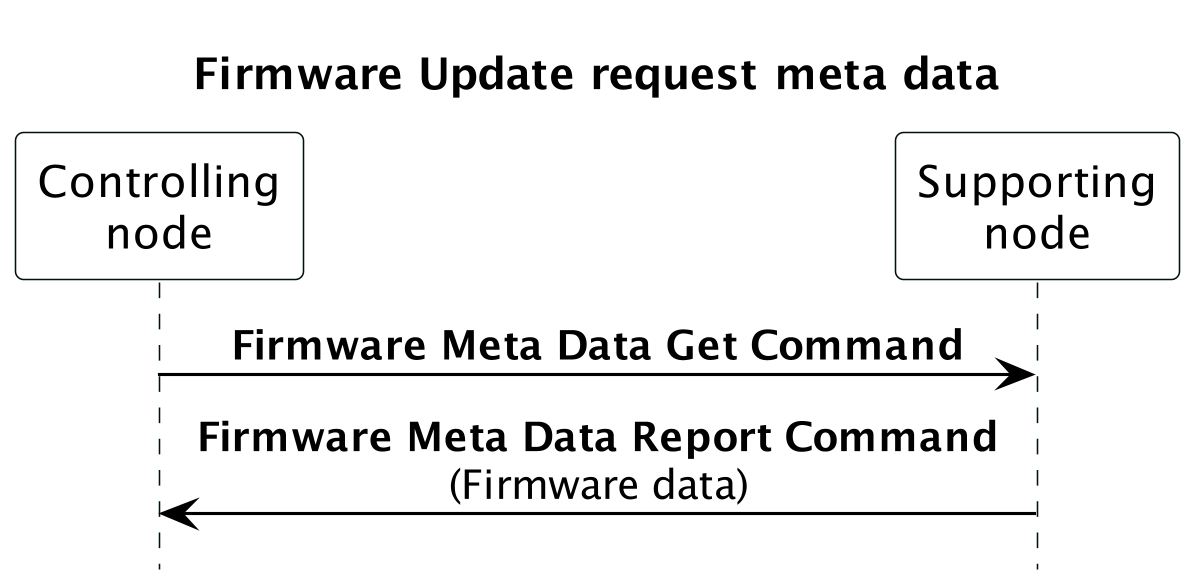
Figure 3.7 Requesting firmware data from a node
3.2.22.15.2. Performing a Firmware update
Figure 3.8 outlines the actual firmware update message flow. Prior to the firmware update, the supporting node may receive an out-of-band authentication (e.g. physical activation of a pushbutton).
The controller sends a Firmware Update Meta Data Request Get Command to initiate the downloading a new firmware image.
The supporting node returns a Firmware Update Meta Data Request Report Command to confirm the update request and the supporting node begins pulling firmware image fragments from the controlling node.
\requirement{CC:007A.08.00.12.001}{0}
It is RECOMMENDED for controlling nodes to time out after a few minutes if no more Firmware Update Meta Data Get Command is received before the end of the transfer. In case of time out, the controlling node SHOULD consider the firmware update as aborted/failed.
Finally a Firmware Update Meta Data Status Report Command is returned to the controlling node to indicate the success (or failure) of the update process.
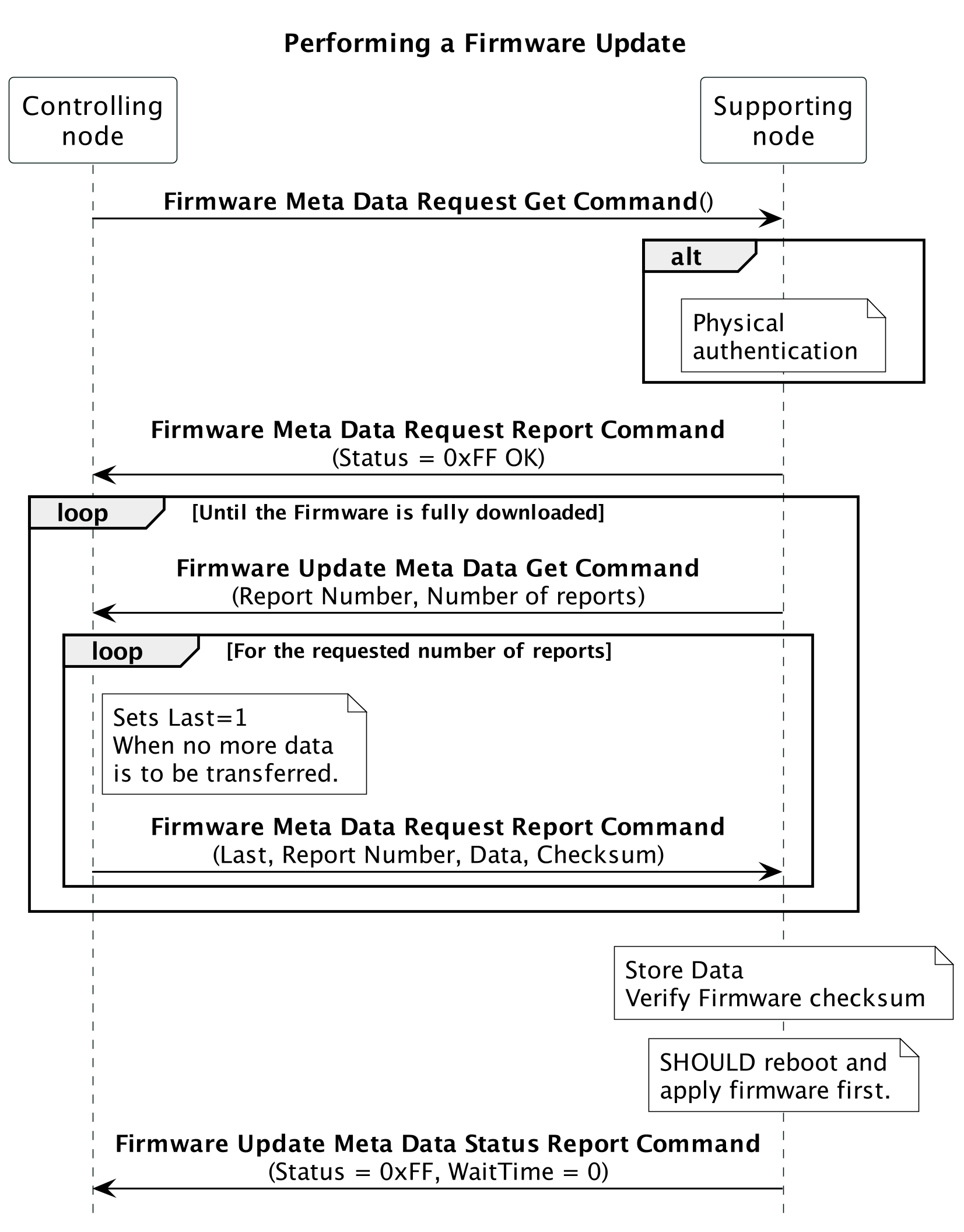
Figure 3.8 Transferring a firmware image to a device
3.2.22.15.3. Identifying Firmware revisions
The different fields Manufacturer ID, Firmware ID and Hardware version are used to identify compatible firmware image with the product. The Version Command Class, version 1 [OBSOLETED] is also used for identifying the Firmware version/subversion An example of the different fields’ usage for a wall outlet is shown in Table 3.100
Product |
Firmware identification |
|||
|---|---|---|---|---|
Manufacturer ID |
Hardware Version |
Firmware ID |
Firmware version/sub-version |
|
Initial Wall outlet |
0x0001 |
0x01 |
0x0001 |
0x01 / 0x01 |
New Revision |
||||
Fixing bugs |
0x0001 |
0x01 |
0x0001 |
0x01 / 0x02 |
New Revision |
||||
New features |
0x0001 |
0x01 |
0x0001 |
0x02 / 0x01 |
New Revision |
||||
US version (as before) |
0x0001 |
0x01 |
0x0001 |
0x02 / 0x01 |
China version |
0x0001 |
0x01 |
0x0002 |
0x02 / 0x01 |
New Revision |
||||
Hardware change (US) |
0x0001 |
0x02 |
0x0001 |
0x02 / 0x01 |
Hardware change (China) |
0x0001 |
0x02 |
0x0002 |
0x02 / 0x01 |
New Revision |
||||
Adding S2 (initial HW, US) |
0x0001 |
0x01 |
0x0001 |
0x03 / 0x01 |
Adding S2 (initial HW, China) |
0x0001 |
0x01 |
0x0002 |
0x03 / 0x01 |
Adding S2 (new HW, US) |
0x0001 |
0x02 |
0x0001 |
0x03 / 0x01 |
Adding S2 (new HW, China) |
0x0001 |
0x02 |
0x0002 |
0x03 / 0x01 |
An illustration of a controller retrieving the firmware information is given in Figure 3.9
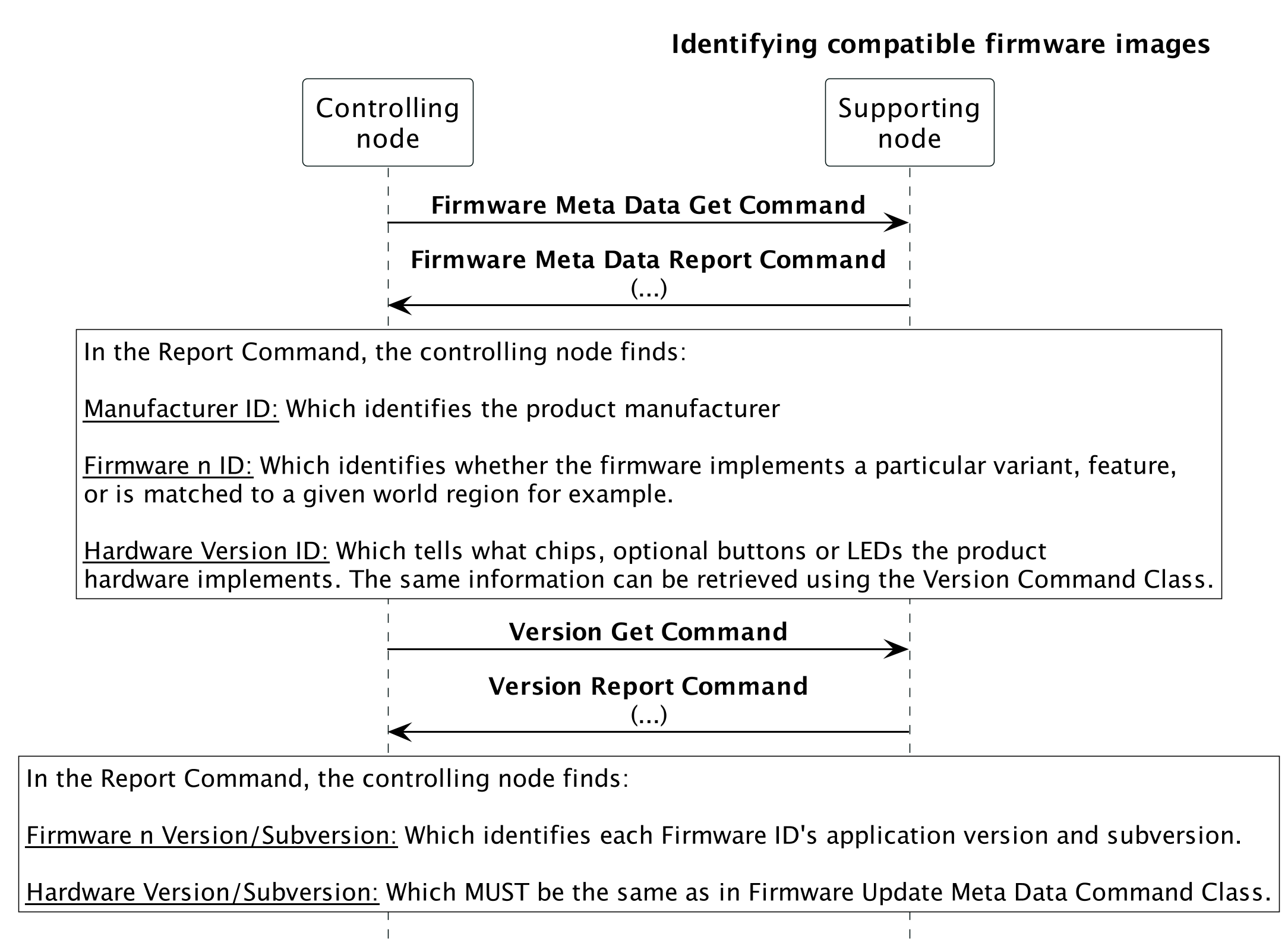
Figure 3.9 Identifying compatible firmware images
3.2.22.15.4. Firmware Activation
A controlling node can instruct a supporting node to wait for activating its firmware after download.
\requirement{CC:007A.08.00.12.002}{8}
Note
nodes supporting version 6 or older may not wait for the activation command after receiving the Firmware Update Meta Data Request Get Command with the Activation field set to 1. It is RECOMMENDED to use this functionality with nodes supporting version 7 or newer.
An example of a firmware activation is given in Figure 3.10.
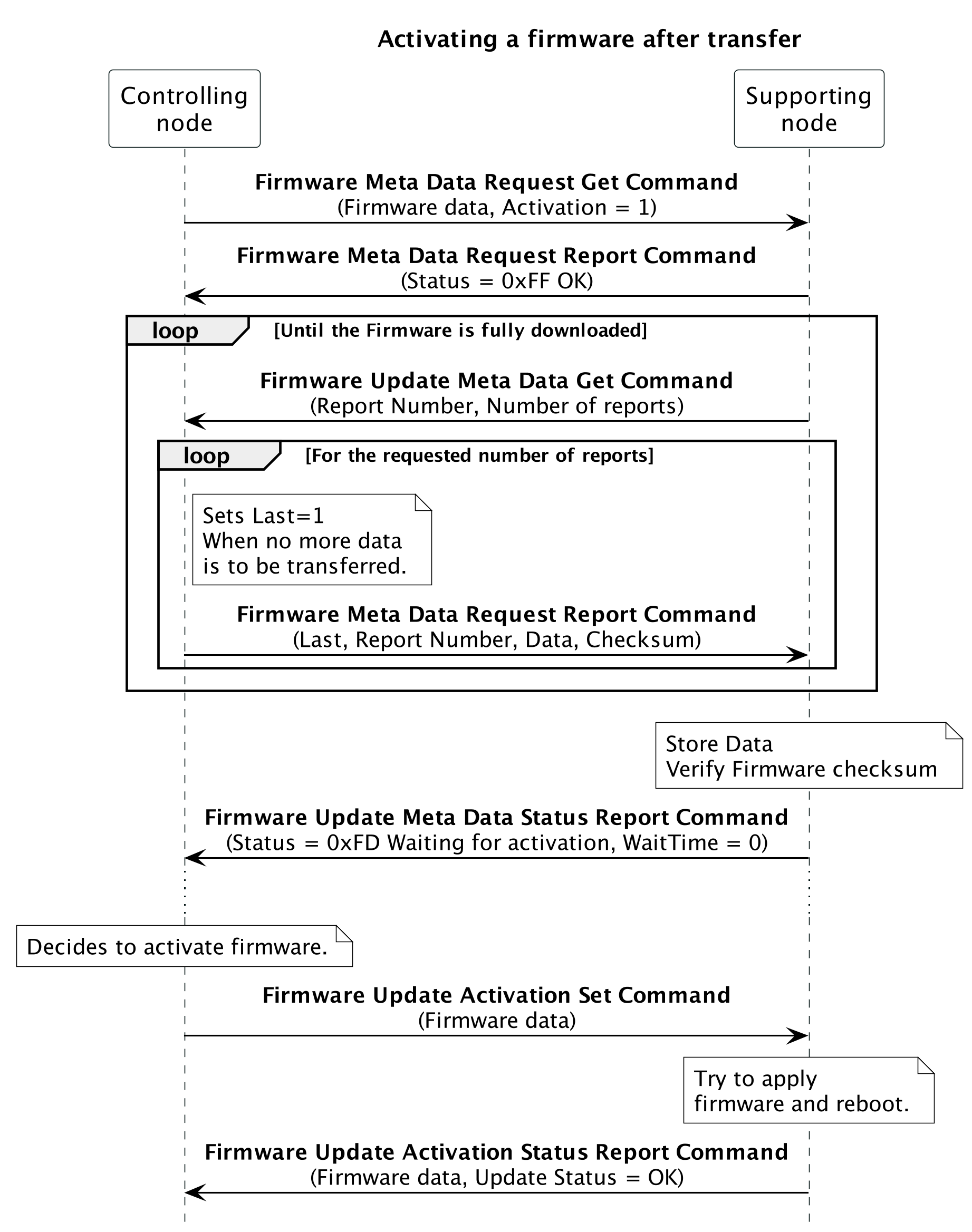
Figure 3.10 Activating a firmware after transfer
3.2.22.15.5. Firmware download
Some supporting nodes can allow to download their firmware for back-up reasons.
Note
Very few supporting nodes are capable of downloading their firmware.
Firmware downloads cannot be performed non-securely and cannot be resumed. An example of a firmware download is given in Figure 3.11.
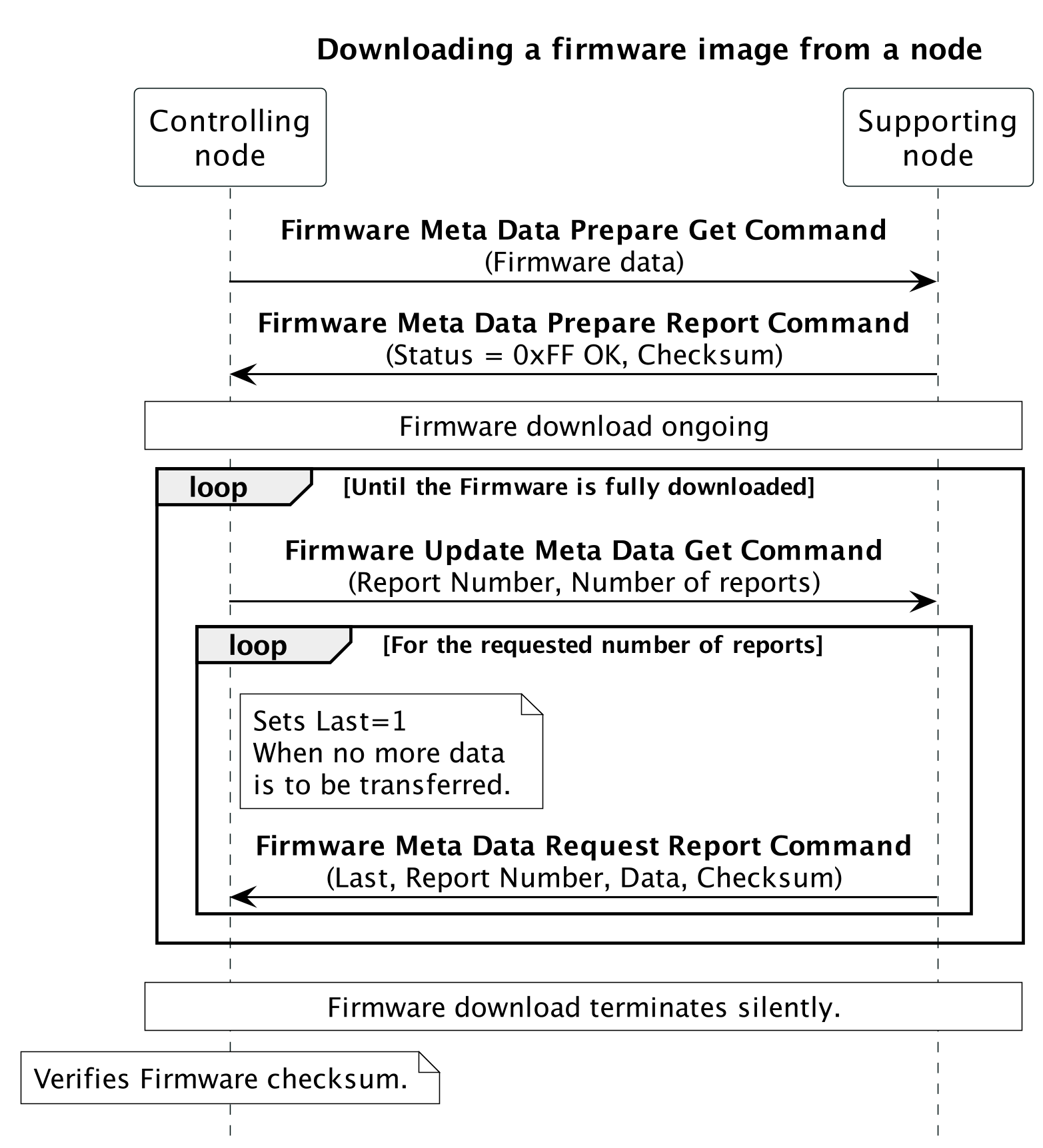
Figure 3.11 Downloading a firmware image from a node
3.2.22.15.6. Firmware Resume
If a previous firmware update failed or was interrupted, the controlling and suppporting nodes can agree on resuming the previous firmware update attempt.
\requirement{CC:007A.08.00.12.003}{0}
The controlling node SHOULD request to resume firmware update if they actively decided to abort a firmware update setting the Last field to 1 in a Firmware Update Meta Data Report Command.
An example of resuming firmware update is shown in Figure 3.12
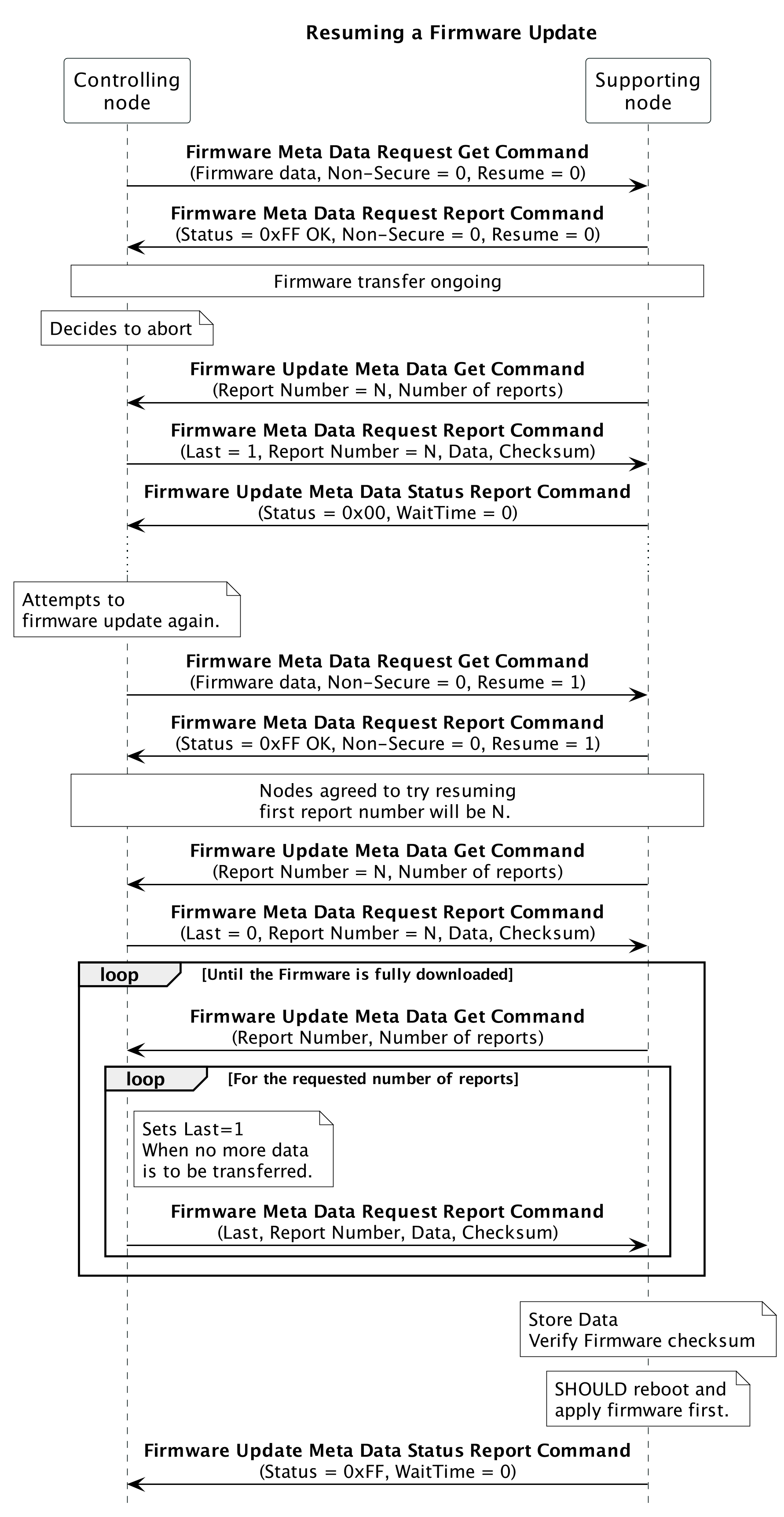
Figure 3.12 Resuming a Firmware Update
\requirement{CC:007A.08.00.12.004}{0}
A supporting node SHOULD accept to resume firmware transfer regardless of the Non-Secure setting, i.e. resuming securely a non-secure transfer or vice-versa SHOULD be allowed.
3.2.22.15.7. Non-secure Firmware update
To increase the throughput of a firmware update, a controlling node and suppporting node can agree on performing the Firmware Transfer without any Security encapsulation.
An illustration of a non-secure firmware update is shown in Figure 3.13
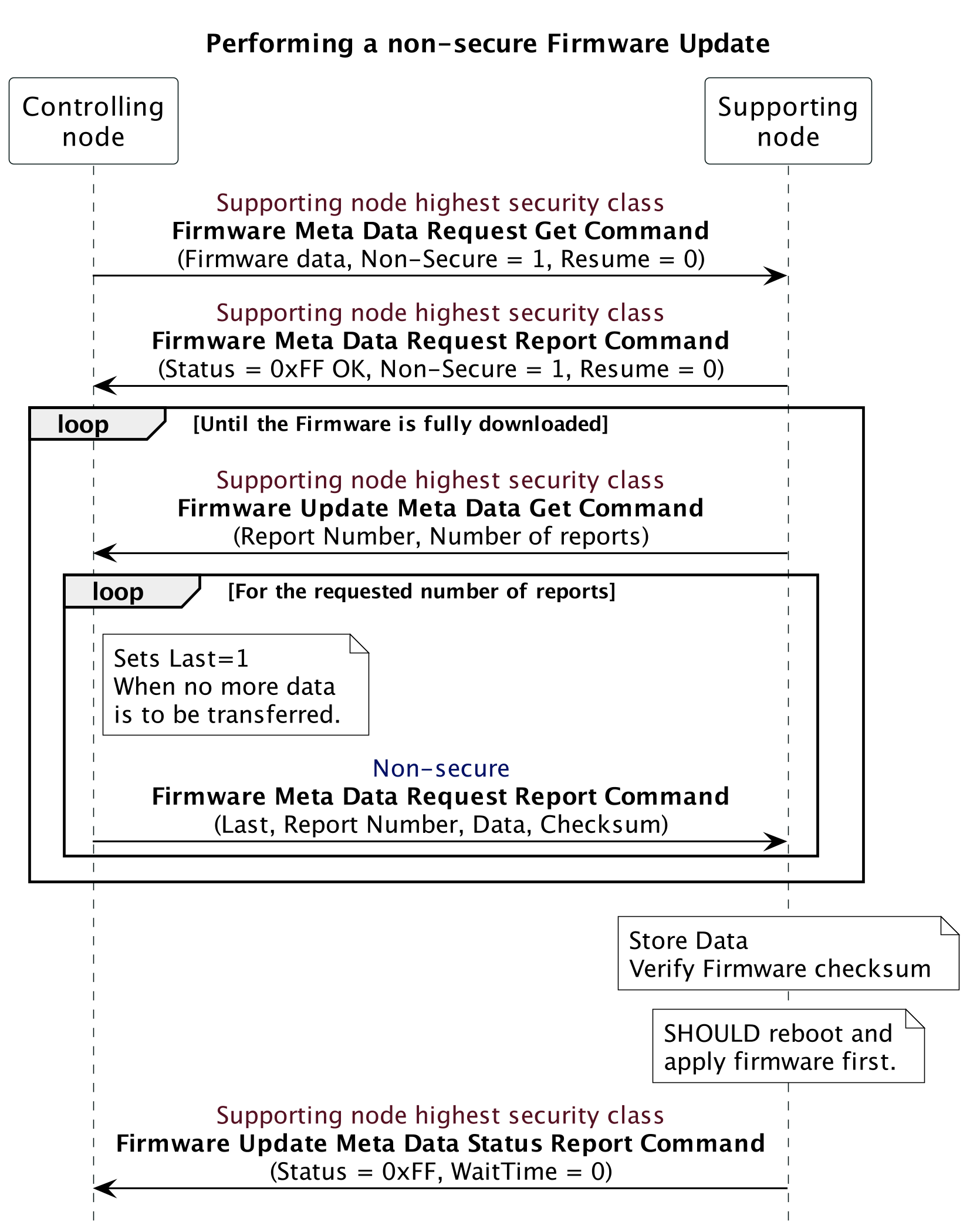
Figure 3.13 Performing a non-secure Firmware Update
3.2.22.15.8. Rejecting firmware updates or downloads
Supporting nodes can reject firmware updates or downloads if they do not support the respective functionality.
An illustration of a non-upgradable firmware is shown in Figure 3.14 and a non-downloadable firmware is shown in Figure 3.15
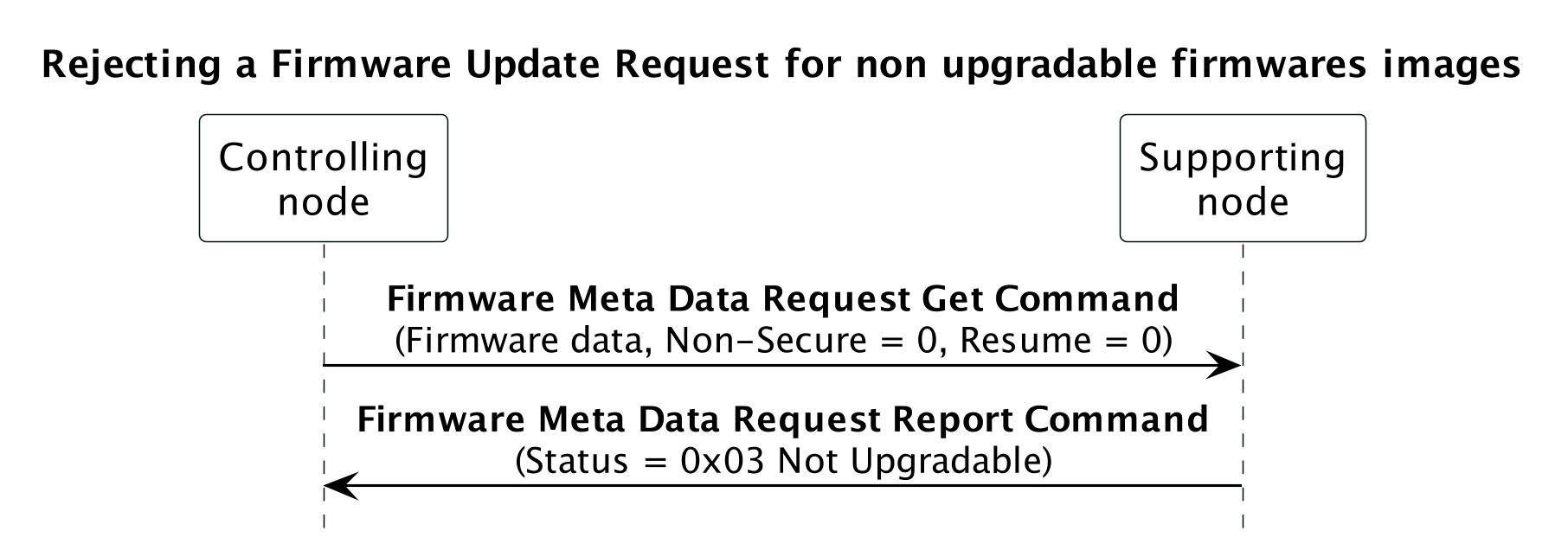
Figure 3.14 Rejecting a Firmware Update Request for non upgradable firmwares images
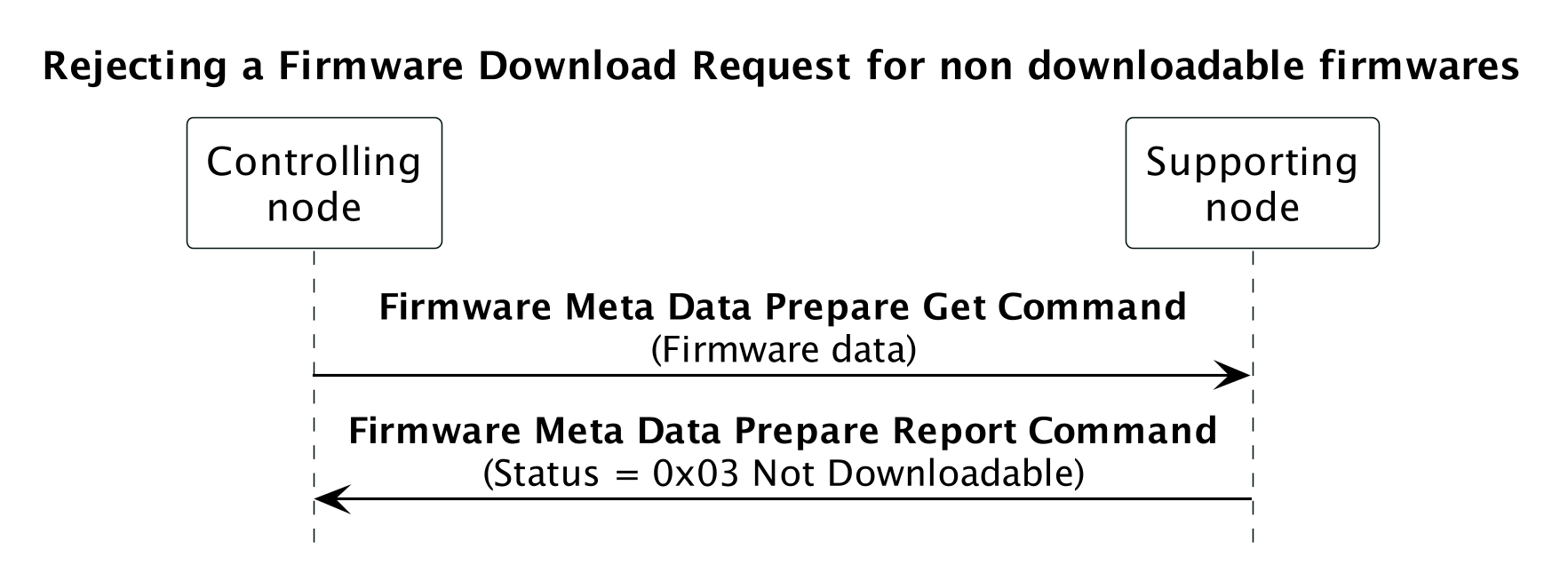
Figure 3.15 Rejecting a Firmware Download Request for non downloadable firmwares
