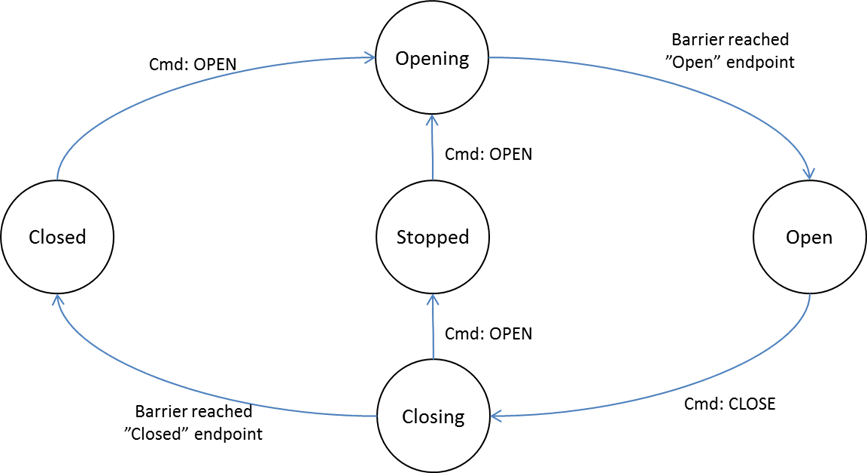
A receiving node MUST comply with the allowed state changes and triggering commands specified in Figure 2.5. Any state/command pair not specified in Figure 2.5 MUST NOT cause any action.
The receiving node SHOULD respond to OPEN and CLOSE commands. However, the receiving node MUST NOT respond to OPEN or CLOSE commands if any safety issue is detected.
\requirement{CC:0066.01.01.11.006}{0}
The receiving node MUST NOT respond to the CLOSE command unless it is in the “Open” state.
The device MUST stop if any safety issue is detected.
\requirement{CC:0066.01.01.11.008}{0}
If the requested operation is overruled by a safety mechanism, the device MUST notify the requester via a Notification Report with the Notification {Access Control::Barrier unable to perform requested operation due to UL requirements}.
\requirement{CC:0066.01.01.11.009}{8}
If the requested operation is prohibited by the specific device class, e.g. SPECIFIC_TYPE_SECURE_BARRIER_OPEN_ONLY or SPECIFIC_TYPE_SECURE_BARRIER_CLOSE_ONLY, the device MUST notify the requester by issuing an Application Rejected Request Command. The Application Rejected Request Command is a member of the Application Status Command Class.
This command is used to request the current state of a barrier operator device.
\requirement{CC:0066.01.02.11.001}{0}
The Barrier Operator Report Command MUST be returned in response to this command.
\requirement{CC:0066.01.02.11.002}{0}
This command MUST NOT be issued via multicast addressing.
\requirement{CC:0066.01.02.11.003}{0}
A receiving node MUST NOT return a response if this command is received via multicast addressing. The Z-Wave Multicast frame, the broadcast NodeID and the Multi Channel multi-End Point destination are all considered multicast addressing methods.
All other values are reserved and MUST NOT be used by a sending node. Reserved values MUST be ignored by a receiving node.
2.2.13.5. Barrier Operator Get Signaling Capabilities Supported Command
This command is used to query a device for available subsystems which may be controlled via Z-Wave.
\requirement{CC:0066.01.04.11.001}{0}
The Barrier Operator Report Signaling Capabilities Supported Command MUST be returned in response to this command.
\requirement{CC:0066.01.04.11.002}{0}
This command MUST NOT be issued via multicast addressing.
\requirement{CC:0066.01.04.11.003}{0}
A receiving node MUST NOT return a response if this command is received via multicast addressing. The Z-Wave Multicast frame, the broadcast NodeID and the Multi Channel multi-End Point destination are all considered multicast addressing methods.
Table 2.80 Barrier Operator Get Signaling Capabilities Supported Command
7
6
5
4
3
2
1
0
Command Class = COMMAND_CLASS_BARRIER_OPERATOR (0x66)
This command returns a bit mask of signaling subsystem(s) supported by the sending node.
The device that issuing this command may not support any signaling subsystem(s).
This field is used to advertise the event signaling capabilities supported by the sending node.
If the device does not support any signaling subsystem(s), the device MAY issue this command with a bitmask felid set to 0x00.
\requirement{CC:0066.01.05.11.004}{0}
It MUST be treated as a bitmask.
Bit 0 in Bit Mask 1 indicates if subsystem type 0x01 is supported
Bit 1 in Bit Mask 1 indicates if subsystem type 0x02 is supported
…
\requirement{CC:0066.01.05.11.001}{0}
If the subsystem type is supported, the corresponding bit MUST be set to 1.
If the subsystem type is not supported, the corresponding bit MUST be set to 0.
For the complete list of subsystem types, refer to Table 2.83.
\requirement{CC:0066.01.05.11.002}{0}
The length of this field depends on the number of subsystems supported by the sending node. The length of this field MUST be in the range 1..32 bytes.
\requirement{CC:0066.01.05.11.003}{0}
A sending node MUST limit the length of this field to represent only those subsystems supported and MUST NOT extend the length of the Bit Mask to pad the packet with 0x00.
2.2.13.7. Barrier Operator Event Signal Set Command
This command is used to turn on or off an event signaling subsystem that is supported by the device.
\requirement{CC:0066.01.06.13.001}{0}
A supporting node MAY ignore this command if the requested operation violates safety regulations.
UL requirements MUST take precedence over any Set command sent to a subsystem. It is up to the discretion of the device to accept or reject the requested action. If the requested action is rejected, the node MUST notify the requester via the Notification Command Class Report with the Notification {Access Control::Barrier unable to perform requested operation due to UL requirements}.
Table 2.82 Barrier Operator Event Signal Set Command
7
6
5
4
3
2
1
0
Command Class = COMMAND_CLASS_BARRIER_OPERATOR (0x66)
The Barrier Device has an Audible Notification subsystem controllable via Z-Wave (For example: Siren)
1
0x02
The Barrier Device has an Visual Notification subsystem controllable via Z-Wave (For example: Flashing Light)
1
0x03.. 0xFF
Reserved
1
Subsystem State (8 bits)
\requirement{CC:0066.01.06.11.003}{0}
This field is used to indicate the state that the specified subsystem MUST assume at the receiving node. This field MUST comply with Table 2.84.
Table 2.84 Barrier Operator Event Signal::Subsystem states encoding
Subsystem State
Description
Version
0x00
Subsystem OFF
1
…
Reserved
1
0xFF
Subsystem ON
1
2.2.13.8. Barrier Operator Event Signaling Get Command
This command is used to request the state of a signaling subsystem to a supporting node.
\requirement{CC:0066.01.07.11.001}{0}
The Barrier Operator Event Signaling Report Command MUST be returned in response to this command if the specified type is supported.
\requirement{CC:0066.01.07.11.002}{0}
This command MUST NOT be issued via multicast addressing.
\requirement{CC:0066.01.07.11.003}{0}
A receiving node MUST NOT return a response if this command is received via multicast addressing. The Z-Wave Multicast frame, the broadcast NodeID and the Multi Channel multi-End Point destination are all considered multicast addressing methods.
Table 2.85 Barrier Operator Event Signaling Get Command
7
6
5
4
3
2
1
0
Command Class = COMMAND_CLASS_BARRIER_OPERATOR (0x66)