THIS COMMAND CLASS VERSIONS 3-7 HAVE BEEN DEPRECATED
A device MAY implement version 3 to 7, but it is RECOMMENDED that new
implementations comply with Notification Command Class, version 8
Pull Mode has been deprecated; it is RECOMMENDED that new implementations support Push Mode
The Notification Command Class is used to advertise events or states, such as
movement detection, door open/close or system failure.
The Notification Command Class supersedes the Alarm Command Class.
Sensors may be designed for several purposes. A multilevel sensor advertises measurements or readings. A notification sensor sends event or state notifications.
This Command Class is used for notification sensors. The Multilevel Sensor Command Class is used for multilevel sensors.
Notifications are categorized into logical groups called Notification Types. A Notification is denoted with its type and event/state: {Notification Type::event/state}. A node may send Notifications from several Notification Types.
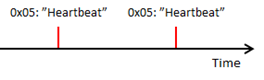
An event only has a meaning in the moment it happens. An event does not indicate the value of a state variable. An example is given in Figure 2.14.
Figure 2.14 Event notifications inform only about instantaneous situations
A state variable may assume two or more states. Some state variables are returned to their idle state via a generic “State idle” Notification.
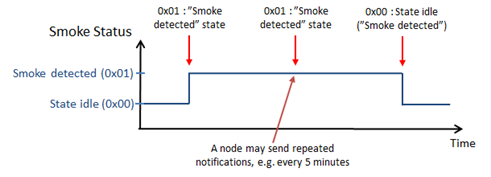
For example, a controlling node receiving a {Smoke alarm::Smoke detected} Notification will consider that the state has not changed until it receives a {Smoke alarm::State idle(Smoke detected)} Notification. An illustration is given in Figure 2.15.
Figure 2.15 Binary state variable with generic “State idle” Notification
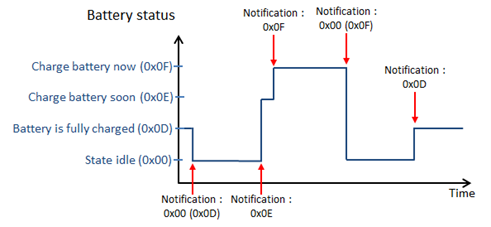
The “State idle” notification may also be used to return a multi-value state variable to its idle state. An example is given in Figure 2.16.
Figure 2.16 Multi-value state variable with generic “State idle” Notification
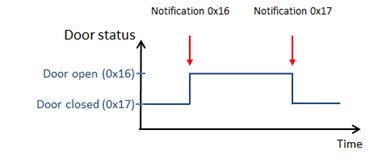
Some state variables use a specific Notification defined for each state change. Figure 2.17 shows an example of such a state variable.
Figure 2.17 Binary state variable with specific idle state Notification
Some notifications are complemented with event/state parameters. For example, the {System::System software failure} Notification may be accompanied with the manufacturer’s failure/error codes as event parameters.
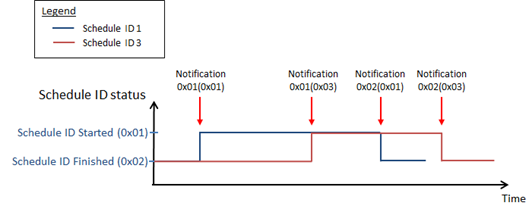
Event/state parameters may also affect state variables and their states. For example, the Notification {Irrigation::Schedule started} takes a 1-byte parameter which identifies the Schedule ID that is started. In that case, each state variable is identified using the state parameters, thus creating a state variable array.
An illustration is given in Figure 2.18, where the same Notifications with different parameters advertise the state of different state variables.
Figure 2.18 State variable array defined by additional Event/State Parameters
A complete list of Notifications (including state variables, event parameters, etc.) is given in [37].
A notification node operates either in Push or in Pull mode.
A Push node sends unsolicited Notifications. The transmission of unsolicited notifications may be disabled or enabled. When enabled, unsolicited Notifications are transmitted via an Association Group. It is not possible to subsequently retrieve Notifications issued by a Push node.
A Pull sensor collects events and state changes in a queue of pending Notifications. Notifications are retrieved one by one from the Pull sensor queue via the Notification Get Command. The Pull sensor advertises that its queue is empty when all Notifications have been retrieved.
A persistent Pull Notification is not removed from the Pull sensor queue until it is actively cleared by a controlling node.
2.2.76.2.1. Notifications and Command Class version
\requirement{CC:0071.03.00.21.001}{4}
New Notification Types and Notifications have been added to each new version of this Command Class. A node MUST implement as a minimum the Notification Command Class version associated with the Notifications it sends. The minimum required version for each Notification is specified in [37].
Earlier text revisions presented inconsistencies and undefined behaviors for Pull nodes. Thus, existing Pull nodes may behave differently than expected by a controlling node. A node supporting the Notification Command Class SHOULD NOT implement Pull mode.
A Pull node MAY reorder Notifications according to priority so that the first detected event is not the first to be reported. A Pull node SHOULD NOT reorder states of the same state variable in the event queue. For example, the “Program in progress” and “Program completed” Notifications SHOULD stay in the same order.
\requirement{CC:0071.03.00.22.005}{0}
A Pull node having its queue full SHOULD remove the oldest notification entry from the queue.
\requirement{CC:0071.03.00.22.006}{0}
Persistent notifications SHOULD carry a sequence number.
If several End Points within a Multi Channel device support the Notification Command Class, they MUST all operate in the same mode (i.e. either all End Points operate in Push mode or all End Points operate in Pull mode).
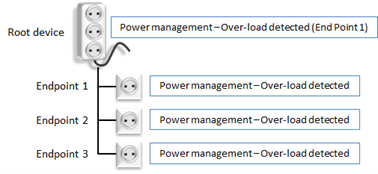
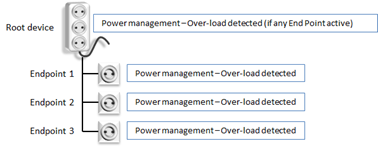
While End Points MAY send identical notifications via the Root Device Lifeline Group, the Root Device MUST NOT send identical Notifications on behalf of multiple End Points. Illustrations are given in Figure 2.19 and Figure 2.20.
Figure 2.19 Multi Channel device aggregating Notifications (Lifeline group)
Figure 2.20 Multi Channel device with End Point notification overlap (Lifeline group)
\requirement{CC:0071.03.00.23.003}{4}
A Multi Channel node with identical End Points issuing the same binary state notification with generic state idle Notification MAY be an exception and issue binary Notifications representing the state all End Points.
\requirement{CC:0071.03.00.21.008}{0}
If doing so, the Root Device MUST issue the active state notification if any of the End Points has the active binary state and MUST issue the event inactive Notification when all End Points are back to the “State idle”.
Figure 2.21 Notification representing all End Points for Binary State with generic State Idle notification
\requirement{CC:0071.03.00.21.006}{0}
Z-Wave Plus Multi Channel devices MUST send End Point Push notifications via the Root Device Lifeline Association Group (if notifications are not identical).
\requirement{CC:0071.03.00.22.007}{0}
A controlling node SHOULD create a Multi Channel Association to the Lifeline group of a supporting node. Thus Notifications will be sent Multi Channel encapsulated via the Root Device Lifeline group, allowing End Points to send identical Notifications.
Individual End Point Notifications can be enabled/disabled by sending a Multi Channel encapsulated Notification Set Command to an End Point, even when End Point Notifications are actually sent via the Root Device Lifeline group.
Every Notification Type has the same generic Notification 0x00 “State idle”, (also known as “Event Inactive” in older specification text) which was introduced in version 4. The Notification allows the device to advertise that a state variable returned to its idle state.
\requirement{CC:0071.04.00.23.001}{0}
A Push sensor MAY send repeated state Notifications without sending any “State idle” Notification to indicate that a given state is still active. For instance, a smoke sensor can send a “Smoke Detected” Notification every five minutes to indicate that the state variable has not returned to idle (refer to Figure 2.15).
\requirement{CC:0071.08.00.21.001}{4}
Notification Command Class, version 8 increases the requirement level for the use of the “State idle” Notification from OPTIONAL to REQUIRED. Refer to Section 2.2.76.2.4.8.
\requirement{CC:0071.04.00.22.001}{0}
A supporting node SHOULD NOT send a “State idle” notification for an event or for a state variable to which state idle does not apply. Refer to [37] for state variables to which the “State idle” notification applies
Interview process includes Events (Event Supported Get / Event Supported Report)
Sequence field added for collection management of reports
The queue empty status (=0xFE) for Pull nodes. A Pull node can now advertise Notification Status = “no pending notifications”
Commands not mentioned in this version are unchanged from Alarm Command Class version 1 and/or Alarm Command Class version 2.
The CC identifier for Notification CC V3 is the same as the Alarm CC V1 and V2. However, the Notification Command Class is not fully backwards compatible with the Alarm Command Class, versions 1 and 2. Clarifications for ensuring backwards compatibility with version 1 and 2 are given in version 4 of this Command Class.
\requirement{CC:0071.03.00.21.007}{8}
An implementation supporting Alarm CC V1 fields MUST map proprietary alarm types and levels to a similar Notification Type and Notification CC V3 where possible. In addition, all Alarm CC V1 alarm types and levels MUST be described in the product manual.
Event/State = 0x00 (State idle) for a given Notification Type to indicate that all state variables of that Notification Type returned to idle
The Zensor Net Source Node ID field has been discontinued. It is now a reserved field.
Clarification to expected behavior in regards to:
V1 and V2 Alarm Get Command handling
Notification Status field description
Notification Type = 0xFF, “Return first detected notification on supported list”
Event = 0xFE in Event Supported Report Command, which must not be advertised.
The support for state idle (event/state=0x00) cannot be advertised in the Event Supported Get Command and version 4 nodes will appear to use reserved values for version 3 controlling nodes.
Table 2.436 outlines the required behavior when receiving an Alarm Get command, Version 1.
Table 2.437 outlines the required behavior when receiving an Alarm Get command, Version 2.
The version of an Alarm Get Command can be determined from the command length.
Table 2.436 Required behavior when receiving Alarm Get, version 1
Received Command: V1, ALARM_GET (Alarm Type = x)
V1 Alarm Type
supported (x)?
Response
YES
V1, ALARM_REPORT (Alarm Type = x, Alarm Level = level)
NO
V1, ALARM_REPORT (Alarm Type = 0x00, Alarm Level = 0x00)
Table 2.437 Required behavior when receiving Alarm Get, version 2
Received Command: V2, ALARM_GET (Alarm Type = x, Z-Wave Alarm Type = y)
Z-Wave Alarm
Type
supported (y)?
V1 Alarm Type
supported (x)?
Response
NO
NO
NO RESPONSE
NO
YES
V2, ALARM_REPORT (
Alarm Type = x
Alarm Level = level
Reserved = 0x00
Z-Wave Alarm Status = 0x00
Z-Wave Alarm Type = 0x00
Z-Wave Alarm Event = 0x00
Number of Event Param = 0x00 )
YES or y = 0xFF
YES/NO
\requirementNS{CC:0071.04.00.21.002}{0}
Notifications newer than V2, idle states or empty queues MUST be represented
with the unknown notification (Notification event/state field set to 0xFE).
\requirementNS{CC:0071.04.00.21.003}{0}
If no state is detected (push nodes) or no event/state queued (pull nodes),
the Notification Type MUST be set to one of the supported Notification Type
in response to a Get (Type = 0xFF)
\requirementNS{CC:0071.04.00.21.004}{0}
Push nodes:
A supporting node MUST return the current states compatible with V2.
Table 2.439 shows a Push
node example returning responses to different V2 Alarm Get Commands.
\requirementNS{CC:0071.04.00.21.005}{0}
Pull nodes:
\requirementNS{CC:0071.04.00.21.006}{0}
A supporting node MUST return only V2 notifications from its queue when
receiving a V2 Alarm Get Command.
A supporting node MUST set the status to 0x00 and event to 0xFE when its
queue is empty.
Table 2.440 shows a Pull
node example returning responses to different V2 Alarm Get Commands.
Version 5 of this Command Class introduces additional Notifications (refer to [37]) and the event/state parameters for the special purpose State idle 0x00, allowing to specify which state variable returned to idle.
A version 4 controlling node will conclude that all state variables have returned to idle when a version 5 node advertises that a single state variable has returned to idle.
Version 6 of this Command Class introduces additional Notifications (refer to [37])
Version 6 clarifies how to use the ‘User Code Report’ Event Parameter. The User Code Report Command is used as Event Parameter for the Notification {Access Control::Keypad Lock/Unlock Operation} Command.
An example of Notification Event/State Parameter encapsulation is given in Section 2.2.76.6.1.
It is RECOMMENDED that new nodes support version 8 of this Command Class.
\requirement{CC:0071.08.00.23.001}{8}
Requirements for backwards compatibility with version 2 nodes introduced in version 4 have been found to be ambiguous and challenging to be observed correctly by newer nodes. Therefore, it is OPTIONAL for a version 8 node to comply with Table 2.437 when receiving a V2 Get Command.
Version 8 of this Command Class introduces additional Notifications (refer to [37]).
\requirement{CC:0071.08.00.21.002}{0}
Version 8 increases the requirement level for the use of the “State idle” Notification from OPTIONAL to REQUIRED.
Supporting nodes implementing version 8 or newer of the Notification Command Class MUST issue a “State idle” Notification when a state variable returns to idle. For instance, the {Smoke alarm::Smoke Detected} Notification MUST be followed by a {Smoke alarm::State idle(Smoke detected)} Notification when the smoke is no longer detected by the sensor. (refer to Figure 2.15).
For Push nodes, it is RECOMMENDED to implement additional association groups for relevant Notifications, which issue a Basic Set Command. It allows configuring a device to control other nodes directly, e.g., turn on lights when motion is detected and turn off when there is no more motion.
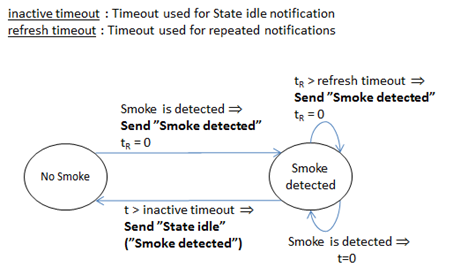
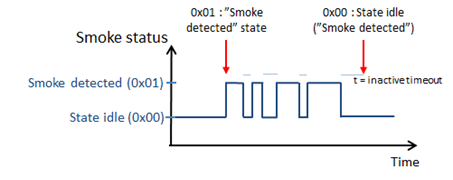
Certain sensors may trigger repeatedly within a short amount of time. It is RECOMMENDED to implement timers to arbitrate the transmission of notifications. Illustrations are given in Figure 2.22 and Figure 2.23.
Figure 2.22 Recommended timer mechanism for sending notifications (1)
Figure 2.23 Recommended timer mechanism for sending notifications (2)
Table 2.442 Notification Set::Notification Status (push mode)
Value
Description
Version
0x00
Unsolicited messages MUST be disabled for the specified Notification Type
2
0xFF
Unsolicited messages MUST be enabled for the specified Notification Type
2
\requirement{CC:0071.03.06.11.006}{0}
All other values are reserved and MUST NOT be used by a sending node. Reserved values MUST be ignored by a receiving node.
\requirement{CC:0071.03.06.13.001}{0}
\requirement{CC:0071.03.06.11.007}{4}
\requirement{CC:0071.03.06.11.008}{8}
\requirement{CC:0071.03.06.12.001}{16}
A receiving node MAY deny the deactivation of a specific Notification Type. In that case, the receiving node MUST respond to this command with an Application Rejected Request Command. Thus, if a node can deny the deactivation of a Notification Type, the node MUST implement the Application Status CC. A sending node should be aware that a receiving node may return a response to the Set Command and thus SHOULD apply a back-off timer before sending a subsequent command.
Pull nodes:
\requirement{CC:0071.03.06.11.009}{0}
A sending node MUST set this field to 0x00 to indicate that a persistent Notification for the specified Notification Type MUST be cleared in the receiving node’s queue.
\requirement{CC:0071.03.06.11.00A}{0}
All other values are reserved and MUST NOT be used by a sending node. Reserved values MUST be ignored by a receiving node.
This command is used to request if the unsolicited transmission of a specific Notification Type is enabled.
Some supporting nodes will also advertise a current state in response to this command.
Pull nodes:
This command is used to retrieve the next Notification from the receiving node’s queue.
\requirement{CC:0071.03.04.11.001}{0}
The Notification Report Command MUST be returned in response to this command unless this command is to be ignored. Refer to the fields description.
\requirement{CC:0071.03.04.11.002}{0}
This command MUST NOT be issued via multicast addressing.
\requirement{CC:0071.03.04.11.003}{0}
A receiving node MUST NOT return a response if this command is received via multicast addressing. The Z-Wave Multicast frame, the broadcast NodeID and the Multi Channel multi-End Point destination are all considered multicast addressing methods.
This field is used to specify a Notification Type. Assigned values are defined in [37].
\requirement{CC:0071.03.04.11.004}{0}
This field MUST be set to a Notification Type that is supported by the receiving node or to 0xFF.
\requirement{CC:0071.03.04.11.005}{0}
A receiving node MUST ignore the command if this field is different than 0xFF and set to a non-supported Notification Type.
Push nodes:
\requirement{CC:0071.03.04.12.002}{4}
The value 0xFF indicates to the receiving node that it MUST select a supported Notification Type and SHOULD advertise the current state of one of its state variables within the chosen Notification Type.
\requirement{CC:0071.03.04.11.006}{0}
A supported Notification Type value indicates that the receiving node MUST advertise the unsolicited transmission status for the requested Notification Type and MAY advertise the current state of one of its state variables within the Notification Type.
Pull nodes:
\requirement{CC:0071.03.04.11.007}{0}
The value 0xFF indicates to the receiving node that it MUST retrieve the next Notification in its queue.
\requirement{CC:0071.03.04.12.003}{0}
A Notification Type value indicates to the receiving node that it SHOULD retrieve the next Notification in its Notification queue matching the specified Notification Type value.
Notification Event / State (8 bits)
This field is used to optionally specify a Notification Event/State within the Notification Type. Assigned values are defined in [37]. This field allows receiving nodes to differentiate between V2 Alarm Get Command and V3 or newer Notification Get Command.
\requirement{CC:0071.03.04.11.008}{0}
If the Notification Type is set to 0xFF, this field MUST be set to 0x00 by a sending node and SHOULD be ignored by a receiving node.
Push nodes:
\requirement{CC:0071.03.04.13.001}{0}
A sending node MAY set this field to 0x00.
\requirement{CC:0071.03.04.13.002}{0}
A sending node MAY specify a value that is supported by the receiving node within the specified Notification Type. In this case, a receiving node:
- MAY advertise a current state related to the indicated state
- MAY return the same value in response to a supported Notification Event.
\requirement{CC:0071.03.04.11.009}{0}
A receiving node MUST return the “Unknown notification” value (0xFE) in response to a non-supported Notification Event.
Pull nodes:
\requirement{CC:0071.03.04.12.004}{0}
This field SHOULD be ignored by a receiving node.
If this command is returned in response to a Notification Get Command, this command advertises if the unsolicited transmission of the advertised Notification Type is enabled and optionally advertises a currently active state.
If this command is sent unsolicited, it advertises an event or state Notification.
The use of the command’s fields is the same in both cases.
Pull nodes:
This command is used by a sending node to return a Notification from its queue or indicate that its queue is empty.
This field MUST be set to 0 by a sending node and MUST be ignored by a receiving node.
V1 Alarm Type (8 bits) & V1 Alarm Level (8 bits)
\requirement{CC:0071.03.05.11.002}{4}
These fields carry the proprietary Alarm Type and Alarm Level fields originally introduced with Alarm Command Class, Version 1. V1 Alarm Type and V1 Alarm Level fields MUST be specified in the product manual.
\requirement{CC:0071.03.05.11.003}{0}
If the V1 Alarm Type is not supported, these fields MUST be set to 0x00.
Notification Status (8 bits)
Push nodes:
This field is used to advertise the status of the Notification Type indicated in this command.
This field MAY carry an encapsulated command. In this case, the field MUST include the complete command structure, i.e. Command Class, Command and all mandatory command fields.
\requirement{CC:0071.03.05.11.00D}{0}
If a node encapsulates a command in this field, the corresponding Command Class MUST be supported by the node and advertised in the Node Information Frame (NIF) or S0/S2 Supported Command Report.
\requirement{CC:0071.03.05.11.00E}{0}
This field MUST be omitted if the “Event Parameter Length” field is set to 0.
Section 2.2.76.6.1 provides an example of Event Parameter encapsulation.
Sequence Number (8 bits)
\requirement{CC:0071.03.05.13.002}{0}
This field is used to advertise a sequence number for the actual Notification. This command MAY carry a Sequence Number field.
\requirement{CC:0071.03.05.11.00F}{0}
This field MUST be omitted if the Sequence flag is set to 0.
\requirement{CC:0071.03.05.11.010}{0}
The first sequence number for each distinct Notification MUST be 1. A sending node MUST increment the sequence number for a Notification each time it issues a Notification Report for that given Notification.
\requirement{CC:0071.03.05.11.011}{0}
The Sequence Number range MUST be in the range 0..255. The value after 255 MUST be 0.
Example:
Notification {Smoke Alarm::Smoke Detected}, …, Seq. Number = 254
Notification {Smoke Alarm::Smoke Detected}, …, Seq. Number = 255
Notification {Heat Alarm::Overheat Detected}, …, Seq. Number = 6
Notification {Smoke Alarm::Smoke Detected}, …, Seq. Number = 0
Etc.
2.2.76.6.1. Event / State parameter encapsulation
\requirement{CC:0071.03.05.11.012}{0}
Event / State parameter encapsulation of commands MUST comprise the entire command, starting from the Command Class identifier.
For example, a “User Code Report” is used as Event / State Parameter in a “Keypad Lock/Unlock Operation”. The “User Code Report” has the following format:
Command Class =COMMAND_CLASS_USER_CODE = 0x63
Command = USER_CODE_REPORT = 0x03
User Identifier = 0x01
User ID Status = 0x01
User Code = 0x30, 0x30, 0x30, 0x30
The complete User Code Report therefore comprises the following Bytes: [0x63, 0x03, 0x01, 0x01, 0x30, 0x30, 0x30, 0x30].
Another example with the Node naming and location Command class is given in Table 2.447.
Table 2.447 Notification Report::Event / State parameter encapsulation (example)
Notification Report Command fields
Value
Explanation
1
COMMAND_CLASS_NOTIFICATION
0x71
Notification CC id
2
NOTIFICATION_REPORT
0x05
Notification Report command id
3
V1 Alarm Type
0x00
Not implemented
4
V1 Alarm Level
0x00
Not implemented
5
Reserved
0x00
Reserved field
6
Notification Status
0xFF
Unsolicited report is activated
7
Notification Type
0x01
Smoke Alarm
8
Notification Event
0x01
Smoke Detected
9
Sequence Number /
Event Parameters Length
0x1A
Sequence Number is appended /
Event Parm Length = 10
This command is used to request supported Notification Types.
\requirement{CC:0071.03.07.11.001}{0}
The Notification Supported Report Command MUST be returned in response to this command.
\requirement{CC:0071.03.07.11.002}{0}
This command MUST NOT be issued via multicast addressing.
\requirement{CC:0071.03.07.11.003}{0}
A receiving node MUST NOT return a response if this command is received via multicast addressing. The Z-Wave Multicast frame, the broadcast NodeID and the Multi Channel multi-End Point destination are all considered multicast addressing methods.
This field is used to indicate if the node implements proprietary Alarms from version 1.
\requirement{CC:0071.03.08.11.001}{0}
The value 0 MUST indicate that the device implements only Notification CC V2 or newer Notification Types.
\requirement{CC:0071.03.08.11.002}{0}
The value 1 MUST indicate that the device implements Notification CC V2 Notification Types as well as proprietary Alarm CC V1 Alarm Types and Alarm Levels.
Number of Bit Masks (5 bits)
\requirement{CC:0071.03.08.11.003}{0}
This field MUST advertise the length in bytes of the Bit Mask field.
The value MUST be in the range 1..31.
Bit Mask (N bytes)
\requirement{CC:0071.03.08.11.004}{4}
The Bit Mask field describes the supported Notification Types by the node. The length of this field in bytes MUST match the value advertised in the Number of Bit Masks field.
Bit 0 in Bit Mask 1 is not allocated to any Notification Type and MUST be set to zero.
Bit 1 in Bit Mask 1 indicates if Notification Type = Smoke Alarm (0x01) is supported.
Bit 2 in Bit Mask 1 indicates if Notification Type = CO Alarm (0x02) is supported.
Bit 3 in Bit Mask 1 indicates if Notification Type = CO2 Alarm (0x03) is supported
If the Notification Type is supported, the corresponding bit MUST be set to 1.
If the Notification Type is not supported, the corresponding bit MUST be set to 0.
\requirement{CC:0071.03.08.11.006}{0}
The Notification Type values 0x00 and 0xFF are special-purpose values. Reserved values and special-purpose values MUST NOT be advertised in the Bit Mask field by a sending node and MUST be ignored by a receiving node.
This command is used to request the supported Notifications for a specified Notification Type.
\requirement{CC:0071.03.01.11.001}{0}
The Event Supported Report Command MUST be returned in response to this command.
\requirement{CC:0071.03.01.11.002}{0}
This command MUST NOT be issued via multicast addressing.
\requirement{CC:0071.03.01.11.003}{0}
A receiving node MUST NOT return a response if this command is received via multicast addressing. The Z-Wave Multicast frame, the broadcast NodeID and the Multi Channel multi-End Point destination are all considered multicast addressing methods.
If a node receives an unsupported Notification Type or a special-purpose value, the receiving node MUST respond with Event Supported Report Command with the Notification Type specified in the this command and the Number of Bit Masks field set to 0.
This field is used to advertise the length (in bytes) of the Bit Mask field.
\requirement{CC:0071.03.02.11.001}{0}
The value MUST be in the range 0..31.
The value 0 MUST indicate that the Notification Type is not supported.
Bit Mask (N bytes)
\requirement{CC:0071.03.02.11.002}{4}
This field is used to advertise the supported Events/States for the actual advertised Notification Type. The length of this field (in bytes) MUST match the value advertised in the Number of Bit Masks field. This field MUST be omitted if the “Number of Bit Masks” field is set to 0.
\requirement{CC:0071.03.02.11.003}{0}
The bit value ‘1’ MUST indicate that the actual Event/State is supported.
The bit value ‘0’ MUST indicate that the actual Event/State is not supported.
Example: Notification Type = Heat Alarm (0x04):
Bit 0 in Bit Mask 1 field is not allocated to any event and must therefore be set to zero.
Bit 1 in Bit Mask 1 field indicates support for Overheat detected (0x01).
Bit 2 in Bit Mask 1 field indicates support for Overheat, unknown loc. (0x02).
Bit 3 in Bit Mask 1 field indicates support for Rapid temp rise (0x03).
…
For Notification Types and their Events/States, refer to [37].
\requirement{CC:0071.03.02.11.004}{4}
The Event/State values 0x00 and 0xFE are special-purpose values. Reserved values and special-purpose values MUST NOT be advertised in the Bit Mask field by a sending node and MUST be ignored by a receiving node.