2.2.23. Central Scene Command Class, version 1 [OBSOLETED]
\requirement{CC:005B.01.00.11.001}{16}
Warning
THIS COMMAND CLASS HAS BEEN OBSOLETED
New implementations MUST support the Central Scene Command Class, version 3 or newer.
The Central Scene Command Class is used to communicate central scene activations to a central controller using the lifeline concept. The central scene controller only need to configure lifeline association in relevant nodes before the home control application can take action in the central scene controller. The typical application contains up to 10-15 selected nodes creating a nice “out of the box” experience with minimum effort by the customer. A scene is typically activated via a push button on the device in question.
The Central Scene Command Class can instruct the central scene controller to perform the relevant actions as shown on Figure 2.6.
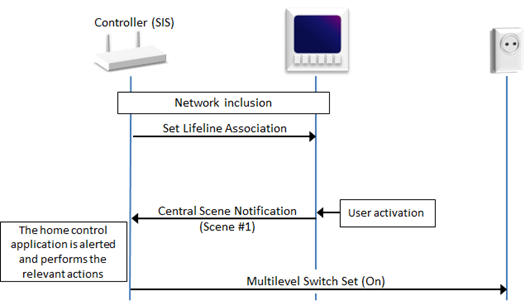
Figure 2.6 Centralized feedback and control
\requirement{CC:005B.01.00.13.001}{0}
Multiple sending nodes MAY advertise the same Scene number.
Therefore, a receiving node MUST interpret the advertised Scene number in combination with the source NodeID of the sending node.
For instance, {Node A, Scene 1} may trigger changes to another scene than {Node B, Scene 1} in the receiving node
Notice that this configuration has a single point of failure in case the central scene controller is broken. The likelihood to experience the “popcorn effect” is increased because the central scene controller may be located far from the push button activated and therefore out of direct range with respect to devices to control.
To compensate for single point of failure in case the central scene controller is broken the devices could do fallback to alternative association groups to control devices directly. These association groups are activated only if the device does not receive acknowledge from configured lifeline. This will ensure some basic level of light control in the house until the central scene controller is restored. Alternatively, a backup central scene controller could be added to the system to take over in case the first one fails.
2.2.23.1. Central Scene Supported Get Command
This command is used to request the maximum number of scenes that this device supports.
\requirement{CC:005B.01.01.11.001}{0}
The Central Scene Supported Report Command MUST be returned in response to this command.
\requirement{CC:005B.01.01.11.002}{0}
This command MUST NOT be issued via multicast addressing.
A receiving node MUST NOT return a response if this command is received via multicast addressing. The Z-Wave Multicast frame, the broadcast NodeID and the Multi Channel multi-End Point destination are all considered multicast addressing methods.
7 |
6 |
5 |
4 |
3 |
2 |
1 |
0 |
|---|---|---|---|---|---|---|---|
Command Class = COMMAND_CLASS_CENTRAL_SCENE (0x5B) |
|||||||
Command = CENTRAL_SCENE_SUPPORTED_GET (0x01) |
|||||||
2.2.23.2. Central Scene Supported Report Command
This command is used to report the maximum number of scenes that the requested device supports.
7 |
6 |
5 |
4 |
3 |
2 |
1 |
0 |
|---|---|---|---|---|---|---|---|
Command Class = COMMAND_CLASS_CENTRAL_SCENE (0x5B) |
|||||||
Command = CENTRAL_SCENE_SUPPORTED_REPORT (0x02) |
|||||||
Supported Scenes |
|||||||
Supported Scenes (8 bits)
This field indicates the maximum number of scenes supported by the requested device.
\requirement{CC:005B.01.02.11.001}{0}
This field MUST advertise the number of available scenes.
Scenes MUST be numbered in the range 1..[Supported Scenes].
\requirement{CC:005B.01.02.13.001}{0}
A device MAY implement virtual buttons via two-button presses, touch screen swipes or other means.
\requirement{CC:005B.01.02.11.002}{0}
Virtual buttons MUST be numbered after physical push buttons or graphical button objects.
\requirement{CC:005B.01.02.11.003}{0} \requirement{CC:005B.01.02.13.002}{4}
The advertised number of Supported Scenes MUST cover physical push buttons, graphical button objects as well as virtual buttons. Therefore, the advertised number of Supported Scenes MAY be larger than the number of physical push buttons or graphical button objects.
2.2.23.3. Central Scene Notification Command
This command is used to report activated scene on device in question including how notification must be interpreted.
In case a lifeline is configured in group #1 using Association Command Class, the device must use this lifeline for transmitting the Central Scene Notification Command. It is allowed to define other association groups handling Central Scene Notification Command and setup rules between the groups. However, lifeline has precedence over other groups handling Central Scene Notification Command in case lifeline is defined.
7 |
6 |
5 |
4 |
3 |
2 |
1 |
0 |
|---|---|---|---|---|---|---|---|
Command Class = COMMAND_CLASS_CENTRAL_SCENE (0x5B) |
|||||||
Command = CENTRAL_SCENE_NOTIFICATION (0x03) |
|||||||
Sequence Number |
|||||||
Reserved |
Key Attributes |
||||||
Scene Number |
|||||||
Sequence Number (8 bits)
\requirement{CC:005B.01.03.11.001}{0}
The sequence number MUST be incremented each time a Central Scene Notification Command is issued. The receiving device uses the sequence number to ignore duplicates.
Key Attributes (3 bits)
\requirement{CC:005B.01.03.11.002}{0}
The key Attributes field specifies the state of the key. The field MUST be encoded according to Table 2.116
Key Attribute |
Description |
|---|---|
0x00 |
Key Pressed |
0x01 |
Key Released |
0x02 |
Key Held Down |
\requirement{CC:005B.01.03.11.003}{0}
All other values are reserved and MUST NOT be used by a sending node. Reserved values MUST be ignored by a receiving node.
\requirement{CC:005B.01.03.11.004}{0}
Notifications carrying these Key Attributes MUST comply with Figure 2.7
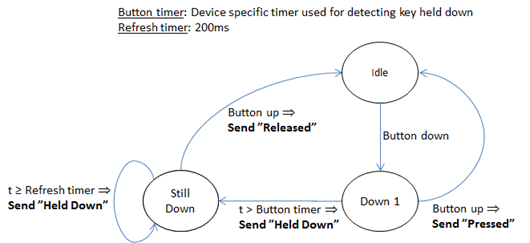
Figure 2.7 Central Scene version 1 button press decoding and timer management
Reserved
\requirement{CC:005B.01.03.11.005}{0}
This field MUST be set to 0 by a sending node and MUST be ignored by a receiving node.
Scene Number (8 bits)
\requirement{CC:005B.01.03.11.006}{0} \requirement{CC:005B.01.03.13.001}{4}
The advertised number of Supported Scenes MUST cover physical push buttons, graphical button objects as well as virtual buttons. Therefore, the advertised number of Supported Scenes MAY be larger than the number of physical push buttons or graphical button objects.
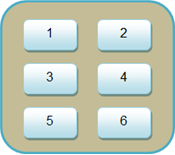
Figure 2.8 Scene number mapping to button layout
