2.2.26. Climate Control Schedule Command Class, version 1 [DEPRECATED]
Warning
THIS COMMAND CLASS HAS BEEN DEPRECATED
A device MAY implement this command class, but it is RECOMMENDED that new implementations use the Schedule Command Class, version 1.
If implementing this command class, it is RECOMMENDED that the Schedule Command Class, version 1 is also implemented.
The Climate Control Schedule Command Class allows devices to exchange schedules and overrides, which specify when to perform a setback on the setpoint.
Note: The setpoint is the temperature a device will try to maintain. The setback is a deviation from the setpoint. When a setback is in use the device will apply the setback to the setpoint, resulting in a different temperature. When using schedules and overrides it is possible to define several setbacks occurring at specific times.
Schedules are exchanged using the Schedule Commands.
Overrides of schedules are exchanged using the Schedule Override Commands.
Detection of updated schedules is done using the Schedule Changed Commands.
The Climate Control Schedule uses the Schedule State type to define each setback. The Schedule State type has the following format:
7 |
6 |
5 |
4 |
3 |
2 |
1 |
0 |
|---|---|---|---|---|---|---|---|
Schedule State |
|||||||
Schedule State (8 bits)
The values are as follows:
Schedule State |
Description |
|
|---|---|---|
Hexadecimal |
Decimal |
|
0x80 … 0xFF 0x00 0x01 … 0x78 |
-128 … -1 0 1 … 120 |
The setback in 1/10 degrees (Kelvin) Example: 0 = 0 degrees setback 1 = 0.1 degrees is added to the setpoint 2 - 0.2 degrees is added to the setpoint -1 = 0.1 degrees is subtracted from the setpoint -2 = 0.2 degrees is subtracted from the setpoint |
0x79 |
121 |
Frost Protection |
0x7A |
122 |
Energy Saving Mode |
0x7B - 0x7E |
123 - 126 |
Reserved |
0x7F |
127 |
Unused State |
When converting between Celsius and Fahrenheit proper rounding MUST be applied with at least two decimals in the internal calculations of a device to avoid rounding errors.
When displaying converted Fahrenheit values it is RECOMMENDED that the displayed value is rounded to nearest quarter of a degree.
2.2.26.1. Schedule Set Command
This command is used to set the climate control schedule in a device for a specific weekday. A climate control schedule defines when to use a setback on the setpoint in a device. A schedule can hold a maximum of 9 switchpoints. A switchpoint defines one setback from the current setpoint.
The entire list of switchpoints in the Command MUST be ordered by time, ascending from 00:00 towards 23:59. Switchpoints which have a Schedule State set to “Unused” MUST be placed last. Duplicates MUST NOT be allowed for Switchpoints which have a Schedule State different from “Unused”.
7 |
6 |
5 |
4 |
3 |
2 |
1 |
0 |
|---|---|---|---|---|---|---|---|
Command Class = COMMAND_CLASS_CLIMATE_CONTROL_SCHEDULE (0x46) |
|||||||
Command = SCHEDULE_SET (0x01) |
|||||||
Reserved |
Weekday |
||||||
Switchpoint 0 Byte 1 |
|||||||
Switchpoint 0 Byte 2 |
|||||||
Switchpoint 0 Byte 3 |
|||||||
… |
|||||||
Switchpoint 8 Byte 1 |
|||||||
Switchpoint 8 Byte 2 |
|||||||
Switchpoint 8 Byte 3 |
|||||||
Weekday (3 bits)
This field MUST be encoded according to Table 2.130.
Value |
Description |
|---|---|
0x00 |
Reserved |
0x01 |
Monday |
0x02 |
Tuesday |
0x03 |
Wednesday |
0x04 |
Thursday |
0x05 |
Friday |
0x06 |
Saturday |
0x07 |
Sunday |
Switchpoint (9*24 bits)
7 |
6 |
5 |
4 |
3 |
2 |
1 |
0 |
||
|---|---|---|---|---|---|---|---|---|---|
Reserved |
Hour |
Byte 1 |
|||||||
Reserved |
Minute |
Byte 2 |
|||||||
Schedule State |
Byte 3 |
||||||||
Hour (5 bits)
This field is used to specify the hour of the of the actual switchpoint. This field MUST be in the range 0..23.
Minute (6 bits)
This field is used to specify the minute of the actual switchpoint. This field MUST be in the range 0..59.
Schedule State (8 bits)
Schedule State uses the Schedule State type format, see Section 2.2.26. If Schedule State has the value of “Unused”, the Hour and Minute field MUST be ignored. Once a Schedule State of “Unused” is encountered, the parsing of switchpoints must stop.
2.2.26.2. Schedule Get Command
This command is used to request the climate control schedule in a device for a specific weekday.
The Schedule Report Command MUST be returned in response to this command.
This command MUST NOT be issued via multicast addressing.
A receiving node MUST NOT return a response if this command is received via multicast addressing. The Z-Wave Multicast frame, the broadcast NodeID and the Multi Channel multi-End Point destination are all considered multicast addressing methods.
7 |
6 |
5 |
4 |
3 |
2 |
1 |
0 |
|---|---|---|---|---|---|---|---|
Command Class = COMMAND_CLASS_CLIMATE_CONTROL_SCHEDULE (0x46) |
|||||||
Command = SCHEDULE_GET (0x02) |
|||||||
Reserved |
Weekday |
||||||
For fields’ description, refer to Section 2.2.26.1 Schedule Set Command.
2.2.26.3. Schedule Report Command
This command is used to report the climate control schedule in a device for a specific weekday.
7 |
6 |
5 |
4 |
3 |
2 |
1 |
0 |
|---|---|---|---|---|---|---|---|
Command Class = COMMAND_CLASS_CLIMATE_CONTROL_SCHEDULE (0x46) |
|||||||
Command = SCHEDULE_REPORT (0x03) |
|||||||
Reserved |
Weekday |
||||||
Switchpoint 0 Byte 1 |
|||||||
Switchpoint 0 Byte 2 |
|||||||
Switchpoint 0 Byte 3 |
|||||||
… |
|||||||
Switchpoint 8 Byte 1 |
|||||||
Switchpoint 8 Byte 2 |
|||||||
Switchpoint 8 Byte 3 |
|||||||
For fields’ description, refer to Section 2.2.26.1 Schedule Set Command
2.2.26.4. Schedule Changed Get Command
This command is used to check if the climate control schedule has changed.
The Schedule Changed Report Command MUST be returned in response to this command.
This command MUST NOT be issued via multicast addressing.
A receiving node MUST NOT return a response if this command is received via multicast addressing. The Z-Wave Multicast frame, the broadcast NodeID and the Multi Channel multi-End Point destination are all considered multicast addressing methods.
7 |
6 |
5 |
4 |
3 |
2 |
1 |
0 |
|---|---|---|---|---|---|---|---|
Command Class = COMMAND_CLASS_CLIMATE_CONTROL_SCHEDULE (0x46) |
|||||||
Command = SCHEDULE_CHANGED_GET (0x04) |
|||||||
2.2.26.5. Schedule Changed Report Command
This command is used to report if the climate control schedule has changed.
7 |
6 |
5 |
4 |
3 |
2 |
1 |
0 |
|---|---|---|---|---|---|---|---|
Command Class = COMMAND_CLASS_CLIMATE_CONTROL_SCHEDULE (0x46) |
|||||||
Command = SCHEDULE_CHANGED_REPORT (0x05) |
|||||||
ChangeCounter |
|||||||
ChangeCounter (8 bits)
The ChangeCounter is a timestamp for a climate control schedule and it is kept in devices which exchange climate control schedules.
One device holds a climate control schedule and other devices uses this climate control schedule. Whenever the climate control schedule changes, the device MUST update its ChangeCounter, and the other devices MUST regularly use the Schedule Changed Get Command on the device which holds the Climate Control Schedule to see if the ChangeCounter is different from last time – indicating a change in a climate control schedule.
The possible values are:
Value |
Description |
|---|---|
0x00 |
The climate control schedule change mechanism is temporarily disabled by the override function. |
0x01..0xFF |
The climate control schedule change mechanism is enabled. ChangeCounter is incremented by one every time climate control schedule changes. When ChangeCounter eventually reach 0xFF, the next increment MUST rollover to 0x01. |
When a device is fresh and has no climate control schedule it MUST retrieve a climate control schedule using the Schedule Get Command and it MUST also use the Schedule Changed Get to get the first copy of the current ChangeCounter, thus avoiding getting the climate control schedule initially twice.
When a device is awake after sleep mode it SHOULD use this Command to detect if the schedule has been changed.
2.2.26.6. Schedule Override Set Command
This command is used to set the override in a device.
The purpose of an override is to inform a device to ignore its current climate control schedule and assume the setting provided by the Override Type and Override State fields.
7 |
6 |
5 |
4 |
3 |
2 |
1 |
0 |
|---|---|---|---|---|---|---|---|
Command Class = COMMAND_CLASS_CLIMATE_CONTROL_SCHEDULE (0x46) |
|||||||
Command = SCHEDULE_OVERRIDE_SET (0x06) |
|||||||
Reserved |
Override Type |
||||||
Override State |
|||||||
Override Type (2 bits)
This field MUST be encoded according to Table 2.138.
Value |
Description |
|---|---|
0x00 |
No override |
0x01 |
Temporary override |
0x02 |
Permanent override |
0x03 |
Reserved |
Note: The difference between a temporary and a permanent override is that a temporary override only overrides the current switchpoint in the climate control schedule.
Both temporary and permanent overrides MAY be cancelled in the device, which receives the SCHEDULE_OVERRIDE_SET. This cancellation MUST be notified in an unsolicited SCHEDULE_OVERRIDE_REPORT as specified in the following sequence diagram:
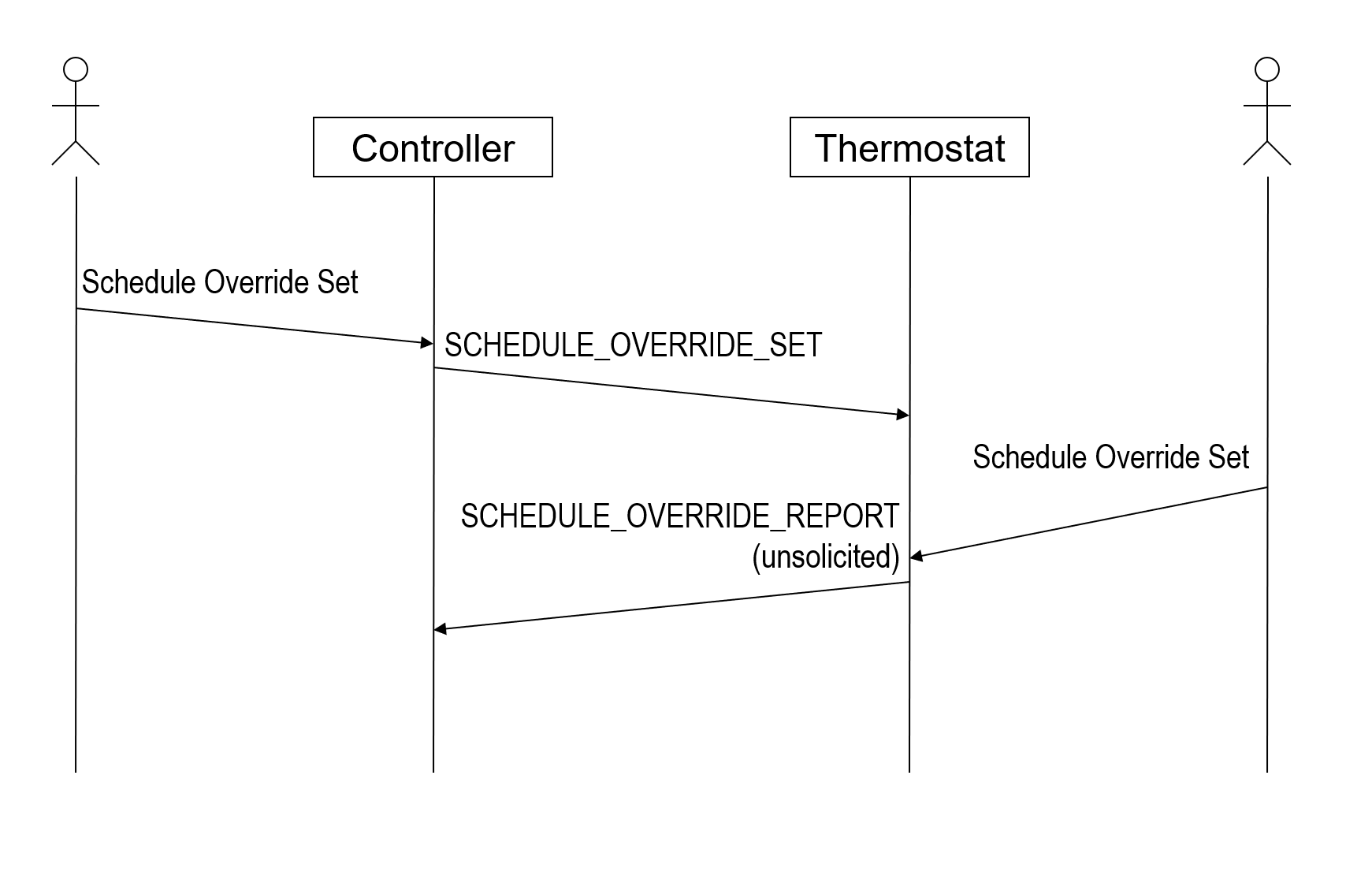
Figure 2.10 Sequence diagram for cancellation of a Schedule Override Set
Override State (8 bits)
The Override State uses the Schedule State type format, see Section 2.2.26
2.2.26.7. Schedule Override Get Command
This command is used to request the override, currently in use in a device.
The Schedule Override Report Command MUST be returned in response to this command.
This command MUST NOT be issued via multicast addressing.
A receiving node MUST NOT return a response if this command is received via multicast addressing. The Z-Wave Multicast frame, the broadcast NodeID and the Multi Channel multi-End Point destination are all considered multicast addressing methods.
7 |
6 |
5 |
4 |
3 |
2 |
1 |
0 |
|---|---|---|---|---|---|---|---|
Command Class = COMMAND_CLASS_CLIMATE_CONTROL_SCHEDULE (0x46) |
|||||||
Command = SCHEDULE_OVERRIDE_GET (0x07) |
|||||||
2.2.26.8. Schedule Override Report Command
The Schedule Override Report Command is used to report the override, currently in use in a device.
7 |
6 |
5 |
4 |
3 |
2 |
1 |
0 |
|---|---|---|---|---|---|---|---|
Command Class = COMMAND_CLASS_CLIMATE_CONTROL_SCHEDULE (0x46) |
|||||||
Command = SCHEDULE_OVERRIDE_REPORT (0x08) |
|||||||
Reserved |
Override Type |
||||||
Override State |
|||||||
Override Type (2 bits)
This field MUST be encoded according to Table 2.138.
Both temporary and permanent overrides MAY be cancelled in the device, which receives the SCHEDULE_OVERRIDE_SET. This cancellation MUST be notified in an unsolicited SCHEDULE_OVERRIDE_REPORT as shown on figure in Section 2.2.26.6.
Override State (8 bits)
The Override State uses the Schedule State type format, see Section 2.2.26
